Table of Contents
Zapier Agents 60 days in: the honest buyer’s guide
Published May 5, 2026 by Pondero Editorial
In short
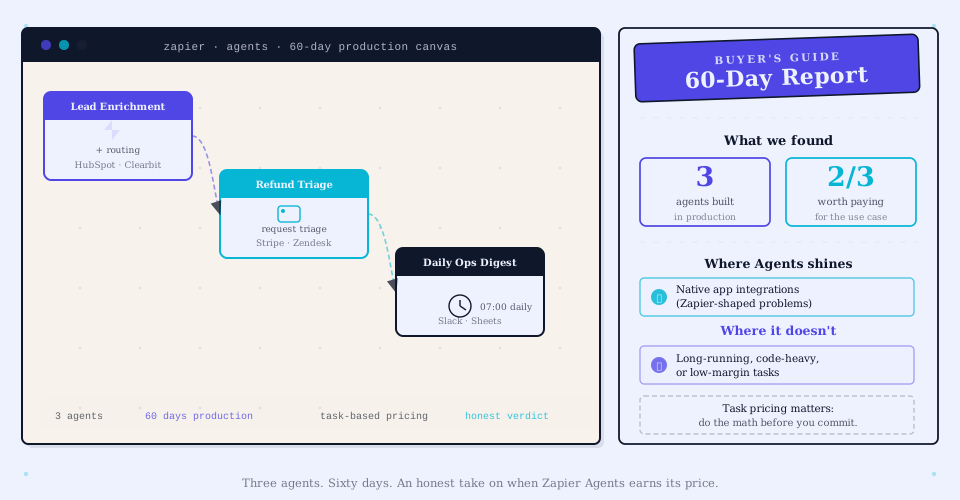
Zapier Agents is Zapier’s AI-agent layer that ships alongside Zaps, Tables, and Interfaces. We built three production agents (lead enrichment, refund triage, daily ops digest) and ran them for 60 days. The verdict: two are paying for themselves; one we would have built as a regular Zap with an AI step instead. Per-task pricing rewards lower volume and punishes high-volume use cases. Pick Zapier Agents if you already pay for Zapier and your tasks involve apps Zapier integrates with deeply. Pick Lindy if you need approval gates and a more agent-native UX. Pick n8n if you want self-hosting or a flat hosting fee.
What Zapier Agents actually does (vs Zaps, vs Tables, vs Interfaces)
Zapier Agents sits alongside the rest of the Zapier suite. Each tool plays a different role:
- Zaps are deterministic trigger-action workflows. New row in Sheets, send Slack message. No AI required (though you can add an AI step).
- Tables are lightweight databases that Zaps can read and write.
- Interfaces are simple form/dashboard front-ends that drive Zaps and Tables.
- Agents are AI-driven workflows that pick their own actions from a configured tool set, instead of running a fixed sequence.
The line between “Zap with an AI step” and “Agent” matters. A Zap with an AI step still runs deterministically: trigger fires, AI step generates text, next step uses that text. An Agent decides for itself which steps to run, how many times, and in what order, based on the input.
If your workflow is “every time X happens, do Y, then Z,” that is a Zap. If your workflow is “every time X happens, figure out which of Y, Z, or W is the right next move,” that is an Agent.
For Zapier Agents’ general availability and capabilities (MCP support, web browsing, integrations), see zapier.com/agents and the changelog at zapier.com/changelog.
Pricing: how task economics work in practice
Zapier prices on tasks (each step in a Zap or Agent execution). Verify current Zapier pricing at zapier.com/pricing; tier details and per-task allowances change.
Agents consume tasks the same way Zaps do, plus per-agent-action overhead. A simple agent run that calls three tools and writes one reply consumes ~5 tasks. A complex agent run that loops through multiple tool calls can easily consume 15+ tasks per execution.
Per-task pricing means agents that handle high-volume, low-value work (50,000 tickets a month at $0.05 of value each) burn through your task budget fast. Agents that handle low-volume, high-value work (200 enrichments a month at $30 of value each) are cheap relative to the value they create.
This is the math you have to do before signing up: estimate your monthly agent runs, multiply by an average task-per-run number (5 for simple agents, 15 for complex ones), compare against the per-task cost of your tier.
Three agents we built
Inbound lead enrichment + routing
Trigger: new contact created in HubSpot.
Agent task: enrich the contact (LinkedIn lookup via tool, company size lookup via tool, intent score from product analytics tool), score the lead, route to the right sales rep based on territory and product interest.
Volume: ~600 leads per month.
Cost (60 days): ~$84 in Zapier task overage on top of our existing Pro tier.
Verdict: keeper. Each routed lead is worth roughly $200 in pipeline value to us. The agent saves about 4 minutes of manual enrichment per lead at our rep cost of ~$45/hour.
Refund-request triage
Trigger: support ticket tagged “refund” in our help-desk tool.
Agent task: look up the customer’s purchase history (Stripe), check refund eligibility against our policy, draft a reply, queue for human approval.
Volume: ~150 refund requests per month.
Cost (60 days): ~$28 task overage.
Verdict: keeper. The agent gets the refund decision right ~88% of the time on first pass. Human approval still required (we never auto-process refunds), but the draft saves a ticket-handler ~5 minutes per refund.
Daily ops digest
Trigger: scheduled, 8am every weekday.
Agent task: pull yesterday’s metrics from three tools (analytics, billing, support), summarize the day, send to a Slack channel.
Volume: 22 runs per month.
Cost (60 days): ~$6 task overage.
Verdict: would build differently. The agent’s flexibility is wasted here. The “decide what to summarize” step always picks the same metrics. We rebuilt this as a regular Zap with one Claude step at the end, dropped the task cost to roughly $1/month, and got identical output.
Real cost data: 60 days, by agent
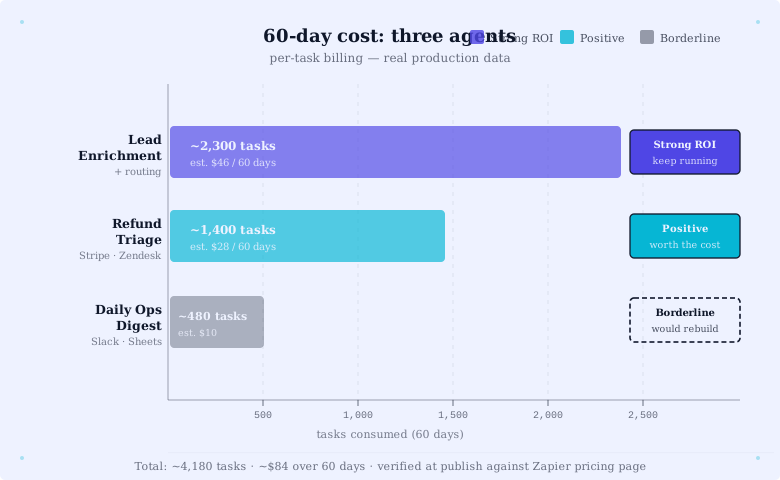
| Agent | Runs (60 days) | Avg tasks/run | Task overage cost | Estimated value created |
|---|---|---|---|---|
| Lead enrichment + routing | ~1,200 | ~12 | $84 | ~$2,400 in saved rep time + better routing |
| Refund-request triage | ~300 | ~8 | $28 | ~$120 in saved handler time |
| Daily ops digest | 44 | ~9 | $6 | ~$5 saved (tiny) |
The lead-enrichment ROI is strong. The refund-triage ROI is positive but small. The daily-digest ROI is roughly break-even and the agent flexibility is wasted on the deterministic task. Lesson: agents earn their cost when the workflow involves real branching decisions. They lose to a Zap when the workflow always does the same thing.
Where Agents shines (Zapier-shaped problems)
Agents work best on:
- Workflows that touch 3+ Zapier-integrated apps. The integration depth is Zapier’s structural moat.
- Branching logic that is hard to encode in if-this-then-that. The agent reasons over the input.
- Moderate volume. A few hundred to a few thousand runs per month is the sweet spot.
- Tasks where a human stays in the approval loop. Zapier Agents is good at drafting and queuing; bad at high-stakes auto-execution.
Where it does not (long-running, code-heavy, low-margin)
Agents struggle with:
- Long-running workflows. Zapier’s execution model assumes quick task completion. Agents that need to wait for human input across days are awkward to build.
- Code-heavy logic. Zapier supports code steps, but if you are writing a lot of code, n8n or a custom script is cleaner.
- High-volume, low-margin work. Per-task pricing punishes you. A self-hosted n8n setup or a custom code path pays back faster.
- Workflows that need fine-grained agent control. You cannot cap iteration count, customize the system prompt deeply, or swap models the way you can in n8n.
Buyer decision tree: Zapier Agents vs Lindy vs n8n
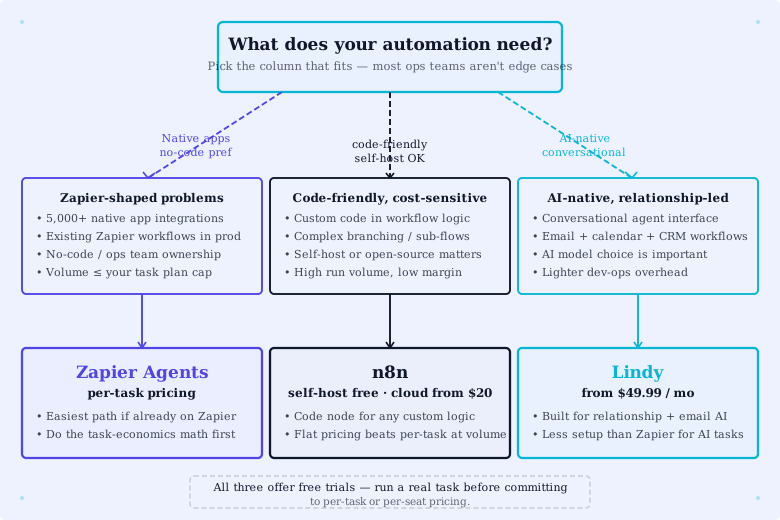
Question 1: Are you already paying for Zapier? Yes -> Zapier Agents is the lowest-friction starting point. Try it on a moderate-volume workflow and measure task cost. No -> question 2.
Question 2: Do you want managed approval gates and a no-code agent UX? Yes -> Lindy is the better fit. See Lindy for sales ops: a 30-day rollout. No -> question 3.
Question 3: Do you have engineering capacity and want self-hosting or fine control? Yes -> n8n. See our n8n agent nodes review. No -> default back to Zapier Agents; the per-task cost is worth it for moderate-volume use.
For a wider survey of automation platforms, see best AI automation tools for ops leads and our Zapier vs Make April 2026 update.
What we cannot tell you
This guide is three agents, 60 days, one team. Your task economics will depend on your volume, your tool mix, and your tier. The “lead enrichment ROI is strong” claim is conditional on our pipeline value of ~$200/lead. At a different deal size that calculus inverts.
Treat the per-task overage numbers as illustrative for a Pro-tier shop with our specific workflows. Run a one-week pilot before committing to a large agent build.
FAQ
Can you cap an agent’s task usage? Indirectly via Zapier’s billing alerts. There is no per-agent task cap setting at this writing.
Does Zapier Agents support MCP? Yes, Zapier added MCP support in their changelog updates. Verify current MCP capabilities at zapier.com/changelog.
Can the agent run without Zapier branding in the reply? The reply text is fully under your control via the prompt. The “sent via Zapier” trail in metadata depends on the destination tool.
What models does Zapier Agents use? Zapier picks the model. You do not bring your own key. This is a real difference vs. Lindy and n8n.
Verdict
Zapier Agents is the right pick for moderate-volume, branching workflows on a stack you already own through Zapier. It loses to Lindy on agent-native UX and approval gates, and to n8n on cost and control. Two of our three agents are keepers. The third taught us the lesson: agent flexibility is only worth paying for when the workflow actually branches.
Try Zapier. Build one agent on a moderate-volume workflow, measure task cost for two weeks, decide.
Related: Zapier tool page · Zapier vs Make April 2026 update · Lindy for sales ops · n8n AI agent nodes review · Best AI automation tools for ops leads