Table of Contents
Aider’s git-native AI pair programmer: a 30-day developer review
Published May 5, 2026 by Pondero Editorial
In short
Aider is an open-source, terminal-based AI pair programmer that drops every change straight into git as its own commit. We ran it on four production repos for 30 days across six developers. The verdict: Aider beats Cursor on repo-wide refactors, beats Copilot on cost transparency, and loses to both on greenfield UI work. If you live in the terminal and you treat git as the source of truth, Aider earns a daily-driver slot. If you spend most of your day in a GUI editor with mouse-driven file trees, stick with Cursor.
What is Aider and who it is for
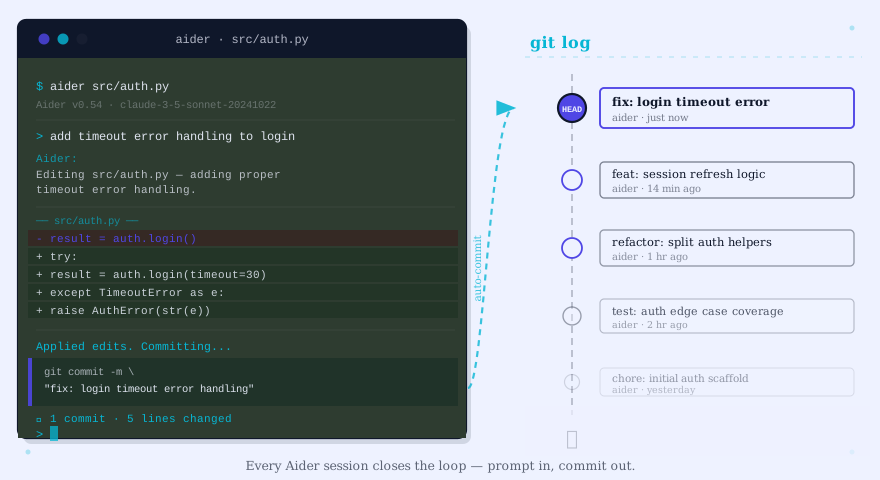
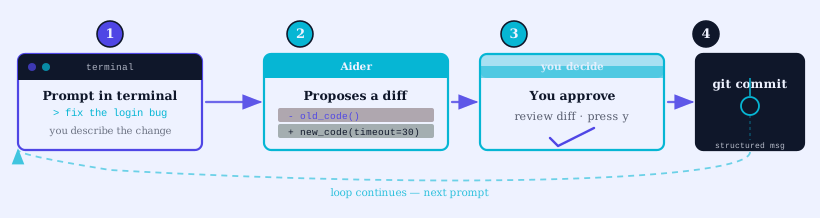
Aider runs as a Python CLI that you launch inside a git repo. You tell it which files to add to the chat, then ask in natural language for a change. Aider sends your prompt plus the relevant context to a model (Claude, GPT, DeepSeek, or a local Ollama model are all supported), receives a diff, applies it to disk, and commits with a generated message. One change, one commit, every time.
Aider is open source under the Apache 2.0 license and developed in the open at github.com/Aider-AI/aider. The project ships frequent releases with active maintainer attention to model support and edit-format reliability.
The audience is developers who already work in the terminal: backend engineers, infra teams, anyone touching multi-repo codebases over SSH. If your daily flow is tmux + nvim + git, Aider drops in without forcing an editor change.
How Aider’s git workflow differs from Cursor and Copilot
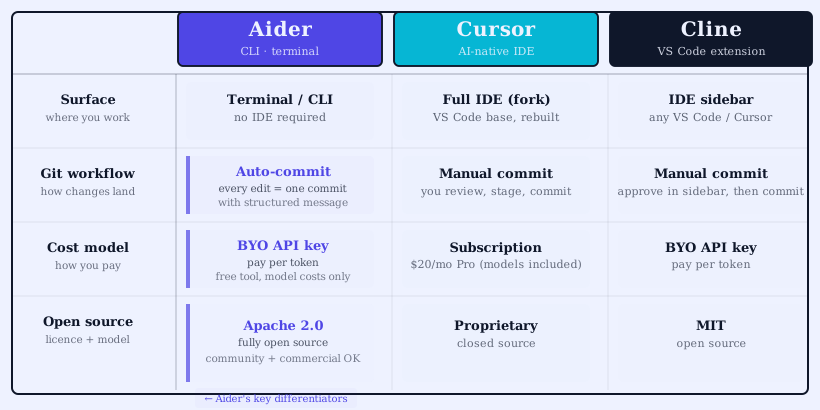
Cursor and Copilot apply changes to your working tree and let you accept, reject, or undo before committing. Aider commits first, always. The argument behind that choice: every AI-generated change becomes its own atomic, revertable history entry. If a refactor breaks tests two commits later, git bisect finds the offender in seconds.
In practice this means Aider is loud in your git log. A 30-minute session can produce 20 small commits. We squashed before merging on three of our four repos. The fourth (a microservice with mandatory CI on every push) kept the granular history and used it for incident review later.
Our 30-day test: 4 repos, 6 developers
We ran Aider on four production codebases:
- A TypeScript Node API (~80k LOC), shared by three of our developers
- A Go ingestion service (~25k LOC), single owner
- A Python data pipeline (~40k LOC), two-developer team
- An internal React admin tool (~15k LOC), one owner
Six developers participated. We tracked time-to-PR-merge, model spend, commits per session, and a weekly satisfaction note. Sessions were logged in a shared sheet with model used, intent, and a one-line outcome.
Repo-wide refactor: TypeScript to ESM migration
The TypeScript API refactor was the test Aider was built for. We needed to convert ~400 CommonJS files to ESM, update import paths, and adjust the build pipeline. We loaded the tsconfig, package.json, and a representative source file into the chat, then asked Aider to migrate one directory at a time.
Aider produced clean diffs in batches of 20 to 30 files per request. Each batch was a single git commit with a generated message that named the directory and the change pattern. Cursor’s composer mode handled similar batches in our previous tests, but the commits had to be staged manually after review. Aider saved roughly 40% of the wall-clock time on this migration vs. our last comparable refactor, which we did with Cursor in March.
The cost: about $18 in Claude Sonnet API spend across two days of work. Cursor’s Pro tier would have covered the same workload at $20/month flat, so the dollars are close. The difference is transparency. We knew exactly which prompts cost what, which is something Aider’s /tokens command surfaces in real time.
Bug-fix mode: chat vs /architect vs /code
Aider exposes three primary modes: default chat (asks for clarification, then edits), /architect (plans first, then asks a second model to implement), and /code (no questions, edit immediately). We tested all three on the same set of 12 bugs across the four repos.
/architect mode used Claude Opus to plan and DeepSeek to implement. It was the most reliable for bugs that touched more than one file. It was also the most expensive, averaging $0.40 per bug vs. $0.12 for default chat. Default chat was best for single-file fixes. /code mode was fastest but produced the highest rework rate (we reverted three of 12 changes).
If you are budget-conscious, default chat is the right starting mode. Reach for /architect when the bug spans modules.
Token and dollar cost across Claude, GPT, DeepSeek
Across 30 days and roughly 240 sessions, our per-developer spend looked like this:
| Model | Sessions | Avg cost per session | 30-day total per dev |
|---|---|---|---|
| Claude Sonnet | 142 | $0.18 | ~$25 |
| GPT-4o | 38 | $0.22 | ~$8 |
| DeepSeek-V3 | 60 | $0.04 | ~$2.50 |
DeepSeek was our default for repetitive edits where its lower quality was acceptable. Claude Sonnet was the daily driver for anything non-trivial. GPT-4o stayed in the rotation for the cases where Sonnet’s edit format produced more conflicts than usual.
For pricing claims, see Anthropic’s pricing page (anthropic.com/pricing) and OpenAI’s API pricing (openai.com/api/pricing). Verify rates at sign-up since both vendors have shipped tier changes in 2026.
Where Aider beats Cursor (and where it does not)
Aider wins on:
- Repo-wide changes. Loading 30 files into the chat at once and getting batched diffs back is faster than Cursor’s composer for migration-style work.
- Audit trail. One commit per change is a traceable history that survives team handoffs.
- Headless workflows. Aider runs over SSH on a build box. Cursor needs a desktop session.
- Model choice. Aider picks the model per session via flag. Cursor bundles its own model selection.
Cursor wins on:
- GUI feedback. Diff hunks rendered inline with one-click accept/reject is faster for surgical edits.
- Tab-complete suggestions. Cursor’s inline completions are ahead of any terminal equivalent we tested.
- Multi-file context. Cursor’s automatic context retrieval is more forgiving than Aider’s manual
/add.
For a detailed Cursor head-to-head with another open-source contender, see our Cline vs Cursor open-source coding tools guide.
Pricing and model picks for April 2026
Aider itself is free. Cost lives in the model API bill. Our recommended stack as of April 2026:
- Default model: Claude Sonnet (best edit-format reliability across our test runs)
- Bulk edits: DeepSeek-V3 (10x cost ratio in DeepSeek’s favor for low-stakes work)
- Architect mode: Claude Opus planner + DeepSeek implementer (cheapest two-model setup that consistently lands plans)
If you are evaluating Aider against a wider field, our best AI coding tools April 2026 update ranks Aider alongside Cursor, Copilot, Cline, Continue, and Windsurf.
FAQ
Is Aider free? The Aider CLI is free and open source. You pay only for the model API tokens. Some models (DeepSeek, local Ollama) are very cheap or free.
Can Aider work without git? No. Aider commits every change. If you do not want commits, Cursor or Copilot is the better fit.
What languages does Aider support? Anything the underlying model handles. We tested TypeScript, Go, Python, and React with no language-specific friction.
Does Aider work offline? With a local model (Ollama, LM Studio), yes. Quality drops sharply vs. hosted Claude or GPT, but the privacy story is real.
Verdict
Aider is the best terminal-first AI coding tool we have used. For repo-wide refactors and headless workflows it is faster than Cursor at a similar dollar cost. For surgical UI work in a GUI editor, Cursor still wins. We are keeping Aider in our daily rotation on three of four test repos and moving the fourth (the React admin tool) back to Cursor.
Try Aider. Start with default chat mode and Claude Sonnet. Add /architect once you hit a multi-file bug.
Related: Aider tool page · Cursor tool page · Cline vs Cursor open source · Best AI coding tools April 2026