Table of Contents
GitHub’s official MCP server: setup, scopes, and what we’d actually use it for
Published May 4, 2026 by Pondero Editorial
A note on framing. We have not run a 30-day production trial of the GitHub MCP server across multiple machines. The recommendations below are an opinionated rubric we’d apply if we were rolling it out to a small engineering team this month, anchored to vendor docs and the public release log. Treat the scope tables and workflow picks as a starting framework, not a measured benchmark.
TL;DR
GitHub publishes an official open-source MCP server that lets Claude Code, Cursor, Claude Desktop, and any other MCP 1.0 client read and act on issues, pull requests, code search, and repo metadata. The server is free. The interesting work is the auth model and scope minimization. If you wire it up with a fine-grained Personal Access Token scoped down to the repos and verbs you actually need, it earns its place next to your IDE assistant. If you wire it with a classic PAT and full repo scope, you have just handed your model write access to every repository the token owner can touch. That is the choice this article is about.
What the official GitHub MCP server actually exposes
The server, hosted at github/github-mcp-server, exposes the GitHub REST and GraphQL APIs as MCP tools. The current toolset breaks down into a few categories:
- Issues: list, read, create, comment, label, close, and search across repos the token can see.
- Pull requests: list, read, comment, request review, and (depending on scope) merge.
- Code search: GitHub’s code search across repos the token has read access to, returned as ranked snippets.
- Repository metadata: branches, releases, file contents, commit history, and contributor lists.
- Notifications: read and mark-as-read for the authenticated user’s notification feed.
What it does not do, by design, is give your assistant a generic shell on a GitHub Actions runner or git push access on its own. Writes are mediated through the same API verbs a human user would call: a comment is a comment, a merge is a merge, and each is gated by whatever scopes the token carries. That predictability is the point. You can read the full tool list in the project’s README and check the version-pinned set in any tagged release before you upgrade.
Setup walkthrough: Claude Desktop, Cursor, and Claude Code
Three clients cover roughly all of our writing this month, so we’ll walk through each. The general shape is identical across MCP 1.0 clients: declare the server in a JSON config, point it at a GitHub token, restart the client.
Claude Desktop
Edit the user-level MCP config file. The canonical Claude Desktop quickstart lists the path per OS. Add a github entry to mcpServers:
{
  "mcpServers": {
    "github": {
      "command": "npx",
      "args": ["-y", "@modelcontextprotocol/server-github"],
      "env": {
        "GITHUB_PERSONAL_ACCESS_TOKEN": "<your-fine-grained-PAT>"
      }
    }
  }
}
Restart Claude Desktop. The server appears in the tools list. If it does not, run npx -y @modelcontextprotocol/server-github in a terminal to surface install errors before they hide inside the client log.
Cursor
Cursor reads MCP servers from its settings JSON. The block is the same shape as Claude Desktop’s. Open the command palette, search for MCP: Edit Config, and paste the same github entry. Reload the window. Cursor’s agent surfaces the tools under the GitHub server name.
Claude Code
Claude Code’s CLI installs the same server via its built-in MCP manager:
claude mcp add github --env GITHUB_PERSONAL_ACCESS_TOKEN=<your-PAT>The command writes to your project or global Claude Code config. Verify with claude mcp list. If you maintain a per-repo config, commit the non-secret half (the server name and command) and pull the token from your shell environment. Do not commit a real token.
Personal Access Token vs GitHub App auth
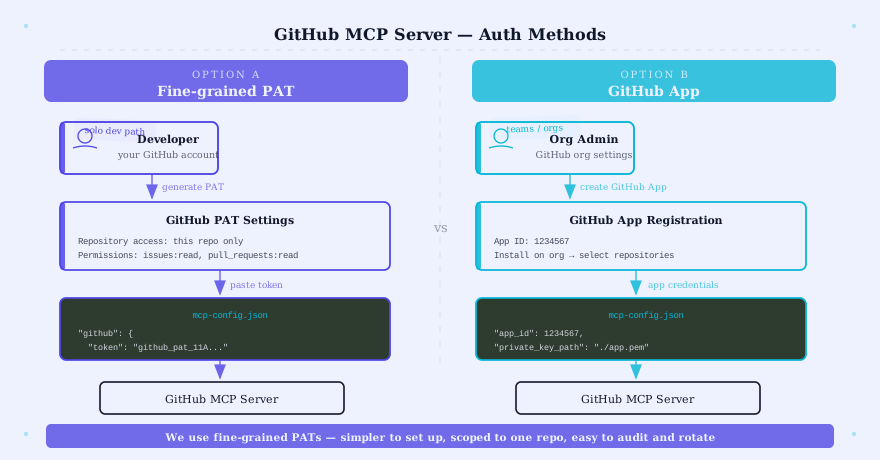
The official server supports two auth modes: a Personal Access Token attached to a human GitHub account, or a GitHub App acting on its own credentials. They imply different things.
A classic PAT authenticates as the human user. Every action in audit logs reads as that user. Scopes are coarse: repo covers every repository the user can touch, public or private, with both read and write. This is convenient and dangerous. If your assistant goes off-script, the blast radius is everything that user can see.
A fine-grained PAT is the same human-account model with two important upgrades. You enumerate a specific repository list, and you pick read or write per category (Contents, Issues, Pull requests, Metadata, etc.). The scope surface drops by an order of magnitude.
A GitHub App is a separate identity. It can be installed only on the specific repositories you choose, can be paused or rotated without touching your personal account, and produces audit-log entries clearly attributable to the App. For team or org rollouts this is the right answer. For an individual operator wiring up their own assistant, fine-grained PATs are the lower-friction path that still keeps you out of repo-scope territory. The GitHub PAT documentation walks both flows.
Scopes we’d recommend (least-privilege)
If we were shipping this to a small engineering team this month, here is the rubric we’d apply. The principle is simple: start read-only on a single repository, add scopes only when a workflow proves out.
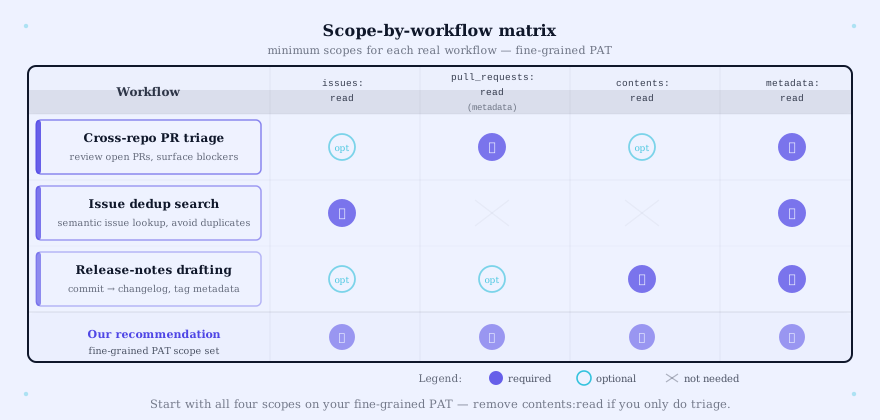
| Workflow | Repos | Contents | Issues | Pull requests | Metadata |
|---|---|---|---|---|---|
| Read-only triage | Selected | Read | Read | Read | Read |
| PR review assist | Selected | Read | Read | Read + Write | Read |
| Issue dedup + labelling | Selected | Read | Read + Write | Read | Read |
| Release-notes drafting | Selected | Read | Read | Read | Read |
| Full agent loop | Selected | Read + Write | Read + Write | Read + Write | Read |
The first row is where we’d start. The last row is where you stop pretending the assistant is supervised and treat it as a co-author with the authority to merge. Most teams should not be at the bottom row in week one.
Two failure modes we’d plan for: a token leak (rotate immediately, GitHub’s UI revokes a fine-grained PAT in two clicks) and a rogue tool call (set the workflow scope so the worst case is a stray comment, not a force-push to main). The fine-grained model makes both recoveries cheap.
Three workflows it actually wins at
Not every problem looks like a nail when you have an MCP-shaped hammer. Three workflows we think justify the install on day one.
1. Cross-repo PR triage
Reviewing five repos worth of open PRs through a chat interface is faster than five browser tabs. Ask the assistant to list PRs older than seven days across a defined set of repos, summarize the diff focus, and surface the ones touching shared infrastructure. The read-only token is enough. The win is attention compression, not auto-merging.
2. Issue dedup search
Engineering teams accumulate near-duplicate issues. The MCP server’s code-search and issue-search tools combined will let an assistant pull a candidate match list for a new issue in seconds. Pair it with a “is this a dup of #X?” workflow and the assistant becomes a triage net rather than a write actor. Issues read scope only.
3. Release-notes drafting
Tag, list merged PRs since the last tag, group by label, draft notes. The assistant does the rote part, a human edits the framing and ships the GitHub release. Read scope on contents and pull requests is enough; the human still hits the publish button.
If you’re already paying for a code-completion tool that overlaps with these workflows, layering an MCP server on top of GitHub Copilot is where the GitHub-stack monetization really compounds. Copilot’s chat lives inside your editor; the MCP server lets the assistant reach across repos without the human switching context.
When NOT to use the GitHub MCP server
A few scenarios where the answer is “do something else.”
You need write access to private package registries, secrets, or GitHub Actions workflows. The MCP server’s tool surface is GitHub’s content APIs, not the admin plane. If your workflow is “rotate this org secret,” use the GitHub CLI under a human’s session.
You’re rate-limited already. Adding an assistant that calls the API on every prompt will not help. The standard 5,000-requests-per-hour ceiling can drain quickly under heavy code-search use. Watch your X-RateLimit-Remaining header on busy days.
You need real-time updates, not pull-based reads. The MCP server polls. If you want notifications-on-events, run a webhook listener or use the GitHub mobile app. Asking your assistant “did anyone comment in the last five minutes?” is the wrong tool.
You’re operating in a regulated environment without GitHub App audit. If your compliance posture requires App-level audit trails, the PAT path is not the answer. Set up a GitHub App, scope it to the org, and pipe the audit log to your SIEM.
Pondero rollout rubric (if we were doing it this month)
A four-week shape we’d suggest. Treat this as a framework, not a transcript.
- Week 1: Single repo, fine-grained PAT, read-only on Contents and Issues. One human operator. The goal is to confirm the server runs, the token works, and your client picks up the tools.
- Week 2: Add a second repo. Add Pull requests read. Run the cross-repo triage workflow against real open PRs.
- Week 3: Promote the workflow you actually used to a written runbook. Add Issues write scope only if labelling or commenting is in that runbook. Document the rotation procedure for the PAT.
- Week 4: Decision point. Either move to a GitHub App for org-level rollout, or stay on fine-grained PATs per-operator. Either is defensible. The wrong answer is the implicit upgrade to classic
reposcope.
We have not measured this rubric end-to-end against a customer org. It is the structure we’d write into a one-pager before any green-light meeting.
FAQ
Is the GitHub MCP server free? Yes. The server itself is open-source under GitHub’s standard license. You pay for your GitHub plan and your MCP client; the bridge is free.
Does it work with non-Anthropic clients? Any MCP 1.0 client that reads the standard config format will talk to it. That includes Cursor, Claude Desktop, Claude Code, and a growing list of others. See our MCP client comparison for the current landscape.
What about GitHub Enterprise Server? The server supports GHES targets via configuration. The auth model is identical; the API base URL differs. Check the project README for the active flag name on the version you install.
Should this replace the GitHub CLI? No. The CLI is the right tool for human-driven operations and CI scripts. The MCP server gives an assistant structured access. They coexist.
Where does this fit in the MCP server stack? It is one server in a roster. Our best MCP servers roundup and the MCP 1.0 rollout context put it next to the database, search, and filesystem servers most teams deploy together.
Verdict
If you write code on GitHub and run an MCP-aware assistant, install the official server. The fine-grained PAT is the only correct starting point. Stay read-only for a week. Promote scopes to writes when a specific workflow asks for them, not before. The vendor docs are honest about what the server does; the operational discipline is on your side of the line.