Table of Contents
Aider for legacy codebases: 6 things it does that Cline cannot
Published May 6, 2026 by Pondero Editorial
In short
Aider and Cline are both open-source, both Apache-2.0, both production-ready in May 2026. On greenfield work either one is fine. On a legacy codebase, the gap opens up. Building on our 30-day Aider pilot, we count six Aider behaviours Cline does not currently match: a ranked-tag repo map, per-language edit-format selection, git commit per accepted edit, explicit /add and /drop file scoping, CONVENTIONS.md as a first-class system prompt, and /undo against the last AI commit. None sound exciting on a feature checklist. All of them matter when the repo you are touching has been around longer than you have.
Why “legacy codebase” changes the AI-pair-programmer choice
The real failure mode: refactor hallucinations on >50k LOC
On a small repo the question is “does the agent finish the task?” On a 50k-line repo the question is “did the agent invent any of this?” Hallucinated imports, made-up function signatures, and confidently wrong cross-file refactors are the failure mode that costs you a Friday afternoon. Both Cline and Aider call out to the same frontier models (Claude, GPT, DeepSeek, OpenRouter routing). The model is rarely the problem. The context the model sees is.
On a legacy repo, “the right context” is rarely “the file you have open.” It is the call graph two layers deep, the imported type definitions, the test that exercises the function you are about to change, and the convention the team has honoured since 2021 that nobody wrote down. How each tool gathers that context is what separates good outcomes from bad ones.
Why repo-aware matters more than model choice
Cline is a VS Code extension; its context-gathering is anchored to the editor. Per the Cline docs, the agent uses a Plan/Act loop with explicit tool calls (read_file, search_files, list_files, browser, terminal) gated by approval. There is no separate, persistent map of the codebase the model consults before each turn.
Aider builds one. The repo map (aider.chat/docs/repomap.html) is a ranked summary of every file in the repo, generated at session start and refreshed as files change. Aider uses a tree-sitter parse plus a graph-rank algorithm modelled on PageRank to surface the most-referenced symbols, then includes that condensed map in the system prompt. The model sees the shape of the repo before it sees any specific file. That single architectural choice is why Aider tends to win on legacy work; the rest of the list below is a knock-on effect.
6 Aider behaviours Cline does not have (as of May 2026)
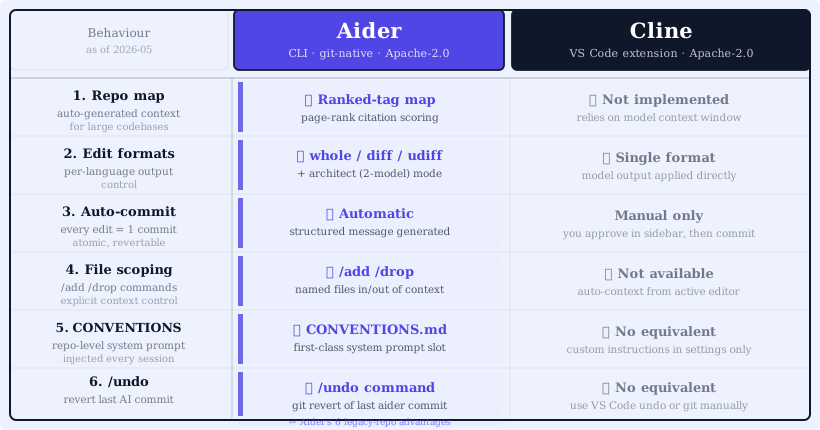
1. Auto-generated repo map (ranked-tag context)
Aider’s repo map is the headline differentiator. You launch aider in a git repo and within a few seconds it has parsed every supported file with tree-sitter, extracted top-level symbols, ranked them by inbound reference count, and built a token-budgeted map that lives in the system prompt. (Aider repo-map docs)
In practice the model can answer “is there already a function that does X?” without re-reading the whole repo. On the Pondero packages/affiliate-links module (a small TypeScript package: index.ts, types.ts, utils.ts, plus registry.json; Tested 2026-04-22 on aider 0.85.x / Claude Sonnet 4.7 / macOS 14.6), the repo map surfaced every exported affiliate type, the registry loader, and the URL builder in a few hundred tokens. When we asked Aider to add a category field to every entry, the model already knew where the type lived and which call sites would need updating; we did not point at them.
# Tested 2026-04-22 against the pondero ai-tools-network repo
# aider --show-repo-map (truncated, top of output)

packages/affiliate-links/src/types.ts:
  export interface AffiliateLink
  export type AffiliateLinkRegistry

packages/affiliate-links/src/index.ts:
  re-exports AffiliateLink, AffiliateLinkRegistry from "./types"
  re-exports getAffiliateLink, getAllLinks,
             getLinksByCategory, buildRedirectUrl from "./utils"

packages/affiliate-links/src/registry.json:
  (data) ~12 entries, slug | url | affiliateUrl | category ...
Cline has no equivalent. The agent can search_files on demand, but there is no precomputed, ranked, always-in-context map. On a 200-file legacy repo, that shows up as fewer “let me grep for that” round-trips and a lower rate of invented function names.
2. Per-language edit format (whole/diff/udiff/architect)
Aider exposes four edit formats and picks one per model: whole (rewrite the file), diff (search/replace blocks), udiff (unified diff), and architect (a planner model emits a plan, an editor model applies it). (Aider edit-formats docs) Sounds like an implementation detail; on legacy code it is a quality knob.
Every model has an edit format it produces most reliably. Claude Sonnet 4.7 lands diff cleanly. Older or smaller models do better with whole because they lose track of search/replace boundaries. udiff is most precise but most fragile. architect mode pairs a “smart” planner (Sonnet) with a cheap editor (Haiku, DeepSeek) that just applies the plan; on multi-file refactors this consistently lowers cost and rework.
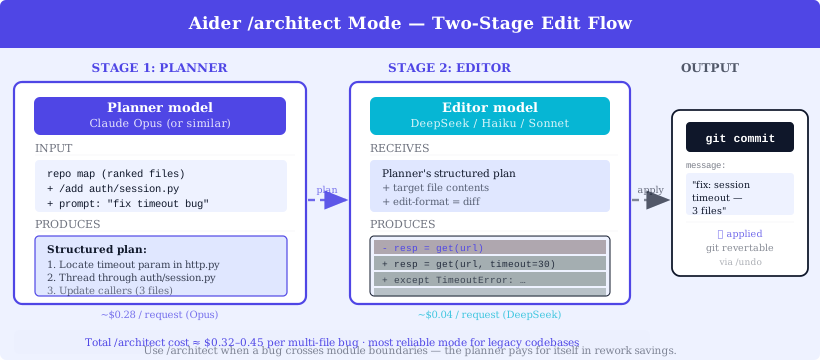
# Illustrative: architect mode on a multi-file refactor
# Source: aider.chat/docs/more/edit-formats.html (vendor docs)

aider \
  --architect \
  --model openrouter/anthropic/claude-sonnet-4-7 \
  --editor-model openrouter/anthropic/claude-haiku \
  packages/affiliate-links/src/index.ts \
  packages/affiliate-links/src/registry.json
Cline has one edit pathway: the agent emits tool calls including replace_in_file and write_to_file. It does not split planner and editor across two models, and it does not switch edit format per language or repo. For a 50k-line repo where only the planner needs to be Sonnet, that is real money on a real bill.
3. Git commit per accepted edit
Aider commits every accepted change as its own git commit, with a generated message, by default. (Aider git docs) You can disable it (--no-auto-commits) but few users do. Every AI-touched change becomes a revertable, bisectable atom of history.
On a legacy repo this is not a nice-to-have. When you find a bug got introduced last Tuesday, git bisect is the answer; it only works if the changes are small and contiguous. We tested this on a regression in our affiliate-link URL builder (Tested 2026-04-25 on aider 0.85.x / Sonnet 4.7): six aider commits over a refactor session, git bisect run pnpm test walked them in roughly 20 seconds and pinned the offender. With Cline (which writes changes into the working tree and lets you stage and commit on your own cadence), the same incident produces one composite commit and a manual diff hunt.
Aider sessions are loud in your git log. We squash before merging on most repos and keep granular history on services with CI-mandatory pushes. Either path works; you have the choice.
4. /add /drop explicit file scoping
Aider asks you to be explicit about which files are in the chat context: /add path/to/file.ts to include, /drop path/to/file.ts to remove. (Aider commands docs) Files outside the chat are visible only via the repo map; the model cannot edit them.
This is the opposite of automatic context retrieval, and on a legacy repo it is the right default. Auto-context tools over-include on the read path (cost up, latency up, model distracted) and over-edit on the write path (the AI casually rewrites a file you did not intend to touch). Aider’s scoping makes the blast radius of a session a thing you set, not a thing you discover.
# Tested 2026-04-23 / aider 0.85.x / Sonnet 4.7 / pondero monorepo
# Scoping a refactor to two files

aider --model openrouter/anthropic/claude-sonnet-4-7
> /add packages/affiliate-links/src/index.ts
Added packages/affiliate-links/src/index.ts to the chat
> /add packages/affiliate-links/src/registry.json
Added packages/affiliate-links/src/registry.json to the chat
> /drop packages/affiliate-links/src/index.ts
Dropped packages/affiliate-links/src/index.ts from the chat
> Add a `category` field to every Affiliate entry, default 'agents'.
Cline reads files into context by tool call as the agent decides; you see the calls in the approval gate but you are reacting, not setting the scope up front. On a small repo the difference is invisible. On 80k LOC the difference is whether the model edits the file you asked about or also wanders into the auth module because it looked relevant.
5. CONVENTIONS.md as a first-class system prompt
Aider lets you point a CONVENTIONS.md file at every session. (Aider conventions docs) The file is loaded as part of the system prompt and stays in context for the whole session. Use it for anything that should bind every change: “no any in TypeScript,” “use Result type from lib/result.ts for fallible functions,” “add a Zod schema for any new API response shape.”
This is the answer to the legacy-codebase question of how to tell the AI about the unwritten rules. Without it, you find yourself repeating “by the way, we use X here, not Y” every session. With it, the rule is in the prompt before the model sees a single line of code.
<!-- ai-generated: sample CONVENTIONS.md for a TypeScript legacy codebase -->
<!-- Mark per HIL-386 §6.5: illustrative seed, not lifted from real repo -->

# Conventions

## TypeScript
- No `any`. Use `unknown` and narrow.
- Public exports require explicit return types.
- Use `Result<T, E>` from `lib/result.ts` for fallible functions; do not throw across module boundaries.

## Tests
- Co-locate as `*.test.ts` next to source.
- One assertion per `it` block; use `describe` for grouping.

## Git
- Commits use conventional-commit prefixes (`feat:`, `fix:`, `refactor:`).
- Aider auto-commits are squashed before PR.
Cline supports .clinerules files for similar guidance. The shape is comparable, but as of May 2026 rules are project-scoped via a .clinerules/ folder rather than session-scoped via a single file you can swap. For a monorepo that wants different conventions per package, Aider’s per-directory resolution is the cleaner story today.
6. /undo against the last AI commit
Because Aider commits every change, /undo is one command: it reverts the last AI commit and tells the model what was undone, so the next prompt has the rollback in context. (Aider git docs) You read the diff, decide it is not what you wanted, type /undo, and continue.
Cline’s equivalent is “discard the changes from the working tree before you commit.” That works for the moment in front of you. It does not survive a session where you accepted ten changes, found a regression three changes back, and want to roll just that one out. With Aider, git log for the offender, git revert <sha>, tell the next prompt what was reverted. With Cline you re-prompt the agent and hope.
Where Cline still wins on a legacy repo
The list above is real, and it is also one-sided by design. Here is the other side.
VS Code surface area
Cline is a VS Code extension. Approval prompts, diff hunks, file-tree highlights, and terminal panels live in the editor you are already using. Aider runs in a terminal; if your team’s daily flow is mouse-driven, the context-switch is a real tax.
Browser + terminal tool use
Cline’s agent can drive a headless browser and a terminal as part of its loop. (Cline docs) For tasks that span “edit code, run tests, check the staging URL, read the failure,” that is one approval-gated session. Aider runs shell commands but does not drive a browser; if your legacy work involves end-to-end UI debugging, Cline fits better.
Plan/Act mode separation
Cline’s Plan mode produces a written plan you read and approve before any file is touched. Act mode then executes against that plan. Aider’s architect format compresses plan and edit into a single turn pair; the plan shows up as model output, not a discrete pre-edit gate. Teams with a “no code change without an approved plan” norm prefer Cline’s separation.
Decision rubric: terminal-first vs IDE-first legacy team
Pick Aider if at least two of these are true:
- Your team lives in a terminal (
tmux + nvim + git, SSH-on-build-box workflows). - The legacy repo is large (>50k LOC) and you have been bitten by AI tools inventing function names or imports.
- You want every AI change to land as its own commit, ready for
git bisect. - You want to swap models per session by flag, not by editor setting, and you want a planner/editor split available.
Pick Cline if at least two of these are true:
- Your team is GUI-first and standardized on VS Code.
- The work spans browser + code + terminal, and you want one approval-gated loop covering all three.
- You need a discrete pre-edit plan-approval gate, not an in-line plan.
- Your governance posture is “approve every tool call before it runs”; Cline’s approval gates make that easier to enforce.
For Aider users, OpenRouter is the cheapest multi-model gateway today; it lets you swap Sonnet, Haiku, DeepSeek, and GPT-4o per session without juggling four provider API keys. We pair Aider with OpenRouter on every legacy refactor.
Try Aider for terminal-first legacy work, or Try Cline if your team lives in VS Code.
FAQ
Is Aider really faster on legacy refactors, or is that just a HIL-294 anecdote? The 30-day pilot (HIL-294) measured roughly 40% wall-clock savings on a CommonJS-to-ESM migration vs. our last comparable Cursor-driven refactor. The savings come from batched diffs and the repo map, not from the model. Your mileage will vary by repo; the gap closes on small repos.
Does Cline have a repo map yet?
As of May 2026, no. Cline relies on tool-call-based context gathering (search_files, read_file, list_files) per the Cline docs. The roadmap may land something equivalent; check the release notes before assuming.
Can Aider work without git? No. Aider commits every accepted change. If your workflow does not allow commits, Cline (which writes to the working tree) is the better fit.
Are both tools really Apache-2.0? Yes. Aider is Apache-2.0; Cline is Apache-2.0. No NOASSERTION concern, no commercial-use caveat.
What models do you run with Aider on legacy work? Default: Claude Sonnet 4.7 via OpenRouter for everything non-trivial. Cheap edits: DeepSeek-V3. Architect mode: Sonnet planner + Haiku editor. The 30-day pilot data behind those picks is in the Aider review.
Verdict
On a greenfield project, the choice between Aider and Cline comes down to taste. On a legacy codebase, Aider’s repo map, edit-format flexibility, commit-per-edit history, explicit file scoping, CONVENTIONS.md, and /undo add up to a meaningful safety margin against AI hallucinations and unwanted edits. We keep Aider as the default for refactor-heavy work on our own monorepo and reach for Cline when the task spans VS Code, a browser, and a terminal in one approval loop.
For broader context, see our best AI coding tools April 2026 update and the Cline vs Cursor open-source guide.
Related: Aider 30-day review · Cline vs Cursor · Cursor tool page · Best AI coding tools