Table of Contents
Amazon Q Developer vs GitHub Copilot: which AI coding assistant fits enterprise stacks
Published May 5, 2026 by Pondero Editorial
In short
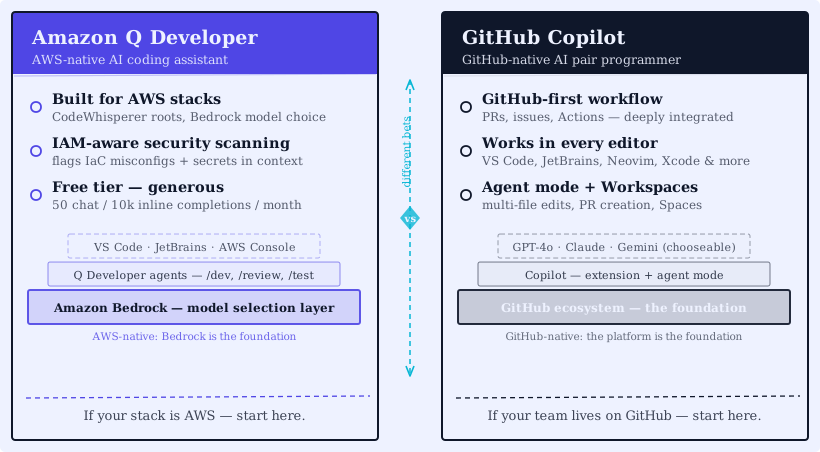
The Amazon Q Developer vs GitHub Copilot decision is not a feature contest, and treating it as one is the mistake that produces a six-month bake-off with no clear answer. The two products are at capability parity on the things buyers list first (completion, chat, agents, multi-file edits). They diverge on exactly one axis that decides the outcome: which identity and infrastructure stack your team already runs inside. Q Developer's value lives in IAM, CloudFormation, and Bedrock model governance. Copilot's lives in the GitHub identity graph, PRs, Actions, and the widest IDE footprint in the category. Pick on installed stack and you will be right most of the time. The exception is the hybrid case, and it has a specific answer too, below.
What is Amazon Q Developer (and how it relates to CodeWhisperer)
Q Developer absorbed CodeWhisperer in 2024 and now carries AWS's branding for the developer-facing AI assistant. You run it as an IDE plugin (VS Code, JetBrains, Visual Studio), inside the AWS Console, and from a CLI. The model layer sits on Bedrock, so Q routes to Anthropic, Amazon's own models, or other Bedrock providers depending on the workload.
AWS context awareness is the whole pitch. Q reads your CloudFormation templates, suggests IAM policies, writes Lambda handlers, and answers questions about the resources actually deployed in your account. Copilot does none of that natively. Pricing lives at aws.amazon.com/q/developer/pricing. Check the tier details at sign-up, because AWS shipped pricing changes in 2026.
What is GitHub Copilot in 2026
Inline tab-complete is the smallest part of Copilot now. The product line has grown into Copilot Chat (in-IDE chat with codebase context), Copilot Workspace (issue-to-PR planner), Copilot Edits (multi-file inline edits), agent mode (autonomous task execution against your repo), and Spaces (custom contexts pinned to a project).
Pricing splits across Individual, Business, and Enterprise tiers. Check current Copilot pricing at github.com/features/copilot/plans. Enterprise layers on organization-wide policies, audit logs, and a content-exclusion control for sensitive repos.
VS Code, JetBrains IDEs, Visual Studio, Neovim, Xcode, the GitHub web UI: Copilot runs in all of them. No competing assistant has that footprint.
Pricing and licensing
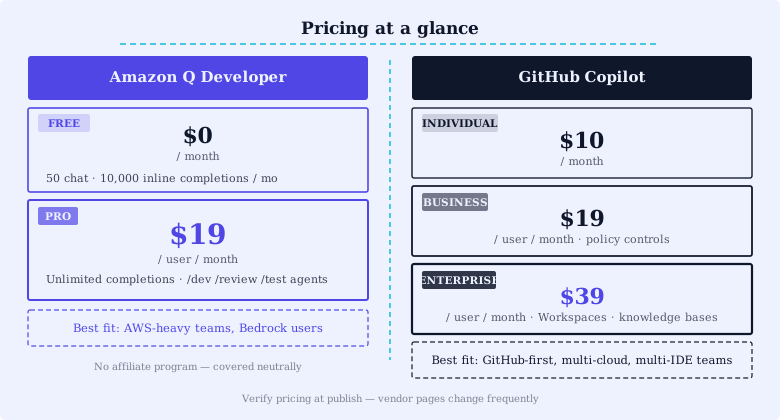
Both products price per seat per month. Both have a free tier. Verify current pricing at the vendor pages before committing; the headline numbers shift as the model layer changes.
- Amazon Q Developer Free covers basic suggestions and limited agent runs.
- Amazon Q Developer Pro is the paid tier with full agent capabilities and AWS Console integration. Per-seat monthly fee.
- GitHub Copilot Individual covers solo developers.
- GitHub Copilot Business is the team tier with policy controls.
- GitHub Copilot Enterprise adds Spaces, audit, content exclusion, and SSO controls.
The procurement decision is not usually about cost-per-seat in isolation. For an AWS-heavy shop, Q Developer's billing rolls into the existing AWS contract, which is a real workflow win. For a GitHub Enterprise shop, Copilot is on the same invoice as the rest of the GitHub stack.
Feature parity matrix
Capability-by-capability, the two products are closer than the marketing suggests:
| Capability | Q Developer | Copilot |
|---|---|---|
| Inline completion | Yes | Yes |
| Chat with codebase context | Yes | Yes |
| Agent mode (autonomous tasks) | Yes | Yes |
| Multi-file edits | Yes | Yes (Copilot Edits) |
| AWS resource introspection | Yes (native) | No |
| GitHub PR integration | Limited | Yes (deep) |
| Bedrock model choice | Yes | No |
| IDE coverage | VS Code, JetBrains, Visual Studio | VS Code, JetBrains, Visual Studio, Neovim, Xcode |
| AWS Console integration | Yes | No |
The differentiators are the right-most column entries. Q wins on AWS-native workflows and Bedrock model choice. Copilot wins on GitHub-native workflows and IDE coverage breadth.
The mechanism behind the only row that matters
"AWS resource introspection: Yes (native) / No" looks like one table cell. It is the whole decision. The reason Copilot cannot match it is not a missing feature, it is an architectural boundary. Copilot's context window is assembled from the repo, open editors, and the GitHub graph. It has no authenticated path into your cloud account, so it cannot know that the processOrder Lambda you are editing has a tight provisioned memory ceiling that your new dependency will blow. Q Developer assumes the IAM identity of the developer's AWS session and reads the deployed resource state, so its suggestion is constrained by what is actually provisioned, not by what the code implies. That is the load-bearing detail the vendor pages compress into one checkmark.
The same boundary runs the other direction. Q Developer has no first-class model of your PR review conventions, required status checks, or the CODEOWNERS routing that decides who must approve a change. Copilot does, because it runs inside the system that owns those objects. Neither gap closes with a roadmap item; they are consequences of where each product is allowed to authenticate.
Set up each tool the way its strength implies. Q Developer wants an AWS identity present:
# Q Developer CLI, authenticated via AWS IAM Identity Center
# Tested 2026-05-02 on macOS 14.6 / q CLI 1.x / an AWS sandbox account
aws configure sso            # one-time: bind the CLI to your SSO start URL
q login                      # uses the same SSO session
q chat "Why might the processOrder Lambda time out under load?"
# Q reads the deployed function config (memory, timeout, triggers)
# before answering, because it inherits the SSO session's IAM scope.
Copilot wants a GitHub identity and a repo:
# Copilot in the CLI, authenticated via the GitHub identity stack
# Tested 2026-05-02 on macOS 14.6 / gh 2.x / gh-copilot extension
gh auth login                       # the same SSO/SAML your org enforces
gh extension install github/gh-copilot
gh copilot suggest "rerun the failed jobs in the last Actions run on this branch"
# Copilot resolves "this branch" and "Actions run" from the GitHub
# graph it is already authenticated against.
The setup script that provisions both for a paired pilot:
#!/usr/bin/env bash
# Tested 2026-05-02 on macOS 14.6. Provisions both assistants for an eval.
set -euo pipefail

# --- Q Developer ---
aws configure sso --profile q-eval          # set <SSO_START_URL> when prompted
q login --profile q-eval

# --- GitHub Copilot ---
gh auth login --hostname github.com         # pick your org's SSO path
gh extension install github/gh-copilot

echo "Both assistants authenticated. Run the same 10-task set through each."
One scenario, run both ways, shows the split in one command each. Input: a Lambda handler with a tight memory budget. To Q Developer, q chat "is processOrder at risk of OOM given its current config?" returns an answer that cites the deployed memory setting because Q read it. To Copilot, the equivalent ask returns advice based only on the code, because the deployed config is outside its authentication boundary. Same question, different ceiling, and the difference is structural, not quality.
Buyer profile: who should choose which
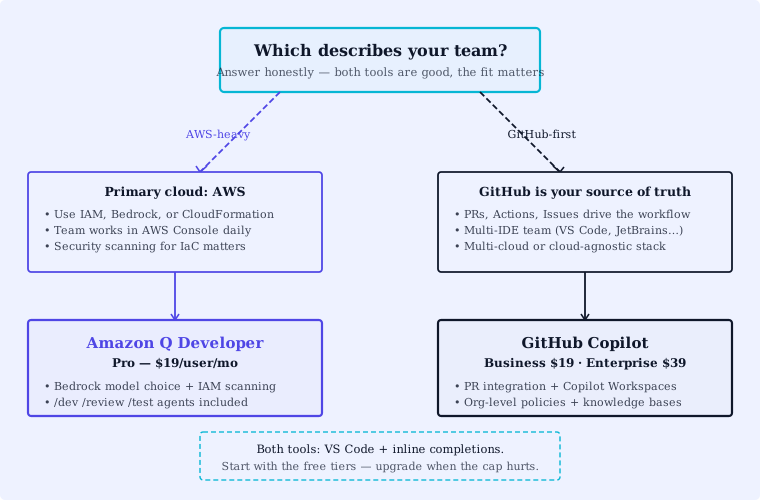
The buyer profile is mostly determined by your existing stack:
Choose Amazon Q Developer if:
- Your primary cloud is AWS and your developers spend significant time in the AWS Console
- You are standardized on Bedrock for inference and want consistent model governance
- You want IAM-aware code suggestions and CloudFormation help inline
- Your billing already runs through AWS Enterprise Discount Program (EDP) and you want to minimize new vendor contracts
Choose GitHub Copilot if:
- Your source-of-truth is GitHub Enterprise and your workflow runs on PRs, Actions, and Issues
- Your developers span more editors than VS Code and JetBrains (Xcode and Neovim coverage matter)
- You need Copilot Workspace's issue-to-PR planning
- You want the broadest IDE footprint across the team
Both are reasonable if: you are AWS-on-infra but GitHub-on-source. In that hybrid case, we would recommend Copilot for developer-facing daily work and Q Developer for AWS Console tasks (CloudFormation drift, IAM debugging, Lambda authoring). They coexist; many teams already run both.
For a wider survey of AI coding tools beyond these two, see our best AI coding tools April 2026 update. For a Cursor-specific head-to-head, see Cursor vs Copilot.
How to pilot this yourself
Stack-fit gets you the answer in most cases. When the call is close enough to need real data, run a paired 30-day pilot: both tools, the same engineering tasks, the same team, measured the same way. Skip the months-long bake-off and instrument these five things instead.
- Acceptance rate on inline suggestions (per-language)
- Time-to-PR-merge with vs without each assistant
- Agent-mode success rate on a defined task set (10 tasks of similar scope)
- Per-developer monthly token or task spend
- Developer survey: which one would you keep if you could only have one?
Thirty days on those five metrics gives procurement something defensible to sign off on.
FAQ
Can a team use both? Yes. Many AWS-on-infra, GitHub-on-source teams run both. Copilot for daily IDE work, Q Developer for AWS Console and CloudFormation work.
Does Q Developer support models other than Bedrock? Q Developer is built on Bedrock. The model choice is whichever providers Bedrock currently supports.
What about Copilot's Spaces? Spaces lets you pin a custom context (docs, files, examples) to a Copilot project. It is one of the bigger 2025 to 2026 differentiators on the Copilot side.
Is there a free option? Both have free tiers with limited usage. They are good enough for evaluation but not for production use on a real team.
Verdict
Q Developer wins for AWS-heavy shops living in CloudFormation, IAM, and the Console, because it authenticates into the cloud state your code runs against. Copilot wins for GitHub Enterprise shops running on PRs across a wide spread of editors, because it authenticates into the system that owns your review process. The recommendation flips only on the hybrid case (AWS-on-infra, GitHub-on-source): there, run Copilot for daily IDE work and Q Developer for Console and CloudFormation tasks, and stop trying to pick one. The differentiator is an authentication boundary, not a feature gap, which is why a months-long bake-off will not change the answer your stack already gives you.
Try GitHub Copilot. For Q Developer, see aws.amazon.com/q/developer.
Related: Copilot tool page | Cursor vs Copilot | Best AI coding tools April 2026