
Table of Contents
Cursor self-hosted machines: My Machines vs Team Pools, and which your team actually needs (September 2026)
With Cursor's self-hosted machines, your codebase, your terminal, your build outputs, and your secrets stay on machines you run, while the model inference and the agent's planning loop keep running in Cursor's cloud (per Cursor's changelog). If the thing blocking Cursor across your team was "our source cannot leave the network," the September 2, 2026 update finally has an answer. If you don't have that blocker, you almost certainly should not build this, and Cursor agrees: it recommends its fully managed cloud agents for most users (per ccleaks).
So this is a decision guide first and a setup walkthrough second. We'll sort out whether you want My Machines or a Team Pool, which infrastructure provider to run a pool on, how to stand one up on E2B, and exactly what data still leaves your network. The short version up top: self-hosted Team Pools are for regulated or data-residency-bound enterprises. Everyone else is better off on the managed cloud.
What Cursor shipped on September 2
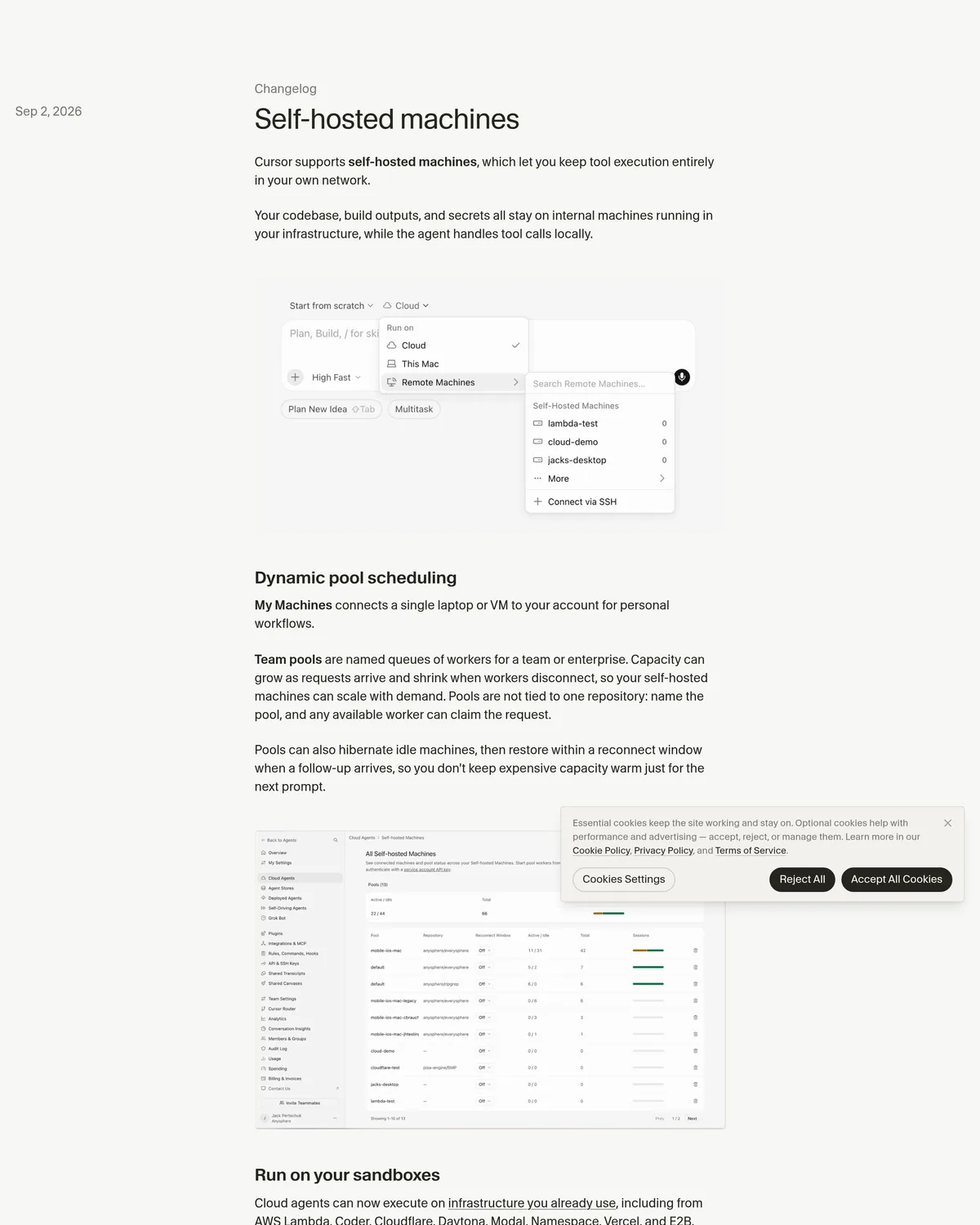
Cursor already ran cloud agents. What changed is where the tools execute. A self-hosted worker now runs file edits, terminal commands, computer use, and local MCP calls on a machine you control, while Cursor cloud still decides the next step and supplies the model (per ccleaks). The September 2 changelog bundled four things worth knowing:
- Two deployment modes. My Machines connects a single laptop or VM to your account for personal work. Team Pools are named queues of workers that serve a whole team (per Cursor).
- Dynamic scheduling and autoscaling. A pool grows as requests arrive and shrinks when workers disconnect. Pools aren't pinned to one repo. Name the pool, and any free worker claims the next request (per Cursor).
- Hibernation. Idle pool machines can hibernate, then restore within a reconnect window when the next prompt lands, so you don't pay to keep capacity warm between tasks (per Cursor).
- Computer use on Linux and Mac. With the right desktop packages, a self-hosted worker can click, type, screenshot, and drive a browser, and you can watch or take over its desktop from Cursor (per Cursor).
 Source: cursor.com, captured October 22, 2026.
The provider list is the practical part. Cloud agents can now run on AWS Lambda, Coder, Cloudflare, Daytona, Modal, Namespace, Vercel, or E2B (per Cursor). Pick the one your infra already lives on and you skip most of the work.
One number to anchor scale: Cursor documents a ceiling of up to 200 workers per user and 1,000 workers per team (per ccleaks). That is fleet-sized, not laptop-sized.
My Machines or a Team Pool: the actual decision
Most people asking about self-hosted machines want one of two very different things. A solo dev wants their own box in the loop. A platform team wants a shared, governed fleet. Cursor split the feature to match, and there's a third column you should not forget: staying cloud-only.
| My Machines | Team Pools | Cloud-only (managed) | |
|---|---|---|---|
| Plan needed | A personal API key, no Enterprise contract (per ccleaks) | Cursor Enterprise plus a service-account key (per ccleaks) | Any paid plan (per Cursor pricing) |
| Setup effort | Connect one laptop or VM, minutes (per Cursor) | Admin policy, service account, worker fleet, controller | None. Cursor runs it (per ccleaks) |
| Concurrency | Multiple agents on one machine (per ccleaks) | One agent per pool worker; scale by adding workers, up to 1,000/team (per ccleaks) | Cursor-managed |
| Where tools run | Your machine | Your fleet | Cursor's infra |
| Best for | A solo dev keeping one box in the loop | A regulated team with a data-residency rule | Almost everyone else |
For most teams the table settles the choice. If you are one person who wants an agent running against your own workstation or a beefy dev VM, My Machines is all you need. Personal credential, a couple of minutes, done. No Enterprise contract, no service account, no fleet to babysit.
Team Pools are a different animal. They exist because a 30-person platform team can't hand out personal credentials and call it governance. A pool is shared capacity: named, autoscaled, policy-gated, and tied to an enterprise service account instead of a person (per ccleaks). You take on that operational weight for one reason: to keep code execution inside your compliance boundary. If you don't have that reason, the managed cloud is genuinely the better call, and it's the one Cursor points most users toward.
Which provider to run a pool on
The eight providers Cursor supports aren't interchangeable, but the choice comes down to two questions, not a benchmark. Where does your infrastructure already live, and do you need VPC isolation for the compliance story? Cursor hasn't published latency or cold-start figures per provider, so ignore anyone quoting them. Pick on fit.
E2B is the fast path when you have no strong cloud commitment. It builds sandboxes designed to run AI-agent workloads, so standing up a worker there is closer to an API call than a cloud-infra project. No VPC to design. This is where most teams should start a proof of concept.
AWS Lambda is the pick when the compliance boundary is your main requirement. If your data-residency rule says "code stays inside our AWS account," running workers on Lambda keeps execution inside a VPC you already own and audit. That is the path a HIPAA or SOC 2 review will accept without a fight. The tradeoff is real setup: IAM, VPC networking, and the ephemeral nature of Lambda compute all become your problem.
Cloudflare slots in for teams already on Cloudflare's platform. If your edge, Workers, and networking already live there, running pool workers on the same account keeps the operational surface small.
Rule of thumb: prototype on E2B, then move to AWS Lambda or Coder inside a VPC if and when your security team requires the isolation.
Setting up a Team Pool on E2B
Prerequisites first, because two of them stop people cold. You need Cursor Enterprise and a service-account API key. A personal My Machines key will not start a Team Pool worker (per ccleaks). Enterprise is custom-quoted, so there's no self-serve checkout: you get the plan and the service-account feature through Cursor's pricing page and sales.
Then the flow runs in three moves: set the org policy, start a worker with the service-account key, and route agent requests to the pool.
1. Set the self-hosted policy. In the Cursor admin dashboard, an administrator picks Allow Self-Hosted Machines or Require Self-Hosted Machines before any worker joins (per ccleaks). Allow makes self-hosting an option. Require makes it the only runtime. For a data-residency mandate, Require is the setting that actually enforces the promise. Name the pool here too.
2. Start a worker with the service-account key. On your E2B sandbox host, hand the worker the enterprise key one of two ways: through the CURSOR_API_KEY environment variable, or as a command-line argument (per ccleaks).
# Team Pool worker on your own host (E2B sandbox, AWS Lambda, etc.)
# Path A: service-account key lives in the environment
export CURSOR_API_KEY=<SERVICE_ACCOUNT_KEY>
agent worker start

# Path B: pass the service-account key as an argument instead
agent worker --api-key <SERVICE_ACCOUNT_KEY> start
The gotcha that bites here: do not reach for your personal login. A personal API key cannot start a pool worker, and each pool worker runs exactly one agent at a time (per ccleaks). Keep the key out of shell history and machine notes while you're at it. If it leaks, rotate it through the org's credential process, not a support ticket.
3. Scale with a controller, and let idle workers hibernate. Once one worker checks out, a controller grows the fleet. The --spawn path is the controller's job, not something you copy into a personal walkthrough (per ccleaks). Workers can carry labels like GPU or iOS so the controller sends matching tasks to hosts that can actually do them.
# One worker in, confirmed. Now let the controller manage capacity:
#   - --spawn grows the pool as requests arrive
#   - hibernation parks idle workers, restoring them within the reconnect window
#   - labels (GPU, iOS) route specialized tasks to capable hosts
agent worker start   # each additional host runs one agent at a time
4. Route agent requests to the pool. Back in Cursor, open the Run on menu and select your pool by name as the execution target. From there, agent requests land on a free pool worker instead of Cursor's managed infra (per Cursor).
The AWS Lambda path is the same shape with more networking. Same service-account key, same worker start, but the host is a Lambda function inside your VPC, so egress rules and IAM come first. Prove the outbound HTTPS path works before you trust the deployment (per ccleaks).
The rollout check that saves you a bad week
Don't spin up 50 workers and hope. Run one, confirm one task, then scale.
- Input: a small task against a repo the worker can reach, like "run the test suite and fix the first failing test."
- Command / path: start one worker with the steps above, then send that request to the pool from the Run on menu.
- Expected: the worker shows as active in the Cloud Agents dashboard, the file edit and terminal work happen on your host, and the worker returns to idle (or hibernates) when the run finishes (per Cursor). A successful key check without a successful one-agent run is incomplete evidence (per ccleaks).
If the worker signs in but the terminal task never lands, your egress path is the first suspect, not the key.
What actually crosses the wire
This is the section your security team will read twice, so let's be precise. Self-hosted machines move the execution boundary onto your hardware. They do not make Cursor air-gapped.
What stays on your machines: file contents and edits, terminal output, build artifacts, local MCP call results, and secrets. What leaves your network: the model inference itself, plus the agent loop and planning that decide the next step (per ccleaks). Concretely, the prompts and completions that feed the model still travel to Cursor's cloud. The files those prompts were built from do not.
The network model is outbound-only. Your worker makes outbound HTTPS connections to Cursor services and artifact storage. Cursor never opens an inbound connection into your network (per ccleaks). That's a clean firewall story: approve the egress destinations, and there's no listener for an attacker to reach from outside.
Here's the honest line to bring to a compliance review. This eliminates the "our source files transit a SaaS" objection. It does not eliminate the SaaS dependency: the agent's reasoning still runs in Cursor's cloud, so prompts and completions cross the boundary, and Cursor remains in your data-flow diagram (per ccleaks). For most data-residency rules, keeping raw source, secrets, and build output on-prem is exactly the win that unblocks adoption. For a true air-gap requirement, this isn't it, and you should say so plainly rather than let a stakeholder assume otherwise.
| Data | Where it lives with a self-hosted worker |
|---|---|
| Source files, edits | Your machine (per ccleaks) |
| Terminal output, build artifacts | Your machine (per ccleaks) |
| Local MCP results, secrets | Your machine (per ccleaks) |
| Model prompts and completions | Cursor cloud (per ccleaks) |
| Agent loop, planning, inference | Cursor cloud (per ccleaks) |
The verdict: who needs this, and who should skip it
Set up a self-hosted Team Pool if you're an enterprise with a real data-residency or compliance boundary, the kind where "source stays inside our VPC" is a written requirement. Run the pool on AWS Lambda or Coder inside that VPC, gate it with Require Self-Hosted Machines, and you get Cursor's agent across the team while raw code, secrets, and build output never leave your network. That specific unblock is what the September 2 release is for. Get Cursor Enterprise to reach the service-account and self-hosted controls, and start on E2B to prototype before you touch VPC networking.
Skip it if that requirement isn't yours. A solo dev who just wants their own box in the loop should use My Machines, no Enterprise plan needed. Everyone else, most teams included, is better served by the managed cloud agents on any paid Cursor plan: no fleet to run, no egress rules to prove, no controller to babysit. Cursor recommends exactly that for most users, and the recommendation is right. Self-hosting is a compliance tool, not an upgrade. Reach for it when the boundary is real, and not before.