
Table of Contents
LM Studio Bionic vs Cursor vs Cline: the free local coding agent, ranked (July 2026)
LM Studio shipped Bionic on July 16, and it changes exactly one number in the AI coding buyer's decision: the software cost of an agent loop can now be $0. Bionic runs a full agent (inspect a repo, edit files, debug, show inline diffs) on models you download and run on your own machine, per the launch post. The short verdict, before you scroll: for a solo dev with a capable GPU, Bionic's free local tier is the pick, because nothing else gives you an agent loop for nothing. For a team that lives in VS Code all day, Cursor still wins on polish and integration. For a shop that wants to route its own models across providers as config-as-code, Cline is the one. The rest of this piece is the reasoning, the cited prices, and the exact conditions where each pick flips.
What Bionic actually does
Bionic is a separate app from the LM Studio you may already run as a model server (launch post). Before this release, LM Studio downloaded and served open-weight models. Bionic wraps an agent around that runtime. Four pieces matter.
Code projects are the coding agent. Point one at a local folder, then ask Bionic to investigate, edit, or debug. It shows inline diffs on every change and runs agentic code search to trace behavior across files, per the launch post. At launch it works with GLM 5.2 and Kimi K2.7 Code.
Work projects handle documents, PDFs, decks, and spreadsheets in a sandboxed environment, with automatic checkpoints so you can roll back any change the agent made (launch post). On Hacker News, LM Studio founder Yagil ("yags") called out that automatic checkpointing on every agent change as the thing to try in Work projects (HN thread, July 16).
Voice input runs local transcription through Voxtral, Mistral AI's audio model, entirely on-device (launch post). You dictate into any app and Bionic types where your cursor sits. No cloud round-trip for the audio.
LM Studio Secure Cloud is the escape hatch for when your laptop is not enough. It runs the bigger frontier open models (GLM 5.2, Kimi K2.6, Kimi Code K2.7) on US-based servers, and requests are processed transiently and not retained after the call completes (launch post; pricing, fetched 2026-07-18). LM Studio commits to zero data retention and to never training on your data across both the local and cloud paths (launch post).
Update from the pricing page: the paid tier that launched as "coming soon" has since shipped. LM Studio now lists three tiers: Free ($0, local only), Bionic+ ($20/month, adds US-hosted OSS models including Kimi K3 and GLM 5.3, discounted bulk tokens, and web search), and Pro ($100/month, 5x the usage limits plus early feature access), all on top of the unchanged free local tier (pricing, fetched 2026-10-15).
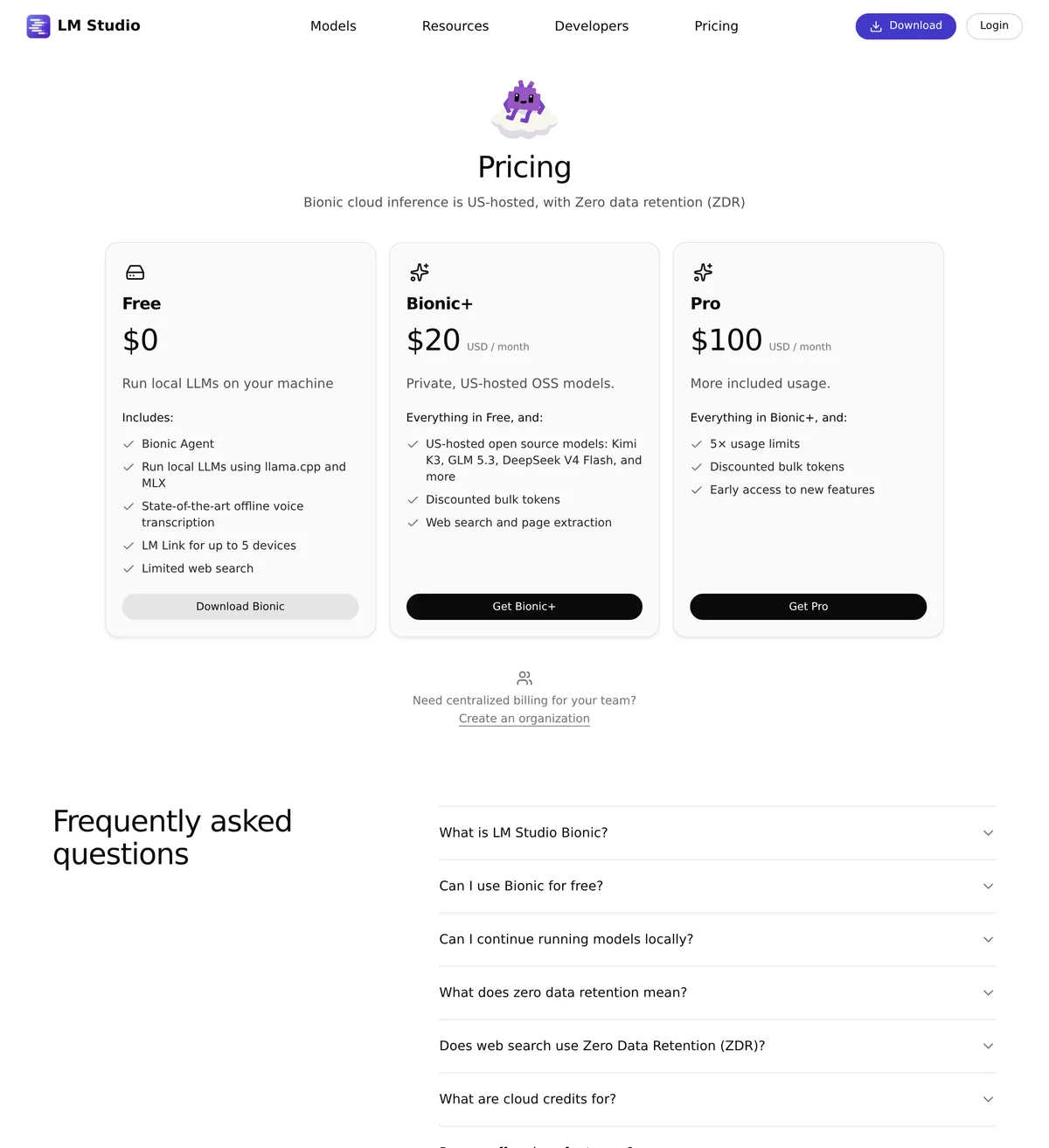 Source: lmstudio.ai, captured October 15, 2026.
The three tools side by side
Prices below are current as of the fetch date. LM Studio's pricing is explicitly provisional, so treat the cloud line as a moving target.
| Axis | LM Studio Bionic (Free) | Cursor | Cline (extension + your API key) | Source |
|---|---|---|---|---|
| Software cost per seat | $0 | $8/mo Plus; $30/mo Premium (Individual, most popular); $30/user/mo Teams | $0 for the VS Code extension | lmstudio.ai/pricing / cursor.com/pricing (fetched 2026-07-18; Cursor repriced since, refetched 2026-10-15) |
| Inference cost | Local: your own hardware. Cloud: pay-as-you-go credits (optional) | Included usage per plan, then usage-based billing | You pay your model provider directly per token | lmstudio.ai/pricing / cursor.com/pricing |
| Model choice | Local via llama.cpp and MLX; GLM 5.2, Kimi K2.6, Kimi Code K2.7 on cloud | Frontier hosted models, MCPs, cloud agents | Any provider via API key, plus Ollama and local servers | lmstudio.ai/pricing / cursor.com/pricing / Cline releases |
| VS Code integration | None (standalone app) | Built as a VS Code fork | Runs inside VS Code and JetBrains | launch post / cursor.com |
| Privacy posture | ZDR on local and cloud by default; no training on your data | Privacy mode (opt-in): code not used for training when enabled | Nothing stored by Cline server-side; your provider still sees requests | launch post / cursor.com/pricing |
| Agent loop | Code + Work projects, inline diffs, agentic search | Agent and Composer with cloud agents | Plan and act with per-action approvals | launch post / vendor sites |
| Voice input | Local transcription (Voxtral) | None native | None native | launch post |
| Auto-checkpointing | Yes, in Work projects | Agent checkpoints | Checkpoints on task steps | launch post |
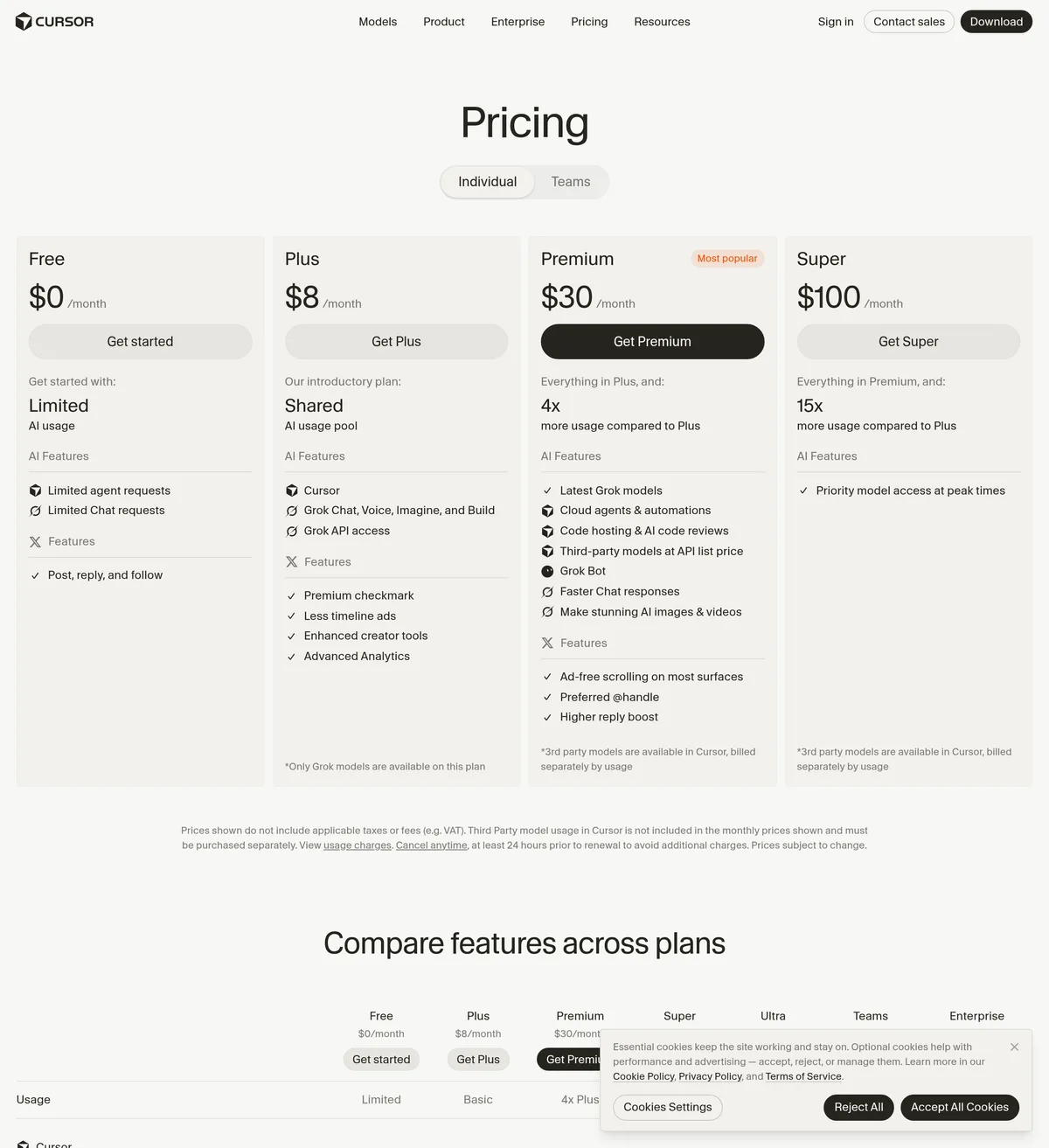 Source: cursor.com, captured October 15, 2026.
Run the seat math and the gap is blunt. Ten Cursor Teams seats at $30/user/mo (repriced down from $40/user/mo at launch) is $300 a month, or $3,600 a year on monthly billing (cursor.com/pricing, fetched 2026-10-15). Ten Bionic seats is $0 in software. The team still pays for compute (hardware you own, or cloud credits when local is not enough), so the honest comparison is "your electricity and optional cloud spend" against "a per-seat subscription plus usage." For a budget-constrained team already running open models, that is a large enough delta to be the whole decision.
Where Bionic wins
Cost, with no asterisk on the software line. An agent that inspects and edits a real repo, for zero dollars in licensing, did not exist for most teams before July 16. Given hardware that can run GLM 5.2 or a quantized Kimi Code K2.7 locally, you get the loop for the price of the GPU you already bought.
Privacy by architecture. The ZDR commitment covers both local inference (nothing leaves the device) and the cloud tier (transient processing, no retention), per the launch post. Cursor's privacy mode is opt-in and has to be turned on by a team admin (cursor.com/pricing, fetched 2026-07-18). For code that sits next to contract text, patient data, or anything under an audit, "private by default" beats "private if configured."
Model portability at $0 to test. Kimi K2.7 Code is a real frontier open model, and Bionic is the one place you can point an agent at it with a single local download and no billing relationship. A dev on the Bionic free tier praised the harness on HN for how clearly it exposes the model's reasoning chain, calling it better for inspecting reasoning than Claude Code or Codex for his workflow (HN thread, July 16). That transparency is the reason to reach for it even when you own a Cursor seat.
The candid con: Bionic is a new, separate app, and early users flagged real gaps in the HN thread. One reported it is locked to a single directory (no system-wide access), has no built-in local web search, and cannot SSH into a remote box (HN thread, July 16). It is version one. Treat it as such.
Where Cursor wins
For a developer whose whole day is VS Code, Cursor is still the tool that disappears into the editor. It is a VS Code fork, so tab completion, the agent, side chats, and MCP support all live where you already work (cursor.com/pricing, fetched 2026-07-18). Bionic is a standalone app with no editor integration, which means an extra window and a different mental model. For a developer who lives in their editor eight hours a day, that friction is not small.
The Teams plan is the other real edge. At $30/user/mo (repriced down from $40/user/mo at launch) it adds centralized billing, usage analytics across seats, team-wide privacy mode, and SSO (cursor.com/pricing, fetched 2026-10-15). If you manage ten engineers and need to see who is burning what, Bionic's free tier gives you nothing to administer, which is a feature for a solo dev and a gap for an org.
The candid con: you pay every month, and heavy agent days can push you into usage-based billing on top of the seat price. Cursor's own pricing notes that every plan includes a set amount of usage and bills on-demand overage in arrears (cursor.com/pricing, fetched 2026-07-18). Budget for the seat, then budget again for the power users. Start on the Cursor pricing page if the VS Code integration is what you are buying.
Where Cline wins
Cline is the pick for the team that treats its coding-agent setup as configuration. It runs inside VS Code and JetBrains as a free extension, and you bring your own API key, so you route each request to whichever provider you want (Cline releases). Nothing is stored on a Cline server, because there is no Cline server in the loop.
The provider flexibility is genuine and recent. Cline v4.0.9 (July 16) added GPT-5.6 ChatGPT subscription models, and a July 16 CLI fix restored Ollama native API routing so context window and timeout settings work again (Cline releases). Run a local Ollama box alongside a couple of hosted providers, and Cline is built to switch between them per request. Bionic runs its own model list; Cline runs yours.
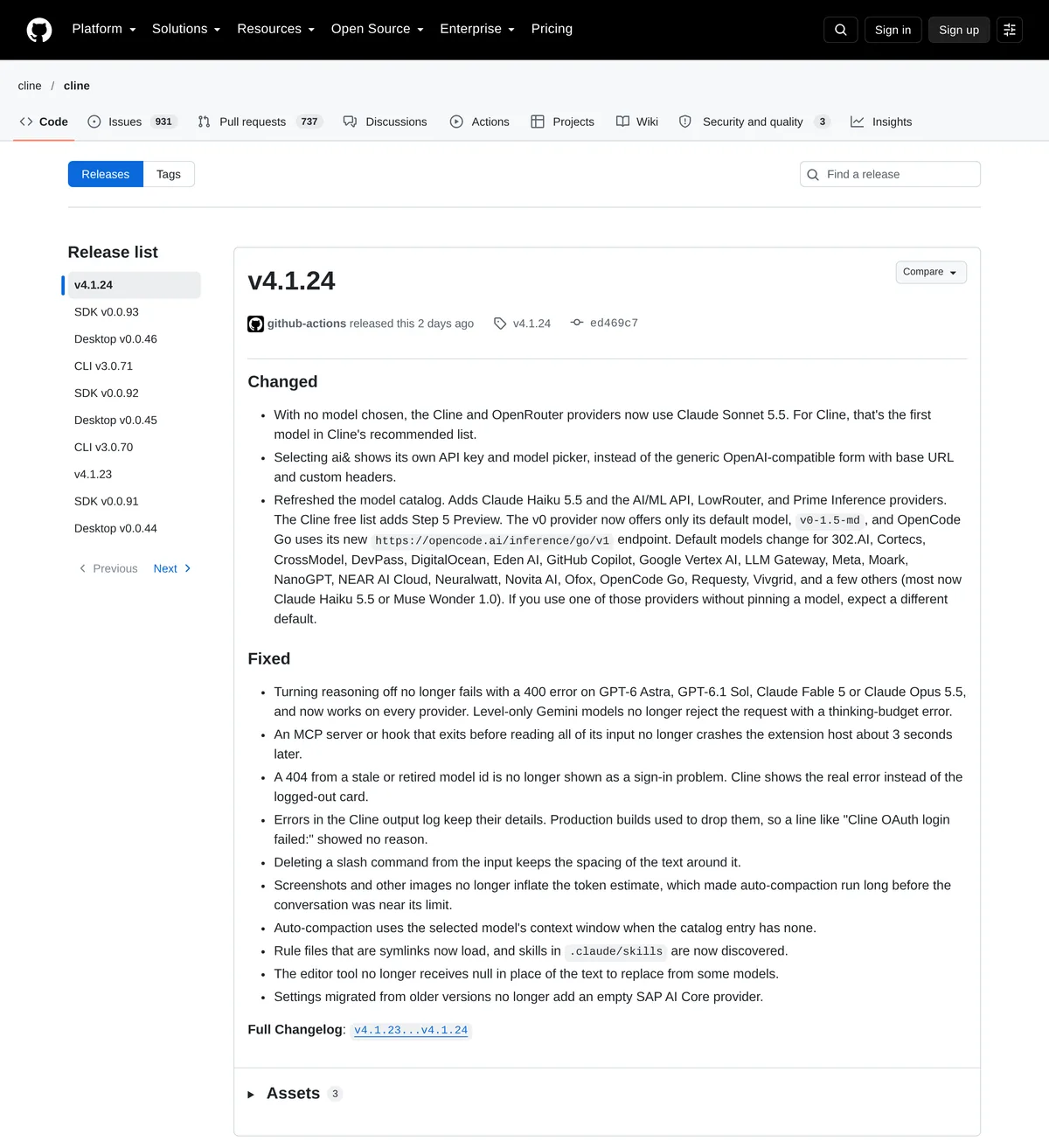 Source: github.com, captured October 15, 2026.
The candid con: there is no free lunch on inference. Cline's extension costs nothing, but every token goes to your provider at your provider's rate, so a heavy Sonnet or Kimi day shows up on a real bill. You also own the config. That is the point for an open-source-first shop and a chore for someone who just wants an agent that works out of the box. Cline's GitHub releases are the place to confirm the current version before you wire it in.
The verdict, by who you are
Solo developer with a capable GPU: Bionic, free local tier. At $0 in software with a real agent loop and voice input, there is no cheaper way to get agentic coding on your own hardware (pricing, fetched 2026-07-18). The pick flips to Cursor only if you refuse to leave VS Code.
Developer team of ten on VS Code: Cursor Teams, at $30/user/mo, or $3,600 a year for ten seats on monthly billing (cursor.com/pricing, fetched 2026-10-15). The integration and the admin tooling are what the money buys. Run the math against Bionic free plus cloud credits: if your developers stay on short, mid-range tasks and lean on local inference, Bionic's cloud spend can land under the Cursor line. If they run long agent sessions all day, the subscription's included usage is the more predictable bill.
Team with a compliance requirement (HIPAA scope, SOC 2 audit): Bionic's ZDR-by-default posture is the right starting point, not the finish line. The launch post states zero data retention on both tiers, but a launch-day marketing claim is not a signed data-processing agreement. Verify the current terms on the LM Studio privacy page and get the ZDR commitment in writing before you route regulated code through any cloud path, Bionic's included.
Open-source-first shop routing its own models: Cline. Bring your keys, wire up Ollama, keep the config in your repo.
Getting started with Bionic
Bionic ships as its own download, separate from the classic LM Studio app (launch post). Grab it, then create your first Code project and give the agent a real task instead of a hello-world.
# macOS (Apple Silicon): download the Bionic app
# https://lmstudio.ai/download
open "https://lmstudio.ai/download/bionic/latest/darwin/arm64"

# After install: launch Bionic, download a local model
# (GLM 5.2 or a quantized Kimi Code K2.7), then create a Code project
# and point it at a local repo folder.
A good first task is one that proves the agentic search, not just autocomplete. In a Code project pointed at your repo, try this prompt:
Find every place the function `processPayment` is called,
explain the call chain, and flag any caller that does not
handle the error return.
Input: your local repo plus that prompt. Action: Bionic runs agentic code search across files. Expected shape: a list of call sites with the file and line, a short trace of how they connect, and inline diffs if you then ask it to add the missing error handling. The useful part is that last step: the agent does not just find the callers, it offers the edit, and you review the diff before anything lands.
When your machine cannot hold a big enough model in memory, switch that same project to LM Studio Secure Cloud and run Kimi Code K2.7 on credits (pricing, fetched 2026-07-18). Same agent, bigger model, and the ZDR commitment follows you to the cloud path. That portability, local when you can and cloud when you must, is the reason Bionic earns a place on the shortlist even for teams already paying for Cursor.