Cursor Review: Plans, Pricing, Models, and Who Should Still Buy It
Published April 28, 2026 · Updated October 22, 2026 · by Pondero Reviews
The short version
Cursor is still the pick for IDE-first developers who are happy driving it with Cursor's own Composer and Grok models. Since October 12, new buyers land on The X Subscription, where Claude, GPT, and Gemini are billed at API list price on top of the plan. Every plan, the legacy-plan switch decision, and a pick per buyer, re-checked against cursor.com on October 22, 2026, three weeks before OpenAI's proposed November 12 shutoff.
Pros
- ✓The editor keeps shipping: Self-hosted Machines (Sep 2), Projects (Sep 10), Rollouts and Security Review (Sep 23), iOS remote control for local agents (Oct 6), the Origin App Marketplace (Oct 13), and cloud agent canvases plus a beta Environments API (Oct 16), per the Cursor changelog
- ✓Cloud agent environments now support up to 300 repositories and large ones load 5x faster, per Cursor's October 16 changelog, which matters for monorepo-adjacent teams running agents across many services
- ✓Self-hosted Machines keeps the codebase, build outputs, and secrets on your own machines while the agent runs tool calls there, which removes the usual data-residency objection to cloud agents
- ✓On The X Subscription, every paid tier carries at least twice the Cursor-model coding usage of the legacy plan it replaces, per Cursor's legacy-plans docs
- ✓Legacy Pro, Pro+, Ultra, and Teams customers keep their plan, price, and included third-party model pool unless they choose to switch
- ✓Bring-your-own-key still works for OpenAI, Anthropic, Google, Azure, and Bedrock on Premium and higher individual plans, and those requests do not draw from your included usage
Cons
- ✕New buyers no longer get any included Claude, GPT, or Gemini usage; third-party models are billed at API list price from prepaid credit, and the $8 Plus plan cannot use them at all
- ✕OpenAI's proposed shutoff for its models in Cursor is November 12, 2026, and OpenAI has said it will not provide future models to Cursor
- ✕Switching a legacy plan to The X Subscription is permanent; Cursor's own help page says support cannot undo it
- ✕Team plans add a $0.25 per million token Cursor Token Rate on third-party model requests, including requests made with your own API key
- ✕Cursor's included pool now covers only Cursor's own models (Grok 4.7, 4.6, 4.5, and Composer 2.5), so the pricing nudges you toward the models Cursor's parent company builds
Cursor Review: Plans, Pricing, Models, and Who Should Still Buy It
OpenAI's models leave Cursor on November 12, three weeks from today, if the shutoff date OpenAI proposed on August 28 holds, per OpenAI. Ten days ago Cursor also changed how new buyers pay. They now land on The X Subscription, a SpaceXSI bundle of Grok, Cursor, and X Premium, where Claude, GPT, and Gemini sit outside the monthly fee and are billed at API list price from prepaid credit, per Cursor's Models & Pricing docs. So anyone who has put off the Cursor decision since September now has two things to settle: what happens to their GPT usage, and whether their plan still makes sense.
The pick: Cursor stays our recommendation for IDE-first developers who are comfortable running most of their agent work on Cursor's own Composer 2.5 and Grok models. If you're already on legacy Pro and you lean on Claude, don't switch plans. If Claude and GPT are your daily drivers and you want them inside a flat monthly price, GitHub Copilot is now the cleaner buy. The rating drops from 4.3 to 4.1 because of the pricing, and the October feature releases (a public app marketplace for Origin, shareable agent canvases, an Environments API) don't change that score in either direction.
What changed since the last update
Three business events reshaped this review, and each has its own news coverage on the site:
- OpenAI is leaving. It notified SpaceX on August 28 that it intends to wind down its contract, with a proposed shutoff of November 12, 2026, and said it will not provide future models to Cursor, per OpenAI. Our report: OpenAI ends Cursor model access.
- SpaceX owns Cursor. The acquisition closed in August. Our report: SpaceX closes the Cursor acquisition.
- New pricing. The X Subscription launched October 12 with Free, Plus, Premium, Super, and Ultra tiers, per Teslarati's launch report and the SpaceXSI announcement. It's covered in full in the pricing section below.
On the product side, Cursor shipped three things in October that the September version of this review predates: iOS remote control for local agents on October 6, the Origin App Marketplace on October 13, and cloud agent canvases with a beta Environments API on October 16, per Cursor's changelog. They're covered in the editor section below.
Nothing has moved on the OpenAI side: the August 28 post carries no update as of October 22, per OpenAI. Tom's Guide's August 31 explainer adds that Cursor could end access earlier than November 12, and that existing OpenAI models work as they do today until it does, per Tom's Guide. As of October 22, Cursor's model docs still list the GPT-5.6 family and carry no end date for it, per Cursor. Plan as if those models are gone on November 12.
Who Cursor fits, and where the pick flips
Cursor is a VS Code fork with the agent wired into the editor: Tab completions, an Agent that plans and applies multi-file diffs, cloud agents that keep running after you close the laptop, and code review bots on the pull request. If your day is spent inside an editor making changes that touch several files, that integration is the reason to pay for Cursor instead of a chat window.
The pick flips in three places.
You run Claude or GPT by default and want a predictable bill. Cursor's new plans work against you there, because every third-party request is a metered extra. GitHub Copilot's Pro+ plan is $39/mo and includes $70 of monthly AI credits that work across Anthropic Claude, OpenAI GPT, Google Gemini, and xAI Grok, per GitHub. For a Claude-first developer, that's the simpler deal.
You work from the terminal, not an IDE. Claude Code is a CLI agent bundled with Claude Pro at $20/mo billed monthly, with Max from $100/mo, per Anthropic. Moving to it means giving up inline Tab and the visual diff panel.
You only need autocomplete. The Free plan gives limited agent and Chat requests, per Cursor's pricing page. For light single-file work, that or Copilot Free is enough.
What you get in the editor
Shipping has not slowed since the acquisition. Six changelog entries between September 2 and October 16 carry the case for Cursor as an editor, per Cursor's changelog:
Self-hosted Machines (September 2)
Your codebase, build outputs, and secrets stay on internal machines in your own infrastructure while the agent handles tool calls there, per Cursor's changelog. Team pools scale up as requests arrive, hibernate idle machines, and can run on AWS Lambda, Coder, Cloudflare, Daytona, Modal, Namespace, Vercel, and E2B. For regulated teams, this is the feature that unblocks cloud agents. Our launch coverage: Cursor Self-Hosted Machines.
Projects (September 10)
A coordinator agent plans a large body of work (a feature, a migration, a full app), delegates it to parallel subagents, and keeps shared context files synced across every machine its agents use, per Cursor's changelog. It can watch a Slack channel, run on a schedule, or follow your PRs. Projects is in beta. Our coverage: Cursor Projects.
Rollouts and Security Review (September 23)
Two bots for Teams and Enterprise plans: Rollouts writes a monitoring plan on each PR and reports deploy health per environment, while Security Review posts one comment per PR covering injection, auth bypasses, committed secrets, SSRF, unsafe deserialization, and vulnerable dependency changes, per Cursor's changelog.
Remote control (October 6)
The Cursor iOS app can now see and reply to local agents running on your computer, on by default for everyone except Enterprise organizations, per Cursor's changelog. It matters if you start long local agent runs and want to answer their questions away from the desk.
Origin App Marketplace (October 13)
Origin is Cursor's code-hosting product, and since October 13 it has an app marketplace open to public submissions, per Cursor's changelog. The launch list covers 21 apps: Cloudflare, Netlify, Render, Spacelift, and Vercel for deployments; Buildkite, CircleCI, CloudBees, Depot, EngFlow, Namespace, and RWX for CI; CodeRabbit, Greptile, and Tenki for code review; Artemis Security, Semgrep, Socket Security, and Upwind for security; Sentry for monitoring; and Linear for project management, per the same entry. Vendors build against the Origin API with app JWT auth and installation tokens, can write check runs and PR reviews, and must submit a slug, tags, and a demo video before Cursor's team reviews the listing.
For a team that already hosts on Origin, this closes the obvious gap. CI status, security scans, and third-party review comments now land on the same pull request your Cursor agents opened, without a GitHub mirror in between. For a team on GitHub, it changes nothing today. Read it as a signal instead: Cursor is building the repo, CI, and review surface that would make leaving harder, during the same weeks a switching window is open. Origin isn't on the $8 Plus plan; code hosting starts at Premium, per Cursor's pricing page.
Canvases and the Environments API (October 16)
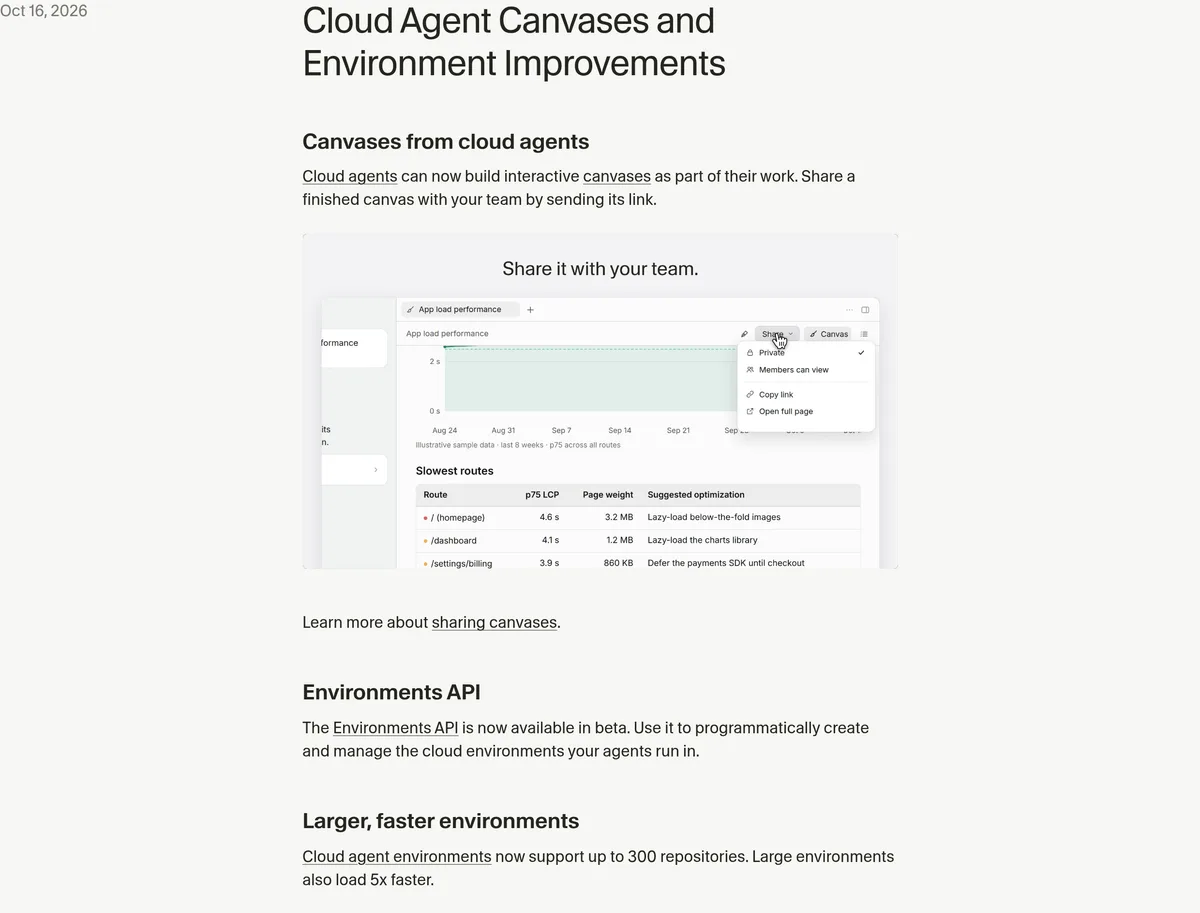
Cloud agents can now produce interactive canvases as part of a run, and you can share a canvas with teammates by link, per Cursor's changelog. The practical use is handing a reviewer something richer than a diff, such as an interactive dashboard or report, without asking them to check out the branch.
The bigger change for platform teams is underneath. A beta Environments API lets you create and manage the cloud environments agents run in from code, and environments now support up to 300 repositories, with large ones loading 5x faster, per the same changelog entry. Put that next to Projects and Self-hosted Machines and the September picture gets a layer deeper: a coordinator agent fans work out to subagents, those subagents run in environments you now script, on machines you own. If you're evaluating Self-hosted Machines for an enterprise rollout, evaluate the Environments API in the same pilot, because together they decide how much of your agent infrastructure you manage as code. It is still beta, so don't build a production provisioning pipeline on it yet. Our multi-repo environments setup guide covers the earlier 3.4 version of this feature.
 Source: cursor.com, captured October 22, 2026.
Models: what's included and what costs extra
On The X Subscription, the included weekly pool covers Grok 4.7, Grok 4.6, Grok 4.5, and Composer 2.5, and nothing else, per Cursor's Models & Pricing docs. The pool is shared with your Grok apps and refreshes weekly. Composer 2.5, Cursor's own agentic model, is listed with a 200k context window and rated fast and low-cost in Cursor's model docs. If it handles most of your agent work, the new pricing is good value; if it doesn't, you pay per token for the model you actually want.
Claude, GPT, and Gemini are billed at each model's API list price from the first request, paid from prepaid credit, on Premium and above, per the same docs. Plus and Free don't get third-party models at all. Cursor's listed per-million-token rates today include Claude Sonnet 5.5 at $2 input and $10 output, Claude Opus 5.5 at $4 and $20, and Gemini 3.1 Pro at $2 and $12, per Cursor.
Two escape hatches matter. The first is staying on a legacy plan, which still includes a third-party model pool (more in the pricing section). The second is bring-your-own-key, which works for OpenAI, Anthropic, Google, Azure OpenAI, and AWS Bedrock; on individual plans those requests are billed by your provider and don't draw from included usage or prepaid credit, per Cursor's API keys help page. The same page notes that custom keys only work with chat models, so Tab completion stays on Cursor's built-in models, and that Cursor's Zero Data Retention policy does not apply to your own keys. Plus has no BYOK at all, per Cursor's docs.
Cursor pricing, re-checked October 22, 2026
 Source: cursor.com, captured October 16, 2026.
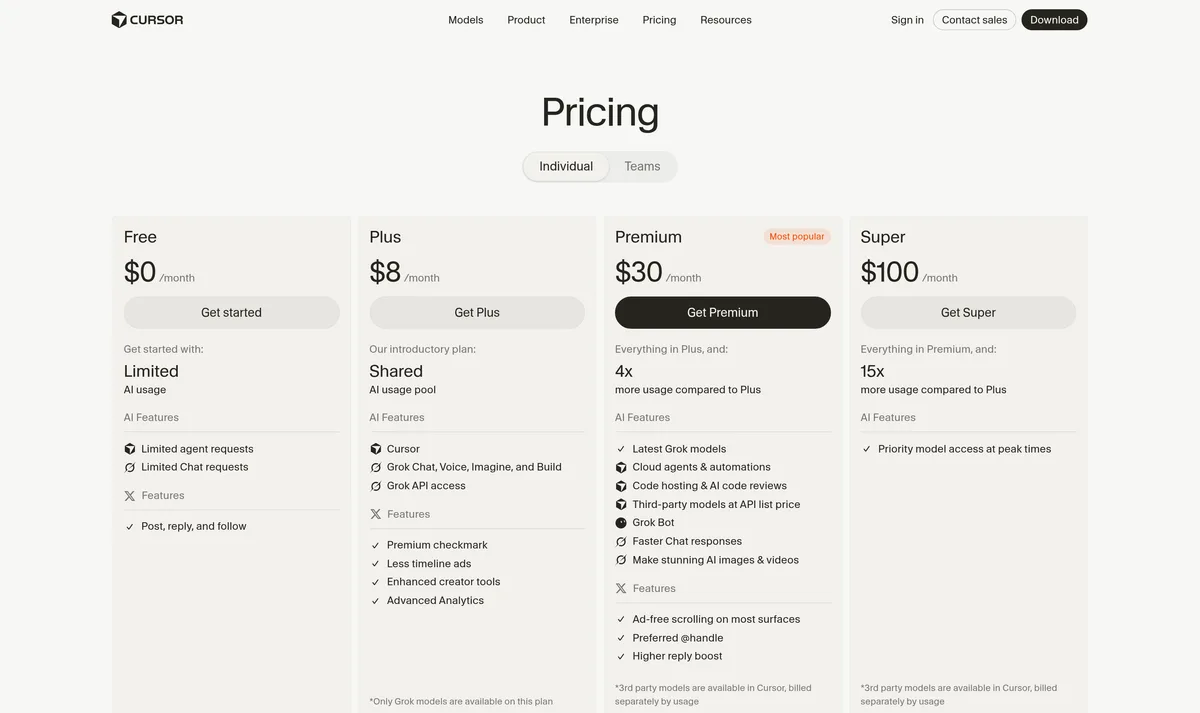
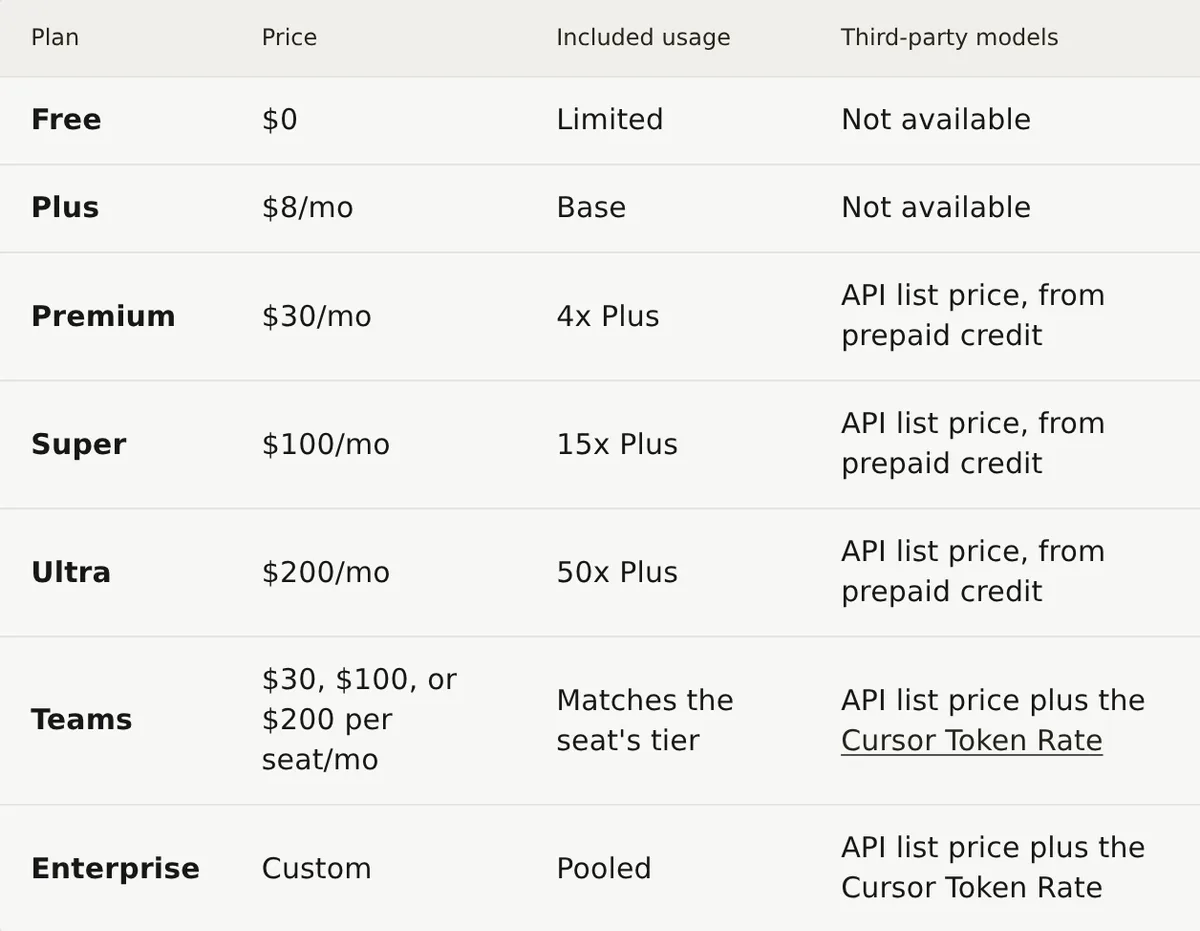
Every price below matched cursor.com when we re-checked it on October 22; the screenshots are from the October 16 pass and show the same numbers. Cursor now runs two price lists side by side. New customers start on The X Subscription; existing customers keep their legacy plan unless they switch, per Cursor's legacy-plans docs.
The X Subscription (new customers)
| Plan | Price | Included usage | Third-party models | Source |
|---|---|---|---|---|
| Free | $0 | Limited | Not available | Cursor docs |
| Plus | $8/mo ($80/yr) | Base pool, Grok and Composer only | Not available | Cursor docs |
| Premium | $30/mo ($300/yr) | 4x Plus | API list price, prepaid credit | Cursor docs |
| Super | $100/mo ($1,000/yr) | 15x Plus | API list price, prepaid credit | Cursor docs |
| Ultra | $200/mo ($2,000/yr) | 50x Plus | API list price, prepaid credit | Cursor docs |
| Teams | $30, $100, or $200 per seat/mo | Matches the seat tier | API list price plus Cursor Token Rate | Cursor docs |
| Enterprise | Custom | Pooled | API list price plus Cursor Token Rate | Cursor docs |
Plus is a trap for anyone buying Cursor to code seriously. It runs Cursor's models at fixed settings (Fast off, medium effort) and has no Auto, cloud agents, Automations, Bugbot, Origin, third-party models, or your own API keys, per Cursor's docs. Premium at $30 is where the editor you read about above actually starts. Super adds priority model access at peak times; Ultra adds earliest access to new products and models, per the same page.
 Source: cursor.com, captured October 16, 2026.
Legacy plans (existing customers)
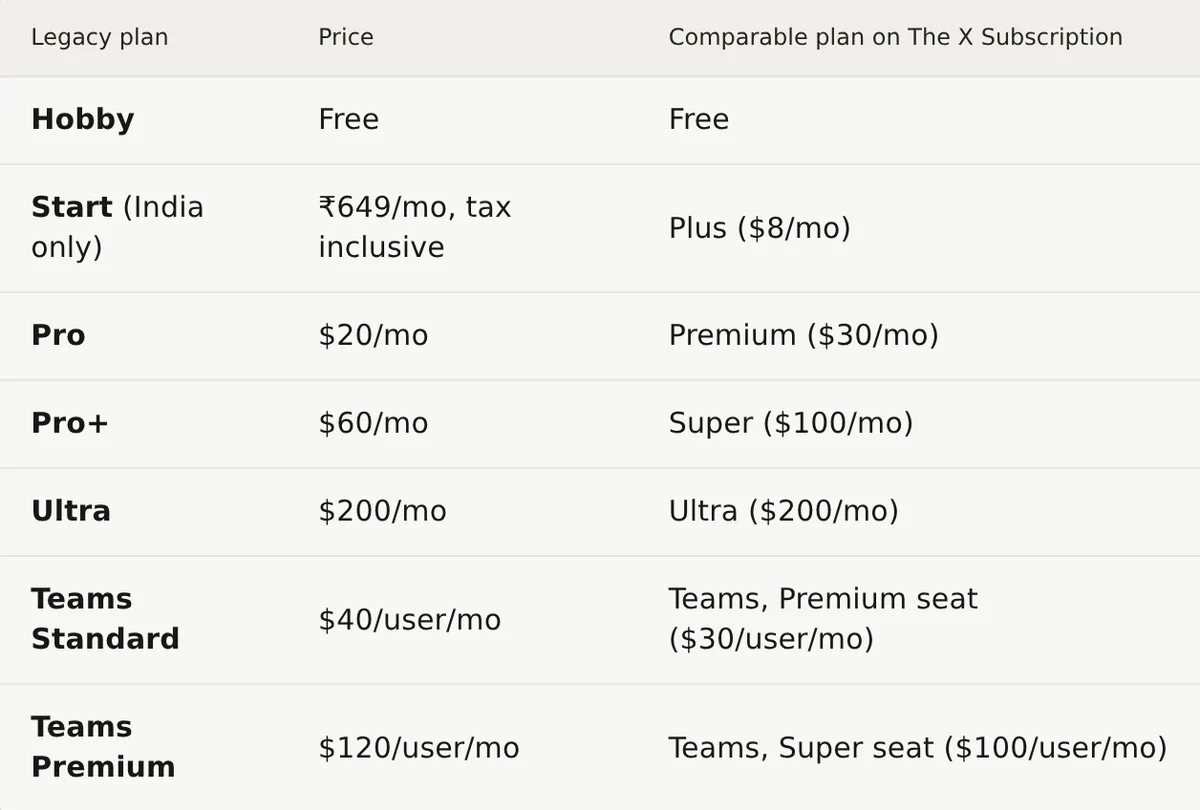
Hobby, Pro at $20/mo, Pro+ at $60/mo, Ultra at $200/mo, and Teams Standard at $40/user/mo and Premium at $120/user/mo keep working as they are, per Cursor's legacy-plans docs. They carry two monthly pools: Cursor Models, and Other Models for third-party usage at each model's API price. Extra usage is on-demand and billed in arrears, per the same page.
 Source: cursor.com, captured October 16, 2026.
Teams and Enterprise
New Teams seats come in Premium ($30), Super ($100), and Ultra ($200) per user per month, plus a free seat with no team allowance, and you can mix tiers on one team, per Cursor's Team Pricing docs. Each paid seat has its own weekly pool; seats don't share. Usage beyond a seat's pool, plus all third-party model usage, comes out of a prepaid balance the whole team shares, per the same docs. Third-party requests on Teams and Enterprise carry a Cursor Token Rate of $0.25 per million tokens on top of list price, and that rate applies to BYOK requests too, per the same docs. Team features include SAML/OIDC SSO, team-wide privacy mode, usage analytics, and Bugbot code reviews.
Enterprise adds pooled usage across Grok and Cursor, invoicing, SCIM, granular spend controls, and advanced security controls, per Cursor's docs. Opting in to regional data residency adds a 10% uplift on eligible model pricing, per the same page.
Should you switch a legacy plan to The X Subscription?
This is the decision most current Cursor users face this month, and the answer depends on which models you actually run.
| Your situation | Do this | Why |
|---|---|---|
| Legacy Pro, mostly Claude or GPT | Stay on legacy Pro ($20/mo) | Legacy plans include an Other Models pool for third-party usage; The X Subscription drops it, per Cursor docs |
| Legacy Pro, mostly Composer or Auto | Consider Premium ($30/mo) | Each new paid tier includes at least twice the Cursor-model coding usage of the legacy plan it replaces, per Cursor docs |
| Legacy Teams Standard, Composer-heavy team | Model it, then move to Premium seats ($30/user) | Seat price falls from $40, but third-party usage moves to prepaid credit plus the Token Rate, per Cursor docs |
| You already pay for SuperGrok or X Premium | Switch | One bill replaces two, and old subscriptions are cancelled with a prorated refund, per Cursor help |
| New buyer who wants Claude in the IDE | Premium plus a budget, or Copilot Pro+ | Cursor bills Claude at API list price; Copilot Pro+ at $39 includes $70 in credits across model families, per GitHub |
Read the fine print before clicking Unify. The switch is permanent and can't be undone, even by support, per Cursor's help page. Any un-invoiced on-demand usage is billed in one final invoice, and billing moves from cursor.com to grok.com, per Cursor's legacy-plans docs. If you're on legacy Pro and unsure, waiting costs you nothing: your plan, price, and features continue unless you change or cancel.
If GPT is in your Cursor workflow, settle it before November 12
Three weeks is enough time to move GPT work out of Cursor without breaking a sprint, as long as you start now. Tom's Guide's August 31 explainer lays out the routes, and each fits a different kind of GPT user, per Tom's Guide.
| If you use GPT in Cursor for... | Do this before November 12 | What you give up |
|---|---|---|
| Occasional Chat and Agent requests | Add your own OpenAI API key in Cursor settings | BYOK doesn't reach Tab, Auto, cloud agents, Automations, the CLI, or Cursor's API and SDK, per Tom's Guide; OpenAI bills you separately |
| Daily agent work on OpenAI's newest models | Install OpenAI's Codex IDE extension inside Cursor | You run OpenAI's agent in Cursor's editor instead of Cursor's agent, per Tom's Guide |
| Habit more than need | Move those prompts to Composer 2.5 or Claude now and compare results | Nothing, if the output holds up on your repo |
| A team standard set on GPT | Price Copilot Pro+ ($39/mo) against your Cursor plan | Cursor's agent and Tab integration, per GitHub |
Two caveats shape that table. OpenAI has said it won't provide future models to Cursor, per OpenAI, so BYOK keeps today's GPT lineup reachable but doesn't guarantee the next one. And Cursor's own help page says the OpenAI key option covers standard, non-reasoning chat models, per Cursor's API keys help page. If your team runs a GPT reasoning model as its default agent, test the BYOK path this week rather than on November 11.
For most readers the exposure is smaller than the headlines suggest. Cursor co-founder Michael Truell has said OpenAI accounts for roughly 5% of Cursor's model traffic, as reported by Tom's Guide. That figure is an aggregate, so check your own usage in the Cursor dashboard. If GPT is most of it, this is the part of the review to act on this week.
Candid cons
The biggest con is the new billing structure. On new plans, the monthly fee buys Cursor's own models and the third-party models you probably chose Cursor for are a separate, metered bill. That's a reasonable price for Composer-first users and a worse deal than last month for everyone else.
OpenAI's exit is still on the calendar for November 12, per OpenAI. BYOK through your own OpenAI key or Azure OpenAI remains documented in Cursor's API keys help page, but the OpenAI section there covers standard, non-reasoning chat models only.
Teams pay a toll on every third-party token, including tokens they already paid their own provider for. The $0.25 per million Cursor Token Rate is small per request and noticeable at team scale, per Cursor.
Cursor's owner also builds the models the pricing favors. The included pool now covers only Grok and Composer, and Cursor is sold as part of a subscription that also includes Grok and X, per Cursor's docs. If you want an editor that treats every model provider the same, Cursor is no longer neutral on price.
Cursor vs Copilot vs Claude Code
Prices checked October 22, 2026.
| Tool | Type | Models in the monthly price | Entry paid price | Best fit |
|---|---|---|---|---|
| Cursor | IDE (VS Code fork) | Grok and Composer 2.5; Claude, GPT, Gemini at API list price | Premium $30/mo, per Cursor | IDE-first developers happy on Composer or Grok |
| GitHub Copilot | IDE plugin plus cloud agent | Claude, GPT, Gemini, Grok via monthly AI credits | Pro $10/mo, Pro+ $39/mo, per GitHub | Claude or GPT users who want one flat plan, GitHub-native teams |
| Claude Code | CLI agent | Claude only | Claude Pro $20/mo monthly, per Anthropic | Terminal-first, repo-scale agent work |
The pick
Solo developer starting fresh: Cursor Premium at $30/mo if you'll let Composer 2.5 carry most of the agent work, per Cursor. Skip Plus. If you know you want Claude for everything, Copilot Pro+ at $39/mo gets you there with credits included, per GitHub.
Solo developer on legacy Pro: keep it. The $20 plan still includes third-party model usage, per Cursor's legacy-plans docs, and there's no deadline forcing a switch.
Small team: new Premium seats at $30/user undercut the $40 legacy Standard seat, per Cursor. Pull one month of per-member usage, price the Claude share at list plus the Token Rate, and migrate only if Composer and Grok carry most of the load.
Enterprise: Self-hosted Machines keeps code and secrets on your own infrastructure, per Cursor's changelog, and Enterprise adds SCIM, granular spend controls, and advanced security controls, per Cursor's docs. That combination makes Cursor deployable in regulated environments. If you're piloting Self-hosted Machines, script the pilot's environments through the beta Environments API, which now handles up to 300 repositories per environment, per Cursor's October 16 changelog. Before renewing, get the model roster after November 12 and the data-routing terms written into the contract.
If Cursor fits that profile, download it from Cursor's site and start on Free to judge Tab and Composer on your own repo before paying.
Review history
This review is updated in place as the product changes. Earlier versions:
- October 22, 2026: Added the November 12 countdown and a GPT exit plan, the Origin App Marketplace (October 13), cloud agent canvases and the beta Environments API (October 16); prices re-checked, rating holds at 4.1 (current version)
- October 16, 2026: Rebuilt around The X Subscription pricing (launched October 12), merged our standalone Cursor pricing guide into the pricing section, moved OpenAI and SpaceX narrative to linked news, rating 4.3 to 4.1
- September 14, 2026: OpenAI Models Leave November 12, and Self-Hosted Machines Land
- August 5, 2026: Buy, Hold, or Switch Before the SpaceX Deal Closes
- July 11, 2026: Cursor Review
- July 5, 2026: New Team Pricing, the DuneSlide Patch, and the iOS App
- June 24, 2026: Is It Still Worth $20/Month After the SpaceX Deal?
Ready to try it?
Try cursor →