
Table of Contents
Postgres MCP servers: which one to use and how to lock it down
Published May 5, 2026 by Pondero Editorial
In short
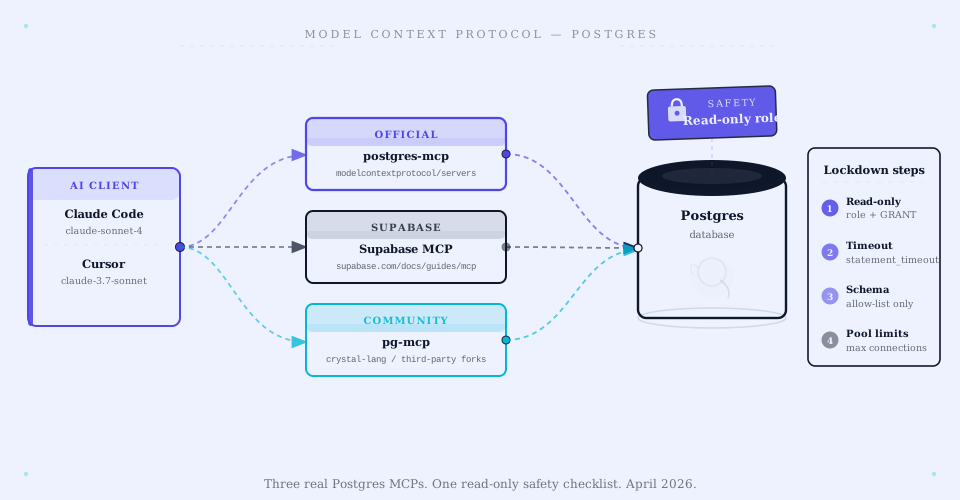
The server choice barely matters. The lockdown does. Pick the official Postgres MCP server (in the modelcontextprotocol/servers monorepo) unless you are already on Supabase, in which case the Supabase MCP inherits your row-level security and the call inverts. Community servers earn a look only for a specific missing feature. All three expose the same risk surface: an MCP server with SQL access is one prompt-injection away from DROP TABLE, and which vendor's server you picked does nothing to change that. The four-step lockdown below (read-only role with statement timeout, schema allow-list, connection limit, audit log) is what actually decides whether this is safe. It is the production floor, built from Postgres role practice, not the ceiling.
What a Postgres MCP server is and why you would want one
The Model Context Protocol (MCP) is an open spec for giving LLM clients structured access to external systems through standardized servers. A Postgres MCP server exposes your database to the client as a set of MCP tools: list_tables, describe_schema, run_query, and so on.
Why bother: the LLM stops guessing at your schema and starts answering from your actual data. "What is the conversion rate for users who signed up last week?" becomes a tool call against your warehouse instead of a hallucinated number.
The cost is real. Any MCP server with SQL access is one prompt-injection away from DROP TABLE. The lockdown section below is what keeps that out of your incident channel.
For the MCP 1.0 spec status, see modelcontextprotocol.io/specification.
Three options in April 2026
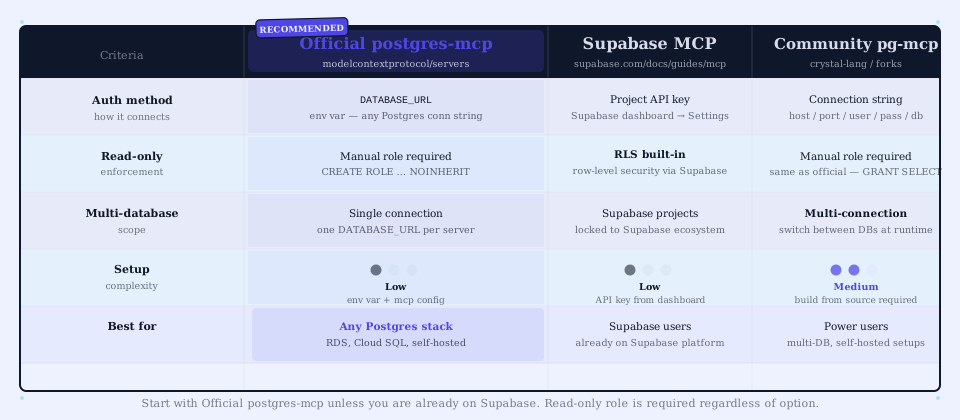
Official postgres MCP server (modelcontextprotocol/servers)
Lives at github.com/modelcontextprotocol/servers-archived/tree/main/src/postgres (the MCP project moved its reference servers to the archived repo). Standard Postgres connection string, read-only tools by default.
Pick it for any vanilla Postgres setup: RDS, self-hosted, Cloud SQL, anything with a connection string. Vendor-neutral, no lock-in, deepest documentation. This is our default for most teams.
You get list_tables, describe_table, list_schemas, and a read-only query tool. Small, predictable surface. Exactly what you want when an LLM has database access. What you do not get is writes. Need INSERT or UPDATE for the agent? You wrap a separate tool with explicit allowlisting.
Supabase MCP
Ships as part of the Supabase developer workflow. Setup steps live at supabase.com/docs/guides/getting-started/mcp.
Pick it if you are already on Supabase. The MCP server inherits your row-level security policies, so the lockdown you already did at the database layer carries straight over to the MCP surface. That is a meaningful head start.
You get schema introspection, query execution, and integration with Supabase auth and RLS, and setup is faster than the official server because Supabase owns the connection plumbing. The price is portability. Move off Supabase later and you move MCP servers too.
Crystal DBA pg-mcp / community options
The community servers, Crystal DBA's pg-mcp and a handful of others on GitHub, target specialized cases: query-plan introspection, SQL formatting, multi-database routing.
Pick one only when you need a feature the official server lacks. Want EXPLAIN plans surfaced as their own tool? Cross-database metadata in a single call? Built-in SQL safety validation? This is where you look.
What you get varies by server. Read the README before you adopt anything. What you give up is the maintenance commitment of the official project. Community servers come and go, and yours might.
Setup walkthroughs (least-privilege)
Same pattern across all three options. Create a dedicated database role for the MCP server. Grant the minimum privileges it needs, nothing more. Connect with that role's credentials. Never the superuser. Never your application's main role.
For the official server, the full least-privilege setup is one script. Run it as a database owner or superuser, then never use that superuser again for the MCP connection:
-- Verified against PostgreSQL 16 (postgresql.org/docs/16/user-manag.html), 2026-05-05
-- Run as db owner. Replace <db> and the password placeholder.
CREATE ROLE mcp_readonly LOGIN PASSWORD '<STRONG_PASSWORD>';
GRANT CONNECT ON DATABASE <db> TO mcp_readonly;
GRANT USAGE ON SCHEMA public TO mcp_readonly;
GRANT SELECT ON ALL TABLES IN SCHEMA public TO mcp_readonly;
-- Future tables inherit SELECT so a new migration does not silently hide data from the agent
ALTER DEFAULT PRIVILEGES IN SCHEMA public GRANT SELECT ON TABLES TO mcp_readonly;
-- Hard caps, applied here so the lockdown lives with the role, not in app config
ALTER ROLE mcp_readonly SET statement_timeout = '5s';
ALTER ROLE mcp_readonly CONNECTION LIMIT 5;
Then point the MCP server at the mcp_readonly connection string. Never the superuser. Never the application role. The ALTER DEFAULT PRIVILEGES line is the one people skip and regret: without it, every new table is invisible to the agent until someone re-grants by hand, which is exactly when someone instead re-grants on the app role to "make it work."
For Supabase, the equivalent is configuring an RLS policy that scopes the MCP role to the rows it should see. Supabase's docs walk through the exact SQL.
Lockdown checklist
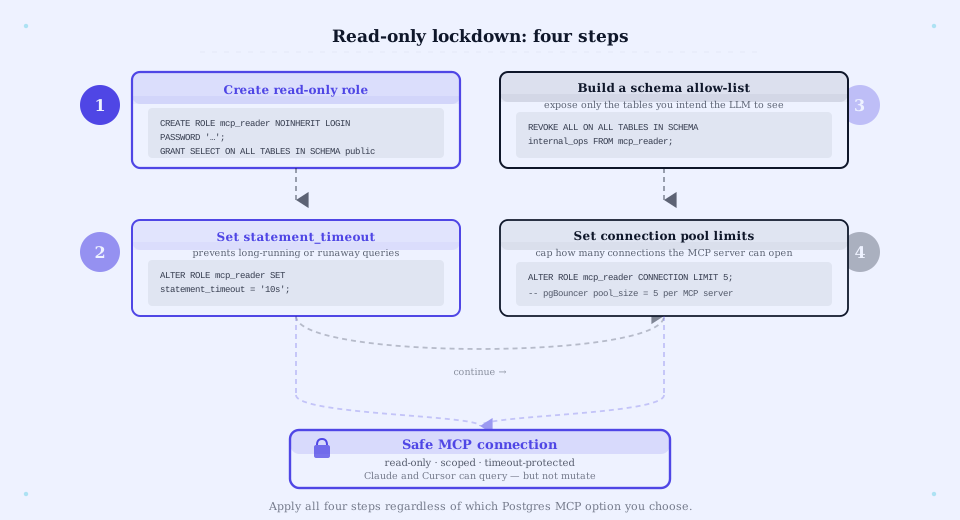
These four controls apply across all three MCP server options. Skip any of them at your own risk.
1. Read-only role + statement_timeout
Create a dedicated read-only role for the MCP server (not your application role, not a superuser). Set a statement_timeout on the role so a runaway query gets killed:
-- Verified against PostgreSQL 16 docs (postgresql.org/docs/16/sql-alterrole.html), 2026-05-05
ALTER ROLE mcp_readonly SET statement_timeout = '5s';
Five seconds is aggressive on purpose. Pick a value that lets normal MCP queries finish and kills anything pathological.
2. Schema allow-list
Do not hand the MCP role every schema. Pick the schemas the LLM should see, typically your warehouse or read-replica schema and not your auth tables, and grant SELECT only on those. Revoke USAGE everywhere else.
Auth or PII tables in the same database as the data you want the LLM to read? This is the step that stops a prompt-injection attack from querying user passwords. Skipping it is how that story ends badly.
3. Connection-pool limits
Set a connection limit on the role:
ALTER ROLE mcp_readonly CONNECTION LIMIT 5;Five connections covers one or two MCP clients. Without a limit, one misbehaving client drains your connection pool and takes the application down with it.
4. Audit logging
Enable Postgres logging for the MCP role's queries (log_statement = 'all' scoped to the role via ALTER ROLE). Ship the logs somewhere queryable. When something goes wrong, the audit trail tells you what the LLM ran.
This is the control that turns "we think the AI did something weird" into "the AI ran this exact query at this timestamp." Cheap insurance.
Three real workflows it shines for
Internal analytics chat. Ops or product asks the LLM "what was our DAU last week" or "show me churn by cohort." A read-only Postgres MCP against the warehouse answers it without inventing the number.
Schema-aware code generation. A developer asks Cursor or Claude to write SQL against the live schema. The MCP server hands the model the real table definitions instead of hoping it remembers them.
Bug triage. A support agent asks "what is the order state for customer X" and the LLM looks it up, then chains follow-ups. Faster than standing up Metabase for a one-off question.
When NOT to give an LLM SQL access
Skip a Postgres MCP server, or pick a much narrower tool, when:
- Your database holds PII you cannot isolate behind a separate role or schema
- Your LLM client takes untrusted input: a public chat surface, external customers
- You lack the engineering capacity to maintain role separation and audit logging
- Your data team has not signed off on the access model
In those cases, build narrow purpose-built tools instead. A "lookup customer order" tool that takes only a customer ID beats handing the LLM full SQL every time.
The one test that proves the lockdown holds
The four controls are necessary, not sufficient. The proof is an adversarial query the agent should refuse to complete, run against your own deployment before any real traffic. Connect as mcp_readonly and try the three things the lockdown is supposed to block:
-- Run AS mcp_readonly. All three must fail.
DROP TABLE IF EXISTS public.orders;          -- expect: ERROR, permission denied
SELECT * FROM auth.users LIMIT 1;            -- expect: ERROR, permission denied (schema allow-list)
SELECT pg_sleep(30);                          -- expect: ERROR, canceling statement due to statement timeout
If DROP is denied, the cross-schema SELECT is denied, and a long pg_sleep is killed at your configured statement timeout, the role boundary is real. If any one succeeds, you have the illusion of a lockdown, which is worse than none because you will trust it. Then confirm the audit log captured all three attempts with timestamps. The checklist makes you safe; this query proves it before a prompt-injection does.
For the wider MCP server landscape, see our best MCP servers April 2026 update. For client-side picks, see MCP client comparison April 2026 update. For an end-to-end MCP build walkthrough, see building your first MCP server with Pipedream.
FAQ
Is the official MCP Postgres server free? Yes. It is open source under the same license as the rest of the modelcontextprotocol/servers monorepo.
Do you need MCP 1.0 to use these servers? The current servers target MCP 1.0. Verify the spec status at modelcontextprotocol.io/specification before adopting; the protocol has shipped breaking changes during 1.x.
Can you write to Postgres through MCP? Yes, but it is a footgun without strict allowlisting. The default for all three options is read-only. If you turn on writes, scope to specific tables and audit every call.
What clients support Postgres MCP? Any MCP-aware client. Claude Desktop, Cursor, Cline, Continue, and others. See MCP client comparison.
Verdict
Official server by default; Supabase MCP if you are on Supabase and the call inverts; community only for a named missing feature. That decision takes five minutes and barely matters. The lockdown is the work: run the setup script, then run the three-query adversarial test as mcp_readonly and confirm all three fail and all three are logged. An LLM with SQL access is safe exactly to the degree that test passes, and not one inch further.
For the wider MCP picture, see best MCP servers April 2026 update.
Related: Best MCP servers April 2026 | MCP client comparison April 2026 | Building your first MCP server with Pipedream