Table of Contents
GitHub Package Firewall: What It Blocks, What It Misses, and How to Turn It On
A compromised npm package does not need a human to open the door. An agent that installs a dependency to finish a task, or a CI job that runs npm install on every push, will happily run a postinstall script from a package nobody on the team has looked at. GitHub's answer, shipped into public preview on October 20, 2026, is a firewall that sits between every one of those endpoints and the npm registry and decides, package by package, whether the install happens at all, per the GitHub changelog. It is free during preview, GitHub Enterprise Cloud only, and npm only.
Here is what it actually checks, how to turn it on, and why an install-time gate still is not the whole answer.
What the firewall actually checks before a package downloads
The package firewall is a proxy in front of the npm registry: point an endpoint's package manager at it instead, and every metadata request and every tarball download gets evaluated against a policy before it is allowed through, per the GitHub docs. Enterprise admins configure five controls, and three of them ship on by default.
Known malware gets blocked outright: the firewall checks the GitHub Advisory Database for an active malware advisory on the exact package. Vulnerability advisories are checked too, but the default threshold is narrow, Critical only, with High, Medium, and Any severity available as stricter options. Attestation downgrades trip a block when a package version drops SLSA attestations that an earlier version had, which matters because an attacker who compromises a maintainer's account usually cannot forge the build provenance the legitimate pipeline produced, so a sudden gap is a tell. Newly introduced install scripts trip a block when a version adds a preinstall or postinstall script that an earlier version did not have, which is the exact shape of the "clean v1.0, malicious v1.1 adds a script" pattern that has carried a lot of this year's npm supply-chain hits. And a minimum package age control holds back anything newer than a configurable window, one day by default, zero to 365 available, so a brand-new malicious release has to survive public scrutiny before your pipeline will touch it.
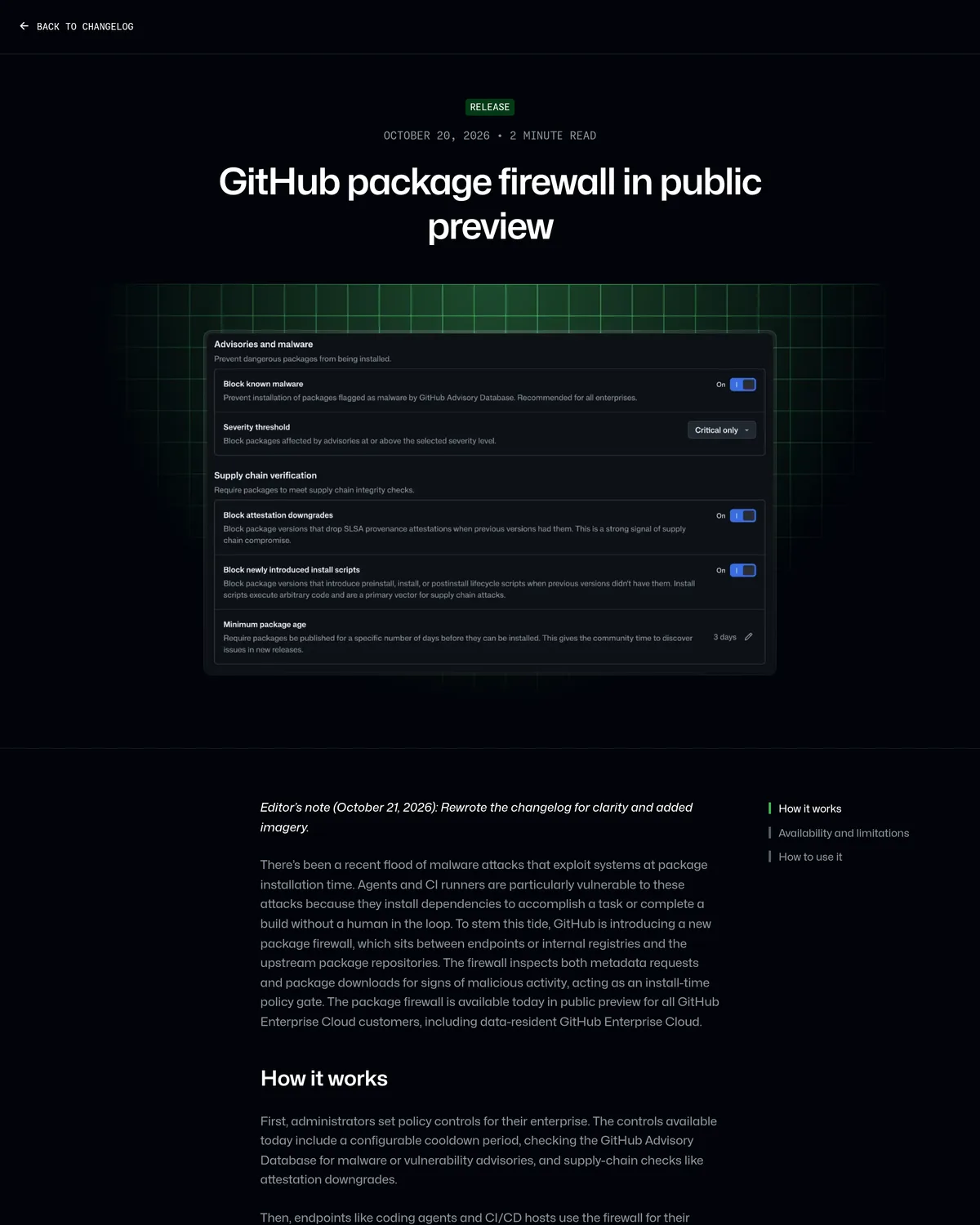 Source: github.blog, captured October 22, 2026.
Who gets it, and what it costs
The firewall is scoped to GitHub Enterprise Cloud, including the data-residency variant, and nothing lower. Teams on GitHub Team or the free tier get no access to this feature as written. It is free for the length of the public preview; GitHub says billing moves to metered usage at general availability, the same model Actions minutes already use, per the changelog. And today it only speaks npm. No PyPI, no Maven, no Cargo, no RubyGems, no container registries. If your agents pull from any of those, this buys you exactly nothing there.
Configuring policy is an enterprise-admin or enterprise-security-manager job by default, though a custom role can be granted the "Edit enterprise-level package firewall policy" fine-grained permission for someone else to carry it.
Turning it on: policy first, then point your endpoints at it
Policy lives at the enterprise level, not per repository. From your enterprise's Policies tab, click Package firewall in the sidebar and set the five controls above. The one change worth making before you flip this on: raise the vulnerability-advisory threshold from the Critical-only default to at least High. Critical-only misses a wide band of exploitable chains that get published as High first and only get reclassified later, and that gap is exactly where agents and CI are most exposed.
Once policy is set, endpoints need to request packages through the firewall instead of the public registry. For npm, that is a .npmrc change plus a token:
# user-level .npmrc, replacing ENTERPRISE with your enterprise slug
# GITHUB_TOKEN needs only "Read-only access to public repositories"
npm config set registry \
  https://package-firewall.githubapp.com/npm/enterprises/ENTERPRISE
npm config set \
  '//package-firewall.githubapp.com/npm/enterprises/ENTERPRISE/:_authToken=${GITHUB_TOKEN}'
That is the shape GitHub's docs give for a direct npm client. Teams running Artifactory can point a remote npm repository at the same firewall URL instead and keep their existing virtual-repo setup, though GitHub flags that integration as experimental.
When a package gets blocked, the npm output or CI log prints a request-an-exception URL with the ecosystem, package name, and version pre-filled. An enterprise admin reviews it under Policies > Package firewall > Package overrides and can approve just that version or widen it to the whole package. That review step is also the soft spot: it is a one-click override sitting right in the error message a rushed engineer sees mid-deploy, which is convenient and also exactly the kind of pressure-release valve that erodes a policy over time if nobody is watching who clicks approve.
What it doesn't catch yet
Every one of the firewall's five controls fires on a signal that exists at install time: a known advisory, a severity rating, a missing attestation, a new script, a version's age. That is a real set of catches, and it is also a ceiling. A package that looks completely clean on install and only turns hostile later, from inside a function body rather than an install script, will not trip any of these checks.
That is not hypothetical. In September 2026, Checkmarx researchers found a package called indexed-btree, impersonating the legitimate sorted-btree library, that had racked up roughly 2 million weekly downloads before nine linked packages were pulled from npm, per BleepingComputer. The malware hid inside the library's own BTree.prototype.set method and only executed when an application called that function with specific arguments, a design built specifically to dodge the install-script blocking GitHub had already shipped by turning npm 12's allowScripts default to off that July, per GitHub's own changelog. A static install-time gate, whether it is npm's own defaults or GitHub's firewall sitting in front of them, has nothing to check against code that waits for a function call to detonate. That gap is the same reason we have been writing about agent-facing scanners that look at runtime behavior and instruction files instead of just the install step, which is the layer our SkillSpector guide covers.
How it stacks up against lockfiles, scanners, and npm's own defaults
The firewall is not the only thing standing between a compromised package and your build. It is one more layer, and it is worth being precise about which layer.
| Defense | What it blocks | When it runs | The gap |
|---|---|---|---|
Lockfile pinning (package-lock.json) | Unexpected version drift on re-install | Install time, client-side | Does nothing on the first install of an already-compromised version; a human still has to commit a good lock |
| SCA scanner (Dependabot alerts, Snyk) | Known CVEs and malware advisories, after the fact | Scheduled scan, not install time | Finds the problem after the package is already in your tree |
| Private registry passthrough (Artifactory, Verdaccio mirror) | Whatever version range you curate | Install time, policy maintained by hand | No built-in malware or advisory feed; the curation is entirely on you |
npm 12 defaults (allowScripts off) plus an opt-in min-release-age | Install scripts by default; overly new versions if you configure the cooldown | Install time, per machine or per project | Any contributor, agent, or CI config can flip --allow-scripts back on locally; nothing enforces it centrally |
| GitHub package firewall | Malware DB matches, severity-ranked CVEs, attestation downgrades, new install scripts, package age | Install time, enforced centrally for any enrolled endpoint | npm only; still install-time, so runtime-triggered malware like indexed-btree can pass until it lands in the Advisory DB |
Source: GitHub docs, GitHub changelog, July 2026, BleepingComputer.
The firewall's real advantage over npm's own defaults is not the detection logic, which overlaps heavily. It is where the policy lives. A developer or an agent session can set --allow-scripts back to true in a local .npmrc without anyone noticing. Nobody downstream of the enterprise policy can do the equivalent to the firewall, short of filing an exception request that an admin has to approve by name.
The verdict: turn it on for CI and agents now, and fix the severity default first
If your organization is already on GitHub Enterprise Cloud and you run coding agents or CI jobs that install npm dependencies without a human watching, enable the package firewall this week. It costs nothing during preview, and it closes the exact gap GitHub built it for: an unattended install that would otherwise run whatever a compromised maintainer account just pushed. Set the vulnerability threshold to High or higher before you flip the switch, not the Critical-only default.
If you are not on GHEC, or you have agents pulling from PyPI, Cargo, or any ecosystem besides npm, the firewall is not your lever yet. Make sure npm is actually on v12 or later across your fleet so allowScripts defaults to off, and set min-release-age in your own .npmrc; npm ships the flag, but it is a cooldown you configure yourself, not one that turns on for you. Neither the firewall nor npm's own defaults catches a payload that waits for a function call instead of an install script, so pair either one with runtime monitoring on anything an agent can reach, not just a gate on what it can download.