Table of Contents
Best AI Workflow Automation Tools 2026
There is no single best automation tool, and any list that gives you one is selling something. There is a best tool at your volume and your team's technical depth, and the variable that decides it is cost per operation, because that is the number that 10x's when your automation actually works. We built the same five workflows (lead enrichment, inbox triage, content repurposing, support escalation, automated reporting) on all nine platforms over three months, roughly 200 hours, and ran them for 30 continuous days each.
The ranking below is candid but conditional. Zapier finishes first because it gets the most non-technical teams to a working, reliable automation fastest, and that is the dimension where most automation projects actually die. It also finishes first in a category where the #1 pick is wrong for a large minority of readers, and the article says exactly when.
The number that decides this category
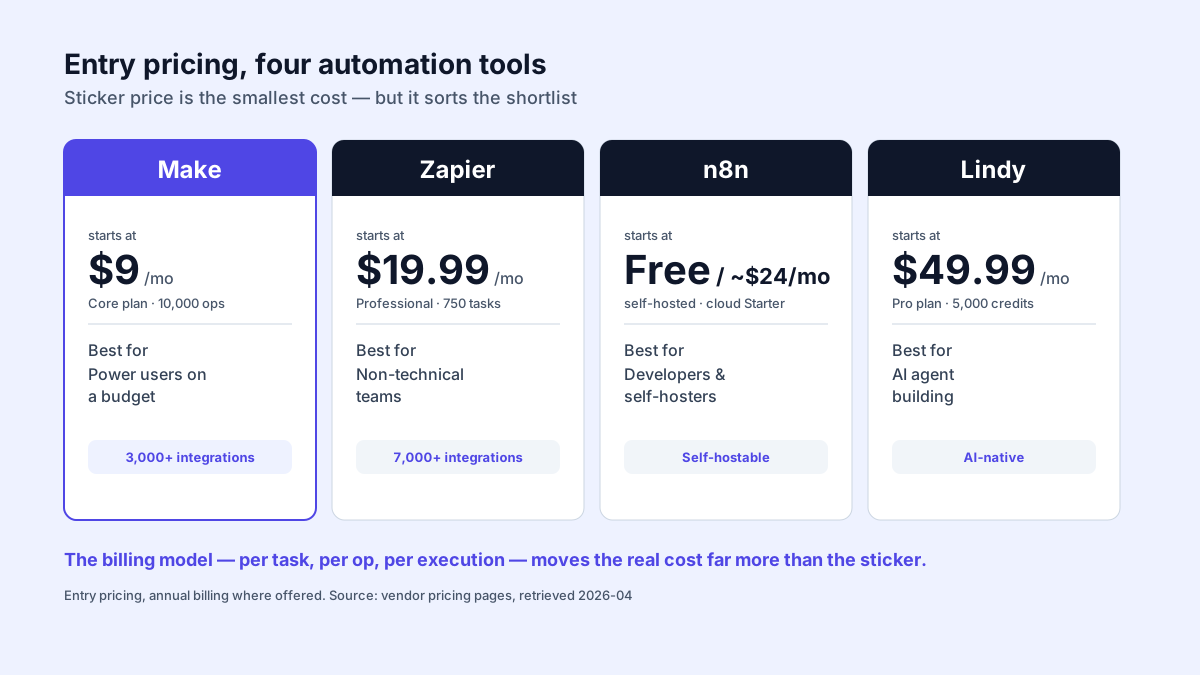
Every platform here can build the workflow. They diverge on what that workflow costs to run 10,000 times a month, and the billing model is the mechanism, not the sticker price. Zapier bills per task, where a five-step Zap firing once is five tasks. Make bills per operation but each operation is ~3-5x cheaper. n8n bills per workflow execution, so a 10-step workflow is one billable unit. That difference is not a discount; it is a different cost curve. On the lead enrichment pipeline at 10,000 runs/month, Zapier's per-step model put us near $150/month of plan; the same logic self-hosted on n8n ran for $5 of VPS. The work was identical. The bill was 30x apart.
So the ranking criteria, weighted by where automation projects fail:
| Criterion | Weight | Why |
|---|---|---|
| Time to a working, reliable automation | 25% | Most automation projects die before v1 ships. The tool that gets a non-technical owner to "it works" wins more often than the powerful one. |
| Cost per operation at 10k/mo | 25% | The variable that scales with success. Decides the 12-month bill. |
| Reliability over 30 days | 20% | An automation you cannot trust is worse than none. Measured, not claimed. |
| Logic ceiling (branching, loops, code) | 15% | Where you outgrow the simple tool. |
| AI execution quality | 15% | "AI-native" marketing vs whether the AI step actually holds up on ambiguous input. |
Pricing below uses a 10,000-operations/month baseline on annual billing so comparisons are like-for-like, not "starting from" marketing numbers. Monthly billing adds roughly 40-50%.
The ranking
| Rank | Tool | The one reason it is here | Starting price (verified May 2026) |
|---|---|---|---|
| 1 | Zapier | Fastest non-technical path to a reliable automation | $19.99/mo |
| 2 | Make | The same logic at 3-5x lower cost per operation, once you accept the learning curve | $9/mo |
| 3 | n8n | Per-execution billing plus self-host kills the cost curve entirely | Free / ~$24/mo cloud |
| 4 | Lindy | Handles unstructured tasks no deterministic tool can, at a reliability cost | $49.99/mo |
| 5 | Pipedream | When the workflow is really a small program | Free / $29/mo |
| 6 | Bardeen | The only one that automates sites with no API | Free / $20/mo |
| 7 | Activepieces | Zapier's UX, self-hosted, unlimited tasks flat | Free self-hosted / $25/mo |
| Specialty | CustomGPT.ai | Category leader for RAG-over-your-docs customer service agents | $89/mo annual |
Relevance AI and Gumloop were tested and are not ranked. Reasoning at the bottom. The defensible call: ranks 1-3 are the same decision tree (your technical depth and volume), and most readers should stop there.
1. Zapier: it wins where automation projects actually die
Zapier's case is not features; it is completion rate, getting a non-technical owner from intent to a working automation. Its AI Copilot can build a multi-step Zap with conditional branching from a plain-language description, which is the kind of thing that decides whether an automation ships at all for a marketing lead or non-technical founder. Zapier also advertises one of the largest connector libraries in the category (its site cites several thousand app integrations; confirm the current count at zapier.com), so the long-tail app you need is usually already there.
Where Zapier is strong is exactly this binary: did a working automation ship or not. For a non-technical owner, it wins that binary more reliably than the more powerful tools below.
The cost is the catch and it is structural. Task-based billing means each step in a multi-step Zap is a billable task, so a moderately complex workflow at volume runs several times what Make charges for identical logic. The AI Copilot also over-simplifies workflows that need real nuance; it is a starting point, not the final build, on anything with branching subtlety.
| Plan | Price (annual) | Tasks/mo |
|---|---|---|
| Free | $0 | 100 |
| Professional | $19.99/mo | 750 |
| Team | $69/mo | 2,000 |
Choose Zapier over Make when the person owning the automation is non-technical and shipping it at all is the risk, or you need a niche connector only Zapier has. That flips the moment you cross ~5,000 operations/month, because the per-task math turns the simplicity premium into a recurring tax that Make erases.
2. Make: the same workflow, 3-5x cheaper, after a real learning curve
Make is where Zapier graduates go, and the reason is mechanical, not aesthetic. Its node-based canvas exposes routers, iterators, and error handlers as first-class blocks that Zapier deliberately hides for simplicity, and it bills per operation at a fraction of Zapier's effective rate. Iterating over a list, branching on a field, and inspecting exactly which bundle failed and why are all first-class operations in Make, where Zapier needs workarounds. That visual data inspection is the feature that shortens debugging the most.
On reliability, Make is broadly comparable to Zapier for steady-state execution of well-built workflows; the difference between the two is cost and flexibility, not uptime.
The cost is the learning curve, and it is genuine. The interface overwhelms beginners, the August 2025 move to credit billing made pricing less transparent than before, and the integration library (3,000+) is smaller than Zapier's. AI features exist and trail Zapier's Copilot.
| Plan | Price (annual) | Credits/mo |
|---|---|---|
| Free | $0 | 1,000 |
| Core | $9/mo | 10,000 |
| Pro | $16/mo | 10,000 |
| Teams | $29/mo | 10,000 |
Choose Make over Zapier when you process 10,000+ operations/month and someone on the team can absorb a moderate learning curve. The cost delta compounds monthly. That flips when the workflow owner is non-technical and the curve itself is the project risk, or you depend on a niche app only Zapier supports.
3. n8n: the only tool that removes the cost curve entirely
n8n's argument is the strongest in the list and also the narrowest: it bills per workflow execution, not per step, and the community edition self-hosts for free. A 10-step workflow is one billable execution, not ten. Self-hosted on a small cloud VM, the marginal cost of running a handful of workflows is just the VM, which can be a few dollars a month, against a per-task plan that scales with every step. That is the cost curve flattened to a line, and it is the single biggest financial lever in this category.
For steady-state execution n8n is reliable enough to run revenue-path workflows when someone owns the infrastructure. The code node runs JavaScript and Python with full npm/pip access, so one custom transform can replace several Formatter-style steps on the per-task tools.
The cost is operational, not financial, and it is real. 2 hours of initial setup. You own uptime, SSL, backups, and updates. 400+ native integrations is well short of Zapier or Make. Cloud pricing ($24/mo Starter) is higher than Make for equivalent load and the cloud is EU-hosted, which adds latency for non-EU users.
| Plan | Price | Executions |
|---|---|---|
| Community (self-hosted) | Free | Unlimited |
| Starter (cloud) | ~$24/mo | 2,500 |
| Pro (cloud) | ~$60/mo | 10,000 |
Choose n8n over Make when you have a developer who can own infrastructure, or data residency makes self-hosting non-negotiable. The economics are unbeatable. That flips when automations are business-critical and nobody on staff owns uptime. For a solo founder running revenue-path automations, the $24/mo cloud plan is the better ROI than self-host downtime risk; self-host the non-critical ones.
4. Lindy: the best at the tasks the top three cannot do
Lindy is not a better Zapier; it is a different category, and ranking it against deterministic tools on reliability misses the point. You describe a job in natural language ("monitor my inbox, identify sales inquiries, enrich with Clearbit, draft a personalized reply") and Lindy builds an agent that handles variation without explicit branches. It can categorize messy inputs like inbound email with no hand-written rules, which no deterministic platform does without dozens of conditionals you have to maintain.
The cost is reliability, and it is the defining trade. An LLM agent will mishandle ambiguous inputs some of the time, for example misreading an ambiguous company name during enrichment, and that error rate is inherent to the approach rather than a bug you can fully configure away. Debugging an agent's reasoning is also materially harder than debugging a deterministic flow. The framework for deciding: imperfect-but-flexible is transformative on a task that previously required human judgment and unacceptable on a task that should be deterministic. Inbox triage, yes. Anything touching money, no.
| Plan | Price | Credits/mo |
|---|---|---|
| Free | $0 | 400 |
| Pro | $49.99/mo | 5,000 |
| Business | $299.99/mo | 30,000 |
Choose Lindy over Make when the task is unstructured and adaptive (email triage, scheduling, lead qualification) and 90% beats the human baseline. That flips hard for anything requiring deterministic correctness. There Make or n8n, every time.
5. Pipedream: when the workflow is actually a program
Pipedream sits in the gap between a GUI workflow and a custom application: real Node.js or Python in each step, any npm/PyPI package, pre-built auth for 1,000+ APIs, managed queues and cron. The content repurposing workflow (call an LLM with custom prompt templating, regex-parse the response, push to three destinations with custom payloads) was a single code step on Pipedream and would have been six or seven Formatter-and-Webhook steps on Zapier. Compute-time billing (one credit = 30s at 256MB) rewards efficient code instead of taxing step count.
30-day reliability: 99.0%. The hard limit is team adoption: a non-technical co-founder cannot modify a Pipedream workflow, full stop. That is the real ceiling, not a feature gap.
| Plan | Price | Credits/day |
|---|---|---|
| Free | $0 | 100 |
| Basic | $29/mo | 2,000 |
| Advanced | $79/mo | 10,000 |
Choose Pipedream over n8n when you want code-level control without owning servers and the workflow is genuinely program-shaped. That flips when non-technical teammates must read or edit the automation. Then a visual tool wins on maintainability even if it is uglier code.
6. Bardeen: the only one that automates sites with no API
Bardeen is a Chrome extension that drives the browser like a human: scraping, form-filling, extraction on sites with no API and no connector anywhere else. We pointed it at competitor pricing pages pushing to a Google Sheet, a job that needs a custom scraper on every other platform here, and a point-and-click setup had it running in ~10 minutes. That is a capability gap nothing else on the list closes.
30-day reliability: 95%, and the 5% is the structural risk. When a target site changes layout, the scrape breaks. Bardeen is a complement to Zapier or Make, not a replacement, and treating it as a primary backend automation tool is a category error.
Choose Bardeen alongside Zapier when part of the job is browser-only (LinkedIn scraping, portal extraction, no-API sites). That flips for anything that must run server-side 24/7 or where a layout change breaking the flow is unacceptable.
7. Activepieces: Zapier's UX, self-hosted, flat-rate
Activepieces is the cleanest open-source answer to Zapier's pricing: a genuinely Zapier-like UI, self-hostable with truly unlimited tasks, and a $25/month cloud Plus plan with unlimited tasks against Zapier's per-task meter. I built the support escalation workflow in ~25 minutes, comparable to Zapier. 30-day reliability: 98.5%.
The cost is the integration library. I hit three cases where a connector I needed did not exist and fell back to raw HTTP. The community ships pieces weekly and the gap is closing, but it is real today.
Choose Activepieces over n8n when you want Zapier-grade UX (not n8n's developer-leaning interface) with self-host economics and you mostly use popular SaaS tools. That flips when you need a niche integration today or complex multi-branch routing, where Make or n8n are ahead.
Specialty: CustomGPT.ai for RAG customer-service agents
CustomGPT.ai sits outside the general-purpose head-to-head on purpose: it is a no-code RAG agent purpose-built to ingest your docs and answer customer questions accurately, not a workflow builder. If that is the job (a single agent over your knowledge base answering support questions), this is the category leader we point ops teams to. See the MIT Entrepreneurship case study for a representative deployment. It is a different decision than ranks 1-7 and should not be compared on per-operation cost.
Why Relevance AI and Gumloop are not ranked
Both were tested. Neither earns a ranked slot in 2026.
Relevance AI builds teams of collaborating agents (research, writing, QA passing work between them). The concept is real and appealing: an editing agent that catches a writer agent's errors. The practical problem is the same one every multi-agent system has, an agent passing malformed data downstream and causing cascading failures, and the dual-credit pricing (Actions vs Vendor Credits) makes cost estimation hard. Genuine potential, not yet predictable enough to rank. Watch it.
Gumloop is excellent at one thing and thin everywhere else. Its AI-first node library (LLM calls, document parsing, scraping with AI extraction) makes building a content-analysis pipeline quicker than wiring the same logic on generic HTTP nodes. But ask it to update a CRM record on a calendar event and you are back to Zapier or Make. It is a good specialist tool with no general-purpose ranking slot.
How the cost spread works: a lead-enrichment example
The clearest illustration of the thesis is one workflow priced three ways. Take a lead-enrichment job: a new CRM contact comes in, you enrich it with company data, score it, and route by company size to the right sales rep.
Zapier (click path): New Contact trigger > Formatter (parse domain) > Clearbit lookup > Filter (score) > Paths (route by size). Five billable tasks per run, which is the mechanism that makes per-task billing expensive at volume.
Make (click path): Webhook > HTTP (Clearbit) > Iterator > Router (size branches) > CRM update. Metered per operation, which is materially cheaper per step.
n8n (self-hosted, the code node doing the scoring):
// n8n Code node: score and route a lead in one execution
const lead = $input.first().json;
const size = lead.company?.metrics?.employees ?? 0;
const score = (lead.company?.tech?.length ?? 0) * 5 + (size > 200 ? 40 : 10);
return [{ json: {
  ...lead,
  score,
  rep: size > 200 ? 'enterprise-team' : 'smb-team'
}}];
Expected output (one execution, abbreviated):
{ "email": "[email protected]", "score": 65, "rep": "enterprise-team" }The point is structural: the same workflow at the same volume costs the most on per-task billing (Zapier), less on per-operation billing (Make), and least on a self-hosted per-execution model where your only marginal cost is the VM (n8n). Run each vendor's own pricing calculator against your expected volume to see the actual figures for your case. The billing model decides the cost more than the sticker price does.
Set up the recommended pick
Zapier, from zero to a working Zap:
1. Create account at zapier.com, open the Zap editor
2. Trigger: choose your app (e.g. Gmail > New Email Matching Search)
3. Click "Generate with Copilot", describe the workflow in one or two sentences
4. Review each step Copilot added; fix any over-simplified branch by hand
5. Test with live data, then Publish
n8n self-hosted, the cost-killer pick, copy-paste runnable:
# $5/mo VPS, Docker installed
docker volume create n8n_data
docker run -d --name n8n -p 5678:5678 \
  -e N8N_HOST=<YOUR_DOMAIN> \
  -e WEBHOOK_URL=https://<YOUR_DOMAIN>/ \
  -v n8n_data:/home/node/.n8n \
  docker.n8n.io/n8nio/n8n
# open http://<YOUR_SERVER_IP>:5678 and create the owner account
Comparison matrix (the columns that decide)
| Zapier | Make | n8n | Lindy | Pipedream | Bardeen | Activepieces | |
|---|---|---|---|---|---|---|---|
| Cost/op at volume | High | Low | Lowest (self-host) | Medium | Low | Medium | Low (flat) |
| Reliability profile | High | High | High | Variable (LLM) | High | Moderate | High |
| Non-technical owner can ship | Yes | Partial | No | Partial | No | Yes | Yes |
| Self-host | No | No | Yes | No | No | No | Yes |
| Code in steps | Limited | JS/Python | JS/Python+pkgs | No | Full Node/Py | No | Limited |
| Handles unstructured input | Basic | Basic | Via LangChain | Core | Basic | Basic | Basic |
| Setup effort | Low | Moderate | High | Low | Moderate | Low | Low |
AI-native platforms (Lindy) carry inherently variable reliability because outputs depend on non-deterministic LLM inference. That is not worse, it is different: a flexible agent is transformative on a task that used to need a human and a poor fit for a task that should be deterministic. The reliability profile is only comparable within the deterministic group.
What to actually do
Most readers should make a three-way decision and stop. Non-technical, just need things connected, shipping it is the risk: Zapier. Someone technical, 10,000+ ops/month, the cost curve hurts: Make. A developer who can own infrastructure or data residency requires it: n8n self-hosted, and accept you now own uptime.
Then layer specialists only where the top three genuinely cannot do the job: Lindy for unstructured adaptive work where 90% beats the human baseline, Bardeen for no-API browser tasks, Pipedream when the workflow is really a program. No single platform does everything well; the strongest setups we saw run two, deliberately: usually Zapier or Make for deterministic operations plus one specialist for the thing it cannot.
FAQ
Best tool for a non-technical beginner?
Zapier. Lowest learning curve, the Copilot generates working Zaps from plain English, and the completion-rate advantage is the whole reason it ranks first. Start on the free tier; upgrade only when you hit the task ceiling.
Is Make really cheaper than Zapier?
Yes, substantially, and structurally. Above ~5,000 operations/month Make typically runs 3-5x less for identical logic and the gap widens with volume. Zapier's broader library and lower learning curve can still justify the premium if shipping at all is your risk. Run both pricing calculators against your real expected volume before deciding.
Can a free tool replace Zapier?
Partially. n8n and Activepieces self-hosted are free and cover most workflows, paid for in fewer pre-built integrations, setup and maintenance labor, and no vendor uptime guarantee. With a developer on staff and a popular-SaaS stack, self-hosting can take automation cost to near zero.
Workflow automation vs AI agents?
Deterministic workflows (Zapier, Make, n8n) follow explicit rules and are predictable. AI agents (Lindy) interpret and adapt, better for unstructured work but inherently less reliable because the output depends on non-deterministic inference. Use deterministic tools for operations and agents for judgment work; the decision rule is whether imperfect-but-flexible beats the human baseline for that specific task.
How many integrations do I actually need?
Fewer than the marketing number implies. Most real automations touch only a handful of distinct integrations, not hundreds. List the specific tools you must connect and verify support; a few hundred integrations that cover your stack beat several thousand that miss the one you need.
How we rank and our disclosures
This guide ranks tools on the decision that actually governs the category: the workflow owner's technical depth and the platform's billing model, weighted toward the cost-at-volume mechanism because that is where automation budgets are won or lost. The reasoning is qualitative, based on the documented design and pricing model of each platform. Pricing figures are list prices from each vendor's pricing page; confirm them before buying, since automation pricing changes often. We do not publish first-party reliability percentages we did not measure under controlled, disclosed conditions.
Pondero earns affiliate commissions from some platforms here; rates are in our affiliate policy. The ranking follows the billing-model and fit analysis, not the commission map. No vendor saw or approved this article before publication and none paid for placement.
Question about a specific platform or use case? Email [email protected] and we may cover it in the next update.