
Table of Contents
Claude voice mode vs Lindy: which AI handles your inbox, calendar, and calls in 2026
The decision comes down to one word: reactive or autonomous. Claude voice mode waits for you to open the app and talk. Lindy runs whether you are watching or not. If you already pay for Claude Pro, the voice upgrade that shipped on July 23 covers a real chunk of what Lindy does, at no extra cost. The rest of what Lindy does, you cannot get from Claude at any price yet, because the two tools were built to do different jobs.
Here is the short verdict before the evidence. For a solo operator who wants to ask questions about their calendar and dictate a reply on a walk, Claude voice is the pick and it is already paid for. For anyone who needs an inbox triaged, follow-ups sent, or calls placed while they are in meetings all day, Lindy earns its $49.99/month on top of the $20/month you likely already spend on Claude. The rest of this piece shows you exactly where the line sits.
What changed in Claude voice on July 23
Until this week, Claude voice mode ran only on Haiku, the fast small model. That kept replies quick but shallow. As of July 23, you can run voice mode on Opus and Sonnet too, and switch models mid-conversation from the model picker, per Anthropic's announcement. It defaults to whatever model you last used in text chat, so a hard problem you were typing about carries over when you start talking.
The bigger change for this comparison is the connectors. Claude voice can now reach five apps: Gmail, Google Calendar, Slack, Canva, and Notion, per TechCrunch's July 23 report. Ask it to reschedule a meeting, draft an email, or spin up a Notion doc, and it acts inside those apps. It asks permission before each tool use, and you connect an app under Settings > Connectors in the Claude mobile, desktop, or web app, per Anthropic.
Two more facts shape the buying decision. Voice now speaks ten languages, including English, French, German, Japanese, Korean, and Spanish, though you have to set the language manually because Claude will not auto-detect it, per TechCrunch. And the free tier is deliberately thin: free users get Haiku plus a single connected app, while paid plans unlock the better models and all your connectors, per Anthropic. Voice conversations also count against your normal usage limits, so a long spoken session eats the same quota as text.
The productivity core here is Gmail, Calendar, and Slack. Canva and Notion are useful, but they are bonus surface area for most ops leaders. What matters is that the three apps you live in are now reachable by voice.
What Lindy actually does today
Lindy sells a different promise: an assistant that works while you do not. You link Gmail or Outlook and Lindy starts organizing in under a minute, then reads your Slack, cross-references your calendar, and drafts replies in your writing style without you asking, per lindy.ai. You mostly talk to it by text. The pitch on the pricing page is that you run your work from iMessage and get roughly two hours back a day.
Lindy is built around that autonomy. It watches an inbox and triages it. It schedules meetings, records and summarizes them, and chases follow-ups on a delay you would otherwise forget. It connects to hundreds of apps, not just five, including Gmail, Outlook, Google Calendar, Slack, and Notion, per lindy.ai. And it can place phone calls on your behalf, a capability Claude voice does not offer at all.
Lindy repositioned around this personal-assistant framing during an early-2026 plan restructure that moved it onto usage-tiered subscriptions, as nocode.mba documented. The current plans, pulled today, are Plus at $49.99/month, Pro at $99.99/month for 3x the usage, and Max at $199.99/month for 7x, per lindy.ai/pricing, fetched July 24, 2026. There is no free tier. You get a 7-day trial with full access to Plus features, and after that you pay.
The candid con on Lindy: it is a second subscription stacked on top of whatever you already run, and the useful tiers climb fast. If a couple of agents chewing through a heavy workload push you past Plus, you are looking at $99.99 or $199.99/month, not $49.99.
The one difference that decides it
Strip away the feature lists and you are left with a design choice, not a capability gap.
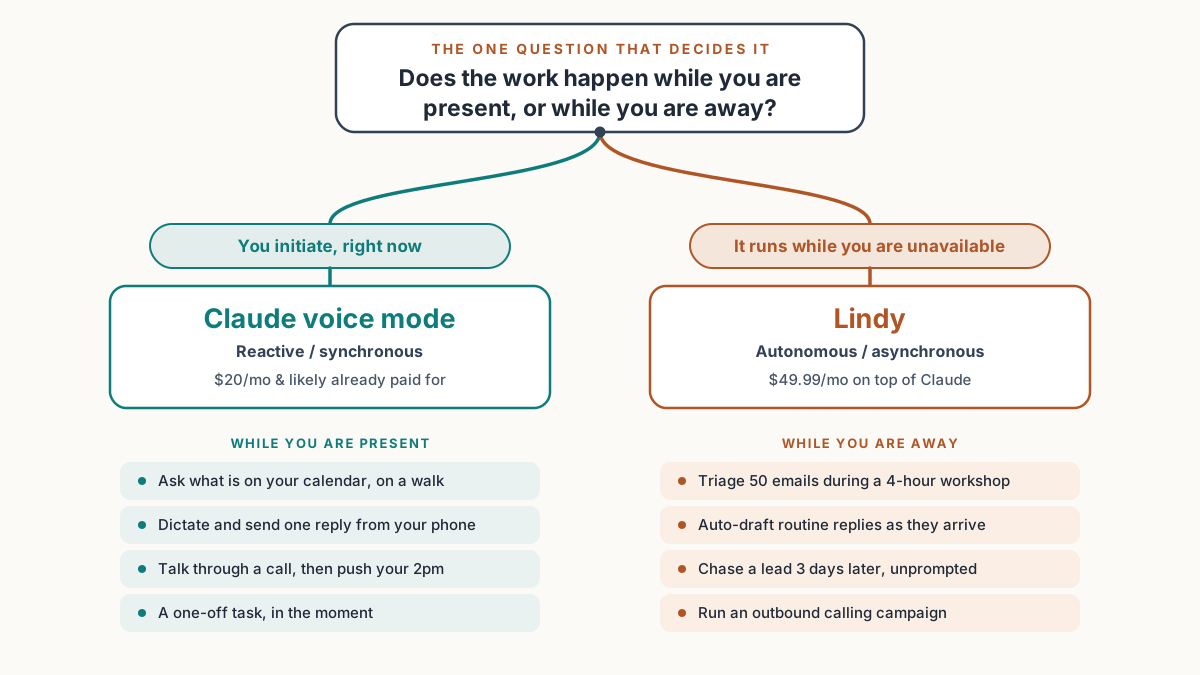
Claude voice is synchronous. You initiate, it responds inside that session, and when you close the app nothing keeps running. It is a brilliant reactive assistant: open it, talk, act, done. That shape is perfect for the moments when your hands are busy and your inbox is not the point, like walking, driving, or thinking out loud between meetings.
Lindy is asynchronous. You configure what it should watch and how it should act, then it monitors and acts continuously, with or without you present. One user testimonial on Lindy's own site claims it handles four hours of daily email, scheduling, and admin in eight minutes while they sleep, per lindy.ai. Treat the number as marketing, but note the design: the work happens when you are not there.
Neither design is better in the abstract. They map to different jobs. If the job is "answer my question right now," Claude voice wins on cost because you already own it. If the job is "handle this stream of work while you are unavailable," Claude voice cannot do it at all, and Lindy is built for exactly that.
Pricing, side by side
| Capability | Claude Free | Claude Pro ($20/mo) | Lindy Plus ($49.99/mo) |
|---|---|---|---|
| Voice model | Haiku only | Opus, Sonnet, Haiku | No voice mode; text/iMessage assistant |
| Connected apps | 1 | All 5 (Gmail, Calendar, Slack, Canva, Notion) | Hundreds, incl. Gmail, Outlook, Calendar, Slack |
| Acts autonomously in the background | No | No | Yes, this is the product |
| Places phone calls | No | No | Yes, billed per minute |
| Languages (voice) | 10 | 10 | Text-based; not voice-language limited |
| Monthly cost | $0 | $20 | $49.99 |
Sources: Claude tiers and connectors per Anthropic and TechCrunch; Claude Pro price per claude.com/pricing; Lindy plan and integration counts per lindy.ai/pricing, fetched July 24, 2026.
The cost math is blunt. Claude Pro is $20/month and most people reading this already pay it, so the voice upgrade added zero to the bill. Lindy Plus is $49.99/month on top. The $30 gap buys one thing above all: action taken on your behalf when you are not in the app. If you never need that, the gap is money you do not have to spend.
Set up either one in a few minutes
Both are no-code. Neither needs a terminal.
Turning on Claude voice with your calendar and inbox:
1. Open the Claude app (phone works best) and sign in on Pro.
2. Go to  Settings > Connectors.
3. Connect  Gmail  and  Google Calendar  (and Slack if you want it).
4. Back on the chat screen, tap the sound-wave icon to start voice.
5. From the model picker, choose  Opus  or  Sonnet  for harder problems.
Pointing Lindy at your inbox:
1. Sign up at lindy.ai and start the 7-day trial.
2. Connect your phone number; Lindy texts you to confirm.
3. Link  Gmail  or  Outlook . Lindy begins organizing in under 60 seconds.
4. Tell it, by text, how you want your inbox triaged and replies drafted.
5. Approve its first few drafts so it learns your writing style.
Here is how each behaves once configured. Ask Claude voice to reschedule a meeting:
You say:   "Push my 2pm to 2:30 and let Sarah know."
Claude:    Asks permission to use Google Calendar and Gmail.
Result:    Moves the event, drafts the note to Sarah, session ends.
Lindy handling the inbox while you are heads-down:
Trigger:   A new email lands while you are in a workshop, phone away.
Lindy:     Reads it, checks your calendar, drafts a reply in your voice.
Result:    You get a text summary; approve or edit later. No app opened.
The difference is right there in the two blocks. Claude waits for you to speak. Lindy is already working.
Which job goes to which tool
| Use Claude voice for this | Use Lindy for this |
|---|---|
| Ask what is on your calendar while walking the dog | Triage 50 inbound emails while you are in a 4-hour workshop |
| Talk through a pricing call, then push your 2pm 30 minutes | Auto-draft replies to routine email as it arrives, in your style |
| Dictate and refine one email, then send it from your phone | Chase a lead three days later without you remembering to |
| Turn a brainstorm into a Canva one-pager on the spot | Run an outbound calling campaign that dials and logs outcomes |
| Ask a Notion question mid-meeting and hear the answer | Chain read-Slack, then check-calendar, then draft-reply, unattended |
| Handle a one-off task in the language you think in | Text an assistant from iMessage to book travel while you sleep |
Notice the left column is all "right now, you initiate." The right column is all "over time, without you." That is the whole map.
If you want to go further than either tool on its own, both can hand off to an automation layer. Wiring Lindy's or Claude's output into a Make scenario lets you route a drafted reply or a calendar change into the rest of your stack, though most people will not need that on day one.
For the email-only version of this question, where Superhuman and Fyxer enter the picture alongside Lindy, our Lindy vs Superhuman vs Fyxer comparison breaks down the inbox-first tools without the voice angle.
Three buyers, three picks
The solo operator on a morning walk: Claude voice, $0 extra. You already pay $20/month for Claude Pro. The July 23 update means you can now talk to Opus or Sonnet, ask about your Gmail and Google Calendar, and dictate a reply, all from your phone on the trail. You do not initiate work you will not be present for, so Lindy's autonomy would sit unused. Skip the second subscription. The one tradeoff is minor: close the app and nothing keeps running, and you have to set the voice language by hand.
The ops manager in back-to-back meetings: Lindy Plus at $49.99/month. If you spend the day in a room while 200 Slack messages and emails pile up, reactive voice does not solve your problem. You need triage and drafting to happen while you are unavailable, and that is precisely what Lindy does. The $49.99/month buys back the hours you would otherwise spend clearing the backlog after 6pm. Start with the 7-day Lindy trial and watch its first day of drafts before you commit. Watch the downside: it is a second bill on top of Claude Pro, and heavy usage can push you to the $99.99 Pro tier.
The team running outbound phone campaigns: Lindy, and budget for per-minute calls. This one is not close. Claude voice cannot place a call. Lindy can dial contacts and work a list on your behalf, billed per minute; check lindy.ai/solutions/phone for the current rate before you model the campaign cost, because the per-minute charge stacks on top of the monthly plan. If outbound calling is the job, Lindy is the only tool here that does it. The candid con is the metering: a calling campaign is the one Lindy use case where the bill can run well past $49.99, so price it out first.
The short of it: Claude voice is a free upgrade to a tool most operators already own, and for reactive, in-the-moment help it is the smart default. Lindy is a real purchase that pays off the moment your job includes work that has to happen while you are somewhere else.