Table of Contents
Gemini in Sheets for BigQuery: setup, cost, and the limits that bite
We've watched people wire BigQuery into a spreadsheet the hard way: an Apps Script function piping cell values through ML.GENERATE_TEXT, a temporary table to dodge the 1MB query-string limit, a custom menu item labeled "Setup" that a teammate inevitably breaks six months later. Google shipped a version of this on October 19, 2026 that skips the Apps Script entirely. Gemini in Google Sheets can now query your connected BigQuery data directly, against the full table, not just the rows visible on your tab, and build a refreshable dashboard from a single prompt.
The payoff worth knowing before you touch it: the feature itself is free once you're on a qualifying plan, but every question you ask still bills against your BigQuery project. Scan a 2 TB fact table once and you've burned through the entire monthly free allowance in one prompt.
What it actually does
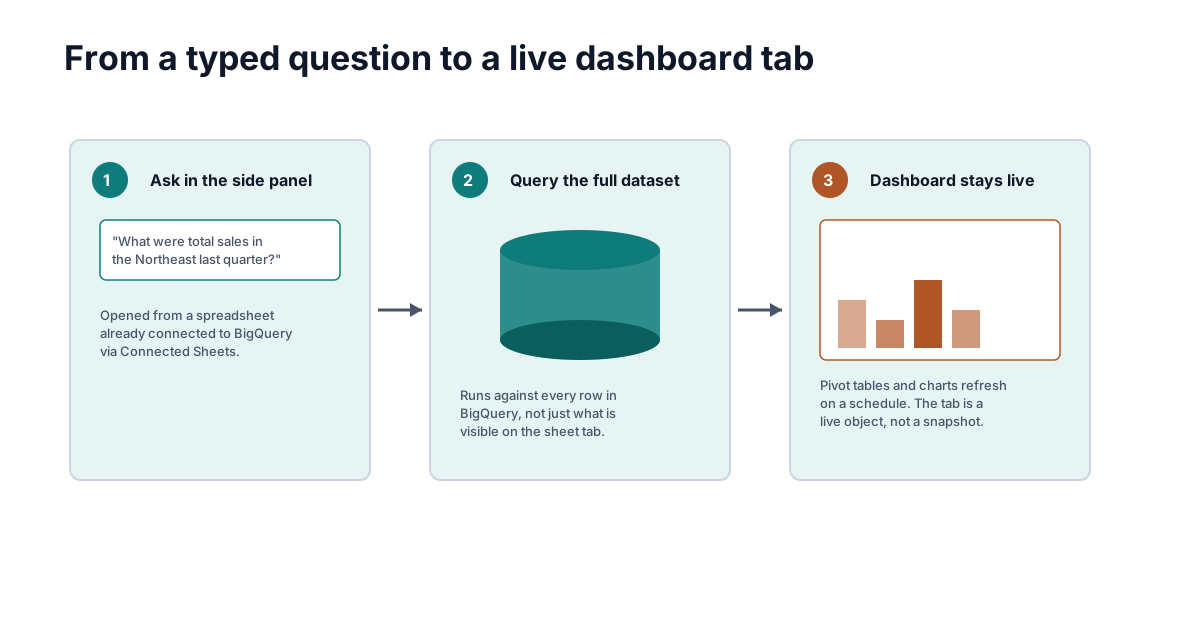
Connect a spreadsheet to BigQuery through Connected Sheets, the native connector Sheets has had for years, and a Gemini side panel now sits on top of that connection. Ask "what were total sales in the Northeast last quarter" and Gemini writes and runs the query against BigQuery itself, not against whatever subset happens to be pasted into your sheet. Google's own example in the announcement: a follow-up like "how does that compare to the same quarter last year" keeps the thread going without you re-stating the filters.
The bigger shift is the second mode. Describe what you want, "build a quarterly sales review with revenue by region, a monthly trend, and our top 10 products," and Gemini proposes a plan for you to approve, then drops a new tab into the spreadsheet with native, connected objects: database formulas, pivot tables, charts, all wired back to BigQuery so a scheduled refresh keeps them current. That's the mechanism that matters. You're not exporting a snapshot. The tab stays live.
Who gets it and what it costs
Two separate bills apply here, and conflating them is the most common mistake. The first is Workspace or Google AI plan access to Gemini-in-Sheets at all. The second is BigQuery compute, which has nothing to do with your Workspace seat and shows up on a different invoice.
| Requirement | What qualifies | Source |
|---|---|---|
| Eligible Workspace/AI plan | Business Standard, Business Plus, Enterprise Standard, Enterprise Plus, Google AI Pro/Ultra (consumer), Google AI Pro for Education, AI Expanded Access add-on | Workspace Updates, Oct 19, 2026 |
| Workspace seat price (list, EU pricing shown on Google's page) | Business Standard ~€13.60/user/mo, Business Plus ~€21.10/user/mo, annual commitment; Enterprise is quote-only | Google Workspace pricing, fetched 2026-10-20 (your local currency may differ; Enterprise shows "Let's talk") |
| Consumer AI plan price (US) | Google AI Pro ~$20/mo; Google AI Ultra $100/mo after Google's May 2026 price cut | Engadget, May 19, 2026 |
| BigQuery project | A Google Cloud project with billing enabled, or BigQuery's free sandbox/trial | Get started with BigQuery data in Sheets |
| BigQuery query cost | First 1 TiB scanned per month free, then $6.25 per TiB scanned (on-demand pricing) | BigQuery pricing, fetched 2026-10-20 |
The feature itself carries no separate line item. Admins get no toggle for it either: per Google's rollout notes, it's on by default in any spreadsheet already connected to BigQuery, for any user who already has permission to query that connected data. If you can run a query through Connected Sheets today, you can ask Gemini about it tomorrow.
The query cost is the part that surprises people. BigQuery's on-demand pricing stays free up to 1 TiB scanned per month, then runs $6.25 per TiB after that. A single Gemini prompt against a multi-terabyte warehouse table can clear that free allowance in one shot. That's not a reason to avoid the feature. It's a reason to point it at a filtered view or a smaller table when you're exploring, and save the full-table scans for the question that actually needs them.
How to turn it on
Nothing to configure on the admin side; there's no setting to flip. For end users:
- Open a spreadsheet, go to Data → Data connectors → Connect to BigQuery, pick a project and a table or view, then click Connect → Start analyzing. This is the existing Connected Sheets flow; Gemini doesn't change it.
- Once connected, click Ask Gemini in the top-right corner to open the side panel.
- Type a question in plain language. For a first run, keep it narrow: "what were the top 5 products by revenue last month" beats "analyze everything" both for cost and for the quality of what comes back.
- Ask a follow-up in the same thread to drill in: "break that down by region." Gemini keeps the context.
- When you want a dashboard instead of an answer, describe the shape you need. Gemini shares a plan before it builds anything, review it, then approve. It drops a new tab with connected, refreshable charts and pivot tables.
One setup gotcha worth flagging before you lean on this for a client deliverable: closing and reopening the spreadsheet, reloading the browser, or losing your connection wipes the Gemini conversation history. Insert anything you want to keep into the actual spreadsheet before you close the tab.
Where it stops
A few limits are worth knowing going in, not discovering mid-project:
- Pivot tables still cap at 200,000 rows. Google doubled this from 100,000 in October 2025, but a pivot table built from a BigQuery connection tops out there even though the underlying query can touch billions of rows. The query itself isn't capped; the pivot table rendering it is.
- Permissions pass through, not around. Gemini can only query data the signed-in user already has IAM access to in BigQuery. It's not a backdoor around your data governance, which is good for security and mildly annoying if you expected Gemini to surface something you personally can't see.
- Every query is audited. BigQuery access through Connected Sheets lands in Cloud Audit Logs with the spreadsheet ID attached, so a security team can trace who asked what. That's a feature if you're the one running the audit, a constraint if you were hoping this stayed informal.
- No admin kill switch. Because the feature is on by default with no separate control, an org that wants to block it has to restrict BigQuery access or the Gemini entitlement itself, not toggle a single setting.
- Rollout is staggered. Google's own notes say gradual visibility over up to 15 days from October 19, so your account and a colleague's on the same plan may not see the side panel option on the same day.
The alternatives
Looker Studio is still the better tool if you need a dashboard multiple people maintain and view on a recurring basis, with row-level permissions, shared data sources, and a proper BI layer. It's free for the base product; a Pro tier adds team workspaces and support SLAs. Gemini-in-Sheets wins on speed to a first answer; Looker Studio wins on anything that needs to survive past the person who built it.
Connected Sheets without Gemini is what you're already paying for if you're on BigQuery. You write the formulas, build the pivot tables, and schedule the refresh yourself. It's free beyond the query cost, and it's the right call if your questions are the same five every week, you don't need natural language, and you'd rather own the exact query than let a model write it.
Third-party BI-in-spreadsheet tools (Coefficient, Supermetrics, and similar) exist mainly to pull data from sources Connected Sheets doesn't reach, like ad platforms or CRMs, into a spreadsheet on a schedule. If your source of truth is already in BigQuery, you don't need a middleman; if it's scattered across SaaS tools that don't speak BigQuery, one of those is still the faster path than funneling everything into a warehouse first.
The verdict
If you're a solo analyst or an operator who lives in Sheets and already has a BigQuery connection, turn this on and use it for exploratory questions. It gets you a first answer out of a warehouse table without writing SQL, and the dashboard-building mode is genuinely useful for a one-off review that doesn't justify a Looker Studio build.
If you're a data team fielding one-off report requests, point your analysts at the dashboard-building mode specifically. The "shorter backlog" framing in Google's own announcement is the real use case: let Gemini draft the first pass, have an analyst check the query logic before it ships anywhere that matters.
If you're an admin worried about cost or governance, the move isn't to block it. It's to put a BigQuery budget alert on the relevant project before your team's curiosity meets a 3 TB table, and to confirm your IAM roles are already where you want them, since Gemini inherits exactly what the user already has.