Table of Contents
Google Genie 4: Access, Price, and How Project Genie Works
You type "make it storm and add a creature" into a 3D scene that is already running, and the world keeps going. The rain starts, a new character shows up in frame, and the ambient sound shifts with it, all without the session resetting. That is the actual change in Genie 4: not better graphics, but a world model you can talk to while it is live.
Google started rolling the model out widely on November 18, 2026, through the browser-based Project Genie prototype, per Google's announcement. It is gated behind a paid subscription, and the price has been reported three different ways across the tech press this month. We pulled the current number straight from Google's own pricing page to settle it.
What Genie 4 actually does
Genie 4 is Google DeepMind's latest world model: software that generates an explorable 3D environment and simulates how it responds as you move through it and change it. Two things separate it from the video-generation tools everyone already knows.
First, you can edit mid-session. Type a new prompt while you are inside a world and Genie 4 folds the change into the existing scene instead of starting over, shifting weather, dropping in a character, or redirecting the action (per Google). Second, it generates audio natively alongside the visuals, ambient soundscapes, sound effects, and character dialogue rendered in sync with what is on screen, not added in a separate pass (per DeepMind's model writeup).
Under the hood, Gemini does the reasoning. Gemini Omni grounds each simulation in real-world appearance and behavior, and other Gemini models handle the planning and consistency checks that keep a scene coherent as it runs, while Genie renders the pixels, sound, and physics (per DeepMind). In one research demo, a Gemini 4 Argon model broke a user's instruction into steps and fed them to Genie 4 as the simulation rendered, directing an Apptronik Apollo humanoid through a game of checkers (per TechCrunch). That is the split: Gemini plans, Genie simulates.
Who gets it and what it actually costs
Here is the part worth getting right, because secondary coverage this month has quoted $99.99, $199.99, and the old $249.99 figure for Google AI Ultra, and only one of those is the current entry price (per Google's official AI plans page, checked November 22, 2026). We pulled Google's own US pricing page directly rather than trust the aggregated number.
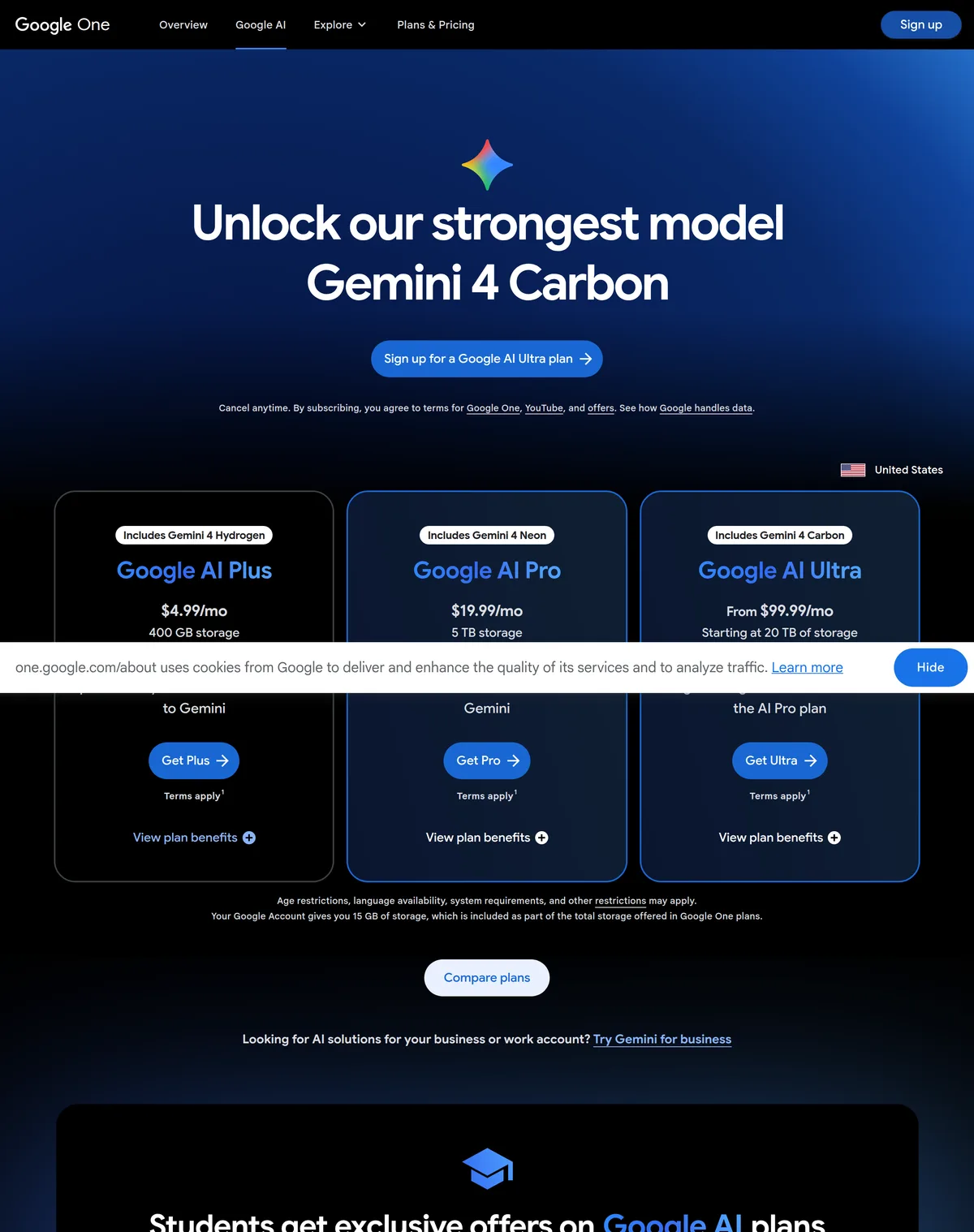 Source: one.google.com, captured November 22, 2026.
| Plan | Price | Storage | Genie 4 access | Source |
|---|---|---|---|---|
| Google AI Plus | $4.99/mo | 400 GB | No | |
| Google AI Pro | $19.99/mo | 5 TB | Waitlist only | |
| Google AI Ultra 5x | From $99.99/mo | 20 TB | Yes | |
| Google AI Ultra 20x | $199.99/mo | 30 TB | Yes |
Prices per Google's official AI plans page, US pricing, captured November 22, 2026. Google cut the old single Ultra tier from $250 to $200 and added the $100 tier at I/O 2026 (per Google), which is where the $249.99 figure you may have seen elsewhere comes from: it is the superseded 2025 launch price.
So the $99.99 figure is real and current, it is just the floor, not the whole range. Either Ultra tier unlocks Project Genie, which is why Google's own benefits list puts "interactive world creation and exploration in real time with Project Genie" on the cheaper $99.99 card rather than reserving it for the $199.99 one. If you are on Google AI Pro at $19.99/mo, you do not get Genie 4 by upgrading your usage. You join a waitlist on the same page where Ultra subscribers log in (per Google).
How to turn it on
There is no separate signup flow. Project Genie lives inside your existing Google account once it is entitled.
- Subscribe to (or confirm you already have) a Google AI Ultra plan, either tier, through one.google.com.
- Go to labs.google/projectgenie and sign in with that Google account.
- Pick a model in the model picker. Genie 4 is the default for the highest fidelity and native audio; Genie 3 is still there if you want longer sessions or want to seed a world from a 360-degree panorama image, both things Genie 4 does not do yet.
- Start from a text prompt, an uploaded image, or the new Project Genie agent, which takes a plain-language description of what you want and orchestrates the generation for you instead of requiring one precise prompt upfront.
- Once you are inside a world, type a new line to steer it live: change the weather, add a person or object, or redirect what happens next.
- Publish to the community gallery if you want it discoverable, or keep it private and just explore.
Google AI Pro subscribers can join the waitlist from the same labs.google/projectgenie page without upgrading first, so it costs nothing to get in line while you decide whether the Ultra price is worth it.
Where it breaks
Genie 4 is a research preview wearing a product's clothes, and Google says so directly. A scene holds together for roughly two minutes before details start to drift, double Genie 3's limit but still short (per TechCrunch). The longer a session runs, or the more prompt edits you stack on top of each other, the more objects and visual details shift out of place. In-world text does not render legibly yet, and audio accuracy is still an open research problem, not a solved one (per DeepMind).
The browser-only framing you will see in a lot of coverage is already out of date. One day after the Ultra rollout, Google shipped Genie 4 on the Gemini API and in Google AI Studio for developers, generating continuous 720p worlds at 24fps with synchronized audio through the Interactions API (per Google). If you build things rather than just explore them, that is the door to walk through instead of the consumer waitlist. All of it, consumer and developer, ships with SynthID watermarking baked into every output.
If you do not want to pay for Ultra
A couple of adjacent tools cover similar ground without a Google subscription, though neither is a drop-in substitute.
World Labs' Marble generates explorable 3D worlds from a text prompt or image and has a free tier (capped at 4 world generations) alongside paid Standard, Pro, and Max tiers that scale up to 75 generations a month, with higher tiers adding multi-image input, editing, export, and commercial rights (per World Labs' own docs). It does not do Genie 4's live mid-session editing or native audio, but it is the closest thing to "try a world model today for free." Worth noting: AMD has agreed to acquire World Labs for roughly $8.2 billion, a deal still pending as of this writing (per TechCrunch).
Decart's Oasis line sits further from a consumer tool and closer to infrastructure: the original Oasis demo is an open-weight, playable Minecraft-style world, while the newer Oasis 3 is API-first and aimed at robotics and physical-AI teams rather than browser exploration. Amazon is reportedly in talks to acquire Decart as well, so treat both of these as a landscape that is actively consolidating, not a stable set of options to compare on a five-year horizon.
The verdict
If you already pay for Google AI Ultra at either tier, there is nothing to decide: Project Genie is already in your plan, so open it and try it. If you are on AI Pro and curious, join the waitlist, it costs nothing, and use the wait to try World Labs' free Marble tier to see whether you even want an interactive world model in your workflow before you pay the $99.99-a-month Ultra entry price (per Google). If your interest is building on this rather than clicking around in a browser, skip the consumer product entirely and go straight to the Gemini API, where Genie 4 is already available to developers at 720p and 24fps (per Google). The browser prototype is a demo. The API is where this turns into something you can ship.