
Table of Contents
Best model in GitHub Copilot (updated monthly)
MAI-Code-1-Flash, the model this guide was first written around in June, is gone from Copilot. GitHub retired it on September 10, 2026 and pointed users to MAI-Code-1.1-Flash (GitHub Changelog, Sept 10). The successor lists at $0.20 per million input tokens and $1.20 per million output, yet two lightweight models that arrived since then, Claude Haiku 5.5 and GPT-6 Luna, list at half that (GitHub Docs, models and pricing, fetched October 15, 2026).
The short version: leave the picker on Auto unless you have a specific reason to pin. Paid plans get 10% off model costs when Auto chooses (GitHub Docs, auto model selection). When you do pin, use Claude Haiku 5.5 for quick edits, Claude Sonnet 5.5 for everyday features and bug fixes, and on Pro+ or higher, GPT-6.1 Sol or Claude Opus 5.5 for the hard problems. Six more models retire on October 19, GPT-5 mini and GPT-5.5 among them (GitHub Changelog, Sept 18), so any config that names them needs an edit this week.
GitHub's supported-models page lists 32 models as of today (GitHub Docs, supported models). We rebuild this page every month from GitHub's own docs and changelog. Prices are list rates. Benchmark figures come from the vendors and are labeled that way.
The October 2026 picks
We built the routing below from GitHub's task categories on its model comparison page, the rate card, and what GitHub said about each model at launch. The credits column prices one medium agent session: 200K input tokens read, 50K output tokens written, no caching, at 1 AI credit = $0.01. It's the same rubric our AI Credits pricing guide uses.
| Job | Pin this model | Plans | Input / output per 1M tokens | Credits per medium session | Source |
|---|---|---|---|---|---|
| Inline completions, next edit suggestions | No pin needed | All paid plans | Not billed in AI credits | 0 | GitHub Docs |
| Quick edits, docs, explanations, subagents | Claude Haiku 5.5 | Pro and up | $0.10 / $0.50 (requests up to 100K input) | About 5 | Pricing, launch |
| Quick edits where the prompt includes an image | MAI-Code-1.1-Flash | Pro and up; Free via Auto | $0.20 / $1.20 | 10 | Pricing, launch |
| Everyday features and bug fixes | Claude Sonnet 5.5 | Pro and up | $2.00 / $10.00 | 90 | Pricing, launch |
| Hard debugging, multi-file refactors | GPT-6.1 Sol | Pro+, Max, Business, Enterprise | $2.00 / $10.00 | 90 | Pricing, launch |
| Hard problems, Claude preferred | Claude Opus 5.5 | Pro+, Max, Business, Enterprise | $4.00 / $20.00 | 180 | Pricing, launch |
| Long autonomous agent runs | GPT-6 Astra | Pro+, Max, Business, Enterprise | $10.00 / $50.00 | 450 | Pricing, launch |
| CI scripts and shared repo configs | auto, or GPT-5.3-Codex as the LTS model | LTS applies to Business and Enterprise | $1.75 / $14.00 for GPT-5.3-Codex | 105 | Pricing, LTS |
Plan availability in that table comes from GitHub's per-plan matrix (supported models). Copilot Free and Copilot Student users don't get a manual picker at all: they reach models through Auto only (same page).
Start with Auto, then choose a tier
Auto is the right default for most people because of how it routes. GitHub describes two systems working together: one tracks model health and availability, the other scores how complex each prompt is, and routing happens along natural cache boundaries so a switch mid-conversation doesn't throw away cached context you already paid for (GitHub Docs, auto model selection). On a paid plan you also get a 10% discount on model costs while Auto is choosing, in Copilot Chat, Copilot CLI, the Copilot app, and the cloud agent (same page).
Since September 14, Auto has three tiers: efficiency, balance, and intelligence (GitHub Changelog, Sept 14). All three draw from the same pool. A simple prompt, like adding a docstring, can still land on a small model under intelligence, and you pay the rate of whichever model Auto picked, whatever the tier (same post). Tiers are available in VS Code, Copilot CLI, and the Copilot app (GitHub Docs). In the CLI you set one directly (CLI command reference):
/model auto balance
/model auto efficiency
/model auto intelligence
Balance suits a normal day. Use efficiency for a session of renames and doc comments, and intelligence when you're about to hand Copilot a gnarly bug.
Auto's pool holds 15 models, among them MAI-Code-1.1-Flash, GPT-6 Luna, Claude Sonnet 5.5, Claude Opus 5.5, GPT-6.1 Sol, and GPT-6 Astra (supported models, Auto table). Claude Haiku 5.5, Claude Fable 5.1, and Kimi K3 are not in it. That gives you the three cases where pinning beats Auto:
- You want a model Auto can't reach, such as Haiku 5.5 for cheap subagent work.
- You need a specific model's data terms, which matters for the Fable models (covered below).
- You need reproducible behavior in CI, where a model that changes per prompt makes failures harder to compare.
To see which model actually answered, hover over the response in Copilot Chat or the Copilot app; the CLI prints it in the terminal (GitHub Docs).
What replaced MAI-Code-1-Flash, and where MAI-Code-1.1-Flash fits
Microsoft launched MAI-Code-1-Flash on June 2, trained against the GitHub Copilot harness used in production. Its launch numbers were self-reported: a 51.2% pass rate on SWE-Bench Pro against Claude Haiku 4.5's 35.2%, and up to 60% fewer tokens on SWE-Bench Verified, measured by Microsoft in that same harness (Microsoft AI, June 2). Those figures describe a model you can no longer select.
The swap was announced on August 11, and the original was retired on September 10 (GitHub Changelog, Aug 11, Sept 10). MAI-Code-1.1-Flash adds native image understanding and, per GitHub, carries a 73% lower list price than the model it replaced (GitHub Changelog, Aug 11). Free and Student users get it through Auto; Pro and higher can also pick it by name. On Business and Enterprise an admin has to turn on its policy first, because it ships off by default (same post).
Microsoft's October 7 update makes a second round of vendor claims for 1.1, all self-reported against its own previous model: a 22% improvement on Terminal-Bench 2.1 in Copilot CLI, 15% on .NET tasks, and 25% fewer tokens per task (Microsoft AI, Oct 7). The same page says a 3-bit quantized build that keeps the 256K context window can be downloaded and run locally, with experimental access in the Copilot app, Copilot CLI, and VS Code promised by the end of October (same page). We'll report whether it shipped in the November update.
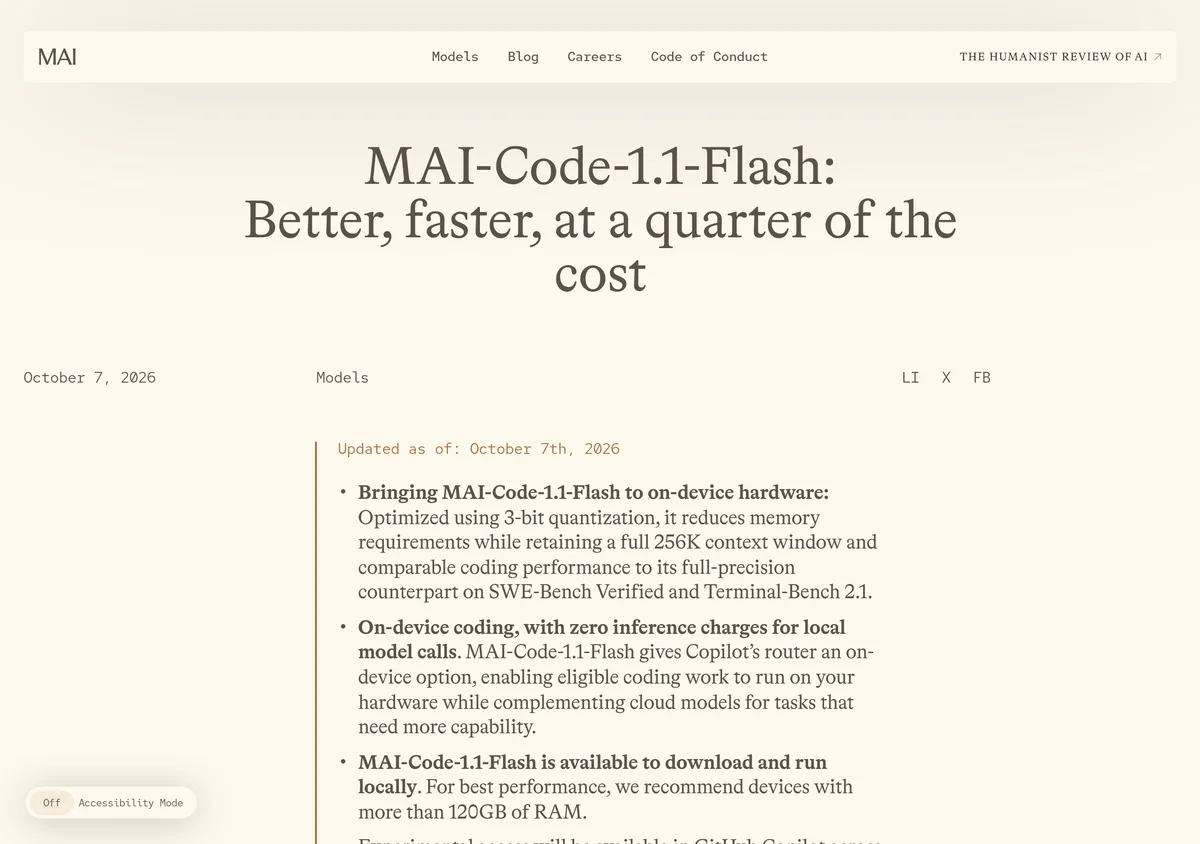 Source: microsoft.ai, captured October 15, 2026.
Every MAI model carries a caveat in GitHub's docs: they are "continuously improving," so behavior can shift as new checkpoints ship (GitHub Docs, model comparison). Treat any benchmark as a snapshot.
So where does it fit? MAI-Code-1.1-Flash is a sensible light model inside Auto, and it's the light pick when your prompt carries a screenshot or diagram. For text-only quick work it no longer wins on price: Claude Haiku 5.5 and GPT-6 Luna both list at $0.10 input and $0.50 output against its $0.20 and $1.20 (GitHub Docs, pricing).
Light work: Haiku 5.5, with one pricing trap
Claude Haiku 5.5 "matched Claude Sonnet 5 on many coding tasks while using significantly fewer tokens and steps" in GitHub's early testing (GitHub Changelog, Oct 7). GitHub hasn't published the benchmark behind that claim, but the price makes it cheap to try: at $0.10 input and $0.50 output, a medium session costs about 5 credits (GitHub Docs, pricing).
Watch the input threshold, though: Haiku 5.5's low rate applies to requests up to 100K input tokens; above that, it bills $0.50 input and $2.50 output, five times more (GitHub Docs, pricing). Quick chat edits stay well under 100K. An agent-mode request that drags a large slice of the repo into context may not. GPT-6 Luna has the same $0.10 and $0.50 base rate but holds it up to 272K input tokens (same page), and it sits in Auto's pool, so it's the safer cheap pin for subagents that read lots of files.
GPT-5 mini is still the starting point GitHub's model comparison page recommends, which closes with "start with a general-purpose option like GPT-5 mini" (GitHub Docs, model comparison, fetched October 15). That model retires on October 19 (GitHub Changelog, Sept 18). Don't build a habit on it.
Everyday features and bug fixes: Claude Sonnet 5.5
Most paid work happens in this tier, and Sonnet 5.5 is the pick. GitHub's launch post says it matched Claude Sonnet 5 on coding tasks "while using significantly fewer steps, tokens, and tool calls," and finished tasks noticeably faster (GitHub Changelog, Sept 28). It lists at $2.00 input and $10.00 output, the same as Sonnet 5, with cached input at half Sonnet 5's rate ($0.10 against $0.20) (GitHub Docs, pricing). It's available on Pro, which matters because Opus-class models are not (supported models).
If you'd rather stay with OpenAI, GPT-5.6 Terra is GitHub's "balanced all-round choice for everyday interactive and agentic coding" at $2.00 input and $12.00 output (model comparison, pricing), and it's also on Pro.
Still on Claude Sonnet 4.6 from the June version of this page? GitHub retired it on September 1, except for individual subscribers on annual Pro and Pro+ plans, who keep it (supported models). At $3.00 input and $15.00 output it costs more than Sonnet 5.5 anyway (pricing).
Hard problems and long agent runs
On Pro+ and above, the most useful price fact on the rate card is that GPT-6.1 Sol lists at $2.00 input and $10.00 output, exactly the same as Sonnet 5.5 (GitHub Docs, pricing). Stepping up to it for a hard bug costs nothing extra per token. GitHub says that in early testing it "reliably completed tasks while using noticeably fewer tokens and steps than earlier models in the GPT-6 and GPT-5.6 families" (GitHub Changelog, Sept 29).
Claude Opus 5.5 is the Claude option at $4.00 input and $20.00 output, cheaper per token than Opus 5 at $5.00 and $25.00 (pricing). Per GitHub's early testing, it resolved tasks comparably to Opus 5 with significantly fewer steps and tokens. It also watermarks its text outputs, which GitHub says adds no tokens or cost (GitHub Changelog, Sept 22).
Gemini 4 Argon arrived on October 13 for Pro+ and up. In GitHub's early testing it solved more tasks than earlier Gemini models on every coding benchmark, with its largest gains in Copilot CLI (GitHub Changelog, Oct 13). Its $2.00 and $10.00 rate is promotional and ends December 1 (pricing), so we'll revisit it in the December update.
For long, autonomous sessions, where the agent plans, edits a dozen files, runs tests, and keeps going without you, the candidates are GPT-6 Astra and Claude Fable 5.1, both at $10.00 input and $50.00 output (pricing). Astra plans and validates as it goes and confirms its own results before declaring a task done, per GitHub's launch post (GitHub Changelog, Sept 4). At about 450 credits per medium session, 7,000 Pro+ credits cover roughly 15 of them (plans). Save these models for runs where the number of steps matters more to the bill than the per-token rate.
Fable 5.1 retains your data by default
Every Claude model in Copilot runs under zero data retention except Claude Fable 5 and Fable 5.1. For those two, Anthropic retains prompts and outputs by default to run safety classifiers, and GitHub states the retained data is not used to train Anthropic's models (GitHub Changelog, Sept 1). On Business and Enterprise the Fable 5.1 policy is off by default, and enabling it counts as acknowledging the retention requirement (same post).
There is now a narrow exception. Eligible enterprises can use both Fable models with zero data retention through the end of 2026 under a time-bound exemption, arranged through their GitHub account team; after that, continued use requires Anthropic's Enterprise Frontier Safeguards (supported models, footnote). Approval doesn't switch the models on; an admin still has to enable each one (same page). If your org has a ZDR posture and no exemption, pick GPT-6 Astra for long runs and skip the policy debate.
HydraFusion, if you'd rather not pick
HydraFusion orchestrates several models into one response. Its October 14 update widened the pool to Claude Opus 5.5, GPT-6 Astra, GPT-6.1 Sol, and GPT-6 Luna, and added a Max option tuned for harder tasks. Both remain in research preview on Pro, Pro+, Business, and Enterprise with preview features enabled (GitHub Changelog, Oct 14). Our HydraFusion guide covers when it beats a single pinned model.
What each pick costs per month
Plan allowances set the budget. Pro is $10 a month with 1,500 AI credits (1,000 base plus a 500 flex allotment), Pro+ is $39 with 7,000, and Max is $100 with 20,000 (GitHub Docs, plans). Business is $19 per seat with 1,900 credits per user and Enterprise is $39 per seat with 3,900, pooled across the org (same page). Allowances reset on the first of each month in UTC, and unused credits don't carry over (GitHub Docs, individual billing).
Dividing each allowance by the per-session cost gives the number of medium sessions a plan covers before you start paying for additional usage. Rates are from GitHub's pricing page, fetched October 15, 2026.
| Model | Input / output per 1M | Credits per medium session | Sessions on Pro (1,500) | Sessions on Pro+ (7,000) | Sessions on Max (20,000) | Source |
|---|---|---|---|---|---|---|
| Claude Haiku 5.5 or GPT-6 Luna | $0.10 / $0.50 | About 5 | About 330 | About 1,550 | About 4,440 | Pricing, plans |
| MAI-Code-1.1-Flash or GPT-5.6 Luna | $0.20 / $1.20 | 10 | 150 | 700 | 2,000 | Pricing, plans |
| Claude Sonnet 5.5 | $2.00 / $10.00 | 90 | About 16 | About 77 | About 222 | Pricing, plans |
| GPT-6.1 Sol | $2.00 / $10.00 | 90 | Not on Pro | About 77 | About 222 | Pricing, plans |
| Claude Opus 5.5 | $4.00 / $20.00 | 180 | Not on Pro | About 38 | About 111 | Pricing, plans |
| GPT-6 Astra or Claude Fable 5.1 | $10.00 / $50.00 | 450 | Not on Pro | About 15 | About 44 | Pricing, plans |
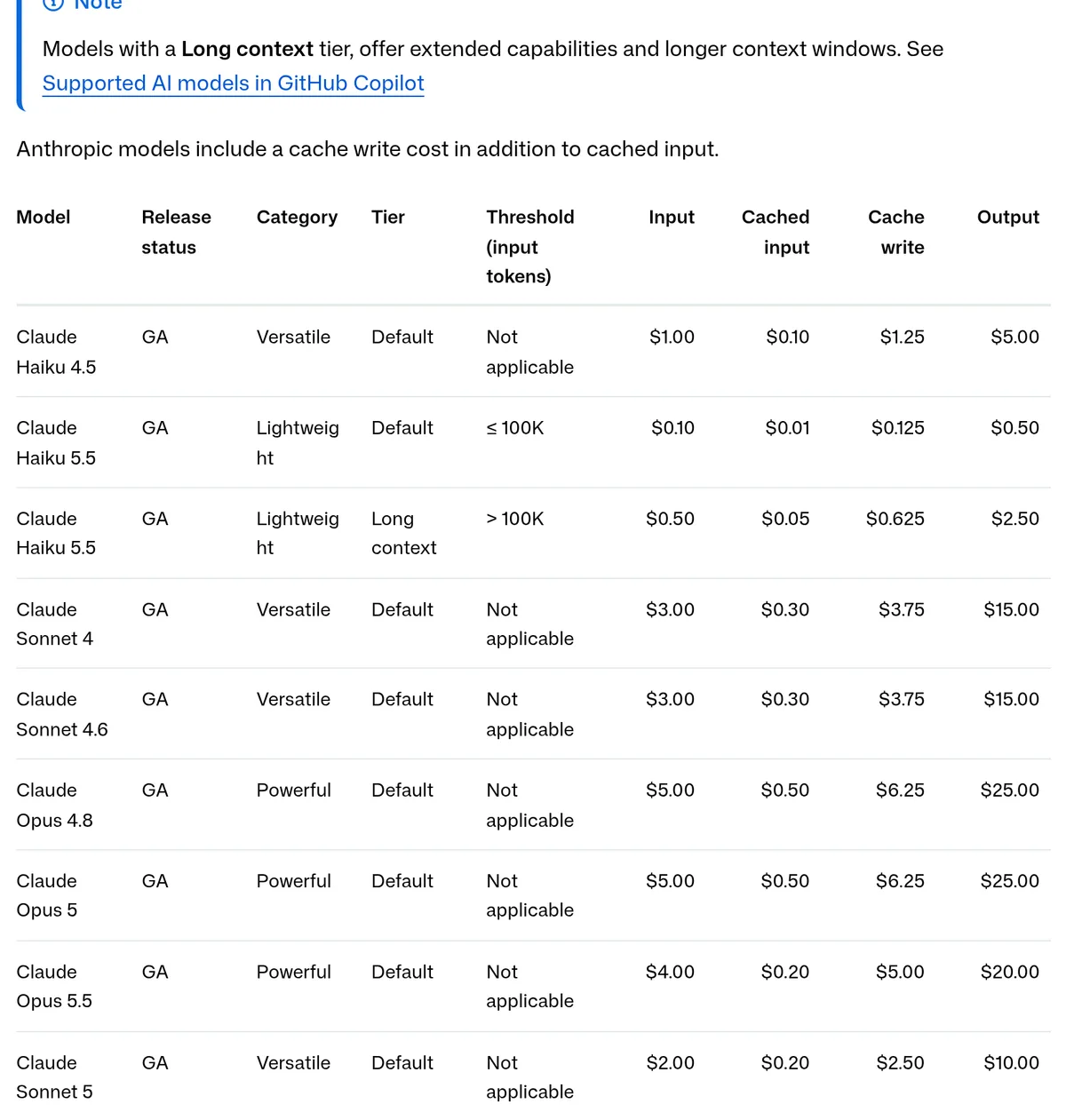 Source: docs.github.com, captured October 15, 2026.
Treat the table as list-price arithmetic; your invoice will differ. It ignores caching: cached input is cheaper, while Anthropic models and OpenAI's GPT-5.6, GPT-6, and GPT-6.1 models also charge a cache-write rate (pricing). Higher reasoning levels and the 1M-token context window both consume more credits (supported models). Routing through Auto takes 10% off whichever model it picks (auto model selection).
For a Pro subscriber, 1,500 credits cover about 16 medium Sonnet 5.5 sessions or about 330 on Haiku 5.5 (pricing, plans). Ten Sonnet sessions plus a hundred quick Haiku edits still fit inside the month.
October changes: two retirement waves
Retired on October 2
GitHub removed Gemini 3.5 Flash, Gemini 3.6 Flash, Kimi K2.7 Code, and Claude Opus 4.7 from every Copilot experience on October 2 (GitHub Changelog, Oct 2). One detail changed between notice and removal: the September notice named Claude Opus 5 as the swap for Opus 4.7 (GitHub Changelog, Sept 3), while the October 2 post names Claude Opus 5.5 (Oct 2). Opus 5.5 is also the cheaper of the two (pricing).
Retiring on October 19
Six more models go on October 19 (GitHub Changelog, Sept 18). GitHub names one replacement per model and says nothing about price, so here is each swap against the rate card, using the same medium-session rubric.
| Retiring model | GitHub's swap | Old rate (in / out) | New rate (in / out) | Credits per session, old to new | Cheaper option on the rate card | Source |
|---|---|---|---|---|---|---|
| GPT-5.5 | GPT-5.6 Sol | $5.00 / $30.00 | $4.00 / $20.00 | 250 to 180 | GPT-6.1 Sol, 90 (Pro+ and up) | Notice, pricing |
| GPT-5.4 | GPT-5.6 Sol | $2.50 / $15.00 | $4.00 / $20.00 | 125 to 180 | GPT-5.6 Terra, 100 (Pro); GPT-6.1 Sol, 90 (Pro+) | Notice, pricing |
| GPT-5.4 mini | GPT-5.6 Luna | $0.75 / $4.50 | $0.20 / $1.20 | 38 to 10 | GPT-6 Luna, about 5 | Notice, pricing |
| GPT-5 mini | GPT-5.6 Luna | $0.25 / $2.00 | $0.20 / $1.20 | 15 to 10 | GPT-6 Luna, about 5 | Notice, pricing |
| Gemini 3.7 Flash | Gemini 3.8 Flash | $0.75 / $3.75 | $0.75 / $3.75 (promo) | 34 to 34 | None needed | Notice, pricing |
| Grok 4.5 | Grok 4.6 | $2.00 / $6.00 | $2.00 / $6.00 | 70 to 70 | Grok 4.7, same rate | Notice, pricing |
The GPT-5.4 row is the one to watch: GitHub's suggested swap raises the per-session cost from 125 to 180 credits, while GPT-5.6 Terra stays in the same Versatile class at 100 (pricing). Two smaller details from the same page: the Gemini 3.7 and 3.8 Flash rate is promotional through December 31, 2026, and GPT-5.6 Luna moves to $0.40 input and $1.80 output above 200K input tokens (pricing).
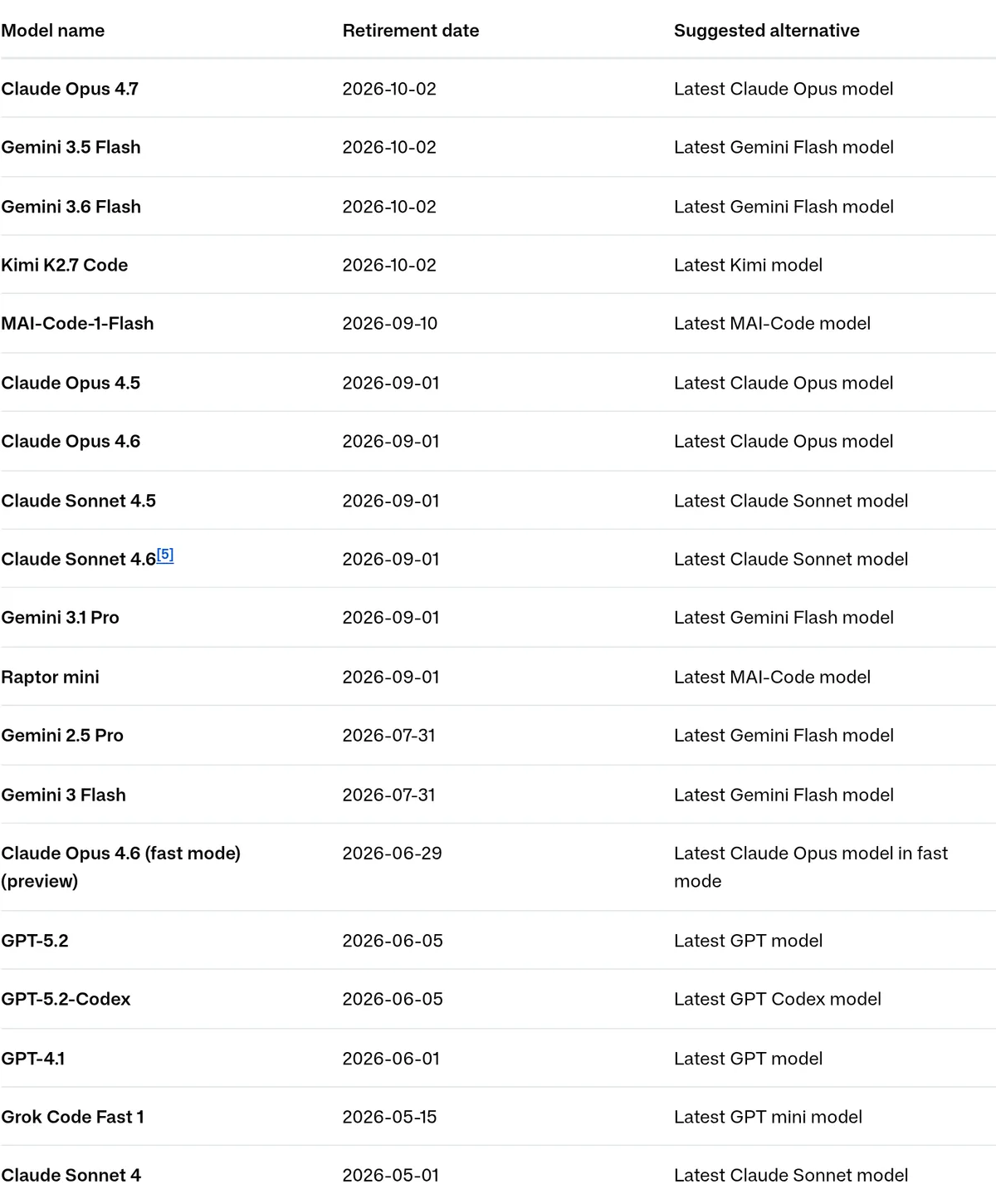 Source: docs.github.com, captured October 15, 2026.
Find old model names before they break a script
GitHub's notices say no action is needed to remove a deprecated model (Sept 18). That covers GitHub's picker. Your own config files still need an edit, and old names hide in four places, all documented:
- The CLI's
--modelflag or theCOPILOT_MODELenvironment variable, usually in CI scripts (CLI command reference). - A
modelkey in~/.copilot/settings.jsonor the repo's.github/copilot/settings.json(CLI config reference). - The
modelproperty in a custom agent profile; leave it unset and the agent inherits the default (custom agents reference). - Per-subagent settings under
subagents.agents, where amodelPolicyof"required"locks the choice (CLI config reference).
This sweep covers the October 19 wave plus the names retired since September:
# Run from the repo root. Checks repo config, workflows, agent profiles,
# and your personal Copilot CLI settings.
grep -rnIiE 'gpt-5\.[45]|gpt-5[-. ]mini|gemini[-. ]?3\.[567][-. ]?flash|grok[-. ]?4\.5|kimi[-. ]?k2\.7|opus[-. ]?4\.7|mai-code-1-flash' \
  .github/ ~/.copilot/settings.json 2>/dev/null

# And the environment your shell and CI runners inherit
env | grep -i COPILOT_MODEL
One false positive: gpt-5\.[45] also matches GPT-5.4 nano, which is not on the retirement list (Sept 18 notice). For a repo-wide default that never goes stale, hand the choice back to Copilot (CLI config reference):
{
  "model": "auto"
}
Admin check before October 19
Under default model enablement, GitHub switches the suggested replacements on automatically for Business and Enterprise, unless an admin has turned off the global default or disabled that model (Sept 18 notice). If your org turned the default off, open the Copilot model settings and enable GPT-5.6 Sol, GPT-5.6 Luna, Gemini 3.8 Flash, and Grok 4.6, plus any cheaper option from the table you want people to use. Users with seats in several orgs should know that since August 31, model access follows only the org that pays for their usage (GitHub Changelog, Aug 31).
Teams that want to stop chasing notices in CI have one stable option. GitHub designated GPT-5.3-Codex as its long-term support model on March 18, 2026 and commits to keeping it available for one year from that date, for Business and Enterprise (GitHub Docs, base and LTS models).
Security checks don't depend on the model
Whichever model writes the code, agent pull requests get automatic CodeQL, Advisory Database, and secret-scanning checks (GitHub Changelog, June 9), and the experimental /security-review command in Copilot CLI scans local changes before you commit (June 10). Neither needs a model change.
Which model to pick, by plan
A solo developer on Pro should run Auto on the balance tier, pin Claude Haiku 5.5 for quick chat edits, and pin Claude Sonnet 5.5 for feature work. With about 16 medium Sonnet 5.5 sessions in the monthly allowance (pricing, plans), the cheap pins are what make the month last.
An agent-heavy developer on Pro+ or Max should pin GPT-6.1 Sol for hard debugging, since it costs the same per token as Sonnet 5.5 (pricing). Use Claude Opus 5.5 when you want a Claude model, and keep GPT-6 Astra for long autonomous runs.
A team lead or Copilot admin has a deadline. Run the sweep above before October 19, point shared configs at auto or the GPT-5.3-Codex LTS model, confirm the replacement models are enabled, and make the Fable retention decision deliberately.
Copilot Free and Student users have nothing to pick: Auto chooses for you (supported models). If you're weighing an upgrade, current plans are on GitHub's Copilot page, and the AI Credits pricing guide has the per-plan math.
FAQ
Is MAI-Code-1-Flash still available in GitHub Copilot? No. GitHub retired it across all Copilot experiences on September 10, 2026 and suggests MAI-Code-1.1-Flash instead (GitHub Changelog). Saved settings that still name it need updating.
What is the lowest-priced model in Copilot right now? Claude Haiku 5.5 and GPT-6 Luna share the lowest list rate on GitHub's pricing page, $0.10 per million input tokens and $0.50 per million output, though Haiku 5.5's rate rises above 100K input tokens per request (GitHub Docs, pricing). Code completions and next edit suggestions are not billed in AI credits at all on paid plans (same page).
Does Auto cost more than picking a model myself? No. You pay the rate of the model Auto selects, and paid plans get a 10% discount on that usage (GitHub Docs, auto model selection).
Can I use MAI-Code-1.1-Flash outside Copilot? Microsoft says a quantized build is available to download and run locally, and recommends devices with more than 120GB of RAM (Microsoft AI, Oct 7). Inside Copilot it's billed at GitHub's list rate (pricing).
Which models can Copilot Free use? Free and Student users reach models only through Auto, not the manual picker (GitHub Docs, supported models). Copilot Free also caps code completions at 2,000 a month (GitHub Docs, plans).
What changed
- October 15, 2026: Rebuilt for the current lineup. MAI-Code-1-Flash was retired on September 10, so the picks now run from Claude Haiku 5.5 and MAI-Code-1.1-Flash for light work through GPT-6 Astra for long agent runs. All prices re-checked against GitHub's models and pricing page; added a per-plan session cost table, the October 2 and October 19 retirements with a config sweep, and the agent security checks. This page now also covers what our June guides on the agentic model picker and the October model deprecations covered.
- June 3, 2026: First published at the MAI-Code-1-Flash launch.