Table of Contents
Claude Code /code-review: How to Post Inline PR Comments to GitHub (May 2026)
Claude Code v2.1.147 shipped on May 21, 2026 (per npm registry) and replaced the old /simplify command with /code-review. The new command audits your code for correctness bugs at a configurable effort level. Pass --comment and it posts those findings directly to an open GitHub pull request as inline review comments, visible to every teammate in the diff view.
That flag is the change worth stopping for. Before v2.1.147, Claude Code's review output lived only in your terminal. Now it crosses into the collaboration layer where code review actually happens.
This guide covers what changed, how to set up the GitHub PR comment workflow, and when to use Claude Code review versus GitHub Copilot's own agent.
What changed from /simplify to /code-review
/simplify cleaned up code; /code-review finds bugs
The old /simplify command reformatted and cleaned up code. That made it a style tool, not a correctness tool. You would run it to tidy up a messy function, not to catch logic errors before a PR review.
/code-review is a different thing. The CHANGELOG entry for v2.1.147 (anthropics/claude-code) describes it as: "reports correctness bugs at a chosen effort level." The cleanup-and-fix behavior is gone entirely. This is a bug-detection command.
The rename signals a different use case. You run /code-review before you ask teammates for review, not after.
From terminal output to GitHub PR comments
Without --comment, /code-review prints findings to your terminal. That output disappears when the session ends, and your teammates never see it.
With --comment, Claude Code posts each finding as an inline review comment directly on the open GitHub pull request for the current branch. Your teammates see it in the same diff view they use for human code review. They can reply, mark it resolved, or trigger Copilot to fix it from the same interface.
The workflow:
- Open a branch with changes and push it to GitHub.
- Open the PR on GitHub (or confirm it's already open).
- In your terminal, inside the repo, run
/code-review high --comment. - Claude Code analyzes the diff, identifies correctness issues, and posts each one as an inline comment on the relevant line of the PR.
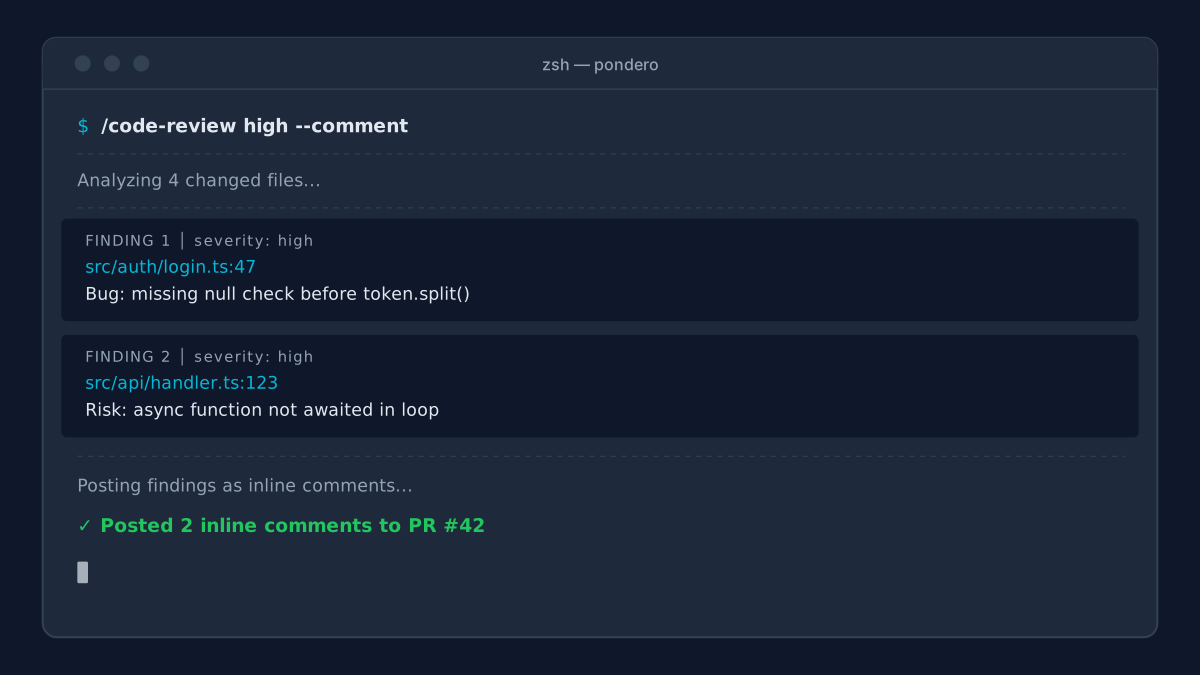
Effort levels: low, default, high
The command accepts an effort level as its first argument:
/code-review
/code-review low
/code-review high
The CHANGELOG documents the syntax but does not specify exactly what changes between levels. Based on the established Claude effort framework: low runs a fast surface scan, checking for obvious bugs and type mismatches without deep reasoning. The default sits in the middle. high runs a more deliberate pass, examining control flow, edge cases, and architectural concerns.
For a small feature branch with straightforward logic changes, low or default is fast and sufficient. For a PR that touches core business logic, authentication, or data pipelines, high is worth the extra time.
Setting up /code-review with GitHub PR comments
What permissions Claude Code needs
Claude Code needs a GitHub token to post inline comments. Set it as the GITHUB_TOKEN environment variable before starting your Claude Code session:
export GITHUB_TOKEN=<YOUR_GITHUB_TOKEN>
claude
The CHANGELOG entry for v2.1.147 does not spell out the exact token scope required. Check the Anthropic Claude Code docs for current scope requirements before generating a token. In GitHub's fine-grained token settings (Settings > Developer settings > Personal access tokens > Fine-grained tokens), set repository access to your target repos and confirm the permission scopes the Anthropic docs specify for --comment.
If you use GitHub Actions or a CI runner, pass GITHUB_TOKEN from the job context directly:
- name: Run Claude Code review
  env:
    GITHUB_TOKEN: ${{ secrets.GITHUB_TOKEN }}
  run: claude -p "/code-review high --comment"
Running the command on an open PR
The command operates on the current branch's open PR. If no PR is open for the current branch, it will not have a target. Open the PR first, then run the review.
# Make sure you're on the feature branch
git checkout feat/my-feature

# Start Claude Code
claude

# Inside the session, run the review
/code-review high --comment
Claude Code reads the diff between your branch and the base branch, analyzes it, and posts findings. If you only want Claude Code to look at specific files rather than the full diff, pass file path arguments:
/code-review high --comment src/auth/login.ts src/auth/session.tsThis scopes the review to just those two files. For large PRs with many files, scoping the review saves time and keeps the GitHub comment thread focused on the areas that matter most.
What the posted review comment looks like in GitHub
Each finding appears as an inline comment on the specific line where the issue lives, same as a human reviewer's inline comment. The comment block includes the identified issue and typically a suggested fix or description of the risk.
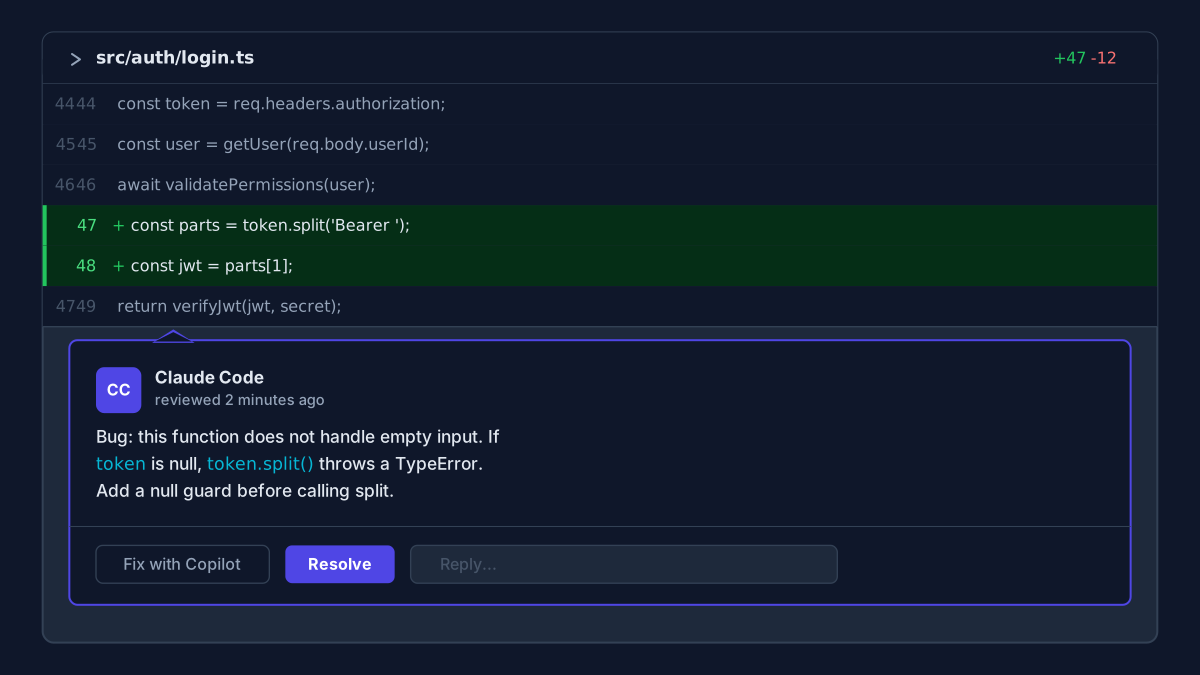
You can reply to these comments, mark them as resolved, or use Copilot's Fix with Copilot button (more on that in the comparison section) to have Copilot apply a fix from the same interface.
Claude Code vs GitHub Copilot code review
Both tools can now post inline review comments to a GitHub PR. The difference is in when they run and who controls them.
How Copilot's code review agent works
GitHub's May 19, 2026 changelog (github.blog) updated Copilot's review flow. Each Copilot review comment now shows a Fix with Copilot button that opens a dialog: choose whether to apply the fix to the current PR or a new branch, pick the model, and add instructions. The Fix batch with Copilot button on Copilot's PR overview lets you send multiple comments to the cloud agent at once.
Copilot's review triggers automatically on PR open. Your team does not invoke it manually. The setup lives in GitHub repository settings, not any developer's terminal. See GitHub Copilot app setup guide for the full setup walkthrough. GitHub Copilot requires Copilot Business or Enterprise.
How Claude Code /code-review works
Claude Code's review is on-demand. You trigger it from your terminal before requesting human review, which means you control the timing. You also control the effort level, the file scope, and whether the output goes to the terminal or to the PR.
The terminal context matters here. Claude Code can see the full project context: your CLAUDE.md, your local settings, any project-specific instructions. A GitHub cloud agent works from the diff and the PR description only.
Which one to use when
Clear decision rule:
Use Claude Code /code-review when you want a deep correctness pass you control before requesting human review. You're running it on your own timing, on a specific subset of files if needed, and with the effort level tuned to the complexity of the change. It catches logic bugs before teammates even see the PR.
Use Copilot's automatic review when you want coverage on every PR without manual invocation. Good for teams where not every developer runs Claude Code locally, or where you want the review to happen as part of the PR-open event rather than as a deliberate dev-side step.
Use both when your team wants the Copilot automatic pass for baseline coverage plus targeted Claude Code deep reviews on complex PRs. A developer running /code-review high --comment before requesting review, combined with Copilot's auto-review on PR open, gives you two independent signals on the same diff.
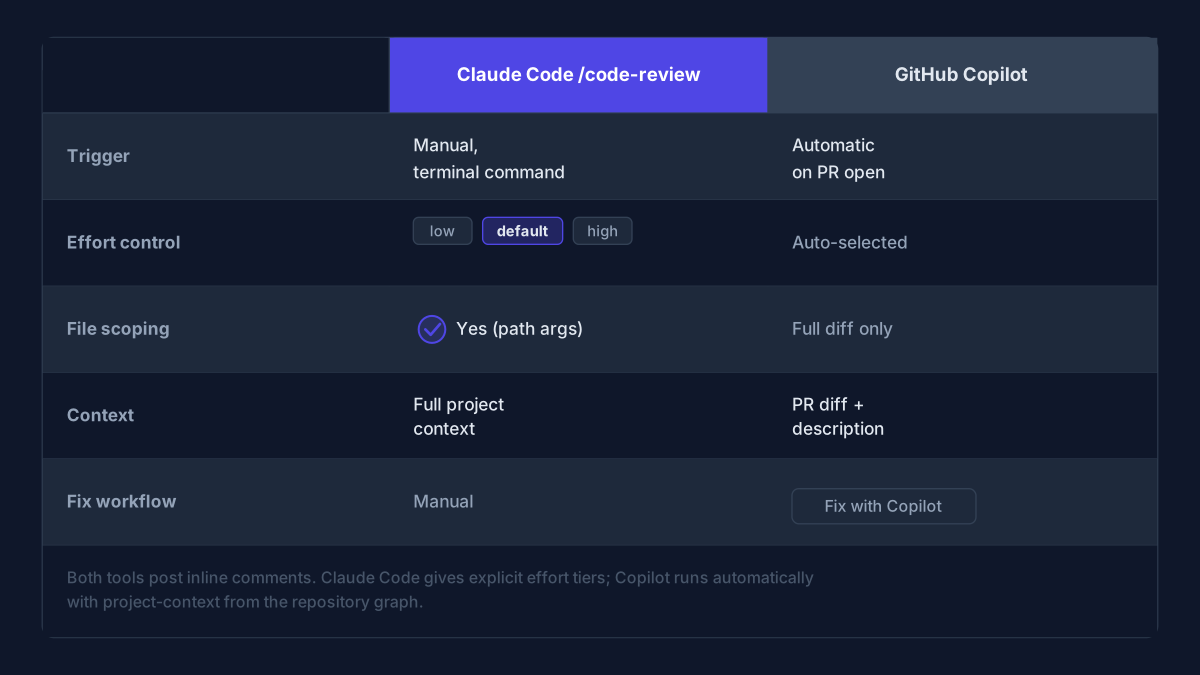
Claude Code /code-review | GitHub Copilot code review | |
|---|---|---|
| Trigger | Manual, from terminal | Automatic on PR open |
| Effort control | Yes (low, default, high) | No (model auto-selected) |
| File scoping | Yes (pass file paths) | Full diff |
| Project context | Full (CLAUDE.md, local settings) | PR diff + description |
| Requires subscription | Claude Code | Copilot Business or Enterprise |
| Result | Inline GitHub PR comments | Inline GitHub PR comments |
| Fix workflow | You act on comments manually | "Fix with Copilot" button applies fix via cloud agent |
Tracking usage: the /usage per-category breakdown
v2.1.149 (shipped May 22, 2026, per npm) added something the tool has needed for a while: a breakdown of where your limit consumption actually comes from.
What /usage now shows
Run /usage inside Claude Code to see your total limit consumption. After v2.1.149, the output splits by category:
- Skills: built-in and custom slash commands that consume context
- Subagents: background sessions and agent dispatches
- Plugins: installed plugin calls
- Per-MCP-server: each connected MCP server listed separately with its own consumption number
That last category is the useful one. If your limits spiked this week and you've been running several MCP servers, /usage now tells you which one is responsible.
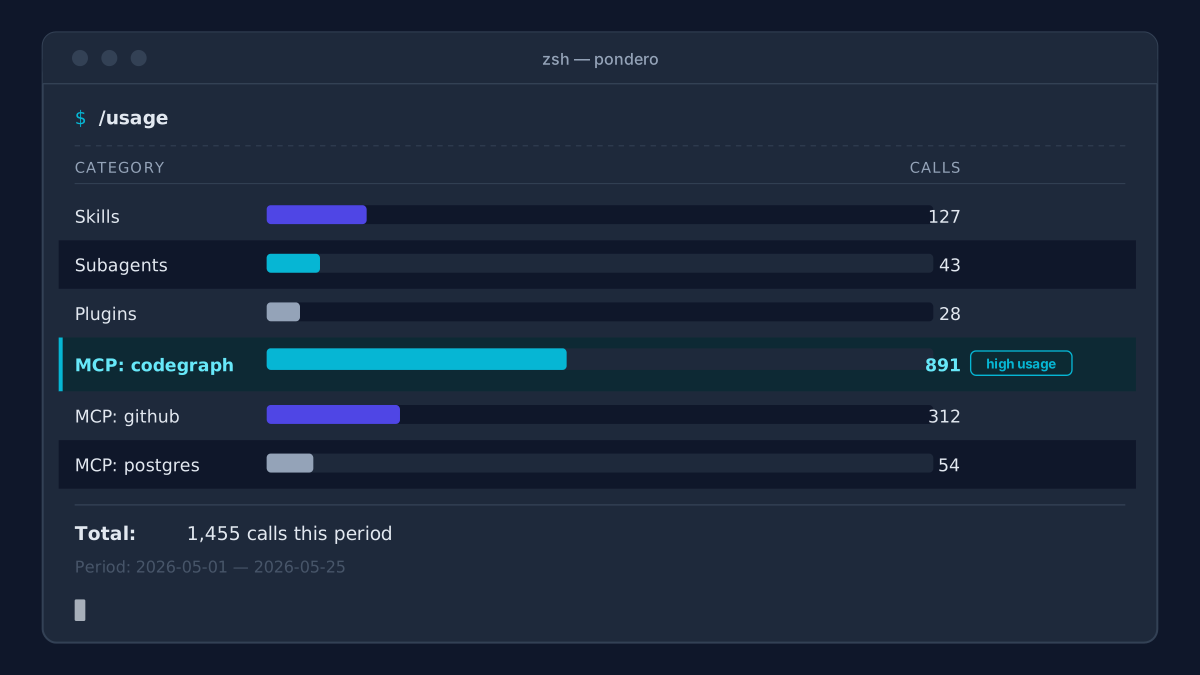
How to spot which MCP server is driving spend
The per-MCP-server row in /usage is granular. Three connected servers, three rows. If one handles significantly more tool calls, that number stands out.
For teams running Codegraph as an MCP server, the /usage breakdown now shows exactly how much of the limit Codegraph's codebase-indexing calls consume versus other connected servers. That visibility lets you decide whether to keep a high-cost server active or deactivate it for sessions where you don't need it.
Teams using n8n as an MCP server now see exactly how much of their limit n8n's tool calls draw down per session, making it easier to decide which automations belong inside Claude Code versus outside it.
The /usage command does not expose a per-server hard cap. To limit a specific server's impact, deactivate it for sessions where you don't need it, or scope it to specific sessions rather than your global MCP config.
The enterprise allowAllClaudeAiMcps setting
Also in v2.1.149: enterprises can now set allowAllClaudeAiMcps in managed settings. This loads claude.ai cloud MCP connectors alongside whatever is listed in managed-mcp.json, eliminating the need to enumerate every connector in the managed config.
Before this, admins had to enumerate each cloud MCP connector in the managed config. Now one setting covers all approved claude.ai connectors. It is opt-in, not a default.
For information on installing and managing skills and plugins in Claude Code, see our Claude Code plugins marketplace guide.
FAQ
Which Claude Code plan includes /code-review?
The command ships with the Claude Code CLI, available to all users at claude.ai/code. The --comment flag requires GITHUB_TOKEN in your environment. Check the Anthropic docs for plan-specific limits on effort levels.
Can I run /code-review without the --comment flag?
Yes. Drop --comment and findings print to the terminal only. Good for a pre-commit scan or for reviewing findings yourself before deciding whether to surface them to the PR.
Does /code-review work on GitLab or Bitbucket?
The v2.1.147 CHANGELOG documents --comment for GitHub PRs only. GitLab and Bitbucket are not mentioned. Check the Anthropic Claude Code docs for the current platform list.
What does "effort level" actually change?
The CHANGELOG does not specify exact parameters. The pattern matches Claude Code's general effort system: low runs a faster, shallower pass for routine changes; high runs a more deliberate analysis covering edge cases and architectural concerns. Run high on auth, payments, or complex state management. low or default is fine for copy updates and variable renames.
Can I cap a specific MCP server's spend after seeing /usage?
Not from inside Claude Code today. Deactivate a high-cost server for sessions where you don't need it, or move expensive tool calls outside Claude Code sessions entirely. Per-server caps do not appear in the v2.1.147-2.1.150 changelogs.
What else shipped this week?
Cursor v3.5 Automations also landed this week with background automation tasks and an expanded Jira integration. That guide covers the Cursor side of the same week's updates.
The --comment flag moves Claude Code's review from your private terminal into the GitHub workflow where your team actually works. For a solo developer, terminal output is fine. For a team doing PR reviews on GitHub, --comment is the flag that changes the collaboration picture.
Run /code-review high --comment on your next complex PR before requesting human review. If the findings are useful, add it to your pre-PR checklist.