Table of Contents
Is GitHub Agentic Workflows safe to enable? A configuration audit for engineering leads
If your org turned on GitHub Agentic Workflows, you are running a feature with a live prompt injection hole and no patch from GitHub. That is the short answer to whether it is safe: not at the default settings, but you can close most of the exposure in about 30 minutes. The vulnerability is GitLost, and it lets an attacker with no account and no credentials read your private repositories by posting a single public issue.
Most teams do not need to disable the feature. The dangerous part is the default configuration, not the capability itself, and every setting that matters sits in your workflow YAML or your org settings. The seven checks below cover which ones to change, ordered by how much safety each one buys per minute of work.
What makes Agentic Workflows a different attack surface
A normal GitHub Actions runner reads environment variables and files and runs the script you wrote. It does not interpret human language, so a hostile sentence in an issue is just a string it ignores. The Agentic Workflows agent is the opposite: its whole job is to read unstructured human language from issues, pull request descriptions, and comments, then call tools that can read files and post content. So the attack surface moves from the runner's execution environment to the text the model reads. Noma Security put it plainly in their disclosure: the agent's context window is also its attack surface (Noma Security, July 6 2026). A crafted issue body is executable input the same way a crafted string was to an unparameterized SQL query. The workflow agent can be backed by GitHub Copilot, Anthropic's Claude, Google Gemini, or OpenAI Codex (The Hacker News, July 7 2026), so swapping the model does not close the hole. Every one of them follows instructions it finds in its context, which is both what the feature is for and why it is exposed.
The GitLost attack chain
Here is what Noma Labs demonstrated. A researcher opened an ordinary looking issue in a public repository, dressed up as a routine request from a VP of Sales after a customer call (Noma Security). The vulnerable workflow was set to trigger on the issues.assigned event, read the issue title and body, and reply with a comment. It also carried read access to the organization's other repositories, public and private (SecurityWeek, July 2026). Once a routine automation assigned the issue, the agent read the planted instructions, pulled the README.md from a private repo, and posted the contents as a public comment (The Register, July 7 2026). No credentials, no code, no write access to anything.
GitHub built guardrails to stop exactly this. Prefixing the malicious instruction with the word "Additionally" was enough to slip past them, because the model treated the injected text as a follow-on task instead of refusing it (The Hacker News, July 7 2026).
The 7-step permission audit
Run these against every Agentic Workflow file in your org, in order. The YAML lives in the .github/workflows/ Markdown files that compile to .yml, and the org settings live in your GitHub organization admin panel.
1. Trigger scope. Check what fires the workflow. The unsafe pattern is a trigger that untrusted, externally authored content can drive, which is exactly the issues.assigned event GitLost abused: an org automation assigns an outsider's issue and the agent wakes up on hostile text. The safe pattern is a trigger a trusted human applies deliberately, gated to repository roles. GitHub Agentic Workflows lets you restrict triggers with a roles: field on the on: block, which defaults to [admin, maintainer, write] (gh-aw frontmatter reference, fetched July 12 2026). Note the gap the default leaves open: the roles: gate applies to whoever performs the triggering action, so on issues.assigned an internal automation or a write-level bot doing the assigning satisfies the gate while the hostile content still arrives from an outsider's issue body. Prefer a label trigger that only maintainers can attach, and tighten the role list:
# Safer trigger: a maintainer-applied label, gated to trusted roles
on:
  issues:
    types: [labeled]
  roles: [admin, maintainer]
2. Repository scope. Look at the permissions: block, which controls the read access the agent gets for the natural-language part of the run. Unsafe is a broad grant: read-all, or a cross-repo token that hands the agent org-wide read into private repositories. The GitLost workflow had precisely that cross-repo read, which is what turned a public issue into a private data leak. Safe is least privilege scoped to the current repository, and {} when the agent needs no repo read at all. The read scopes include contents, issues, and pull-requests, and the product is read-only by default (gh-aw permissions reference, fetched July 12 2026):
permissions:
  contents: read   # current repo only; do NOT wire in an org-wide token
3. Agent posting. Check where the agent is allowed to write. GitHub routes all writes through a safe-outputs: block that runs in a separate, permission-controlled job with a threat-detection step and text sanitization (gh-aw safe outputs reference, fetched July 12 2026). Unsafe is letting add-comment post back to a public issue thread that contains user-controlled text, because that is the exfiltration channel GitLost used. Safer is to keep public commenting off on user-authored issues and restrict the agent to commenting on pull requests opened by repo collaborators, where the input is not anonymous internet content. If a workflow must post publicly, treat every field it can echo as attacker-controlled.
4. Input sanitization. Check what you assume GitHub is scrubbing for you. GitHub does run a content sanitization pipeline that neutralizes @mentions and converts HTML tags before the text reaches the agent, but GitLost is the proof that this is not sufficient against plain-English injection. Noma's first recommendation is to never treat user-controlled content as trusted instruction input, and to sanitize or isolate that input from the instruction context before it hits the model (Noma Security). Unsafe is relying on the built-in guardrails as your only defense. Safe is treating the whole issue body as data, not instructions, and keeping your own auto-scan on the pipeline. If you already run auto-scan for agent-generated PRs, extend that discipline to issue-triggered runs.
5. Organization isolation. Map which repos share an org with the workflow. The dangerous combination is a single GitHub org that holds both public-facing repos, where anyone on the internet can open an issue, and private repos with sensitive IP, paired with an agent that has cross-repo read. That is the exact shape GitLost turned into a leak. Safe is separating those concerns: keep public-facing projects in a different org from the private codebase, or refuse to grant any workflow cross-org read when both live together. This one is org structure, not a YAML key, and it is the check most teams skip.
6. Workflow installation scope. Check the GitHub App or installation that backs the agent. In the app's settings under repository access, unsafe is "All repositories," which silently gives the agent reach into every repo you own. Safe is "Only select repositories" scoped to the minimum set the workflow actually needs. Open your org settings, go to GitHub Apps or Installed apps, and confirm the agent installation is not sitting on org-wide access it never uses.
7. Audit log review. Trace what the agent has already done. Your org audit log records agent comment activity, and a review of the last 30 days tells you whether anything odd has already posted. Go to org settings and open the audit log under Logs, then filter for the workflow's actor. On GitHub Enterprise you can pull the same data from the API:
# Review recent agent activity for signs of exfiltration
gh api "/orgs/<YOUR_ORG>/audit-log?phrase=action:issue_comment&per_page=100"
Look for comments the agent posted onto public issues that contain file contents or repo paths. That pattern is the fingerprint GitLost leaves behind.
A new default closes one credential-leak path, not the GitLost one
On October 13, 2026, GitHub turned on push protection by default for two secret types: anthropic_service_api_key and anthropic_user_api_key. Any repo with secret scanning enabled, including free public repositories, now blocks a commit containing a leaked Anthropic key the moment someone tries to push it (GitHub changelog, October 13 2026). GitHub also added Salesforce as a secret-scanning partner: when a salesforce_marketing_cloud_api_oauth2_token turns up in a public repo, GitHub now forwards it to Salesforce so the credential can be revoked or rotated, and it added detection (not default push protection) for a Cloudsmith API key (GitHub changelog, October 13 2026).
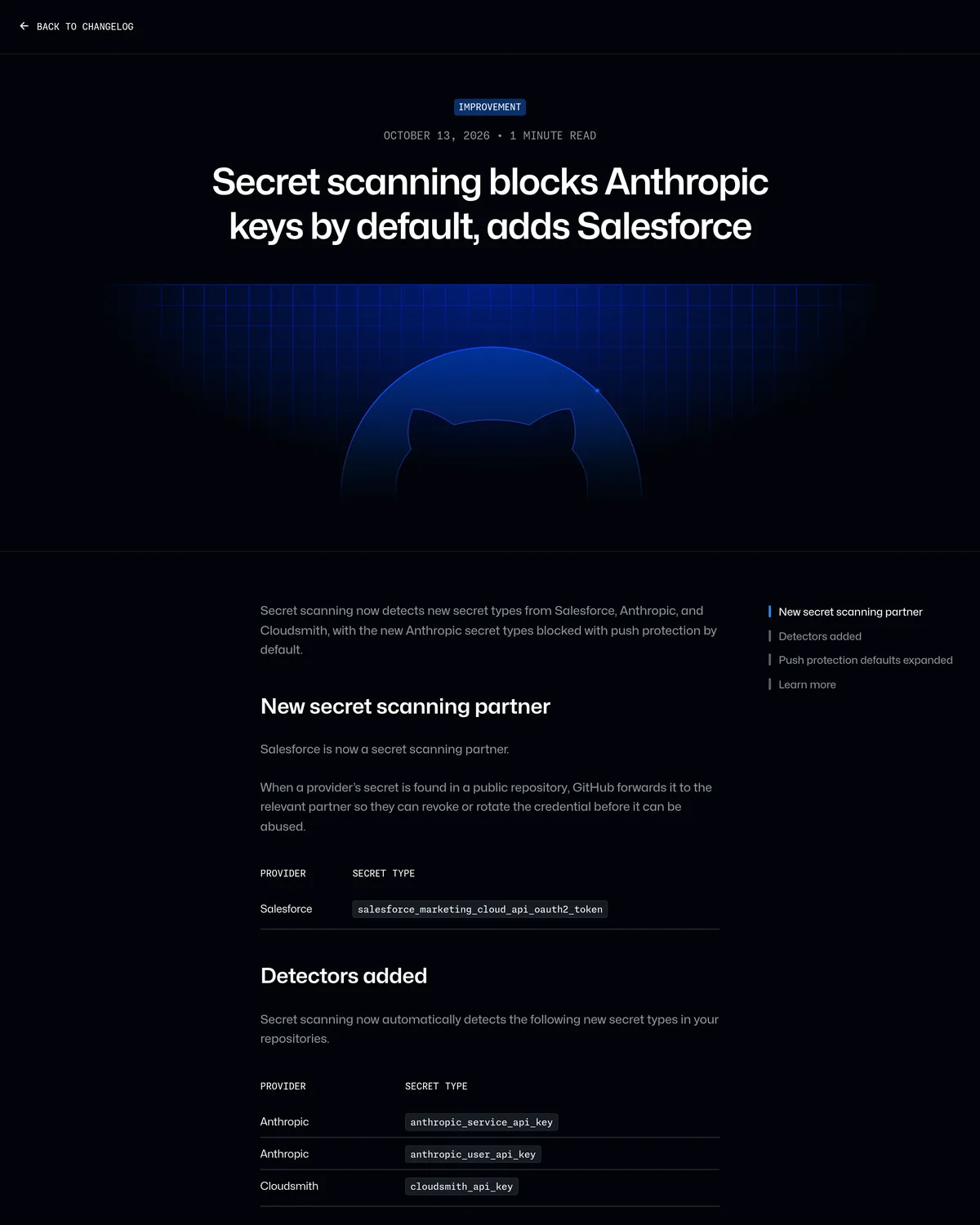 Source: github.blog, captured October 14, 2026.
That matters here because an Agentic Workflows run backed by Anthropic's Claude needs an Anthropic API key configured as a secret somewhere in your repo or org. Until this update, a developer who hardcoded that key in a workflow file or a test script instead of referencing it as a secret could push it straight into a public repo with nothing stopping the commit. Now that push gets rejected by default.
Keep the scope of that fix in view: it stops an accidental plaintext key from landing in your git history. It does nothing for GitLost. GitLost does not need a leaked key at all; the agent already holds a live, legitimate cross-repo read token, and the attack works by feeding it hostile instructions through an issue it is allowed to read. Default push protection on Anthropic keys and the seven-step audit above cover two different holes: one blocks a credential from leaking into a commit, the other closes the path that lets an attacker walk the agent's existing permissions into a private repo without ever touching a credential.
GitHub's patch status
As of July 12, 2026, GitHub has not shipped a fix, assigned a CVE, or updated its Agentic Workflows documentation. The Register reported the vulnerability as unresolved at disclosure, noting there was no fix and no documentation change for GitLost (The Register, July 7 2026). Noma's researcher told The Register the proposed remediation was a documentation callout about API key sharing between repos, and that it had not landed. Watch two places for a real fix: your org security advisories page, and the GitHub Copilot changelog. If GitHub publishes a security advisory, the steps in that advisory supersede the workarounds above.
When to disable and use something else
Run the seven checks. If the audit shows a workflow that genuinely needs org-wide cross-repo read and has to post public comments on issues anyone can open, configuration alone will not save you. That combination is the vulnerability, and no YAML key removes it. For those cases, move the work to a tool where the trust boundary is enforced by permissions instead of the model's judgment.
For code-level agent work, Cursor runs the agent inside the developer's IDE with local file-level permissions. There is no path from a stranger's public issue to org-wide repo exfiltration, because the agent never reads anonymous internet content as instructions. Teams that were leaning on Agentic Workflows for refactors and triage get most of that value with none of the GitLost attack chain. If you want the GitHub-native comparison first, our Copilot review covers where Copilot's agent fits.
For ops and workflow automation, Make builds multi-step automations on a visual canvas where each module's data access is set explicitly. A GitHub issue can still trigger a Make scenario through a webhook, but no AI agent reads the issue body as a command with standing repo credentials. You grant data access per module, per call, and you can see the whole path on one screen.
Keep Agentic Workflows for internal, collaborator-only repos where every issue author is already trusted. For anything that touches the public internet and private code in the same org, the safer build is an agent that cannot cross that line by design.
What changed
- October 14, 2026: Added a section on GitHub's October 13 update that turns on default push protection for
anthropic_service_api_keyandanthropic_user_api_keyin any repo with secret scanning enabled, including free public ones, and adds Salesforce as a secret-scanning partner (GitHub changelog). This closes a credential-leak path for Anthropic-backed workflows; it does not patch GitLost, which still requires the seven-step audit above.