
Table of Contents
GitHub Copilot Cloud Agent Pricing: Which Model to Use (May 2026)
If you got the June 1 billing notice and want a clean answer before the meter starts: pick Auto for mixed workloads, route batch and routine work to Claude Haiku 4.5 or GPT-5.4 mini at 0.33x, keep Claude Sonnet 4.5/4.6 or GPT-5.2-Codex at 1x for the workday default, and only reach for Claude Opus 4.7 at 15x on architecture-grade tasks that genuinely need it. The single most expensive mistake teams are making right now is leaving every cloud agent task pinned to Opus 4.7. That is roughly 45 times the cost of running the same task on Haiku 4.5, and for "fix the README" or "bump this dependency" it buys you nothing.
GitHub shipped two changes in the week of May 18-20, 2026 that make the cost picture sharper. Fast, low-cost models came to the cloud agent on May 18 (per the GitHub changelog). Auto model selection with a 10% discount landed in VS Code on May 20 (per the follow-up changelog entry). The full multiplier table runs from 0.33x to 15x. Most teams have never opened that table.
This guide pulls the table from the official Copilot billing docs (fetched 2026-05-28), maps it to actual task types, and closes with a pick for three common team sizes.
Why Model Choice Matters Starting June 1
A premium request is a single unit drawn from your plan's monthly request pool. One chat turn or one cloud agent task uses one premium request multiplied by the model's cost multiplier. Pick a 1x model, you spend 1 unit. Pick a 0.33x model, you spend a third of a unit. Pick a 15x model, you spend 15 units.
That ratio matters because the June 1 change moves Copilot Business and Enterprise to usage-based billing for premium requests beyond the plan-included pool. (We covered the mechanics in our Copilot usage-based billing guide.) Once the meter is on, the model picker is the lever. The plan tier sets the floor. The model multiplier sets the slope.
The two May changes shift the math in your favor if you use them.
Fast cheap models for the cloud agent (May 18). Claude Haiku 4.5 and GPT-5.4 mini are now available to cloud agent tasks at a 0.33x multiplier. Per the GitHub changelog announcing the change: "The following models are now available, in addition to the existing options: Claude Haiku 4.5 (0.33x multiplier), GPT-5.4-mini (0.33x multiplier)." Both are pitched at simple work.
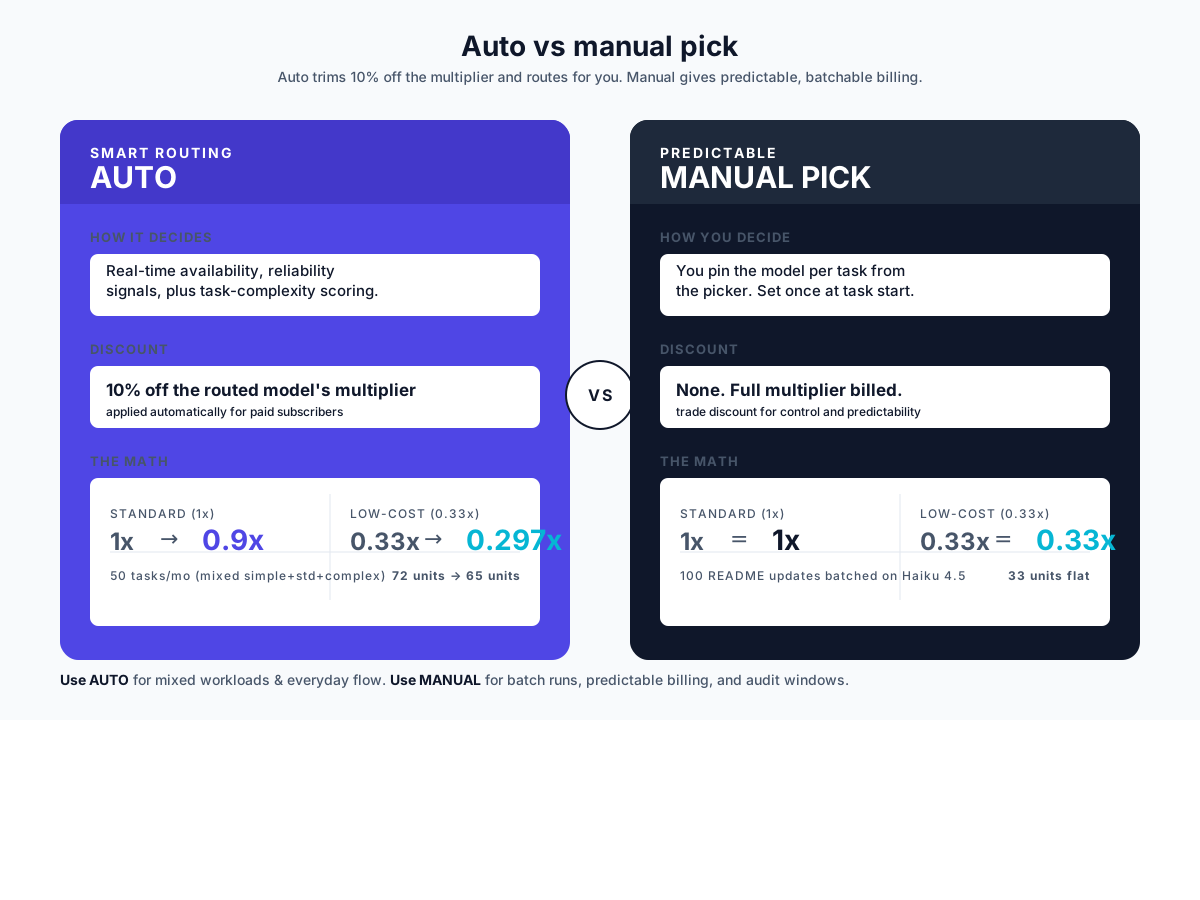
Auto model selection with a 10% discount (May 20). Set the picker to Auto and Copilot routes each task to a model based on availability, reliability signals, and task complexity. Paid subscribers get a 10% reduction on the model multiplier when Auto handles the request. A 1x model gets billed at 0.9x. A 0.33x model gets billed at 0.297x. Per GitHub: "Paid subscribers get a 10% discount on the model multiplier when using auto."
All Cloud Agent Models and What They Cost
Eight model slots are available to the cloud agent today, plus Auto. The table below mirrors what the official docs publish for paid plans (fetched 2026-05-28).
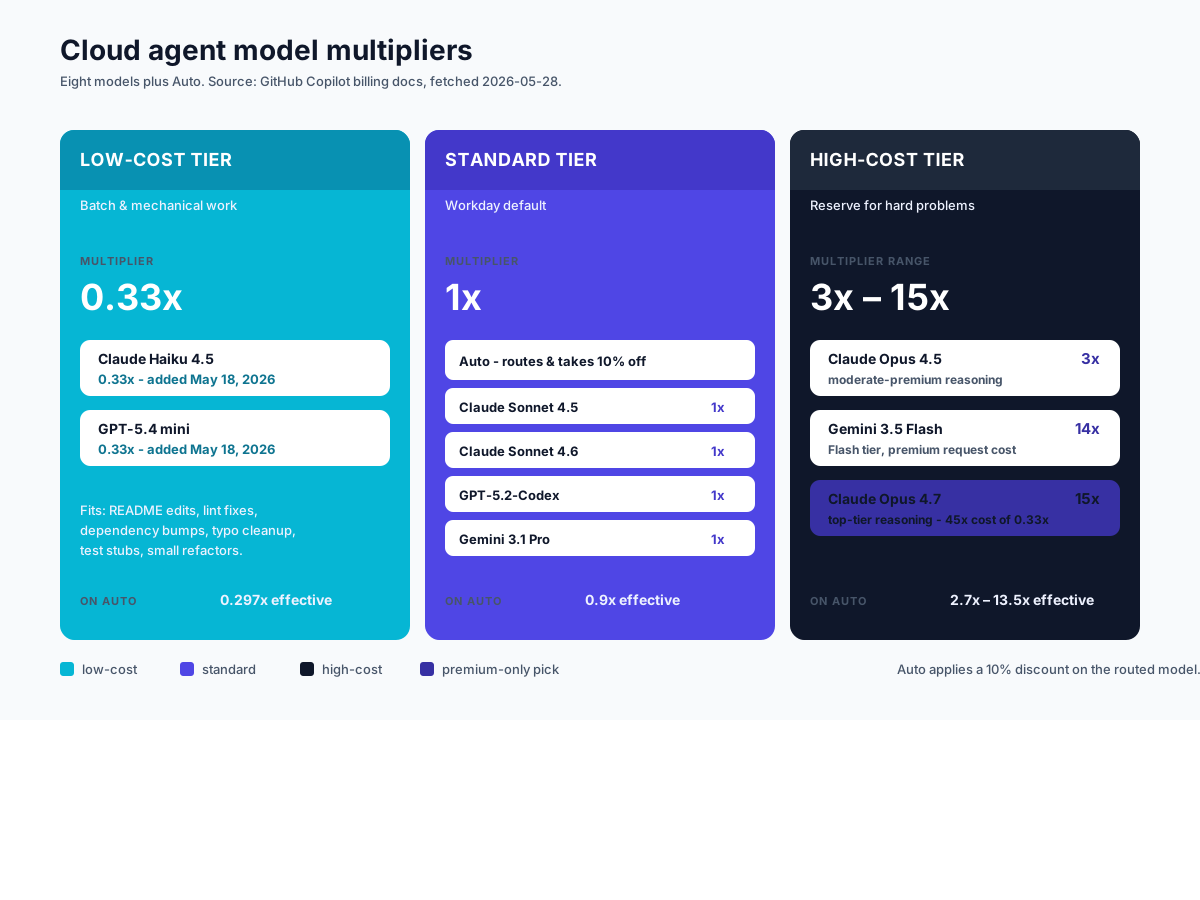
| Model | Multiplier (paid plans) | Notes |
|---|---|---|
| Auto | Variable, 10% off the routed model | Routes to the most suitable model based on task and availability. |
| Claude Haiku 4.5 | 0.33x | Fast, cheap. Added to cloud agent May 18, 2026. |
| GPT-5.4 mini | 0.33x | Fast, cheap. Added to cloud agent May 18, 2026. |
| Claude Sonnet 4.5 | 1x | Workday default for general coding tasks. |
| Claude Sonnet 4.6 | 1x | Workday default with newer training cutoff. |
| GPT-5.2-Codex | 1x | Code-tuned GPT variant. |
| Gemini 3.1 Pro | 1x | Google's general-purpose Pro model. |
| Claude Opus 4.5 | 3x | Higher reasoning at a moderate premium. |
| Gemini 3.5 Flash | 14x | High-throughput Flash tier at a steep multiplier for premium reqs. |
| Claude Opus 4.7 | 15x | Top-tier reasoning. Reserve for hard problems. |
A few things to call out. Gemini 3.5 Flash at 14x looks counterintuitive (Flash is normally the low-cost tier elsewhere). The multiplier reflects request cost on GitHub's metering, not the API tier name. Read the multiplier, not the brand. The 0.33x tier covers Haiku 4.5 and GPT-5.4 mini equally; pick the family your team already trusts. Auto applies a flat 10% discount on whatever it routes to: a 1x model bills at 0.9x, the 0.33x tier at 0.297x.
Which Model Fits Which Task
The multiplier table is reference material. The actionable question is which model fits which work. Here is how we draw the lines.
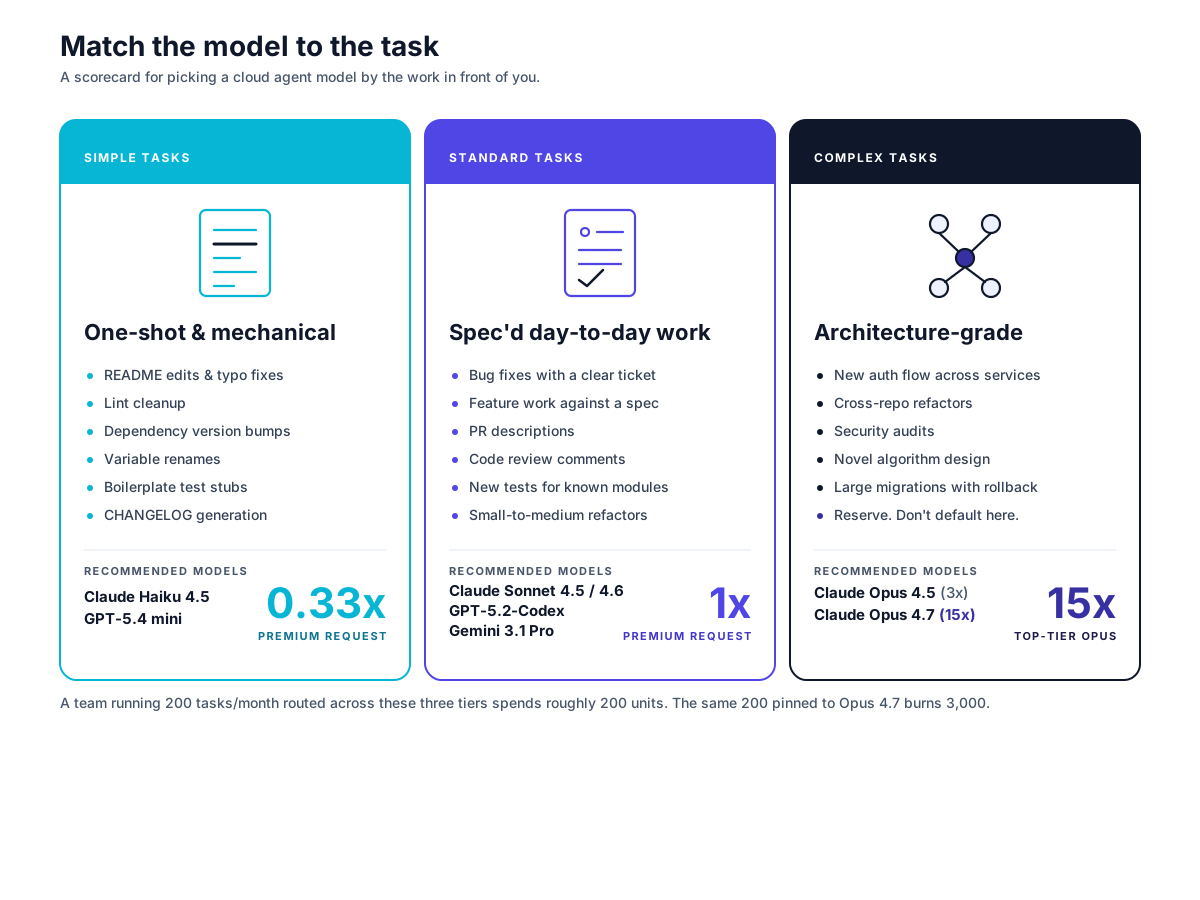
Simple tasks (0.33x tier): Haiku 4.5 or GPT-5.4 mini
What qualifies: README edits, typo fixes, variable renames, dependency version bumps, lint cleanup, boilerplate test stubs, CHANGELOG generation, small refactors where the spec is one sentence. If the task fits in one or two file diffs and the answer is mostly mechanical, this is your tier. Pick Haiku 4.5 if your shop runs on Anthropic; pick GPT-5.4 mini if you are an OpenAI shop. Both shipped to the cloud agent on May 18, 2026 (per the GitHub changelog).
Standard tasks (1x tier): Sonnet, Codex, or Gemini Pro
What qualifies: bug fixes where expected behavior is documented in a ticket, feature work against a clear spec, PR descriptions, code review comments, new tests for an existing module, small-to-medium refactors. Most of a normal day.
Claude Sonnet 4.5 and 4.6, GPT-5.2-Codex, and Gemini 3.1 Pro all bill at 1x. Sonnet 4.6 has the newer training data. GPT-5.2-Codex is code-tuned and tends to be strongest on pure completion-style tasks. Gemini 3.1 Pro is the right pick if your stack lives on Google Cloud.
Complex tasks (3x to 15x tier): Opus territory
What qualifies: a new authentication flow across three services, cross-repo refactors spanning multiple PRs, security audits, novel algorithm work, large migrations where the agent has to reason about ordering and rollback. Tasks where a wrong answer costs hours of debugging downstream.
Claude Opus 4.5 at 3x is the moderate-premium pick. Claude Opus 4.7 at 15x is the heavyweight; the 45x cost ratio versus Haiku 4.5 is real money. Reserve it for cases that genuinely need its reasoning depth. A team running 200 cloud agent tasks per month at Opus 4.7 burns 3,000 premium request units. The same 200 routed correctly (60% to 0.33x, 30% to 1x, 10% to 3x-15x) lands closer to 200 units. An order of magnitude.
Auto Mode vs Manual Pick: Which Saves More
The 10% Auto discount is concrete savings. The question is whether you want Auto choosing for you or whether you want to pick.
How Auto routes
Per the GitHub changelog: Auto "weighs real-time model availability and reliability signals, then evaluates your task across several dimensions like reasoning, code generation complexity, bug diagnosis difficulty, and tool orchestration needs to select the optimal model." It also routes along cache boundaries to cut cache reload costs. Hover on a response to see which model Auto picked, which is useful for cost auditing.
The 10% math
Example: a developer running 50 cloud agent tasks per month on Pro. If those tasks split evenly across simple (0.33x), standard (1x), and complex (3x), manual picking spends roughly 50 * (0.33 + 1 + 3) / 3 = 72 units. The same workload on Auto spends 72 * 0.9 = 65 units. Seven units saved per month. Small, but free.
The case for Auto: you do not want to think about model choice on every task and the 10% discount is automatic. The case for manual: predictable billing, batch jobs where you want every task on 0.33x, and audit-window discipline. If you are running 100 README updates, manual-pinning to Haiku 4.5 beats Auto's 10% on whatever it picks; Auto's evaluator might still send some to 1x.
How to Set the Model for a Cloud Agent Task
The cloud agent model is set at task start. Per the official docs on changing the AI model, you can pick a model from any of these entry points:
- Assigning an issue to Copilot on GitHub.com
- Mentioning
@copilotin a pull request comment on GitHub.com - Starting a task from the agents tab or agents panel
- GitHub Mobile
- The Raycast launcher
The picker is a dropdown. Pick the model and submit the task. Anywhere the picker is not shown, Auto runs by default. That is GitHub's deliberate default for low-friction entry points.
For organization-level control, Copilot Business and Enterprise admins set model availability policies under Copilot settings, the same surface used for the Memory controls we cover in our Copilot Memory controls guide. Org admins can restrict which models are available to seats, which is the right lever if you want to disable Opus 4.7 across a team to cap downside.
If you are wiring Copilot cloud agent into a workflow for the first time, our Copilot App setup guide walks through the installation and permissions steps before you get to the model picker.
Three Scenarios and What to Pick
The right pick depends on team shape. Three illustrative cases.
Example: Solo developer on Pro running ~50 tasks/month. Pin Auto for general cloud agent work. The 10% discount is free, you do not need predictability for billing audits at this scale, and the routing handles the simple-vs-standard call for you. Reach for Haiku 4.5 manually only when you have a known batch of mechanical tasks. Skip Opus 4.7 entirely unless you hit a hard architecture problem; the 15x multiplier eats a Pro plan's pool fast. GitHub Copilot Pro at the price listed on the Copilot plans page gives you the full picker.
Example: Team of 5 on Business with varied task types. Default the team to Auto via org-level model policy. Allow Sonnet 4.6 and GPT-5.2-Codex as manual overrides for senior engineers who want predictability on bug fixes. Restrict Opus 4.7 to two designated seats (tech leads). This caps spend without throttling the team's daily work. Use the model availability admin controls to enforce.
Example: Enterprise team on 50 seats wanting consistent behavior. Lock the model policy. Pin Auto for the bulk of seats. Allow Sonnet and Codex for a senior engineering pod. Make Opus 4.7 a request-to-unlock model rather than a default. The behavior consistency wins matter more than per-task savings at this scale. The June 1 billing change makes a board-defensible model policy the difference between predictable spend and a surprise bill.
FAQ
Does model choice affect quality, or just cost? Both. The 0.33x models genuinely are weaker on multi-step reasoning. A README edit lands fine on Haiku 4.5; a cross-service refactor will not. Match the model to the task. The cost ratio reflects capability, not arbitrary pricing.
Can I switch models mid-task? No. Model selection is set at task start. If you need a different model, cancel and restart the task with the new pick.
What happens if I hit my premium request limit? On Pro plans, additional requests are blocked or billed depending on your overage settings. On Business and Enterprise after June 1, overage rolls onto usage-based billing at the published per-request rate. Our usage-based billing guide covers the metering details.
Does the 10% Auto discount stack with other discounts? Per the official changelog, the 10% applies to the model multiplier when Auto routes the request. It is not described as stackable with other discounts. Check your plan's billing surface for the rendered rate.
Which models are available on Copilot Free? Copilot Free does not include the cloud agent. Free covers chat and completions with a smaller monthly pool. The cloud agent (and the full model picker) starts at Pro.
The Pick
If you are auditing your Copilot spend ahead of June 1: open the model picker once, set the default to Auto, and stop pinning Opus 4.7 by habit. That single change handles most of the cost optimization for most teams. Then go through your last 30 cloud agent tasks and ask which ones genuinely needed deep reasoning. The honest answer is usually three or four. Route the rest to 0.33x manually for batches, and let Auto handle the everyday flow. The cost picture clears up fast.
If you have not enrolled yet and you want the cloud agent itself, GitHub Copilot Pro is the entry point (current rate on the Copilot plans page). Business is the right step up once you need org-level model policies. Enterprise unlocks the deeper admin controls and is priced on the GitHub sales surface.
Some links above are affiliate links. We may earn a commission at no extra cost to you. See our affiliate disclosure for details.