Cline Review (2026): Desktop Grows Into a Lightweight IDE, ClinePass Drops Its $4.99 Intro, Defaults Flip Again
Published September 15, 2026 · Updated October 26, 2026 · by Pondero Reviews
The short version
Cline Desktop v0.0.49 adds a session diff pane, a project file tree, a built-in terminal, and Ollama and LM Studio management. ClinePass now lists a flat $9.99/month with no $4.99 first month, and the Cline provider's unpinned default changed three times in 13 days. Rating, verdict, and pricing re-checked 2026-10-26.
Pros
- ✓Desktop v0.0.49 (October 26) adds a Changes pane with a per-file diff for the last turn or the whole session, a project file tree with git status, an integrated terminal, and a Local Models page for Ollama and LM Studio, per the Cline releases
- ✓The MCP output paging that only the CLI, SDK, and Desktop had on October 1 reached the VS Code extension in v4.1.23 on October 7
- ✓SDK v0.2.0 fixes an auto-compaction size estimate that ran about 7x high after the first compaction and re-triggered compaction every few tool calls
- ✓Opening a task that is already running in another Cline app now reattaches to it instead of starting a second run you could not stop (CLI v3.0.74, Desktop v0.0.49)
- ✓BYOK is still free, and ClinePass lists 14 open-weight models for $9.99/month
Cons
- ✕The ClinePass $4.99 first month is gone from cline.bot/cline-pass as of October 26; the page now shows $9.99/month only
- ✕With no model pinned, the Cline provider's default moved three times in 13 days (Claude Sonnet 5.5 on Oct 13, Gemini 4 Argon on Oct 16, Claude Sonnet 5.5 again on Oct 26), and v4.1.26 changes defaults for most other providers too
- ✕Desktop still ships regressions: SSH remotes failed to connect from v0.0.38 until v0.0.45 on October 8, and v0.0.46 broke Marketplace plugins until v0.0.47
- ✕The ClinePass marketing page lags the app: v4.1.26 makes Kimi K3.1 Pro the ClinePass default, and the page does not list it
- ✕SSO, RBAC, and the JetBrains build still sit behind custom-priced Enterprise
Cline Review (2026): Desktop Grows Into a Lightweight IDE, ClinePass Drops Its $4.99 Intro, Defaults Flip Again
Cline stays at 4.5, and the reason it does not move up is in its own changelog. Desktop v0.0.49, released October 26, is the first build where you can review every file the agent changed, browse the project tree, and open a terminal without leaving the app, per the desktop-v0.0.49 notes. In the same month, SSH remotes stayed broken until v0.0.45 and a plugin regression shipped in v0.0.46, per the Cline releases. Pricing moved too: cline.bot/cline-pass no longer shows the $4.99 first month this review quoted on October 1, only $9.99/month (checked 2026-10-26).
The call, before the detail. Solo dev: BYOK free, pin your model, add ClinePass when your open-weight usage clears break-even. Team that wants an agent app rather than an editor plugin: Desktop is ready to standardize on. Org with compliance needs: Enterprise, unchanged.
What changed since October 1
Cline shipped 27 releases across its four surfaces (VS Code extension, CLI, Desktop, SDK) between October 2 and October 26, per the GitHub releases list. The ones that change a buying decision:
| Release | Date (UTC) | What changed | Source |
|---|---|---|---|
| desktop-v0.0.42 | Oct 2 | /compact slash command; Connectors become the default Customize tab | Cline releases |
| v4.1.23 | Oct 7 | Oversized MCP output can be paged with read_files in the extension too | Cline releases |
| desktop-v0.0.45 | Oct 8 | SSH remotes start again; they had failed since v0.0.38 | Cline releases |
| v4.1.24 | Oct 13 | Unpinned Cline provider defaults to Claude Sonnet 5.5 | Cline releases |
| v4.1.25 | Oct 16 | Cloud sessions; unpinned default becomes Gemini 4 Argon | Cline releases |
| desktop-v0.0.47 | Oct 16 | Marketplace plugins load again after v0.0.46 broke them | Cline releases |
| desktop-v0.0.49 | Oct 26 | Changes pane, project files panel, terminal, Local Models page | Cline releases |
| v4.1.26 | Oct 26 | Unpinned default back to Claude Sonnet 5.5; Local or Cloud model toggle | Cline releases |
| sdk/sdk/v0.2.0 | Oct 26 | First SDK tag past v0.0.x; compaction and reattach fixes | Cline releases |
One October 1 con is now closed. That review noted the MCP output cache had reached the CLI, SDK, and Desktop but not the VS Code extension. Extension v4.1.23 fixed that on October 7: an MCP tool that returns more than fits in context now hands the model a preview plus a link it can page through, per the v4.1.23 notes. Cloud sessions, which run a task in a hosted sandbox on a GitHub repo and keep going after the editor closes, arrived in v4.1.25 and were covered in our October 17 news item.
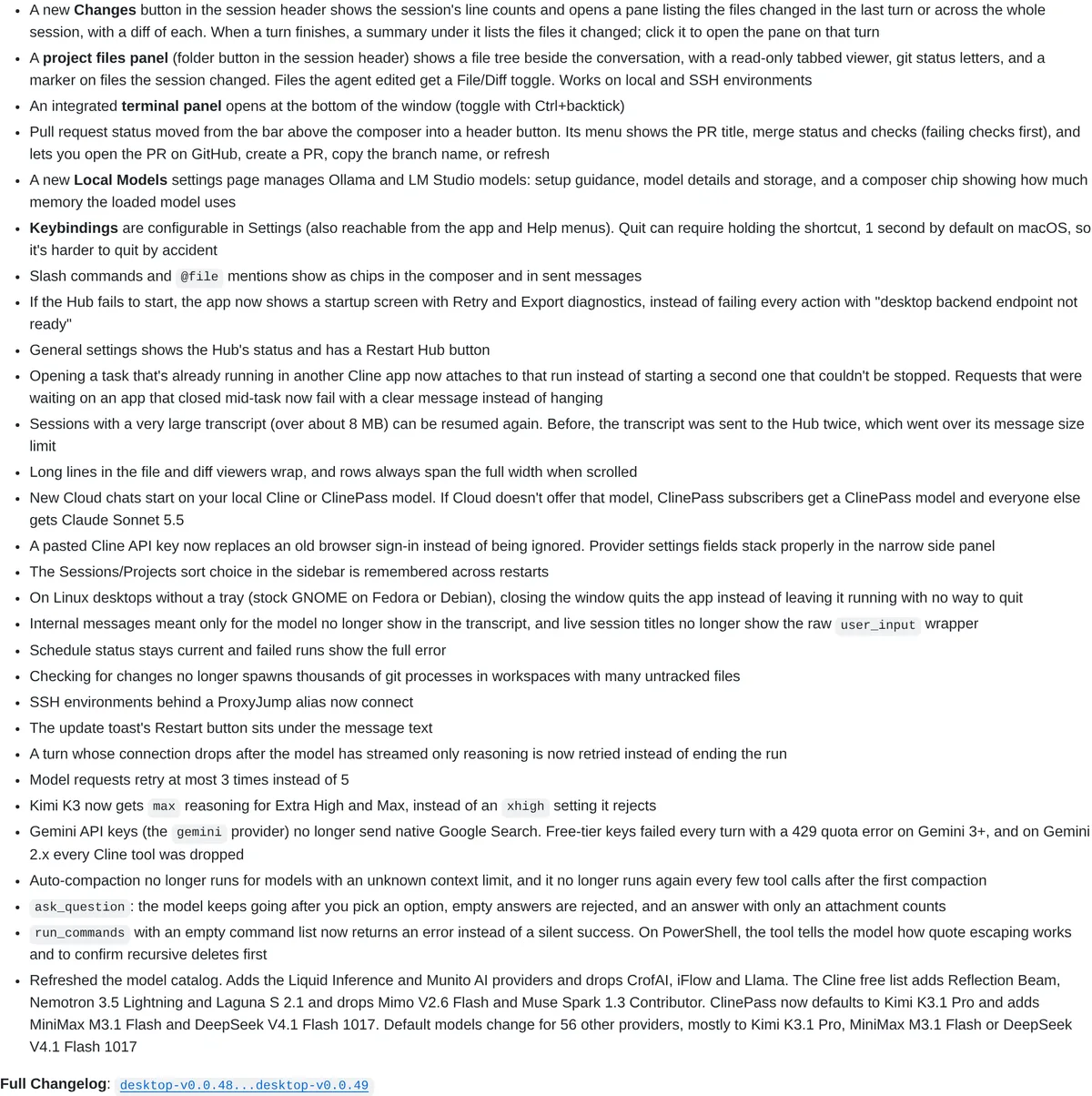
Desktop v0.0.49 is the first build you could live in
Before this release, checking the agent's work in Desktop meant reading the transcript, then switching to your editor to see the code. Version 0.0.49 removes most of those trips, per the release notes:
- A Changes button in the session header opens a pane listing every file changed in the last turn or across the session, with a diff for each. A summary under each finished turn links straight to it.
- A project files panel puts a file tree beside the conversation, with a read-only tabbed viewer, git status letters, a marker on files the session touched, and a File/Diff toggle on edited files. It works over SSH as well as locally.
- A terminal panel opens at the bottom of the window with Ctrl+backtick.
- A Local Models settings page manages Ollama and LM Studio models, with a composer chip that shows how much memory the loaded model uses.
 Source: github.com, captured October 26, 2026.
Smaller fixes in the same build matter if you run long sessions. Transcripts over about 8 MB can be resumed again; before, the app sent the transcript to the Hub twice and blew past its message size limit, per the same notes. A Hub that fails to start now shows Retry and Export diagnostics instead of failing every action with "desktop backend endpoint not ready." Pull request status moved into a header button that lists failing checks first.
The viewer is read-only. You still edit by hand in a real editor, so Desktop is a review-and-steer surface, which is the right shape for an agent-first workflow and the wrong one if you want to type into the file the agent just changed, which Cursor still does in one window.
Two harness fixes that touch your token bill
Both landed on October 26 in the shared harness that the CLI, SDK, and Desktop run on, and the compaction fix is in extension v4.1.26 as well.
Auto-compaction is the first. After a session's first compaction, Cline's size estimate ran about 7x high, so compaction re-ran every few tool calls, per the SDK v0.2.0 notes. Each compaction asks the model for a summary, which costs tokens on BYOK and throws away detail the agent might have needed. The estimate now uses the messages as actually sent. Compaction also stops running for models with an unknown context limit.
Duplicate runs are the second fix: opening a task that was already running in another Cline app used to start a second run that could not be stopped, per the CLI v3.0.74 notes; now it reattaches. If you drive the same task from the CLI and Desktop, two runs could be going at once and you could stop only one. Update both.
Smaller items from the same day: model requests retry at most 3 times instead of 5, and Gemini free-tier keys stop failing every turn with a 429 error, per the v4.1.26 notes. On the CLI, cline hub status and cline doctor now time out after 3 seconds instead of hanging on a frozen Hub, per the CLI v3.0.74 notes.
The unpinned default changed three times in 13 days
This review has told readers to pin their model since September, and October made the case again. With no model chosen, the Cline provider used Claude Sonnet 5.5 from v4.1.24 (October 13), Gemini 4 Argon from v4.1.25 (October 16), and Claude Sonnet 5.5 again from v4.1.26 (October 26), per the Cline releases. The surfaces did not even agree in between: Desktop v0.0.48 went back to Sonnet 5.5 on October 17, nine days before the extension did, per the v0.0.48 notes.
The same v4.1.26 catalog refresh changes defaults for most other providers, mostly to Kimi K3.1 Pro, MiniMax M3.1 Flash, or DeepSeek V4.1 Flash 1017, and the release notes say outright to expect a different default if you have not pinned one, per the v4.1.26 notes. A different default model usually means a different per-token price, so an unpinned setup can change your bill on an auto-update. Pin a model per provider in Settings > API Configuration, and pin the new Cloud model separately: v4.1.26 stores it apart from your local models.
Which Cline surface to pick
| If you are... | Use | Why | Source |
|---|---|---|---|
| A VS Code user who wants an agent in the sidebar | Extension v4.1.26 | Same harness fixes, plus Cloud tasks from the editor | Cline releases |
| Running agents on local models | Desktop v0.0.49 | Local Models page manages Ollama and LM Studio | Cline releases |
| Reviewing agent work across many files | Desktop v0.0.49 | Changes pane and per-file diffs | Cline releases |
| Scripting agents in CI or over SSH | CLI v3.0.74 | Reattach fix, cline doctor no longer hangs | Cline releases |
| Embedding Cline in your own product | SDK v0.2.0 | First tag past v0.0.x | Cline releases |
ClinePass pricing, October 26, 2026
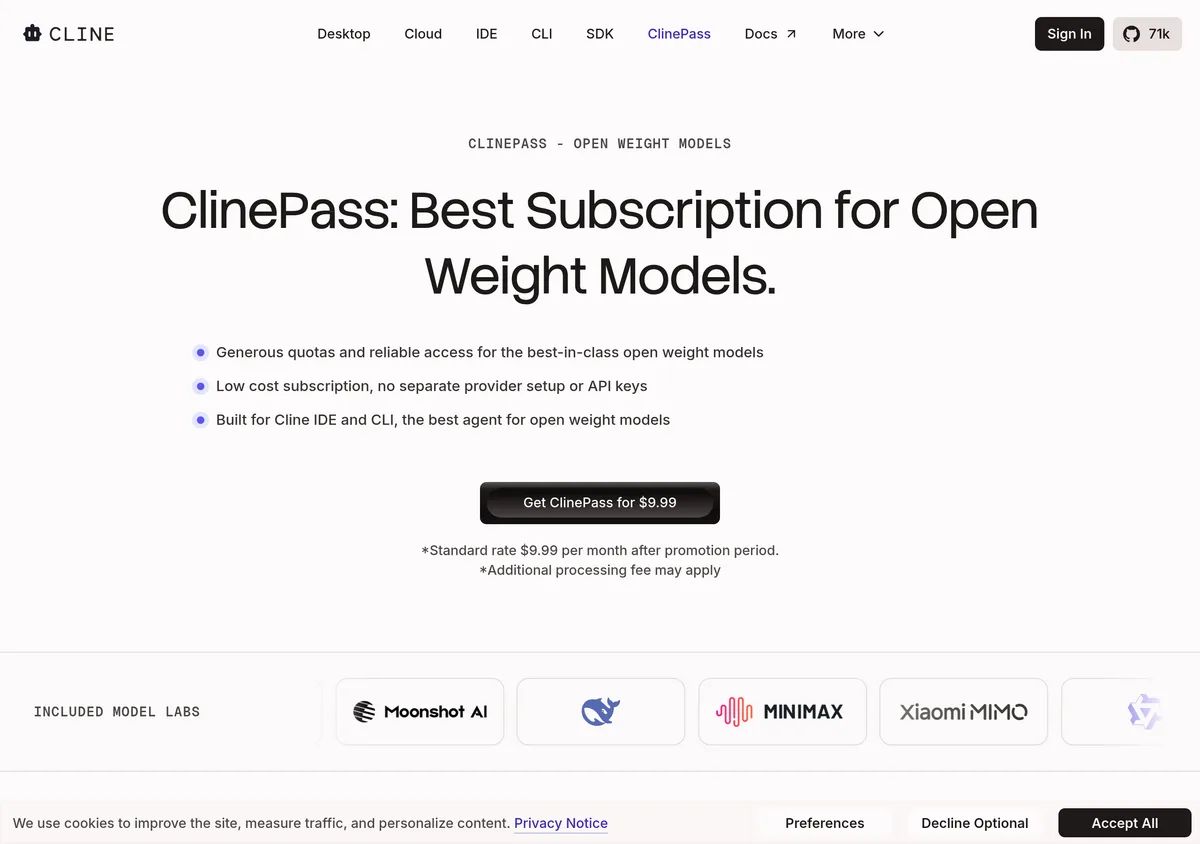
ClinePass is $9.99/month plus a possible processing fee, per cline.bot/cline-pass (fetched 2026-10-26). The $4.99 first month we quoted on October 1 is no longer offered on the page. A footnote still mentions a "promotion period," but every price button and the FAQ now say $9.99. Cline still describes the quotas as 2 to 5 times standard API rate limits.
 Source: cline.bot, captured October 26, 2026.
The page lists 14 models, adding GLM 5.3 Flash, GLM 5.3, Kimi K3, and Qwen3.8-Max to the October 1 lineup, per cline.bot/cline-pass. The app has moved further than the page: v4.1.26 makes Kimi K3.1 Pro the ClinePass default and adds MiniMax M3.1 Flash and DeepSeek V4.1 Flash 1017, and SDK v0.2.0 drops MiMo V2.5 and V2.5 Pro, which the page still lists, per the SDK v0.2.0 notes. Check the model picker in the app, not the marketing page, before you subscribe for a specific model.
| Path | What you pay | Best for | Source |
|---|---|---|---|
| BYOK | $0 for Cline, provider rates for inference | Light or bursty use; frontier-model work | cline.bot/pricing |
| ClinePass | $9.99/month | Daily open-weight agent sessions | cline.bot/cline-pass |
| Enterprise | Custom | SSO, RBAC, JetBrains, audit logs | cline.bot/pricing |
| Cursor Premium (for scale) | $30/month, third-party models at API list price on top | Cursor's own editor and cloud agents | cursor.com docs |
The Cursor row changed too. New Cursor customers now start on plans where Premium at $30/month is the first tier with third-party models, billed at API list price from prepaid credit, per Cursor's docs; the old $20 Pro is a legacy plan. Our Cursor review has the full breakdown.
With the intro month gone, the break-even from the July review is the only number that matters. At the roughly $1.50 per million tokens open-weight rate in the Cline blog, $9.99 a month beats pay-as-you-go somewhere around 150K to 200K tokens a day, per the July review's math. Below that, BYOK is cheaper.
Rating: 4.5 holds
Desktop gained what the September and October reviews said it lacked, per the desktop-v0.0.49 notes, and the compaction fix should cut wasted summarization calls in long sessions. That would justify 4.6 on features alone. The October review set a different bar, though: a month without a breaking Desktop release. October had two (SSH remotes broken until v0.0.45, plugins broken in v0.0.46), per the Cline releases. Add a third default-model swap and a price rise for new ClinePass subscribers, and 4.5 is the fair number. Desktop now has the features to be your main Cline surface; what it still lacks is a release month with no regression.
Verdict
If you already run Cline: update the CLI, Desktop, and extension together on the October 26 builds, since the compaction fix shipped in all three and the reattach fix needs both the CLI and Desktop current, per the Cline releases. Then pin a model for every provider you use, plus the Cloud model.
If you are evaluating: install Cline free and bring your own key first. Add ClinePass at $9.99/month, per cline.bot/cline-pass, only once your daily open-weight usage nears the break-even above. Pick Cline over Cursor if you want the agent on your own hardware with your own keys and a review pane for its work. Pick Cursor Premium at $30/month, per Cursor's docs, if you want inline editing and cloud agents in one editor. Go to Enterprise only for SSO, RBAC, or the JetBrains build.
Review history
This review is updated in place as the product changes. Earlier versions:
- October 26, 2026: Desktop Grows Into a Lightweight IDE, ClinePass Drops Its $4.99 Intro, Defaults Flip Again (current version)
- October 1, 2026: Desktop Reaches Linux and ARM, MCP Output Caching Lands, Defaults Shift
- September 15, 2026: Desktop App, Agent Plugins, and the ClinePass Tier Shift
Ready to try it?
Try cline →