Table of Contents
Firecrawl Workflows: which of the 15 skills are worth installing for ops teams (June 2026)
One line installs the whole library. What happens next is where the decisions start.
npx skills add firecrawl/firecrawl-workflowsFirecrawl shipped firecrawl-workflows in early June 2026: 15 installable agent skills, each a Markdown instruction set that tells Claude Code, Cursor, Codex CLI, or Gemini CLI exactly how to use Firecrawl to produce a concrete deliverable (GitHub, firecrawl/firecrawl-workflows). The deliverables are real: a competitive pricing report, a pre-meeting company brief, an SEO audit, an LLM-ready knowledge base. Not feature demos. Not toy examples.
The buyer question the repo does not answer is which skills are actually worth running, what each one costs in credits, and which plan you need before the math works. That is what this guide covers. We pulled the current skill list and pricing, grouped the 15 by job-to-be-done, and called out the one gotcha for each group that the repo README skips.
How the skills library is organized
Firecrawl's agent integration model has three tiers. Each targets a different builder.
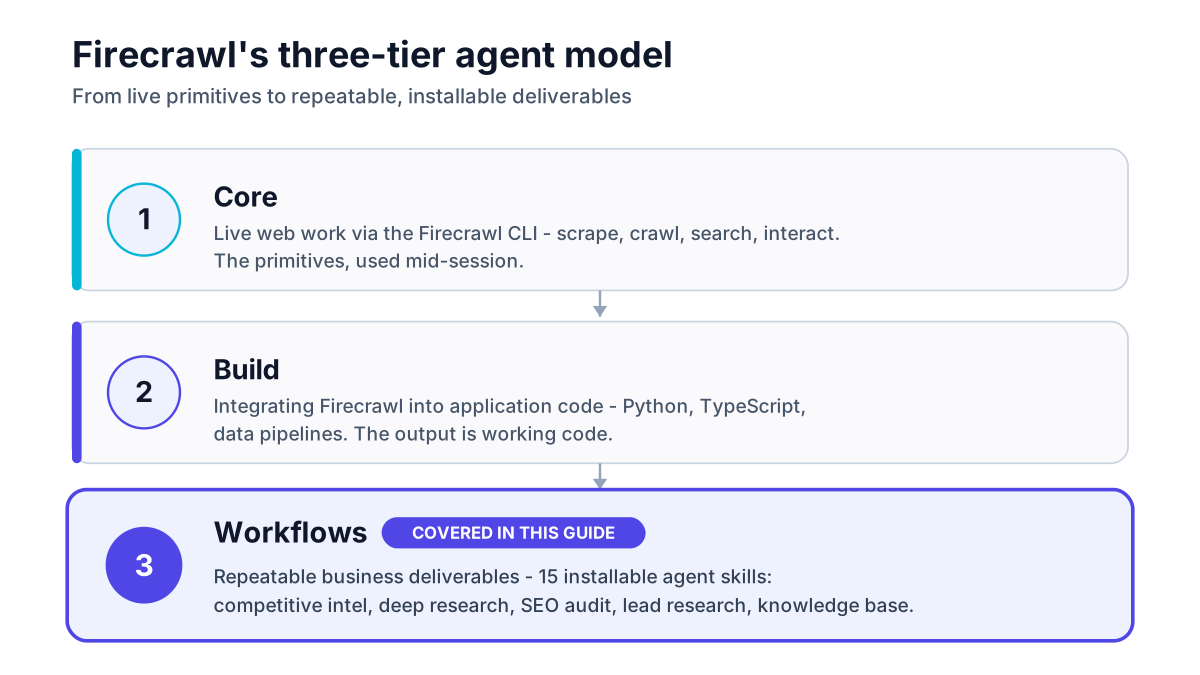
Core skills handle live web work through the Firecrawl CLI: scrape a page, run a crawl, pull search results, interact with a JS-heavy site. These are the primitives. You reach for them when you want one-off web access mid-session, without building anything.
Build skills are for teams integrating Firecrawl into application code. The skills walk an agent through wiring Firecrawl into a Python script, a TypeScript API route, or a data pipeline. The deliverable is working code, not a research report.
Workflows are the third tier and the newest. Each skill targets a repeatable business deliverable. The agent reads the skill file, infers what it can from context, asks one to three clarifying questions if needed, then runs the full workflow. The outcome is structured enough to reuse on a schedule, hand to a downstream process, or drop straight into a Notion doc or a CRM field. This guide covers only this tier.
You can install all three tiers at once with the full CLI init:
npx -y firecrawl-cli@latest init --all --browserOr just the Workflows pack with the command above. The skills are harness-agnostic: the same .md files work in Claude Code, Cursor, Codex CLI, and Gemini CLI without modification (GitHub authoring principles).
The 15 skills break into four groups by job-to-be-done. Credit costs follow Firecrawl's published model: 1 credit per page for scrape and crawl, 2 credits per 10 search results (Firecrawl pricing, pulled June 16 2026). We cover the full pricing picture in the closing section; for a deeper look at tiers, pros, and cons, see our Firecrawl API review.
Research and intelligence skills
Five of the 15 skills live in this category. For most ops teams, this group returns immediate value because the deliverables fit directly into a Monday brief or a pre-call workflow without extra tooling.
Multi-source research report (firecrawl-deep-research). The agent crawls multiple sources, synthesizes findings, and produces a formatted research report with citations. The practical use case is market diligence on a target segment or a technology area: three to five hours of human research time compressed into a session. Credit cost scales with source breadth. A 30-source deep dive at 5 pages per source runs roughly 150 credits plus search costs.
Example: 30 sources x 5 pages each = 150 scrape credits + 10 search queries = 152 credits total against Hobby's 5,000-credit monthly budget. On the Standard plan, that is well under 1% of the monthly allowance.
Market, earnings, and industry analysis (firecrawl-market-research). Oriented toward financial and competitive market data: earnings reports, industry publications, analyst summaries. Useful when a research brief needs to incorporate structured financial data from investor-relations pages, which are often JavaScript-heavy and poorly served by basic scraping tools. Firecrawl's Playwright-backed rendering handles these.
Literature reviews from papers and PDFs (firecrawl-research-papers). This one crawls papers, PDFs, and whitepapers to produce a literature review. PDF ingestion quality varies by document structure, and a paper with complex tables or multi-column layouts may come out mangled. Run one source manually first to sanity-check the output before wiring it into a pipeline.
Recurring pricing, feature, and changelog monitoring (firecrawl-competitive-intel). For most ops teams, this is the standout skill. The agent crawls competitor pricing pages, feature tables, and changelogs on demand and produces a structured diff from the previous run. No webhook, no scheduler to maintain at the agent level. Run it on a Monday morning cadence and you get a standing competitive brief. Teams who want event-driven alerts instead of scheduled runs should look at Firecrawl's /monitor endpoint; we cover the full build in our n8n and Make integration guide.
Pre-meeting company and person intelligence brief (firecrawl-lead-research). Give the agent a company name or a person's name and LinkedIn or company URL. It pulls the company's public web presence, recent press, product pages, and team signals, then writes a one-page brief. The output is a 5-10 minute read that covers what 20-30 minutes of manual tab-opening would surface. Credit cost is light: a typical 10-page company crawl costs 10 credits.
Revenue and prospecting skills
Three skills target the sales-adjacent workflow. The honest framing: these are useful in niches where Apollo.io and Clay don't go, not replacements for a purpose-built prospecting tool.
Prospect list from databases and directories (firecrawl-lead-gen). The agent crawls a specified directory or database and extracts companies, contacts, and relevant fields into a structured list. The use case is unstructured directories that prospecting tools don't index: conference exhibitor lists, local chamber directories, niche trade association member pages, government procurement portals. Where Apollo has structured data, this skill wins on unstructured pages.
The plan requirement matters here. A lead-gen run against a 500-company directory at one page per company costs 500 credits minimum (Firecrawl pricing: 1 credit per page). Hobby's 5,000-credit monthly budget means that one run consumes 10% of the allowance. Teams doing this more than a few times a month need Standard.
Company directory extraction (firecrawl-company-directories). Narrower than lead-gen: specifically oriented toward extracting directory listings into structured company lists. The distinction is that this skill targets the directory page itself (one crawl of a paginated list), while firecrawl-lead-gen follows links out to individual company pages for richer data. Pick this one when you want coverage over depth.
Product research and shopping recommendations (firecrawl-shop). Crawls e-commerce pages and product listings to produce purchase recommendations. More useful for procurement research and supplier comparison than for building lead lists. A small tool, worth installing, but not a first-install priority for a typical ops team.
Content and web quality skills
Four skills for teams running website audits, QA processes, or design research. This group has the highest per-run credit variance because site scope drives cost.
Site audit with SERP comparison (firecrawl-seo-audit). The agent crawls a site, extracts the sitemap, runs on-page checks (title tags, meta descriptions, heading structure, internal link coverage), and compares target pages against current SERP results for the primary keyword. The output is a prioritized recommendation list, the kind of deliverable that normally costs an agency retainer for a one-off. Credit cost is directly proportional to site size: a 200-page site costs 200 crawl credits plus search costs.
Live-site QA report with reproduction steps (firecrawl-qa). The agent crawls a live site or a staging URL and produces a QA report: broken links, rendering errors, form failures, and reproduction steps for each issue. For teams without a dedicated QA workflow, this gets you a structured bug list before a launch without a QA contractor. The skill outputs issues in a format that maps cleanly to a Jira or Linear ticket structure.
Product flow walkthrough and UX teardown (firecrawl-demo-walkthrough). The agent navigates a product's documented flows or public demo environment and produces a structured walkthrough with UX observations. Useful for competitive UX research and for documenting your own product flows. Requires Playwright-capable browser interaction, which Firecrawl handles via the interact endpoint (2 credits per browser minute).
Design system extraction to DESIGN.md (firecrawl-website-design-clone). This one needs a clear caveat: the skill extracts a website's design system into an agent-ready DESIGN.md file covering color tokens, typography, spacing, and component patterns. It is a design research tool, not a cloning tool. Using it to reproduce protected UI is an IP issue the skill's authoring makes no attempt to solve. For legitimate use cases like brand research or building a design system audit, it saves significant manual work.
Knowledge management skills
Three skills for teams building RAG pipelines, internal knowledge bases, or LLM-ready documentation sets.
LLM-ready reference docs and RAG chunks (firecrawl-knowledge-base). The agent crawls a site or a set of URLs and produces a structured knowledge base: clean markdown chunks sized for embedding, with metadata fields for a vector database. The output goes straight into a Pinecone, Weaviate, or Chroma collection without additional processing. It also handles JavaScript-rendered documentation portals that simple scraping misses, which is where most DIY knowledge-base builds stall.
Auth-gated and JS-heavy docs portal ingestion (firecrawl-knowledge-ingest). The hardest problem in RAG pipeline setup is not chunking or embedding; it is getting structured, clean text out of auth-gated or JavaScript-rendered portals. This skill handles that specifically: internal wikis, Notion exports, Confluence spaces accessible via session, and developer portals that require login. It is the most technically differentiated skill in the library. If your team is building a knowledge base for a Claude or GPT agent, this is where to start.
Metrics extraction from dashboards and internal web tools (firecrawl-dashboard-reporting). The agent extracts metrics from dashboards and internal web-based reporting tools and produces a structured summary. Useful for teams whose data lives in web-based BI tools rather than a data warehouse with an API. The skill works through Firecrawl's Playwright layer and costs 2 credits per browser minute for dynamic dashboard interactions.
Quick reference: which skill for which job
| Use case | Recommended skill | Plan required | Credits per typical run |
|---|---|---|---|
| Weekly competitive pricing brief | firecrawl-competitive-intel | Hobby | 20-50 (10-25 pages) |
| Pre-meeting company research | firecrawl-lead-research | Free or Hobby | 5-15 (per company) |
| Multi-source research report | firecrawl-deep-research | Hobby | 100-200+ (scope-dependent) |
| SEO audit, 100-page site | firecrawl-seo-audit | Standard | 100+ crawl credits |
| Niche directory lead list (500 entries) | firecrawl-lead-gen | Standard | 500+ (one page per company) |
| RAG knowledge base from docs site | firecrawl-knowledge-base | Hobby or Standard | 50-500 (site-size-dependent) |
| Auth-gated docs ingestion | firecrawl-knowledge-ingest | Standard | 100-1,000+ |
| Live-site QA before launch | firecrawl-qa | Hobby | 50-200 |
| Design system research | firecrawl-website-design-clone | Hobby | 20-80 |
| Market and earnings research | firecrawl-market-research | Hobby | 50-150 |
Credit estimates follow Firecrawl's published model: 1 credit per page scraped or crawled, 2 credits per 10 search results, 2 credits per browser minute for interactive sessions (Firecrawl pricing). Run counts marked "scope-dependent" scale directly with site size.
Recommended starter stack
For a three-person ops team starting fresh with Firecrawl, install these three skills first.
firecrawl-competitive-intel first. It delivers recurring value, costs under 50 credits per weekly run, and the output is immediately usable by anyone on the team. No pipeline to wire, no downstream process to build. Run it on Monday, share the brief in Slack. The feedback loop is fast.
firecrawl-deep-research second. This replaces the ad hoc research sessions where someone opens 15 browser tabs and synthesizes notes for two hours. The structured output is better than hand-written notes and reproducible. It is the skill most likely to get buy-in from a skeptical team member because the before/after is obvious.
firecrawl-lead-research third. Pre-meeting prep is a cost most teams don't measure because it's invisible in a calendar invite. A 10-credit run per meeting adds up to less than 200 credits a month for a team doing 20 calls a week.
All three run comfortably on the Firecrawl Hobby plan at $16 per month billed yearly, which includes 5,000 credits. A weekly competitive-intel run (50 credits) plus daily lead-research runs (15 credits x 20 working days = 300 credits) plus four deep-research reports (150 credits x 4 = 600 credits) totals roughly 950 credits a month, well inside Hobby.
Add firecrawl-seo-audit or firecrawl-lead-gen when your use case demands them, and move to Standard ($83 per month, 100,000 credits) when your monthly credit burn consistently exceeds 4,000.
Plan sizing and where to start
Free gives you 1,000 credits per month at no cost, enough to run the starter stack a handful of times and confirm the output quality is worth paying for. Hobby at $16 per month covers a team running the three-starter-stack skills at a realistic weekly cadence. Standard at $83 per month is the right tier once you add firecrawl-seo-audit, firecrawl-lead-gen, or firecrawl-knowledge-base against larger sites (Firecrawl pricing, June 16 2026).
The full pricing picture, plan-by-plan comparisons, and scraping quality notes are in our Firecrawl API review. That guide covers what we're skipping here so the two pieces don't repeat each other.
Start with the Hobby plan on Firecrawl, install the three skills above, and run each one against a real use case before deciding whether to expand. The install is one command. The decision about which skills are worth maintaining is the longer exercise, and the table above is the reference for that call.