The 60-Second AI Coding Tool Cheat Sheet
Pick the right tool without two weeks of trials.
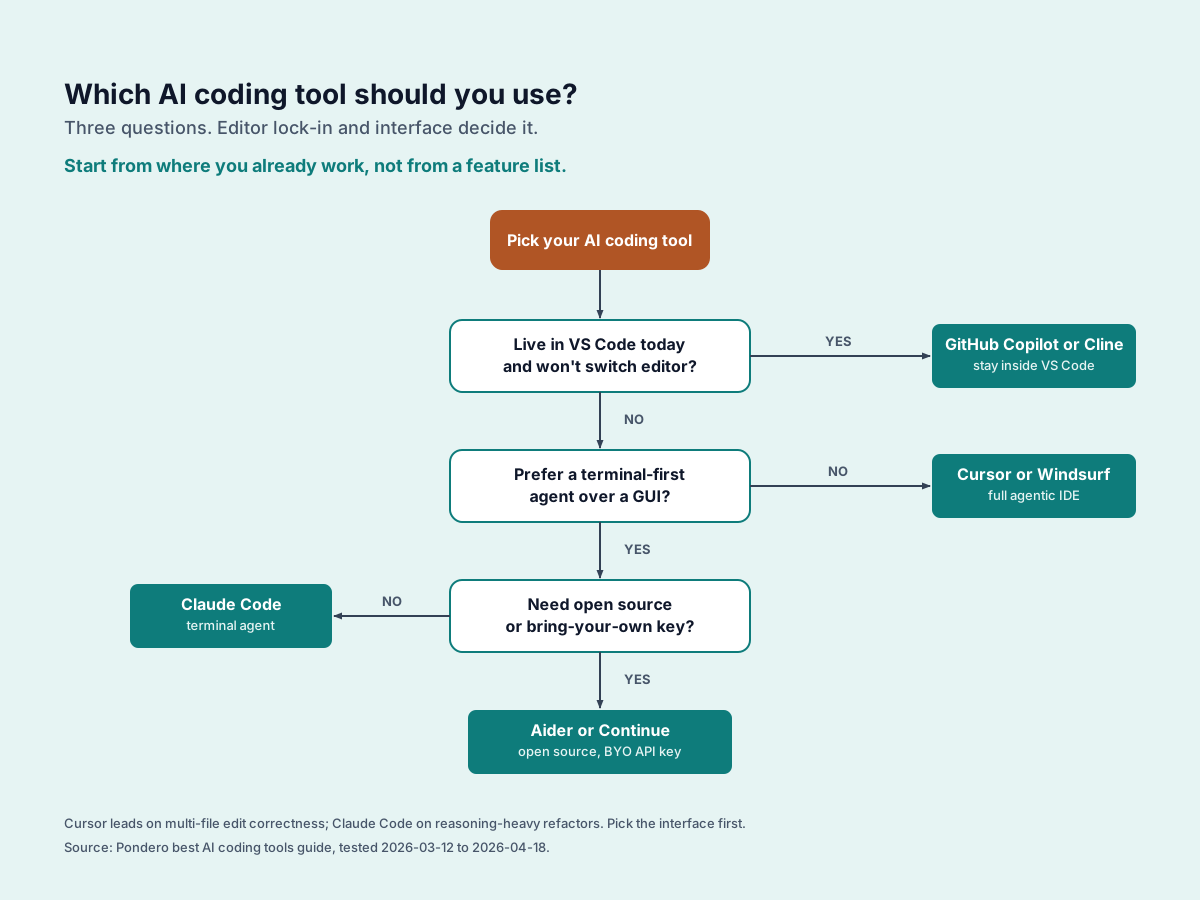
Decision flow: pick a tool in one glance
Trace from the top oval to the leaf box that fits your situation.
Prefer the questions in plain text? Expand the 3-question version.
- Q1
Already paying for GitHub Teams or Enterprise?
- Q2
Will you switch IDE or live in the terminal?
- Q3
Need open-source or BYO-key flexibility?
Feature matrix
Scanner-friendly comparison. Sortable by tool name; rows mirror the cards below.
| Tool | Price | IDE | Multi-file edits | Local model | Best for |
|---|---|---|---|---|---|
| Aider | Free + BYO key | Terminal (CLI) | Yes (git-aware) | Yes | Legacy codebases, git-aware editing, terminal-native teams |
| Claude Code | Usage-based | Terminal (CLI) | Yes (autonomous) | No | Terminal-first agentic coding, full shell access |
| Cline | Free + BYO key | VS Code | Yes | Yes | Cursor-class power inside VS Code, no subscription |
| Continue | Free + BYO key | VS Code, JetBrains | Yes | Yes (Ollama) | Customizable open-source plug-in, local-model privacy |
| Cursor | $20/mo | Cursor (VS Code fork) | Yes (Composer) | No | Full IDE replacement, agentic multi-file edits |
| GitHub Copilot | $10/mo | VS Code, JetBrains, Neovim | Limited (Agent mode) | No | Staying in your current IDE, zero workflow disruption |
| Windsurf | $15/mo | Windsurf (VS Code fork) | Yes (Cascade) | No | Cursor-class agentic IDE with focus on flows + cascade |
The tools at a glance
Each card links to the full Pondero review and (where applicable) a tracked affiliate signup.
Cursor
$$$ ~$20/mo- Best for:
- Full IDE replacement, agentic multi-file edits
- Strength:
- Composer agent rewrites across whole codebase in one shot
- Weakness:
- Subscription cost. Closed-source. Heavy for simple tasks
- Use when:
- You want the most capable daily AI IDE right now
Windsurf
$$ ~$15/mo- Best for:
- Cursor-class agentic IDE with focus on flows + cascade
- Strength:
- Native Codeium model integration; fast cascade execution
- Weakness:
- New entrant. Smaller community than Cursor. Closed-source
- Use when:
- You want Cursor's power but prefer Windsurf's flow paradigm
GitHub Copilot
$ $10/mo- Best for:
- Staying in your current IDE, zero workflow disruption
- Strength:
- Works in VS Code, JetBrains, Neovim with no editor switch
- Weakness:
- Chat quality lags behind Cursor. Agent mode is newer
- Use when:
- You already pay GitHub and want solid autocomplete plus chat
Claude Code
$$ Usage-based- Best for:
- Terminal-first agentic coding, full shell access
- Strength:
- Runs long autonomous tasks. Edits, tests, iterates end-to-end
- Weakness:
- No GUI. Costs accumulate on large tasks. Token limits apply
- Use when:
- You prefer CLI and need an agent that can own multi-step work
Aider
Free OSS + BYO key- Best for:
- Legacy codebases, git-aware editing, terminal-native teams
- Strength:
- Git-aware multi-file edits, reads history and diffs natively
- Weakness:
- CLI-only. No GUI. Steeper setup than subscription tools
- Use when:
- You live in the terminal and want a git-respecting BYO-key agent
Cline
Free + BYO key- Best for:
- Cursor-class power inside VS Code, no subscription
- Strength:
- Open-source VS Code extension. Plug in any model, local or remote
- Weakness:
- No built-in model. Token costs depend on your key choice
- Use when:
- You want agentic VS Code without switching editors
Continue
Free OSS + BYO key- Best for:
- Customizable open-source plug-in, local-model privacy
- Strength:
- Deeply configurable. Works with Ollama out-of-the-box
- Weakness:
- More setup. Narrower community than Cursor or Cline
- Use when:
- You need per-project AI behavior or local-model privacy
Red flags to avoid
Four patterns we treat as disqualifying when we evaluate a new AI coding tool.
Tools that won't tell you which model they use
Transparency matters for debugging quality drift. If a vendor hides whether you are talking to GPT-4, Claude 4, or a fine-tuned 7B, you cannot reproduce a bug or evaluate a regression.
Per-seat billing without a monthly cap
Token usage spirals. Surprise four-figure bills after one weekend of agentic refactors are a real risk. Demand a hard cap before you put a card on file.
No offline or local-model option
Even if you do not need it today, vendor lock-in is the cost. The ability to swap to a local model on a flight or behind a client firewall is worth optionality.
AI assistants that auto-execute shell commands without confirmation
A `rm -rf` from a hallucinated agent is unrecoverable. Insist on a confirm-before-run mode and never disable it for convenience.
Quick terms
- OSS:
- Open-source. Free to use, often BYO API key for the underlying model.
- BYO key:
- Bring-your-own API key. You pay the model provider (Anthropic, OpenAI) separately.
- IDE:
- Integrated Development Environment. Cursor and VS Code are IDEs.
- Agent:
- AI that takes multi-step actions, not just autocomplete.
- Local model:
- Runs on your machine via Ollama. Private, no API cost.
- Composer / Multi-file:
- AI that edits across several files at once, not just one.
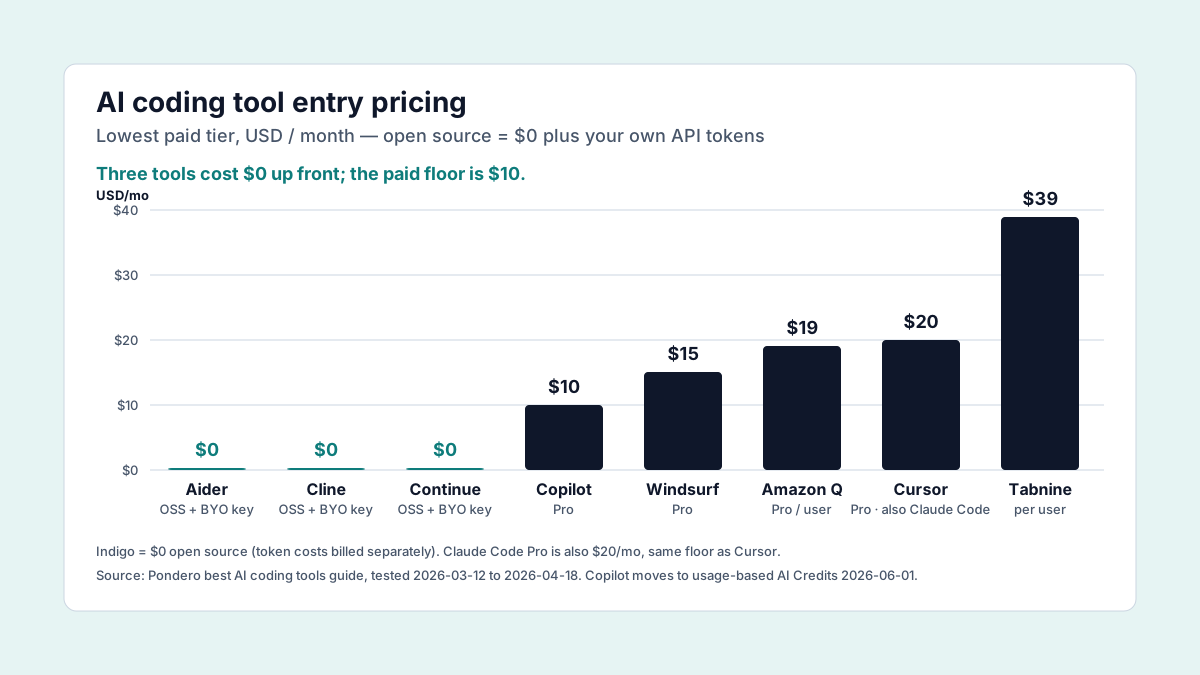
Pricing at a glance
Lowest paid tier per tool, May 2026. Open-source tools (Aider, Cline, Continue) are free; you pay the model provider separately.