Table of Contents
GitHub Copilot vs Cursor Pricing 2026: Which Costs Less After June 1
On June 1, GitHub Copilot stops counting premium requests and starts counting tokens. Every Copilot plan now includes a monthly pool of AI Credits ($0.01 each), and any agentic work that burns through that pool triggers per-token charges at published rates. Cursor's pricing did not change: Pro stays at $20/month flat, Teams at $40/user/month.
That shift makes a concrete cost comparison possible for the first time. Below is the math by persona, worked examples by model, and a clear verdict for each use case. All figures pulled directly from the GitHub Copilot models and pricing docs and the Cursor pricing page on 2026-05-27.
What changed on June 1 (and what did not)
Copilot moves from request counts to AI Credits
Previously, Copilot Pro let you make a fixed number of "premium requests" per month. Starting June 1, that system is gone for monthly subscribers. In its place, each plan includes a monthly AI Credit pool equal to the plan's base price:
- Copilot Pro ($10/month): $10 in monthly AI Credits
- Copilot Pro+ ($39/month): $39 in monthly AI Credits
- Copilot Business ($19/user/month): $19 in monthly AI Credits, pooled across the org
- Copilot Enterprise ($39/user/month): $39 in monthly AI Credits, pooled across the org
Business and Enterprise customers get a promotional bump through August: Business gets $30 in credits, Enterprise gets $70, per the official GitHub announcement (published April 27, 2026).
One important note: annual Copilot Pro and Pro+ subscribers are NOT automatically migrated on June 1. They stay on request-based billing with adjusted model multipliers until their plan expires.
Cursor stays flat-rate
Cursor's structure is simpler. You pay $20/month for Pro (or $40/user/month for Teams) and get a set amount of included model usage. Cursor's pricing page as of 2026-05-27 shows Pro includes "extended limits on Agent" and "access to frontier models" with no listed per-token surcharge for included usage.
Code completions stay free on both platforms
This matters for the comparison. On Copilot, code completions and Next Edit suggestions do not consume AI Credits. They stay unlimited on all paid plans, per the GitHub Copilot models and pricing docs. On Cursor, Tab completions are included in Pro with extended limits.
Both tools have essentially free code completion. The cost gap appears in chat, agentic runs, and frontier-model usage.
The real per-session cost on each platform
How the Copilot pricing table works (1 credit = $0.01)
Every chat exchange or agent turn on Copilot consumes tokens. Input tokens (your prompt + context), output tokens (the model's response), and cached tokens (context the model reuses) each carry a per-million rate that varies by model. The total token cost converts to AI Credits at 1 credit = $0.01, per the GitHub Copilot pricing docs.
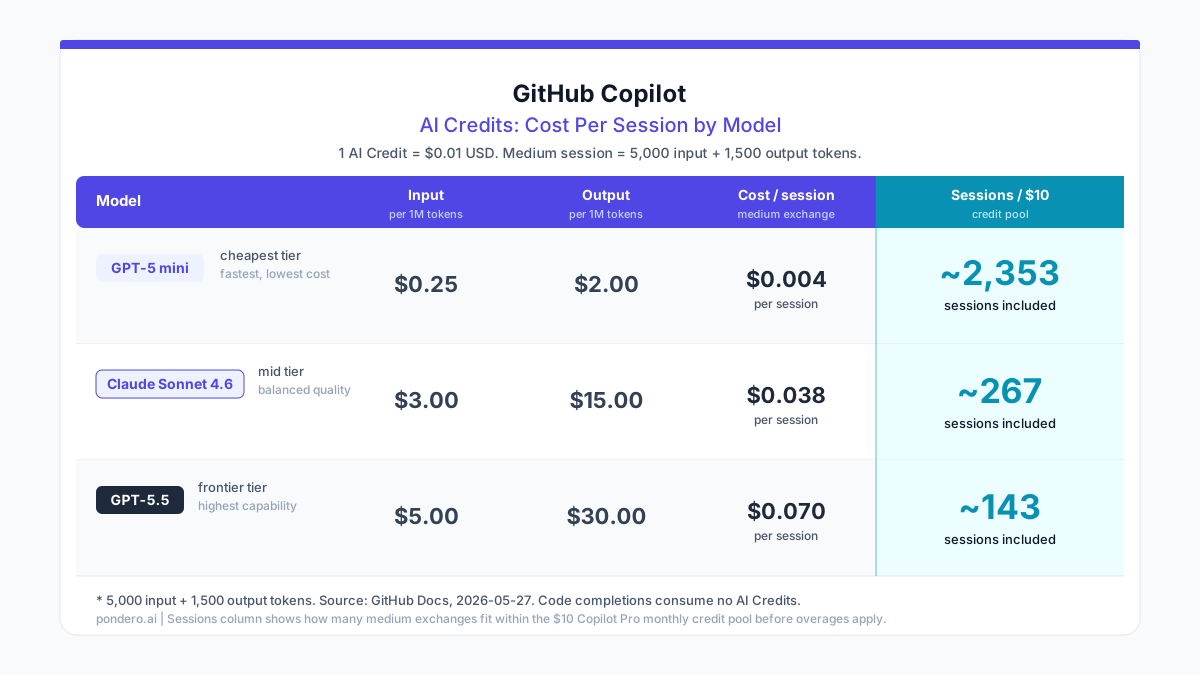
Worked example: a typical Copilot Chat session by model
Assumption: medium session = 5,000 input tokens + 1,500 output tokens (no cache hits). All rates from the GitHub Copilot models and pricing docs, fetched 2026-05-27.
GPT-5 mini (lightweight, included model)
Input:  5,000 tokens x $0.25/1M = $0.00125
Output: 1,500 tokens x $2.00/1M = $0.00300
Total:  $0.00425 (0.425 AI credits per session)

Copilot Pro pool ($10 = 1,000 credits):
1,000 / 0.425 = ~2,353 sessions before overage
Claude Sonnet 4.6 (versatile, $3.00 input / $15.00 output per 1M)
Input:  5,000 tokens x $3.00/1M = $0.01500
Output: 1,500 tokens x $15.00/1M = $0.02250
Total:  $0.03750 (3.75 AI credits per session)

Copilot Pro pool ($10 = 1,000 credits):
1,000 / 3.75 = ~267 sessions before overage
GPT-5.5 (powerful, $5.00 input / $30.00 output per 1M)
Input:  5,000 tokens x $5.00/1M = $0.02500
Output: 1,500 tokens x $30.00/1M = $0.04500
Total:  $0.07000 (7.0 AI credits per session)

Copilot Pro pool ($10 = 1,000 credits):
1,000 / 7.0 = ~143 sessions before overage
What $10/month in Copilot Pro credits actually buys you
If you run GPT-5 mini for all your chat, the $10 pool is enormous: over 2,300 medium sessions, calculated from the per-token rates in the GitHub Copilot pricing docs. That is more chat than most developers realistically do in a month.
Switch to Claude Sonnet 4.6 for everything and you get roughly 267 sessions, per the same GitHub pricing table. A developer doing 10-15 Sonnet sessions per day hits the ceiling in about 20-25 working days. Fine for casual use. Tight for a daily heavy user.
Run GPT-5.5 daily for complex agentic tasks and 143 sessions goes fast. A two-hour cloud agent session is not one "session" in this sense; the actual token count during an agentic run can be 5-10x a single medium chat exchange. Overages kick in after the pool is exhausted.
How Cursor's included usage compares
Cursor does not publish a per-token breakdown for its included usage. The flat $20/month covers extended agent usage and frontier model access without a published credit ceiling. The practical limit is Cursor's internal fair-use policy, which the company adjusts periodically. Cursor's docs explain that usage-based billing (on-demand) applies only after included usage is consumed.
For the comparison: Cursor Pro is $20/month with no per-session math to track, per cursor.com/pricing. Copilot Pro is $10/month with per-session math that depends entirely on which model you pick, per the GitHub billing announcement.
Cost comparison by persona
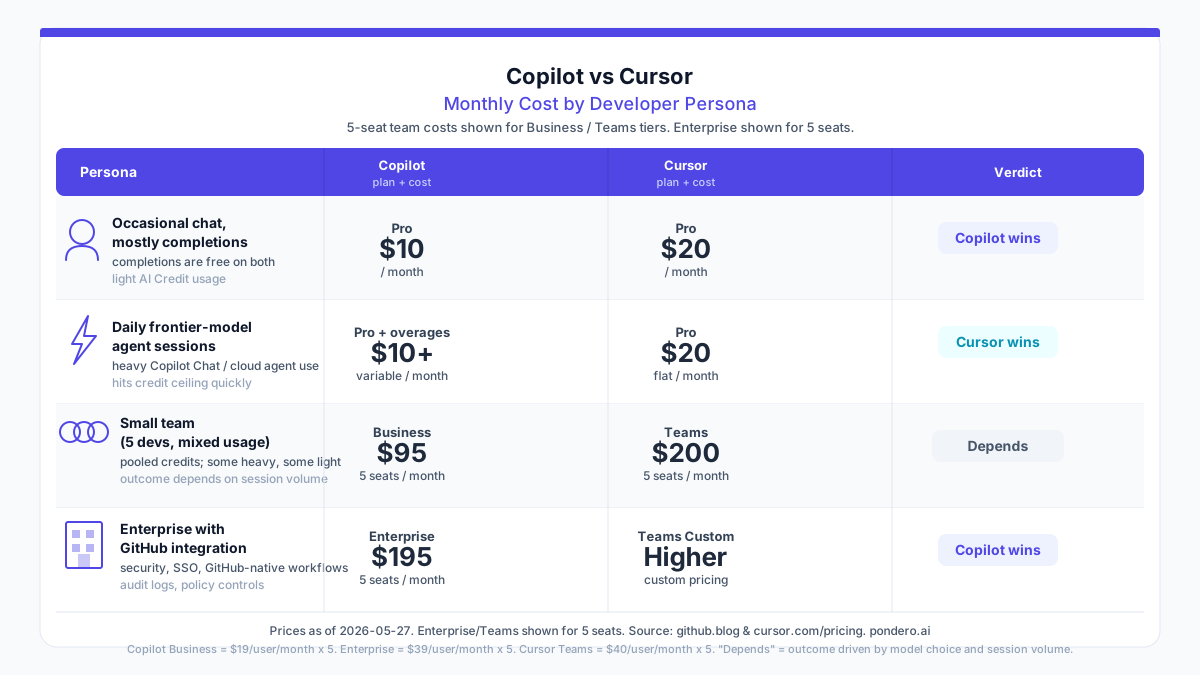
Solo developer with occasional AI chat
Verdict: Copilot Pro at $10/month. Half the price of Cursor Pro at $20/month (per cursor.com/pricing), and a light user running occasional Sonnet or GPT-5 mini sessions will not clear the included credit pool. Code completions are free on both. There is no reason to pay $20 for Cursor Pro if your monthly chat usage amounts to a few dozen sessions on versatile models.
The math: 267 Sonnet sessions fit in the $10 Copilot pool. A developer who fires off 3-5 chat sessions per working day tops out around 65-100 sessions per month. Well within the pool.
Caveat: if you want Cursor's IDE-specific features (the editor itself, Tab completions baked into the interface), that is a separate question from cost. On pure cost, Copilot Pro wins for occasional users.
Developer with daily agentic sessions on frontier models
Verdict: Cursor Pro at $20/month flat (cursor.com/pricing). A developer running multi-step agentic sessions on GPT-5.5 or Claude Opus 4.7 will exhaust the Copilot Pro credit pool in roughly two weeks at moderate intensity. Overages at $5/1M input + $30/1M output (per the GitHub pricing table) add up fast. The Cursor flat rate is predictable.
The math: at 143 GPT-5.5 medium sessions per pool, a developer doing 10 frontier-model sessions per day hits the ceiling in 14 days. Each overage session after that costs $0.07 at minimum for a "medium" exchange. Real agentic sessions are longer, so the actual per-session cost is higher.
Cursor Pro at $20/month for unlimited-ish frontier model access beats Copilot Pro + overages for this profile.
Small engineering team (5-10 devs)
Verdict: Depends on workflow. Copilot Business at $19/user/month pools credits across the team, per the GitHub billing announcement. A 5-person team gets a shared pool of $95/month (or $150/month during the June-August promotional period). If half your devs use AI chat lightly, the heavy users on the team can draw from unused credits in the shared pool.
Cursor Teams at $40/user/month is $200/month for that same 5-person team, per cursor.com/pricing. No per-token overages, but the base cost is more than double. The break-even depends on how often your heavy users blow past the included Copilot pool.
For teams where most devs chat occasionally and one or two run heavy agentic work: the Copilot Business pool model may cover the heavy users without overages. For teams where everyone runs frontier-model agent sessions daily: Copilot Business overages will likely exceed the Cursor Teams premium.
If you want to pull your April usage data to project forward, our Copilot usage tracking guide walks through the billing dashboard.
Enterprise with GitHub integration requirements
Verdict: Copilot Enterprise at $39/user/month, especially through August. The $70/user/month promotional credit pool (June-August) gives enterprise teams significant headroom to run agentic workflows without overages, per the GitHub billing announcement. Copilot Enterprise also includes GitHub-native integrations: Jira, Slack, Linear, and Azure Boards via the cloud agent.
Cursor Teams at $40/user/month (per cursor.com/pricing) offers competitive per-seat pricing, but it lacks the GitHub-native governance layer that enterprise security and compliance teams expect: SAML/OIDC SSO, model controls at the org level, and audit log integrations sit in the Teams plan, while deeper enterprise controls are in Cursor's custom Enterprise tier.
If your organization runs GitHub Enterprise and your security team needs auditability into which models ran on which pull requests, Copilot Enterprise is the better fit regardless of cost math.
Three specific scenarios where the answer flips
Scenario 1: mostly code completions and occasional chat
You use Tab-complete constantly, fire off maybe 30-50 chat questions per week, and rarely touch the cloud agent.
Copilot Pro at $10/month wins. Code completions are free. Fifty Sonnet sessions per week = ~200/month. You will not exhaust the 267-session pool. Cursor Pro at $20/month delivers no meaningful cost advantage here.
Scenario 2: daily cloud agent sessions on frontier models
You kick off 2+ hour cloud agent sessions most days. Each session touches GPT-5.5 or Claude Opus 4.7 for planning, implementation, and verification loops.
Cursor Pro at $20/month flat wins. Copilot Pro's $10 pool covers about 143 medium sessions on GPT-5.5. A real multi-hour agentic run burns far more tokens than a single medium session. Overages compound quickly.
Cursor's multi-repo Automations, launched May 20, 2026, let you run agents across multiple codebases in a single workflow. If you're doing this kind of cross-repo work regularly, explore Cursor's Automations setup guide for how to configure them.
Try Cursor Pro free for 14 days
Scenario 3: you need Jira and GitHub integration in one agent workflow
Your engineering workflow runs from a Jira issue through GitHub PR to merge. You want the AI agent to pick up the Jira ticket, draft the code, open the PR, and respond to review comments, all in one session.
Copilot Enterprise wins on native integration depth. GitHub's cloud agent supports Jira integration directly, per the GitHub cloud agent docs. Cursor can do similar things via MCP connections, but the GitHub-native version requires less configuration for shops already running GitHub Enterprise.
Our Cursor Jira cloud agent setup guide covers the MCP-based approach if you want to try it on the Cursor side first.
The bottom line: which should you pick
Stay on Copilot if...
You fit any of these:
- Your primary use is code completions with light chat. The $10/month Copilot Pro pool is likely enough.
- You run on annual billing. You're not switching to usage-based until your plan expires anyway.
- Your team is already on GitHub Enterprise and needs org-level model controls and audit logs.
- Your agentic use is moderate and you prefer running on GPT-5 mini (an included model) for most work.
Switch to Cursor if...
- You run frontier-model (GPT-5.5, Claude Opus 4.7) agentic sessions daily and want a predictable monthly bill.
- You prefer an IDE purpose-built for agentic coding rather than an add-on to VS Code or JetBrains.
- You want multi-repo automation workflows without per-token cost exposure.
Try Cursor Pro free for 14 days
Consider both if...
Your shop is BYOK (bring your own key) and wants to route certain model calls through direct API access while using a flat-rate tool for others. Copilot supports using your own API keys at the org level. Cursor supports custom model providers. Running both simultaneously for different workloads is a valid setup for larger teams.
FAQ
Will Cursor raise prices to match Copilot's new model?
There's no announced pricing change from Cursor as of 2026-05-27. Cursor's pricing page still shows $20/month Pro and $40/user/month Teams. If that changes, it would appear at cursor.com/pricing.
Does the June 1 change affect annual Copilot plans?
No, not immediately. Annual Pro and Pro+ subscribers stay on request-based billing with adjusted model multipliers until their annual plan expires. The GitHub announcement explains that at expiration, annual subscribers transition to Copilot Free with an option to upgrade to a monthly paid plan. You can also convert early and receive prorated credits for remaining annual plan value.
What happens to Copilot usage when credits run out?
Under the new model, you do not get a free fallback to a cheaper model (that option is being retired). Instead, your organization's admin can configure a spending budget. When the included pool is exhausted, usage either stops or continues at published per-token rates depending on how the admin has set the budget controls. Per the GitHub announcement: "organizations can choose whether to allow additional usage at published rates or cap spend."
Can you use Cursor and Copilot on the same machine?
Yes. They are separate tools that can run simultaneously. Copilot runs as a VS Code extension (or JetBrains plugin). Cursor is a standalone IDE based on VS Code. Many developers run Copilot for quick inline suggestions in their existing setup and Cursor for heavier agentic sessions. The cost question then becomes: are you paying for both subscriptions, and does the combined cost beat running one tool for everything?
Is Cursor's $20 plan truly unlimited for frontier models?
Cursor's Pro plan does not publish a hard token cap. "Extended limits on Agent" and "access to frontier models" are the listed features, per cursor.com/pricing. Cursor applies fair-use policies and may throttle heavy users. The exact limits are not publicly documented. Per Cursor's pricing FAQ, on-demand usage-based billing applies after the included amount is consumed, billed in arrears. For most developers, the included allocation is generous. For very heavy users (multiple hours of frontier-model agentic work per day), Cursor Pro+ may be the more appropriate tier.