Table of Contents
GitHub Copilot SDK GA: What You Can Build, What It Costs, and Whether It Beats Rolling Your Own
GitHub shipped the Copilot SDK to general availability on June 2, 2026, at Microsoft Build. If you have been sketching out an internal AI coding tool and you are deciding whether to build it on this SDK or wire up the Anthropic or OpenAI SDK yourself, here is the short answer: the Copilot SDK hands you a production agent loop, GitHub-native auth, and MCP out of the box, so you skip the orchestration layer entirely. What you trade away is control over that orchestration. The rest of this guide is the long answer, with the cost math and a per-persona pick at the end.
The SDK gives you programmatic access to the same agent runtime behind GitHub Copilot: planning, tool invocation, file edits, streaming, and multi-turn sessions. That runtime has been in public preview for months. GA is the moment GitHub froze the API surface, so what you build today does not break next quarter.
What the Copilot SDK actually is
Think of Copilot the product as one client built on top of an engine. The SDK is that engine, exposed as a library. You import it, point it at a model, register some tools, and you have an agent that plans, calls tools, edits files, and streams results back. No prompt-engineering a control loop from scratch. No glue code to manage tool-call rounds.
GitHub describes it as the runtime that handles "planning, tool invocation, file edits, streaming, and multi-turn sessions, so you don't have to build your own orchestration layer" (per the GA changelog). That last clause is the main reason to use it: building an agent loop that does retries, tool dispatch, permission gating, and streaming correctly is a multi-week project, and the SDK has already done that work.
Six languages, two of them new at GA
At GA the SDK supports six languages. Rust and Java both landed at general availability; the other four carried over from preview.
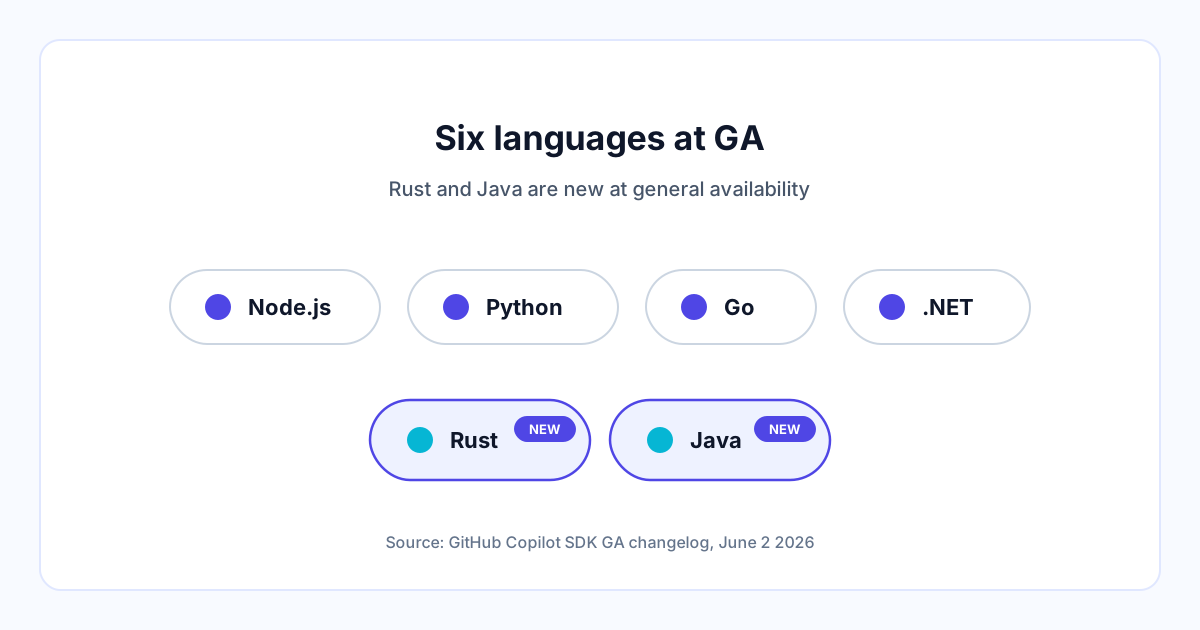
The install command per language, straight from the getting-started docs:
# Node.js / TypeScript
npm install @github/copilot-sdk

# Python
pip install github-copilot-sdk

# Go
go get github.com/github/copilot-sdk/go

# .NET
dotnet add package GitHub.Copilot.SDK

# Rust (new at GA)
cargo add github-copilot-sdk

# Java (new at GA): add the dependency via Maven or Gradle
The Rust crate bundles the Copilot CLI binary by default, which means one fewer thing to provision on the machine running your agent. Java ships through Maven and Gradle. If your shop is on the JVM and you have been locked out of the agent-SDK conversation until now, that gate is open.
What it ships with versus what you configure
Out of the box you get the agent loop, a set of built-in tools (file reads and edits, shell, search primitives like grep), session management, and streaming. You configure the model, the system prompt, your own custom tools, MCP server connections, and the permission policy. The split matters for the build-vs-buy decision: the parts that are tedious and easy to get subtly wrong (the loop, the streaming, the tool dispatch) are GitHub's; the parts that are specific to your product (which tools, which model, what the agent is allowed to touch) are yours.
Three things teams are building with it
GitHub says the preview cohort used the SDK to build "everything from CI/CD assistants and internal developer tools to customer-facing AI features." Those three buckets map cleanly to real projects.
CI/CD assistants are the obvious first one. An agent that reads a failing pipeline, looks at the diff, and proposes a fix as a PR comment is a few hundred lines on top of the SDK rather than a quarter of engineering. Because auth runs through GitHub Apps, the agent already has a sane permission story inside your org.
Internal developer tools are the second. A code-review bot tuned to your house conventions, a migration assistant that rewrites a deprecated API call across a monorepo, a triage agent that labels and routes issues. The SDK's hook system lets you intercept the agent at pre/post tool use and at permission requests, so you can keep a human in the loop on anything that writes.
Customer-facing AI features are the third and the one with the highest stakes. Embedding an agent in your own product means your users hit it, your latency budget owns it, and your bill scales with their usage. The SDK does not change that math, but it does mean the orchestration is battle-tested by Copilot's own traffic rather than something you wrote last sprint.
Key capabilities at GA
A few of the GA capabilities are worth calling out because they shape what the SDK is good for.
Custom tools and MCP. You register tools the agent can invoke on its own, connect to Model Context Protocol servers, and even override built-in tools like grep and edit_file with your own implementations. If you already run MCP servers, the agent can reach them without a shim.
Fine-grained system prompt customization. You edit individual sections of the Copilot system prompt, such as identity, tone, tool instructions, and safety rules, instead of replacing the whole thing. That keeps GitHub's safety scaffolding intact while you bend the persona to your product.
BYOK. Authentication supports GitHub OAuth, GitHub Apps, environment tokens, and bring-your-own-key for OpenAI, Microsoft Foundry, Anthropic, and other providers. This is the most undersold line in the changelog. It means you can run the Copilot SDK's orchestration while paying Anthropic or OpenAI directly for the tokens. You do not even need a Copilot subscription to do it.
OpenTelemetry tracing. W3C trace context propagates across CLI startup, JSON-RPC calls, session operations, and tool execution. When a session hangs in production, you get a real trace instead of guesswork.
Hook system. Intercept agent behavior at pre/post tool use, session start, MCP tool calls, and permission requests. This is your seam for guardrails, audit logging, and human approval gates.
GA also brought better multi-client workflows (different clients can contribute tools and permissions to the same session), slash commands and interactive prompts across every SDK, and improved diagnostics for slow or failing connections.
The cost math under usage-based billing
Copilot moved to usage-based billing on June 1, 2026, one day before the SDK went GA. Every plan now meters work in GitHub AI Credits. One credit equals $0.01 USD, and the cost of any interaction depends on the model and the number of tokens consumed (billing docs). For the full mechanics of how credits accrue and how to cap them, we walked through the AI Credits billing explained earlier.
You have two cost paths with the SDK.
The Copilot subscriber path
If you or your org already pay for Copilot, SDK usage draws from the same AI Credit pool. Each Copilot Business seat includes 1,900 AI Credits per user per month; each Enterprise seat includes 3,900 (billing docs). Those credits are pooled at the billing-entity level, so 100 Business seats share 190,000 credits rather than 100 separate buckets. Power users draw more, light users subsidize them. Once the pool is gone, you set an additional budget and keep going at the same per-credit rate. For how that seat price stacks against a competitor, see how Copilot Business pricing compares to Cursor.
The BYOK path
With bring-your-own-key, your SDK sessions never touch Copilot credits. You pay your model provider directly. No Copilot subscription required. This path wins when your workload is high-volume and not especially tied to GitHub-native features, because you skip the seat fee and pay raw token rates.
Worked example: a busy internal tool
Here is a hypothetical to show the shape of the two bills. Treat the numbers as a back-of-envelope sketch, not a benchmark.
Example: an internal tool runs 50 agent sessions a day, roughly 10k tokens per session, split 8k input and 2k output. Over a 22-day working month that is about 8.8M input tokens and 2.2M output tokens.
BYOK on Anthropic Opus 4.8 at $5/MTok input and $25/MTok output (Anthropic pricing): 8.8M input is about $44, 2.2M output is about $55. Call it roughly $99 a month for that one tool's traffic, with no Copilot seat needed.
Copilot subscriber path: the same work draws AI Credits from your pool at $0.01 a credit, on top of the $19 Business seat you are already paying. The exact credit draw depends on the model and tokens, so GitHub does not publish a flat token-to-credit rate, but the structural takeaway holds.
The pattern is consistent. If you are already on Copilot Business or Enterprise and the tool's usage fits inside your pooled credits, the marginal cost is near zero and the subscriber path wins on simplicity. If the tool is high-volume, standalone, and you do not need GitHub-native auth or repo context, BYOK on a raw provider key usually wins on cost.
Copilot SDK vs building on other agent frameworks
This is the decision the docs do not make for you. The Copilot SDK is one of several ways to put an agent in your product. The alternatives are the Anthropic SDK, the OpenAI Agents SDK, and a finished tool like Cursor that you adopt instead of build.
Use the Copilot SDK when you want GitHub-native auth (OAuth and GitHub Apps), MCP connectivity without plumbing, a production session system you did not have to write, and multi-client orchestration. The sweet spot is anything that lives inside the GitHub workflow: PR bots, CI assistants, repo-aware internal tools.
Build on the Anthropic SDK or OpenAI Agents SDK directly when you need full model portability inside your own orchestration loop, want to benchmark multiple providers head to head under identical control logic, or are shipping into a non-GitHub environment where Copilot's auth model is dead weight. You write more code, and in return you own every layer.
Pick Cursor over either when the answer is "we want our developers to be more productive in the editor," not "we are building a product." Cursor is a finished tool, not a library. If nobody on the team wants to maintain agent code, that is the honest call.
| Use case | Recommended foundation | Why |
|---|---|---|
| PR bot, CI assistant, repo-aware internal tool | Copilot SDK | GitHub-native auth and MCP out of the box; the agent loop is already production-grade |
| Multi-provider agent infrastructure, custom benchmarking | Anthropic SDK or OpenAI Agents SDK | Full control of the orchestration layer and model portability; worth the extra code |
| Customer-facing feature where you control the whole stack | Anthropic SDK (or Copilot SDK with BYOK) | Own the loop for full control, or take Copilot's loop with BYOK to move faster |
| Developer productivity in the editor, no product to build | Cursor | A finished tool beats a library you have to maintain |
If your team is already paying for Copilot and the tool you are building lives inside GitHub, building on the SDK is the path of least resistance.
Getting started
To see it work, run the Python quickstart. Install the package, write about ten lines, run it.
pip install github-copilot-sdkAuthentication has three shapes. GitHub OAuth is the default for a developer running locally and signed into the GitHub CLI. GitHub Apps is the right choice for anything running in your org's automation, because the app carries its own scoped permissions. BYOK is for the case where you supply a provider key (OpenAI, Anthropic, Microsoft Foundry) and skip Copilot billing entirely. Full setup is in the authentication docs.
Your first session
This is the first-message example from the official getting-started guide, in Python. It starts a client, opens a session, asks one question, prints the answer, and shuts down.
import asyncio
from copilot import CopilotClient
from copilot.session import PermissionHandler


async def main():
    client = CopilotClient()
    await client.start()

    session = await client.create_session(
        on_permission_request=PermissionHandler.approve_all,
        model="gpt-4.1",
    )
    response = await session.send_and_wait("What is 2 + 2?")
    print(response.data.content)

    await client.stop()


asyncio.run(main())
Run it:
python main.pyThe on_permission_request=PermissionHandler.approve_all line auto-approves every tool the agent wants to call. That is fine for a throwaway test. In anything real, you replace it with a handler that gates writes and shell calls, which is exactly what the hook system is for. The model argument is where BYOK or a Copilot-hosted model gets selected.
Once the agent works, it needs somewhere to run. A CI assistant or a customer-facing feature has to live on a server, and the SDK does not host anything for you. A managed VM or container platform is the usual home for a session that has to stay up; if you want a quick path, you can deploy on Cloudways and point your GitHub App's webhook at it.
For more, the SDK cookbook has recipes across all six languages, and the full documentation covers auth, custom tools, cloud sessions, and the hook system in depth.
The verdict
For internal tooling that lives inside GitHub, use the Copilot SDK. The auth story, the MCP connectivity, and the production-grade agent loop you would otherwise spend weeks building are the whole reason it exists, and if you are already on a Copilot subscription the marginal cost of running it is near zero until your team's usage outgrows the pooled credits.
For multi-provider agent infrastructure, where you want to swap and benchmark models inside one orchestration loop, build on the Anthropic SDK or the OpenAI Agents SDK directly. You write the loop, and you keep full portability.
For a high-volume standalone tool with no real GitHub dependency, run the Copilot SDK with BYOK or skip it and call a provider SDK directly. Either way you pay raw token rates and dodge the seat fee, and at scale that is the cheaper bill.
For a team that just wants to code faster in the editor, do not build anything. Adopt Cursor and move on.
GitHub also announced Project Polaris alongside the SDK at Build 2026, which is a separate story about the models behind Copilot rather than the developer platform. The SDK is the part of the June 2 announcement that changes what you can ship.
FAQ
Does the Copilot SDK work with Copilot Free? Yes. The SDK is available to all existing Copilot subscribers, including Copilot Free for personal use, per the GA changelog. Copilot Free usage is subject to that plan's limits.
Can I use the SDK without a GitHub Copilot subscription? Yes, through BYOK. Non-Copilot users can run the SDK by supplying their own provider key for OpenAI, Anthropic, Microsoft Foundry, or another supported provider. You pay that provider directly and consume no Copilot credits.
Does the SDK expose Copilot's code completion models or only the agent runtime? The SDK exposes the agent runtime: planning, tool invocation, file edits, streaming, and multi-turn sessions. It is the orchestration engine behind Copilot, not the inline code-completion product.
What changed from public preview to GA? GitHub added a Rust SDK that bundles the CLI binary, improved multi-client workflows so several clients can share one session, brought slash commands and interactive prompts to every SDK, stabilized the API surface, and improved connection diagnostics.
Does this replace Copilot Extensions or GitHub Apps? No. GitHub Apps are still how you give an automated agent scoped permissions inside your org; the SDK uses them as one of its auth options. The SDK is the agent engine you build with, not a replacement for the permission model around it.