Table of Contents
MCP in the Enterprise: Governing Tool Servers Before the Standard War Settles
Three MCP server requests are sitting in your inbox: GitHub, an internal billing API, and a Slack connector a team lead wired up last week without asking. Each one hands an agent production write access to a system that matters, and you have no written policy for approving any of them. Enterprise-Managed Authorization did not give you one. EMA reached stable on June 18, 2026 (our coverage; Anthropic), and it solved one layer: IT admins can now grant MCP server access once through Okta so employees inherit it at login instead of per-developer OAuth consent. That is who-can-connect. It leaves four governance gaps wide open: vendor vetting (who ships the server and what is their security posture), scope policy (which tool permissions auto-approve and which need a human gate), change control (what happens when a server update adds a tool you never reviewed), and runtime monitoring (how you find out an agent used a tool in a way nobody signed off on). The July 14 coalition standard from Google, Microsoft, Salesforce, Snowflake, and ServiceNow (our coverage) does not buy you time to wait; the agents are already running. Which protocol eventually wins is a separate decision (MCP vs A2A). This is the policy that ships now, and it fits on one page.
Vendor vetting: check the server before you allow it
Run every server request against these six criteria. Apply the same review discipline you use for agent skill files. One hard fail is a block, not a negotiation.
| Vetting criterion | What to look for |
|---|---|
| Publisher identity | A named entity with a published security policy. An anonymous registry entry gets a manual review or a rejection, never a default yes. |
| Code provenance | Open source with recent commits and a public changelog beats a closed binary. Open source is not automatically safe; it is auditable, and the binary is not. |
| Supply-chain hygiene | Whether the server pulls remote content at runtime. That is the pattern behind Microsoft's July 1 tool-poisoning report (our coverage; Microsoft). If it does, demand the pinning and validation policy first. |
| Tool-description integrity | Tool annotations (read, write, destructive) present and accurate. A server that labels a file-delete tool read-only fails here outright. |
| Auth scope | The minimum OAuth scope the tools actually need, not broad account access. Broad-by-default is a flag on its own. |
| Incident response | A disclosed vulnerability contact and a record of patching CVEs. No contact means no owner the day it breaks. |
Scope policy: which tools earn a gate
Vetting clears the server. Scope policy governs what its tools can do once an agent is holding them. Map every tool to one of four classes and let the class pick the gate.
| Tool class | Approval gate | Rationale |
|---|---|---|
| Read-only (fetch, search, list) | Auto-approved by IdP group, no human review | No state changes. The blast radius is read access EMA already provisioned. |
| Bounded write (create issue, send Slack message) | Manager approval, logged to SIEM | Writes are reversible and narrow. The log is your audit trail when one misfires. |
| Destructive or broad write (delete, bulk update, filesystem write) | Security-team approval plus a mandatory human-in-the-loop step in the agent config | One bad call here is unrecoverable. The human step is the last gate before production. |
| External fetch (retrieves and runs remote content) | Blocked by default; case-by-case security review | This is the tool-poisoning vector. Default-deny, and make the requester justify each exception. |
Change control: a server update is a new tool
MCP servers ship updates, and an update can add a tool. A tool that arrives after your review is a permission nobody approved, and by default the agent adopts it on the next launch. Put server updates in change control instead of treating them as silent runtime changes, and require operators to notify you on major tool additions. Pin the version where the client supports it: Claude Code's project-scope .mcp.json lets you pin the server package version in the launch command and set oauth.scopes to hold a server to a security-team-approved subset, which the docs call the supported way to restrict a server below the scope it advertises (Claude Code MCP docs). Commit that file to version control so a scope change surfaces in a pull request, not in production.
What your security team will ask
Six questions come up in every review. Each one wants an artifact, not an assurance.
- Which servers are authorized, and who approved each one? Artifact: a server registry with an approver name and a date on every entry.
- What is the maximum scope each server can exercise? Artifact: the pinned
oauth.scopeslist plus the tool-class mapping above, recorded per server (Claude Code MCP docs). - Where are MCP interactions logged, and for how long? Artifact: SIEM ingestion of tool-call logs with a stated retention period; 90 days is a common floor.
- How are secrets stored? Artifact: all tokens in Vault or AWS Secrets Manager, with the
.mcp.jsonconfig holding zero literal credentials. - What is the plan if a server is compromised? Artifact: an incident runbook that names how to revoke the IdP grant and rotate the affected tokens.
- Is there a version-pinning policy? Artifact: pinned versions in committed config plus a quarterly permissions audit already on the calendar.
What breaks first
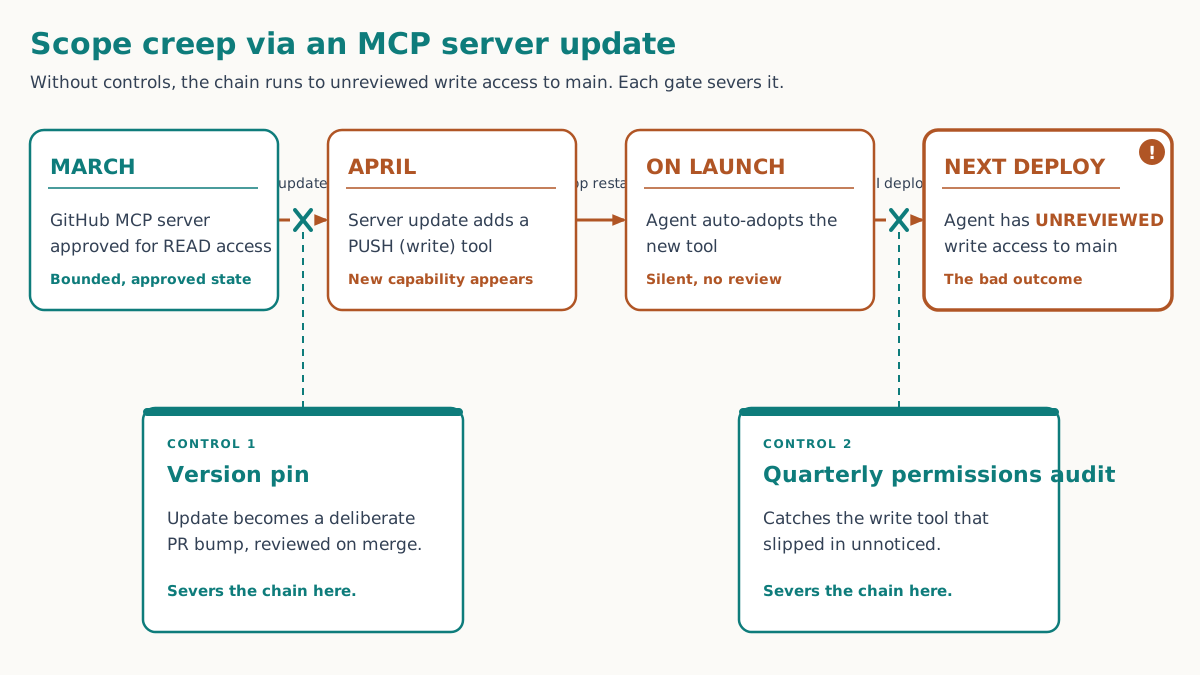
The failure mode is scope creep through a server update. A developer approves a GitHub MCP server for read access in March. In April the server ships a push tool. The agent picks it up on the next launch, and by the following deploy cycle you have an agent with unreviewed write access to main, granted by nobody and alerted by nothing. The fix is two controls that cost an afternoon each: pin the server version so an update becomes a deliberate bump in a pull request, and run a quarterly permissions audit that diffs each server's live tool set against what you approved. The audit is what catches the tool that slipped in between reviews.