
Table of Contents
Lindy vs. Superhuman vs. Fyxer: Which AI Email Assistant to Buy in 2026
Three tools are splitting the "best AI email assistant" search in mid-2026, and they are genuinely not after the same buyer. Lindy is a background automation agent that handles your inbox without you opening it. Superhuman is a keyboard-first email client built for speed, with AI layered on top. Fyxer sits in the middle: it organizes your inbox and drafts replies, but stays out of your way and doesn't need configuring.
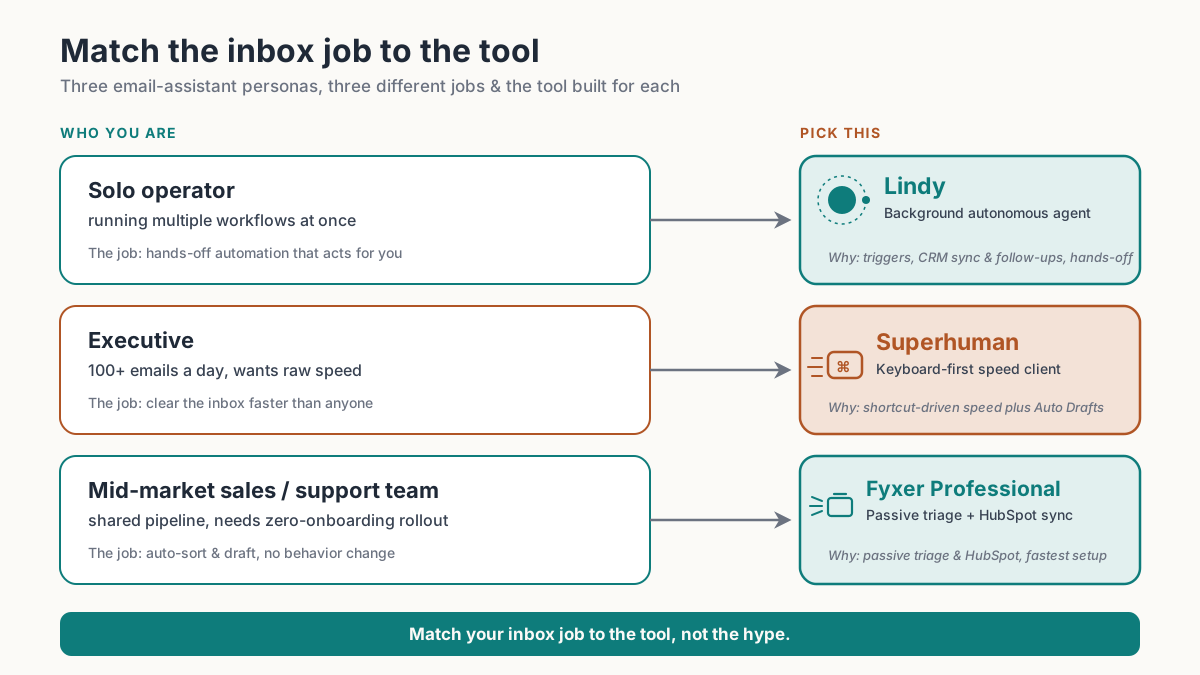
Pick Lindy if you want email handled autonomously and are willing to pay for it. Pick Superhuman if processing 100+ emails a day fast is the job. Pick Fyxer if you want passive triage at a lower price and a genuinely short setup.
Quick-pick verdict
| Persona | Best pick | Why |
|---|---|---|
| Solo operator running multiple workflows | Lindy | Background agent with triggers, CRM sync, follow-up chains, and computer use on Pro+ |
| Executive processing 100+ emails/day | Superhuman | Keyboard-shortcut-driven, split inbox, Auto Drafts and AI reply on Business tier |
| Mid-market sales or support team | Fyxer Professional | Multi-inbox + HubSpot + Fyxer Chat, the lowest friction onboarding of the three |
What each tool actually does
Lindy: a background agent, not an email client
Lindy is not a redesigned inbox. You never open it to read email. Instead, you build workflows using triggers, actions, conditions, looping, and memory, and Lindy executes them in the background without you watching (per Lindy's documentation). A trigger could be "new email from a domain I don't recognize"; the action chain could triage, pull the sender from a CRM, draft a reply based on stored context, and schedule a follow-up. Pro and Max plans add computer use, which means Lindy can interact with web interfaces to complete tasks that don't have an API.
This architecture matters. Lindy isn't making you faster at reading email. It's trying to make reading email optional. That's a different product with a different learning curve.
Superhuman: keyboard speed, AI on top
Superhuman is a replacement email client for Gmail and Outlook, built around keyboard shortcuts and split-inbox triage. The core experience is getting from zero to inbox-zero as fast as possible. On the Business tier ($33/user/mo per superhuman.com/pricing), you get Auto Drafts (AI-generated full replies), Ask AI, a knowledge base Superhuman draws from, voice and tone matching, and the new Superhuman Mail MCP, which connects the client to the wider Model Context Protocol ecosystem. HubSpot and Salesforce integrations also live at Business tier only.
The candid con: Superhuman requires genuine keyboard-discipline investment. If you don't like learning shortcuts, this is not the tool. It also adds a client layer on top of your existing email provider, which not every IT setup permits.
Fyxer: passive triage without the configuration
Fyxer connects to your Gmail or Outlook account, then starts sorting, summarizing, and drafting in the background. You don't build workflows or learn shortcuts. On Starter ($30/user/mo monthly, or $22.50 on annual billing per fyxer.com/pricing), it covers one inbox, drafts replies in your voice, and has a meeting notetaker. Professional ($50/user/mo monthly, or $37.50 annual) adds multiple inboxes, HubSpot, cross-team meeting scheduling, Fyxer Chat (ask questions of your inbox), and file uploads to train it further.
The setup is the genuine differentiator here. Fyxer runs a 7-day free trial with no credit card friction to start, and teams are live in minutes rather than sessions.
Pricing compared
Pricing as of June 2026; verify at vendor site before purchase.
| Tool | Entry price | Mid tier | What the upgrade unlocks | Source |
|---|---|---|---|---|
| Lindy Plus | $49.99/mo | $99.99/mo (Pro) | Computer use, model choice, up to 3 inboxes | lindy.ai/pricing |
| Lindy Max | $199.99/mo | Enterprise (custom) | 7x more usage than Plus, up to 5 inboxes | lindy.ai/pricing |
| Superhuman | $25/user/mo (Starter) | $33/user/mo (Business) | Auto Drafts, Ask AI, Mail MCP, HubSpot/Salesforce | superhuman.com/pricing |
| Fyxer | $30/user/mo (Starter) | $50/user/mo (Professional) | Multi-inbox, HubSpot, Fyxer Chat, scheduling | fyxer.com/pricing |
Two things stand out in this comparison. Lindy starts at nearly 2x Superhuman's entry price (per lindy.ai/pricing and superhuman.com/pricing). Fyxer and Superhuman are close at the top of their standard tiers ($50 vs $33 per the respective pricing pages), but Fyxer Professional includes multi-inbox and HubSpot, features Superhuman bundles into Business only. For a small team with one CRM, that makes the choice genuinely competitive on price.
Where Lindy wins
Lindy is the right call when the inbox problem is structural, not just slow. If you're a solo operator running outbound sequences, handling inbound lead triage, following up with calendar scheduling, and logging to a CRM, those are four separate jobs that Lindy can chain into one workflow. No other tool in this comparison does that. Superhuman speeds you up as the human doing those jobs; Lindy removes you from the loop.
Computer use on Lindy Pro expands this further. Tasks that would require a custom API or a Zapier chain can be handled by Lindy navigating a browser on your behalf. For ops-heavy founders or small sales teams without a RevOps function, that's meaningful capability with no dev work.
The architectural difference is concrete and worth stating plainly: Lindy is built on triggers, conditions, looping, and memory (documented at docs.lindy.ai). Superhuman and Fyxer have no comparable workflow builder. Once you're on a paid Lindy plan, you can connect it to 100+ integrations including Gmail, Outlook, HubSpot, Salesforce, Slack, Notion, and Google Calendar, and chain them in ways neither competitor supports.
Candid con: Lindy's Plus plan at $49.99/mo (per lindy.ai/pricing) assumes you'll invest time building workflows. If you just want cleaner email without configuring anything, you'll pay more than you need to and underuse what you paid for. Computer use is gated to Pro at $99.99/mo, which is a real cost step.
Try Lindy free for 7 days to see whether the workflow builder fits how you actually work.
Where Superhuman wins
The case for Superhuman is pure throughput. If you process 100+ emails a day and the bottleneck is reading speed and decision speed, the split inbox, one-key archive, and Auto Drafts on Business tier solve the right problem. The keyboard-shortcut model is a real productivity layer for people who've internalized it, and the team features (shared drafts, team comments, team reply indicators) make it defensible for a coordinating team where one person's delay blocks another's.
Superhuman Mail MCP, launched at the Business tier, is a notable new addition for mid-2026 buyers. It connects Superhuman into the MCP ecosystem, which means AI agents in other tools can read and act on your email context. For teams already building agentic workflows in other platforms, this is a real hook.
Candid con: Starter at $25/user/mo keeps the best AI features (Auto Drafts, Ask AI, HubSpot) behind Business at $33/user/mo (per superhuman.com/pricing). For a 10-person sales team, the Business tier runs $396/month billed annually. Superhuman also doesn't claim it will handle your email for you. You still read everything. It just makes the reading and response faster.
Where Fyxer wins
Fyxer wins on friction. The 7-day free trial is instant, setup takes minutes, and you're not committing to learn a new client or build workflows. For a mid-market support or sales team that wants drafts and inbox sorting without a project to implement it, Professional at $37.50/user/mo on annual billing (per fyxer.com/pricing) is a fair price.
The HubSpot integration at Professional tier is the conversion argument for sales teams specifically. Drafts that pull CRM context, meeting notes that go into Fyxer Chat for instant retrieval, and multi-inbox support covering a team's shared alias and personal mailbox all in one plan. That's a coherent package for a 5-15 person team.
Candid con: Fyxer doesn't let you build any logic on top of it. Emails are organized by category, replies are drafted, meetings are noted. There is no trigger-action builder, no looping, no computer use. If you outgrow passive triage, there's nowhere to go within Fyxer. The Enterprise tier (minimum 50 users) adds SSO and dedicated support, but doesn't add agentic capability.
Who should skip all three
Free Gmail features have gotten substantively better in 2026. If you're an individual processing under 40 emails a day without a CRM or team coordination need, the built-in AI suggestions and Smart Reply cover the basics at no cost. Adding a subscription starting at $25-49.99/user/mo (the entry tiers for Superhuman and Lindy respectively, per their pricing pages) for moderate volume is hard to justify.
Heavy IT governance environments may also find all three tools difficult. Superhuman is a client layer on top of Gmail or Outlook, which some security teams will block. Fyxer and Lindy connect via OAuth and store processed context. None of the three have the data-residency options or granular audit controls that a regulated enterprise (healthcare, finance, legal) might require at standard pricing tiers. Lindy Enterprise does include HIPAA compliance and audit logs, but you'll need to negotiate that directly with sales.
The verdict
For a solo operator or small ops team: Lindy is the pick. The entry price is the highest of the three, but the autonomy ceiling is also the highest. A well-built Lindy workflow handles email, calendar, CRM, and follow-up in a chain that would take three separate tools to approximate.
For an executive who lives in their inbox all day: Superhuman at the Business tier is defensible once the keyboard shortcuts are internalized. Auto Drafts and Ask AI are the features that move the needle; don't pay Starter pricing and expect them.
For a sales or support team that needs inbox sanity without a rollout project: Fyxer Professional is the shortest path from "our inbox is a mess" to "our inbox is handled." The HubSpot integration and multi-inbox support at that tier make it a real team tool, not just a personal productivity add-on.