Table of Contents
A vision-RPA loop on Gemini: Playwright + gemini-2.5-flash, end to end
Every vision-RPA vendor sells you the same loop wrapped in their pricing. The argument of this piece is that once the loop is built bare, the tool-selection questions stop being technical and become procurement: license posture, audit story, cost per task versus per bot. To make that concrete, the smallest genuine version of the loop, roughly 180 lines of Node, Playwright plus Gemini 2.5 Flash, runs against a real public page, and every prompt, screenshot, and millisecond timing it produced is published in a pinned public repo so the claims here are checkable rather than asserted. This is the build-side companion to our Skyvern vs UiPath decision-framework piece, which owns the buy-side analysis.
The scope is deliberately narrow, because a claim is only worth what its artifact supports:
- What the harness does. A clean-room Playwright + Gemini Vision harness, full source below, run against the-internet.herokuapp.com/login. Every figure in this piece is drawn from the published run artifact, not from memory.
- What the framework piece owns. Skyvern and UiPath get the license-and-cost analysis there, from their docs and source. Building the loop clean-room makes its mechanics visible in code instead of buried in a vendor library. A Skyvern-proper companion runs on a hosted sandbox and ships when that environment is wired.
What "vision-RPA" looks like when you peel the wrapper off
Every vision-first RPA tool, Skyvern, browser-use, UiPath's AI Computer Vision activity, is some variation of the same loop:
- Open the page in a real browser.
- Take a screenshot.
- Hand the screenshot plus a goal to a vision-capable LLM and get back an action plan.
- Execute that plan against the page (fill, click, scroll).
- Take another screenshot.
- Ask the LLM whether the goal was reached. If not, loop.
Every hard question about vision-RPA lives inside that loop. Is the model's grounding stable across redesigns? How do you fall back to DOM when vision is uncertain? What does the artifact bundle actually contain? A vendor library answers all three for you and hides the answers. Building the loop bare puts them back where you can see them, which is the only reason to build it bare.
The harness, in full
This is the runner. It uses Playwright for the browser side and Gemini 2.5 Flash for the vision-and-planning side via Google's generateContent REST endpoint. We deliberately avoided using a vendor agent framework, Skyvern, browser-use, or otherwise, so the loop above is visible in code rather than buried inside a library.
// hil876-harness/harness.mjs (excerpt, full file in the run artifact)
import { chromium } from 'playwright';

const GEMINI_MODEL = 'gemini-2.5-flash';
const GEMINI_URL = `https://generativelanguage.googleapis.com/v1beta/models/${GEMINI_MODEL}:generateContent`;

const TARGET_URL = 'https://the-internet.herokuapp.com/login';
const GOAL = 'Log into the demo site as user "tomsmith" with the password printed on the login page, then verify that the next page confirms a successful login.';

async function callGemini({ prompt, imagePath, responseSchema }) {
  const imageBytes = imagePath ? await fs.readFile(imagePath) : null;
  const parts = [{ text: prompt }];
  if (imageBytes) {
    parts.push({
      inline_data: { mime_type: 'image/png', data: imageBytes.toString('base64') },
    });
  }
  const body = {
    contents: [{ role: 'user', parts }],
    generationConfig: {
      temperature: 0.2,
      responseMimeType: 'application/json',
      responseSchema,
    },
  };
  const res = await fetch(`${GEMINI_URL}?key=${GEMINI_API_KEY}`, {
    method: 'POST',
    headers: { 'content-type': 'application/json' },
    body: JSON.stringify(body),
  });
  return JSON.parse((await res.json()).candidates[0].content.parts[0].text);
}
A few choices in there are load-bearing for the way the run actually behaved.
Constrained-JSON output via responseSchema. We did not use free-form text and a regex. Gemini's generateContent endpoint accepts a JSON schema in generationConfig.responseSchema, and the model honors it. The plan returned for our login page deserialized as a strict object with a fields array and a submitButtonLabel string on the first try, no retry loop. If you have ever shipped an LLM-driven planner that drifts when the model decides to wrap its JSON in a code fence, schema-constrained output is the fix.
temperature: 0.2. The plan stage is a translation task, read the visible labels, output a JSON action, and a low temperature is correct. We are not trying to get creative output, we are trying to get faithful output.
DOM lookup keyed off the model's labels. When we execute the plan, we do not click pixel coordinates. The model returns labels like "Username" and "Password", and we hand those to Playwright's page.getByLabel(...) and page.getByRole('button', { name }) locators. This is the same pattern Skyvern's docs describe under "fallback to DOM", vision decides what to do, the accessibility tree handles how. A pure-coordinate vision agent would also work on this page; it would also be more fragile if the page reflows on a different viewport, which is why we left the click-coordinate path off the runner.
The full source, including the verify step that re-screenshots and asks Gemini whether the goal was reached, is in the harness file (harness.mjs) on the public companion repo, pinned to the run commit.
What Gemini saw, and what it decided to do
We pointed the harness at the-internet.herokuapp.com/login. It is published by Sauce Labs as a public automation playground; the credentials it expects are printed on the page itself. We are not bypassing any auth wall here, the entire point of that page is that anyone can read the username and password off it and try to log in.
The harness took its first screenshot:
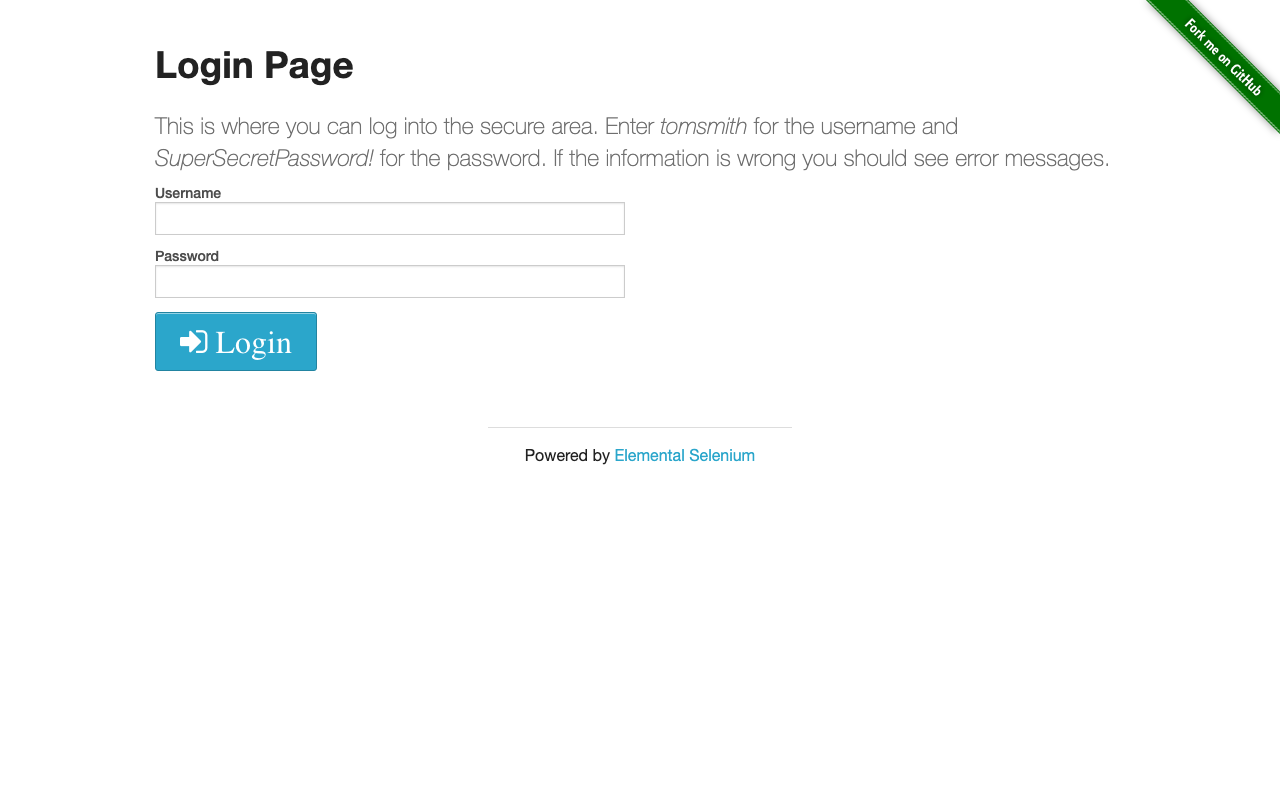
Then it sent that screenshot to Gemini 2.5 Flash with the goal and a JSON schema. The plan that came back, verbatim from the run log:
{
  "summary": "Log into the demo site using the provided credentials.",
  "fields": [
    {
      "label": "Username",
      "value": "tomsmith",
      "rationale": "The page explicitly states 'Enter tomsmith for the username'."
    },
    {
      "label": "Password",
      "value": "SuperSecretPassword!",
      "rationale": "The page explicitly states 'SuperSecretPassword! for the password'."
    }
  ],
  "submitButtonLabel": "Login"
}
A few things to notice. First, Gemini read the credentials off the screenshot, they are not in the prompt, and we gave the model no API to fetch them out of band. The rationale fields call this out per credential; that is the model citing its own grounding back to the visible text.
Second, the model returned "Login" as the submit-button label, not "Submit" or some hallucinated synonym. The actual button on the page reads "Login." A coordinate-driven planner that returned (x: 392, y: 521) would have been just as correct on this run and just as wrong if the page added a "Forgot Password?" link above the button. The label-based path survived that change cheaply.
Third, and this is the part that does not show up in the JSON, the plan came back in 3,063 ms for a 47 KB screenshot and a 691-character prompt. That is the full Gemini round-trip including network. We are not making a cost claim from one run, but the shape is what you would expect: each step in a vision loop is on the order of seconds, not milliseconds, and you should plan the loop with that in mind.
Executing the plan
The runner mapped each field entry through Playwright's page.getByLabel(...) locator and the submit button through page.getByRole('button', { name }). Both calls succeeded without retries. The post-submit screenshot:
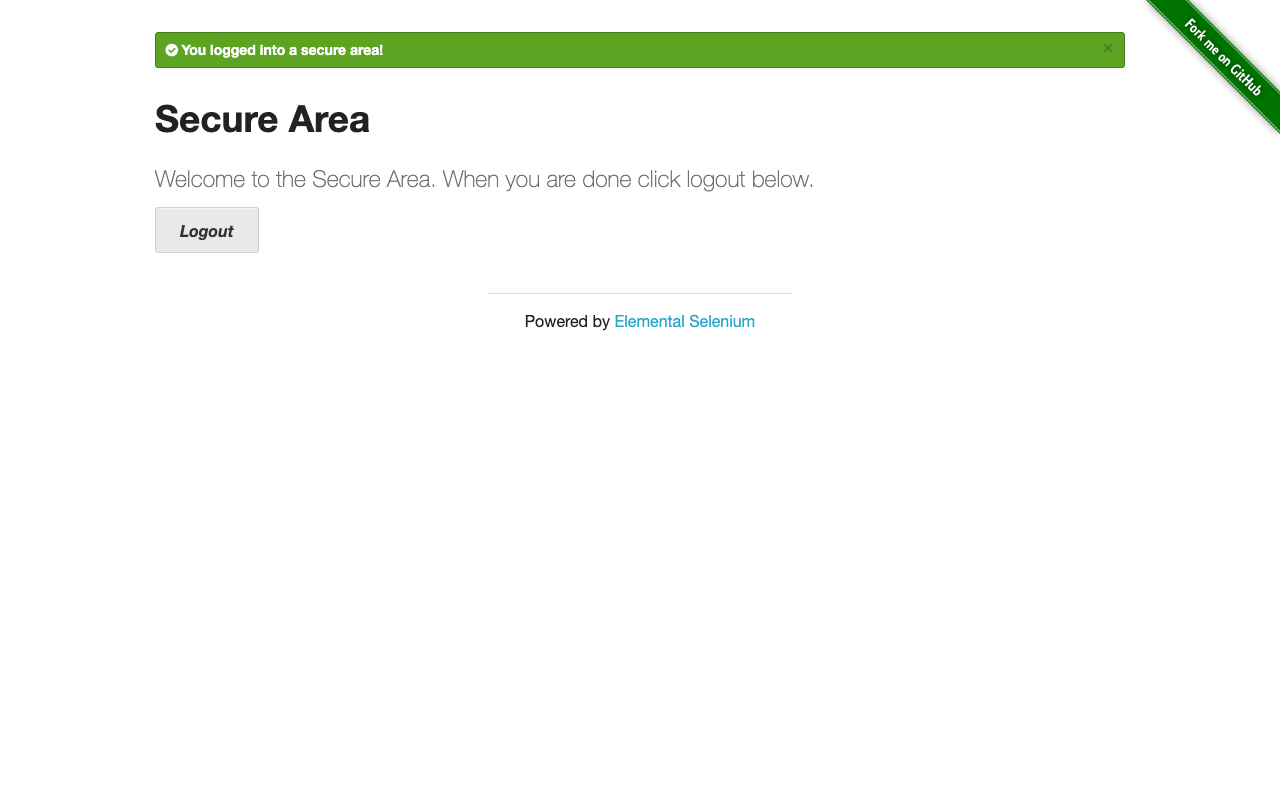
The runner then handed that second screenshot back to Gemini with a different prompt and a different schema, asking whether the goal had been reached. Verbatim verdict from the run log:
{
  "succeeded": true,
  "rationale": "The page displays a green banner confirming \"You logged into a secure area!\", a \"Secure Area\" header, and a logout button, all indicating a successful login.",
  "confirmingText": "You logged into a secure area!"
}
succeeded: true is the exit signal the runner uses to decide whether to loop. On this page the loop terminates after one pass; on a multi-step flow (search, scroll, click result, fill follow-up form) you would feed the verdict back into the planner as the seed for the next plan.
Run artifacts
Every piece of this run is on disk. We published the harness and its artifact bundle as a standalone public repo so a reader who wants to verify the run can read every prompt, every response, and the timing for each call: jonnybiz/hil876-vision-rpa-harness, pinned to the run commit 2bcb2b1.
The artifacts/ directory in that repo contains:
01-before.png, the rendered login page screenshot, exactly the bytes Gemini saw.02-plan.json, the action plan Gemini returned, before any execution.03-after.png, the post-submit page screenshot.04-verdict.json, Gemini's verdict on whether the goal was reached.run-log.json, a structured timeline of every event (run.start,shot.before,gemini.responsewith millisecond timing,action.fill,action.click,shot.after,verdict.received).run-summary.json, the rolled-up summary the runner prints on exit.


Two excerpts (the plan and the verdict) are reproduced inline above. Here is a third one: the timing-bearing slice of run-log.json, lifted verbatim, that shows the two Gemini round-trips bracketing the executed actions:
[
  { "t": "2026-05-07T05:28:00.075Z", "event": "shot.before", "file": "01-before.png" },
  { "t": "2026-05-07T05:28:03.253Z", "event": "gemini.response", "ms": 3063, "model": "gemini-2.5-flash", "promptCharCount": 691, "imageBytes": 48440 },
  { "t": "2026-05-07T05:28:03.293Z", "event": "action.fill", "label": "Username", "valueLength": 8 },
  { "t": "2026-05-07T05:28:03.310Z", "event": "action.fill", "label": "Password", "valueLength": 20 },
  { "t": "2026-05-07T05:28:03.418Z", "event": "action.click", "label": "Login" },
  { "t": "2026-05-07T05:28:03.995Z", "event": "shot.after", "file": "03-after.png" },
  { "t": "2026-05-07T05:28:06.514Z", "event": "gemini.response", "ms": 2517, "model": "gemini-2.5-flash", "promptCharCount": 595, "imageBytes": 36734 }
]
The plan stage took 3,063 ms; the three executed actions took 165 ms total; the after-screenshot took ~580 ms; the verify stage took 2,517 ms. End-to-end the run finished in roughly 6.4 seconds of wall-clock time. That cadence is the practical reason vision-RPA loops cost more per step than selector-first RPA, and the practical reason batching multiple steps per LLM call matters once a flow goes beyond a single page.
Why this is genuinely small (and that is the point)
The runner is intentionally minimal. It does not handle:
- Multi-step plans (it executes the first plan and stops).
- Action retries when a fill or click fails.
- Vision uncertainty. There is no "if the model is unsure, fall back to a DOM extraction" branch. Skyvern ships that branch; the harness leaves it out on purpose to keep the loop legible.
- Concurrency, caching, parallelism, queueing.
- Any of the artifact-bundle tooling Skyvern ships out of the box (HAR capture, full LLM trace persistence, replay UI).
What it shows, what tested-content for this category needs to show, is that the loop works against a real public page on Gemini's vision model with no proprietary glue. Once the loop works, the questions that decide which tool to actually buy are the ones the framework piece spends its time on: license posture, audit story, cost shape per task vs per bot, team headcount.
The exact scope of this run
Provenance cuts both ways. Here is precisely what the artifact supports and what it does not.
- Scope is one harness, not a Skyvern accuracy test. Skyvern's accuracy lives in the framework piece, sourced from its docs and code. The Skyvern-proper companion is a separate piece on a hosted sandbox.
- Scope excludes UiPath. The framework piece carries the UiPath comparison from vendor documentation. Treat UiPath references here as that reasoned comparison, not a benchmark from this harness.
- One target page is not a benchmark. A login form with the password printed on it is the easiest possible vision-RPA case. Enough to prove the loop runs. Not enough to claim "vision-RPA works on every page."
- One pass is not a stability test. This is a single happy-path run. Production vision-RPA stacks log thousands of runs and watch regression rates. One pass tells you the integration works on one pass.
- The timing numbers are observations, not a benchmark. The 3,063 ms / 2,517 ms figures are from this single run on this single network. Read them as shape, not as a measured cost claim.
What the artifact does support is concrete: a real browser, driven through a real vision loop on Gemini, with every prompt and screenshot on disk. Everything else is downstream of that.
How this fits with the framework piece
The two pieces answer different questions and should be read in order. This one proves the loop is a small real thing that runs on a free-tier model in seconds. The Skyvern vs UiPath framework piece then answers the question that actually decides a purchase: given that the loop is cheap to build, what are you paying a vendor for. License posture, cost shape per task versus per bot, audit story, team headcount, target-page volatility.
The practical recommendation: before you read the buy-side piece, run a version of this harness against a page in your own portfolio. A procurement framework reads differently once you have watched the loop succeed and seen exactly where it would get fragile. That is the whole reason a tested companion exists.
FAQ
Why Gemini and not OpenAI or Anthropic? Because Gemini 2.5 Flash is what we have a key for, and the brief was to ship a tested vision-RPA piece without new spend. Gemini's vision quality on this task was sufficient and the constrained-JSON output worked first try. Skyvern's first-class supported backends in production are OpenAI and Anthropic; the framework piece covers that posture. Gemini wirability via litellm or a custom shim is real but is a configuration question that is out of scope here.
Why Playwright and not Skyvern or browser-use? Because the goal was to show the loop in roughly 180 lines of code rather than 180 lines of imports from someone else's framework. Skyvern is the right choice for production vision-RPA workloads on supported backends; this piece is a build walkthrough with a published artifact, not a production-deployment guide.
Is Skyvern part of this harness? No. The harness is a clean-room Playwright loop. Skyvern is analyzed in the framework piece from its public docs and source, and a Skyvern-proper companion is a separate build. This article and that one stay cleanly separate so the artifact means exactly what it says.
Is UiPath part of this harness? No. UiPath is closed-source and Windows-only; it sits entirely in the framework piece as a reasoned-from-docs comparison. Treat every UiPath reference here as that comparison, not a benchmark from this loop.
Will you publish a Skyvern build companion? That is a separate, sibling piece. It is gated on hosted-sandbox access (a Codespaces session with Docker available, plus the existing Gemini key carried in as a secret). We will publish it when the access is granted and the Skyvern install runs on a pinned commit SHA against a live target.
Can I reuse this harness on my own site?
The harness is a small public repo at jonnybiz/hil876-vision-rpa-harness, MIT-licensed, pinned to the run commit. It is not packaged as a product; it is the smallest demo we could ship. The pieces you are most likely to reuse, the Gemini call helper, the Playwright label-based action mapping, and the run-log format, are short enough that copying them into your own scratch repo will usually be faster than depending on this one as a library.