
Table of Contents
Continue.dev vs Cursor: the open-source AI coding extension on its own terms
Published May 5, 2026 by Pondero Editorial
In short
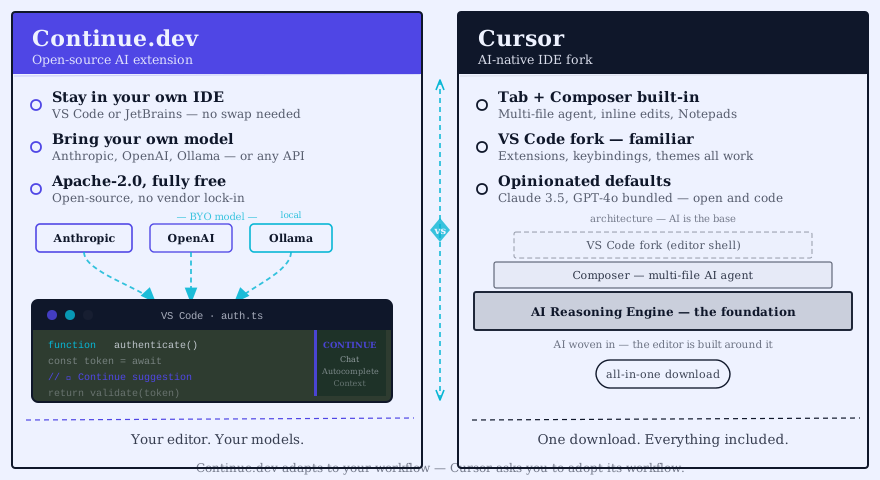
Continue and Cursor target different buyers, and the thesis is this: for a single developer with no model constraint, Cursor's polish wins daily use by a wide margin, and the open-source argument does not change it. Continue's case is not "it is free." It is that Continue removes a constraint Cursor architecturally cannot: you can point every prompt at a model you control. That matters at exactly two thresholds (a compliance requirement, or a team large enough that per-seat economics dominate) and almost nowhere else. Pick Cursor unless you hit one of those thresholds or you cannot leave JetBrains, in which case the call inverts hard.
What Continue.dev is
Apache 2.0, an extension, not an editor. It drops into VS Code or any JetBrains IDE and gives you inline completions, codebase-aware chat, custom slash commands, and per-repo rule files that pin how the assistant behaves. The model is yours to choose. Anthropic, OpenAI, Google, Ollama, vLLM, or anything else that speaks the OpenAI-compatible protocol. Config is a YAML file in your home directory.
Development happens in the open at github.com/continuedev/continue, with frequent releases, the changelog on GitHub, and provider docs at docs.continue.dev.
What Cursor is
A different bet entirely. Cursor forks VS Code outright (Anysphere owns it) and bakes proprietary AI straight into the editor: a multi-file composer, agent mode, codebase chat that fetches its own context, and a tab-complete model trained on code. You pay a flat per-seat monthly fee on the Pro tier and model usage is folded in. Verify current Cursor Pro pricing at cursor.com/pricing.
The catch is the model menu. You pick from what Anysphere bundles (Claude, GPT, Cursor's own tab model) and you cannot point it at an arbitrary key the way Continue lets you.
Side by side: install, setup, daily use
Install and setup
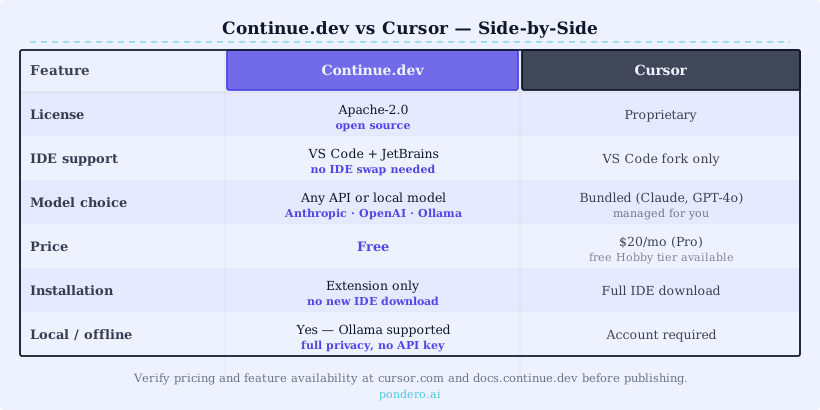
Continue: Install the extension from the VS Code or JetBrains marketplace, paste your provider key into the YAML config, restart. Around five minutes if you already have an Anthropic or OpenAI key.
Cursor: Download Cursor from cursor.com, sign in, point it at your existing project. Around two minutes. Cursor imports your VS Code settings on first launch.
Code completion latency
Completion latency is the clearest place Cursor's architecture pays off. Cursor's tab model is served through Anysphere's own acceleration layer, so inline suggestions feel snappier than routing Continue through a general hosted endpoint or a self-hosted model. The gap narrows once you self-host a fast model or pick a quick hosted one, but the structural reason holds: a purpose-built completion model behind a provider-side cache is hard to match with a generic OpenAI-compatible endpoint. If your day is completion-heavy and interactive, Cursor has the edge on raw responsiveness.
Chat with codebase context
Cursor's @codebase chat retrieves relevant files automatically. Continue's @codebase does the same but you have to configure the embeddings model and the indexing scope yourself. Once tuned, Continue's retrieval is competitive, but out of the box Cursor wins because it makes those choices for you.
Custom rules and slash commands
Both tools support per-repo rule files. Continue's .continue/rules/ directory takes plain markdown. Cursor's .cursorrules file takes the same. Rules port between the two with little or no change.
Slash commands are where Continue pulls ahead. You can define arbitrary commands in YAML that wrap any model with any system prompt. Cursor has a smaller set of built-in commands and less surface area for custom ones.
Model flexibility
This is Continue's biggest structural win. You can swap between Claude Sonnet, GPT-4o, DeepSeek, and a self-hosted Llama model in the same Continue install. Same chat history, same rules, different brain.
Cursor's model picker is faster (one click) but limited to whatever Anysphere has on their model menu. If your compliance team wants every prompt to hit your VPC-hosted endpoint, Cursor cannot do that. Continue can.
The reason this is structural, not a settings gap, is where inference is brokered. Cursor's editor talks to Anysphere's backend, which talks to the model provider; your prompt transits a third party by design, because that backend is also what makes the tab model and context retrieval fast. Continue's extension talks directly to whatever endpoint you configure in config.yaml, so a prompt to your vLLM box never leaves your network and a prompt to Anthropic carries your own key and your own data-processing terms. That is also why Continue is slower on completion (no provider-side acceleration layer) and why it is the only one of the two a regulated team can deploy. The latency tax and the compliance capability are the same architectural choice seen from two sides.
When Continue wins
- Privacy or compliance constraint. If your security team requires a self-hosted or on-prem model, Continue is the only option of these two.
- Model choice. Bring your own key, swap models per session, mix providers.
- Cost at scale. A 20-developer team can run Continue against DeepSeek for a fraction of 20 Cursor Pro seats.
- You cannot leave JetBrains. Cursor is VS Code only. Continue runs in IntelliJ, WebStorm, GoLand, PyCharm, and the rest of the JetBrains family.
When Cursor wins
- Polish. The diff UI, multi-file composer, and inline completions are tighter than Continue's out of the box.
- Agent features. Cursor's agent mode is more mature and ships further than what Continue currently offers.
- Less setup. Sign in and code. Continue rewards a tinkerer; Cursor rewards a buyer.
- Solo developers. If you are not optimizing for team-wide cost or compliance, Cursor's flat fee is a clean trade.
Buyer recommendation
Two-developer team or smaller, no compliance constraint: Cursor. The polish gap matters more than the model bill at that scale.
Five-plus-developer team, or any team with a privacy or compliance constraint: Continue. The cost and model-flexibility wins compound, and the polish gap closes after a week of config.
JetBrains shop: Continue, no question. Cursor is not an option there.
For our wider survey of AI coding tools, see best AI coding tools April 2026 update. For the Cursor vs Copilot head-to-head, see Cursor vs Copilot.
FAQ
Is Continue.dev really free? The extension is free under Apache 2.0. You pay only for the model API tokens you use, or zero if you self-host.
Does Continue support agent mode? Continue ships agent-style workflows via custom slash commands and tools, but the experience is less integrated than Cursor's first-party agent.
Can you use Continue and Cursor together? Technically yes (different windows), but you will fight over keybindings and rules files. We do not recommend it.
What about GitHub Copilot? Copilot is the third option in this category. We covered it in Cursor vs Copilot. Short version: Copilot's per-seat pricing and GitHub-native integration win for teams already on GitHub Enterprise. Copilot loses to Continue on model choice and to Cursor on agent features.
Verdict
Continue and Cursor are both good. They are aimed at different buyers. Cursor is the polished, paid, opinionated default for solo developers and small teams. Continue is the configurable, open-source, BYO-model pick for larger teams, JetBrains shops, and anyone with a compliance constraint. The pragmatic move for many teams is to route by project: Continue where you need JetBrains support or cheap self-hosted models, Cursor where editor polish on a TypeScript front-end matters most.
Try Continue or try Cursor. Both have free trials.
Related: Cursor tool page · Continue tool page · Cursor vs Copilot · Best AI coding tools April 2026