Table of Contents
GitHub Copilot code review's adaptive effort and secret detection, explained
GitHub's November 17 changelog batch ships three things that change how Copilot code review behaves on your pull requests: an Adaptive effort level that picks the review depth per PR instead of using one fixed setting, inline secret detection that flags exposed credentials in the diff, and a Repository insights dashboard that shows whether anyone actually acts on the comments. None of this costs extra on top of a Copilot Pro, Pro+, Max, Business, or Enterprise seat, per GitHub's changelog. But Adaptive is not the cost-saver it sounds like, and that is the part worth understanding before you flip it on for every repository.
This builds on the effort-level and API changes we covered in October, when Balanced replaced Lite as the default review tier. Adaptive is effort level number four, and it works differently from the other three.
What Copilot code review does, in one paragraph
Copilot code review reads a pull request diff and leaves comments where it spots a likely bug, a security issue, or now, a possible secret. You can request it manually from the Reviewers box, trigger it automatically on every PR in a repo, or call it through the REST or GraphQL API. Three fixed effort levels existed before this release, and GitHub's docs describe them plainly: Lite is a standard pass, Balanced adds deeper analysis of complex logic and security-sensitive code and is the current default, and Max runs multiple high-reasoning models on the riskiest changes. Someone had to pick one of those three ahead of time, for a repo, an org, or a single review. Adaptive removes that decision.
Adaptive doesn't pick for you, it picks per pull request
Adaptive looks at a pull request's complexity and risk, then reviews it with Lite, Balanced, or Max, and the finished review shows which level it chose. A README typo fix might get Lite. A change to auth.ts that touches session handling gets bumped to Max, per GitHub's November 17 changelog. It's in public preview and available on Pro, Pro+, Max, Business, and Enterprise plans.
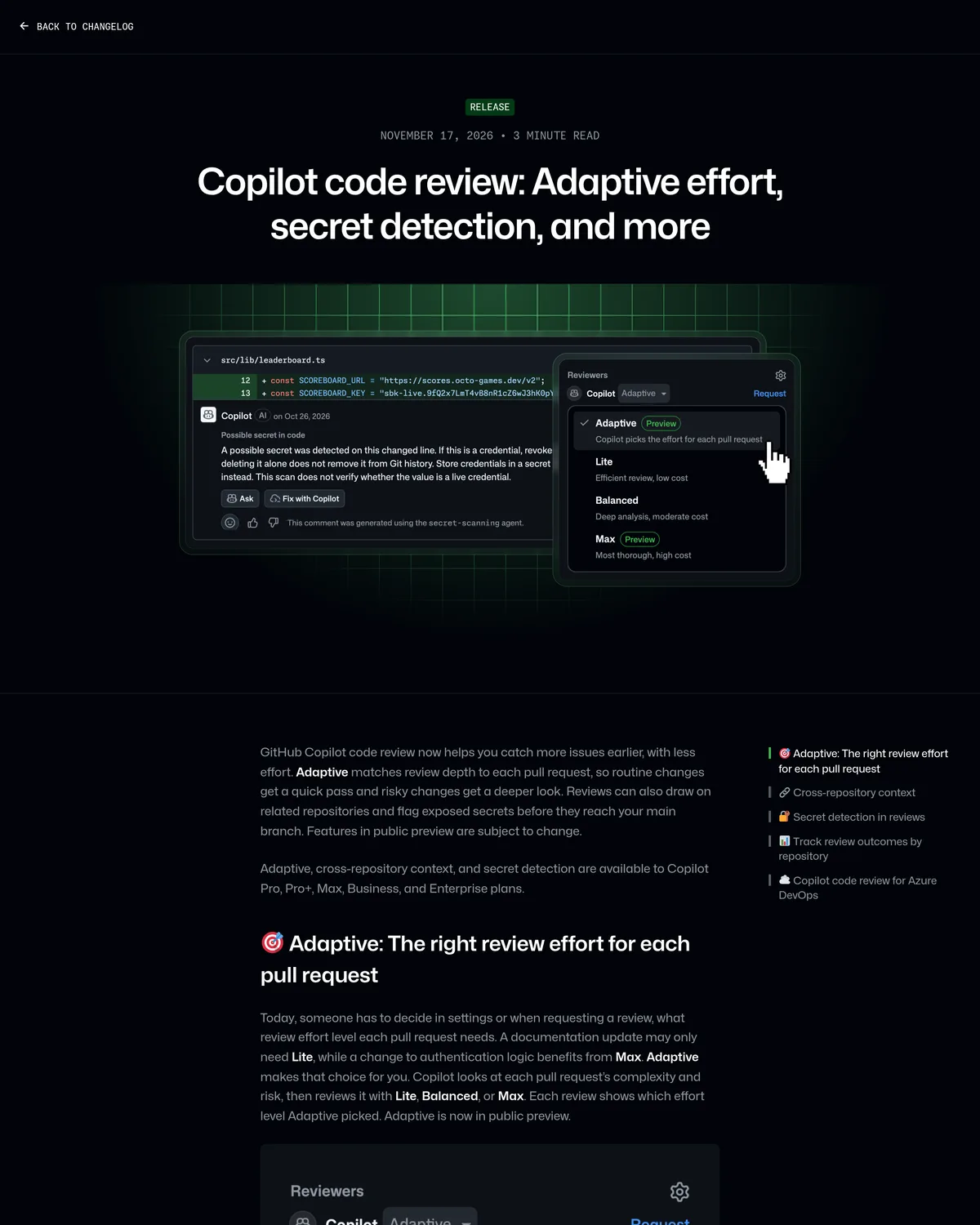 Source: github.blog, captured November 18, 2026.
| Effort level | What it runs | GitHub's description | Cost signal |
|---|---|---|---|
| Lite | One pass, standard depth | "Efficient review, low cost" | Lowest AI-credit draw |
| Balanced | Deeper look at complex/security-sensitive code (current default) | "Deep analysis, moderate cost" | Moderate |
| Max | Multiple high-reasoning models | "Most thorough, high cost" | Highest |
| Adaptive | Picks Lite, Balanced, or Max per PR | "Copilot picks the effort for each pull request" | Variable, bounded by your configured ceiling |
Most writeups will skip the part that actually matters: Adaptive never picks a level above the maximum review effort level configured for your enterprise, organization, or repository, but it can still pick Max on any single PR that looks risky, and that review draws more AI credits than a Balanced one would have. If you turned Adaptive on hoping it would quietly save credits on your mostly-boring PR stream, it won't, by itself. The actual spend control is the max-effort ceiling you set at the repo or org level, not Adaptive's own judgment. Set that ceiling to Balanced if you want a hard stop on Max-tier credit burn, and let Adaptive choose between Lite and Balanced under that cap.
Secret detection reads the diff, not just the line
Secret detection is the second public-preview feature in the same release, and it runs independently of which effort level you picked. The changelog entry breaks Copilot code review's new credential flagging into two methods: known formats, matched against the 500-plus patterns built through GitHub's secret scanning partner program with 150-plus technical partners, and AI/ML-detected secrets, which uses an LLM and a purpose-built model to catch credentials that don't match a recognizable format. In the screenshot above, the flagged comment comes with an explicit caveat worth repeating: the scan does not verify whether the credential is live, and deleting the line alone doesn't remove it from git history. You still have to rotate the key.
To turn it on, go to your repository or organization settings, select Copilot, then Code review, per GitHub's docs. It's off by default, separately from whichever effort level you're running.
Repository insights tells you if anyone's reading the comments
The third piece answers a question effort levels and secret detection can't: is Copilot's output actually changing what ships? Open a repository's Insights tab and click Repository insights, and GitHub's November 17 writeup lists four numbers waiting there: comments addressed, high-severity comments addressed, pull requests with no later human change request, and merged pull requests Copilot never reviewed. Below that sits an addressed-rate trend line broken out by effort level and a bar chart of comment categories.
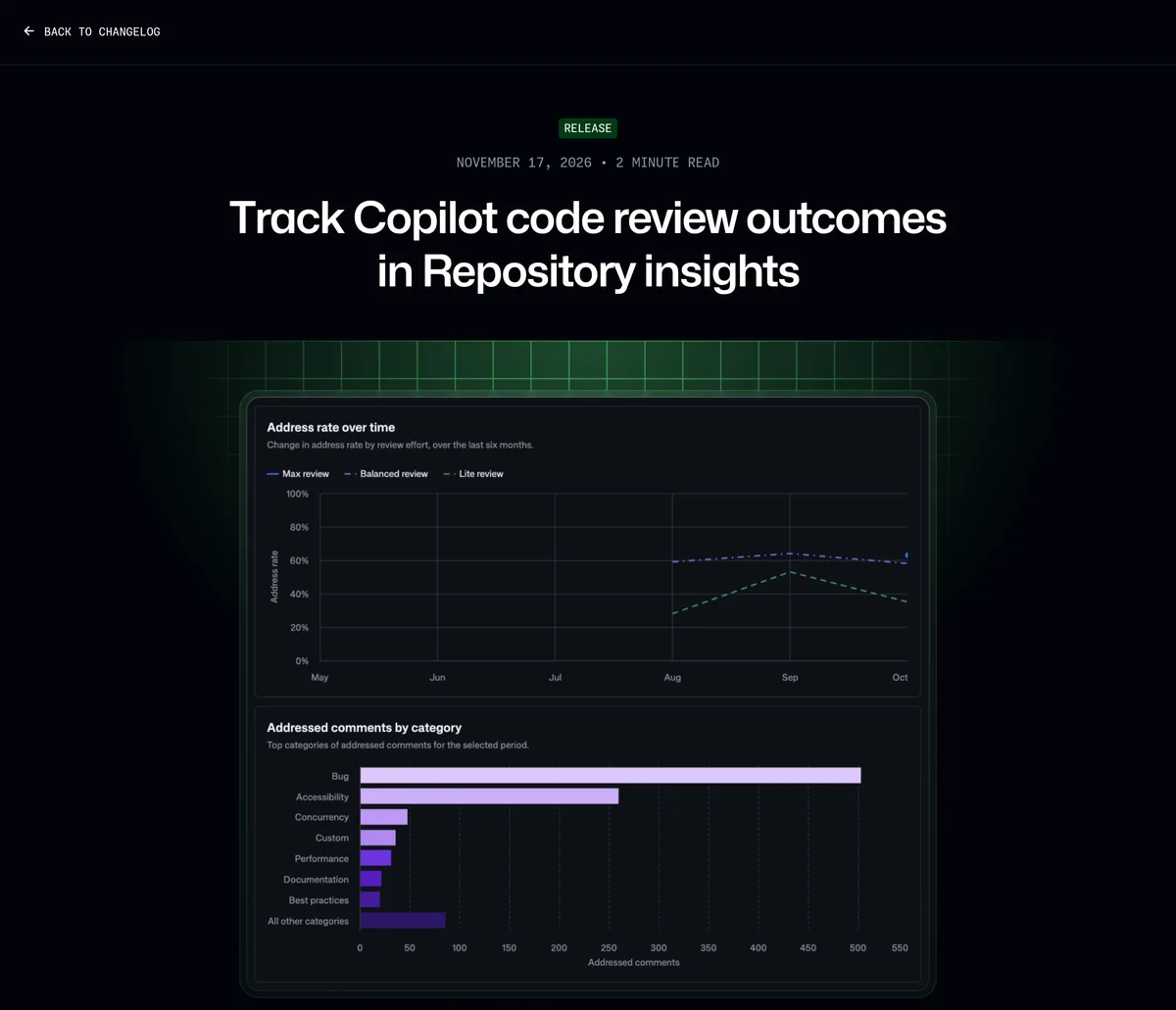 Source: github.blog, captured November 18, 2026.
GitHub's own example dashboard makes a case for retiring Lite quietly: the Max and Balanced review lines track together in the upper band of the chart, while the Lite review line sits visibly lower and dips further toward October. If your repo's own chart shows the same pattern, that's your evidence to raise the floor from Lite, not a reason to assume Adaptive will fix it on its own. Access to the dashboard needs read access to the repo; the same data via the usage metrics API (repos-1-day report) needs the View Copilot Metrics permission and the Copilot usage metrics policy turned on, per the same changelog entry.
Turning all three on
Adaptive and the effort-level default live in the same settings surface as before; secret detection and the Insights tab are separate toggles. For a single PR you're requesting through automation instead of the UI, skip the settings page and call the REST API directly. It carries the same effort-level field this feature added in October:
# Request a Copilot review and let Adaptive pick the depth
curl -L \
  -X POST \
  -H "Accept: application/vnd.github+json" \
  -H "Authorization: Bearer <YOUR-TOKEN>" \
  -H "X-GitHub-Api-Version: 2026-03-10" \
  https://api.github.com/repos/OWNER/REPO/pulls/PULL_NUMBER/copilot-code-review \
  -d '{"review_effort":"adaptive"}'
Expected response on success, per GitHub's REST API reference:
# Status: 201
{
  "node_id": "RRR_kwDOAA",
  "state": "PENDING"
}
If adaptive isn't yet available for your repository or plan, the same endpoint returns a 422 with failure_reason: "INVALID_REVIEW_EFFORT" and the response body lists which effort levels you can actually request, per the same reference. That's a useful one-call check before you wire Adaptive into a CI pipeline.
For the UI path, the settings are split across three menus:
# 1. Default effort level (personal, repo, org, or enterprise):
#    Profile picture -> Copilot settings -> Code review -> Review effort level -> Adaptive

# 2. Secret detection (off by default):
#    Repository or organization settings -> Copilot -> Code review -> enable secret detection

# 3. Outcome tracking:
#    Repository -> Insights tab -> Repository insights
Repository settings override organization settings, which override enterprise settings, the same precedence that governed the Lite-to-Balanced default switch in October. If you manage more than a couple of repos, set the ceiling at the org level first and let individual repos opt down, not up.
Where this leaves Bugbot and CodeRabbit
None of this changes the pick between Copilot's native reviewer and a dedicated tool like Cursor Bugbot or CodeRabbit on cost, speed, or catch rate. That comparison, with current pricing and a verdict by team size, lives in our Bugbot vs CodeRabbit guide. What this release does is close a specific gap for teams already paying for Copilot. Before November 17, catching a hardcoded key in a PR diff meant a separate tool or a dedicated GitHub Advanced Security secret-scanning policy. Now it's a toggle inside the review you already requested.
| GitHub Copilot code review | Cursor Bugbot | CodeRabbit | |
|---|---|---|---|
| Review depth control | Lite / Balanced / Max / Adaptive, per PR | Default or high effort | Fixed, tuned for low noise |
| Secret detection in the review itself | Yes, public preview (Nov 2026) | Not part of the review comment flow | Not part of the review comment flow |
| Per-repo outcome dashboard | Repository insights, built in | No equivalent dashboard | No equivalent dashboard |
| Billing | AI credits + Actions minutes, scales with effort level | Usage-based, ~$1-$1.50/run (per Cursor) | Free tier, then per-developer plan |
If a team is running Copilot Business or Enterprise and paying separately for secret-leak coverage on pull requests, this update is the one to act on this week: there's no new subscription, just a settings toggle and whatever AI credits the deeper reviews consume. If a team's real complaint about Copilot's reviewer has been catch rate or speed rather than secret coverage or visibility, nothing here moves that needle, and the Bugbot/CodeRabbit comparison above still holds.
What to check before you turn Adaptive loose
Set the max-effort ceiling at the org level before enabling Adaptive broadly, not after a surprise credit bill. Turn on secret detection separately, since it's not bundled with the effort-level change. Then give Repository insights a week before judging anything: with four summary numbers and a trend line, one bad sprint in a flaky repo will look worse than it is. Check the AI credits pricing guide if you need the per-plan credit allowance math before deciding how aggressively to let Adaptive run on your busiest repos, and current plans are at github.com/features/copilot.