
Table of Contents
Zapier SDK vs Zapier MCP: Which One Does Your AI Coding Agent Actually Need?
Zapier now ships two separate ways to plug an AI agent into its app catalog, and most developers hit both before anyone tells them which is which. The MCP server exposes a curated menu of pre-built actions to any chat client. The TypeScript SDK hands a coding agent direct, authenticated access to write its own integration logic. The split is not about which apps you need. It is about how your agent runs: clicking through a chat, or executing code. Pick wrong and you either fight a chat tool that cannot branch, or you wire up a build pipeline you never needed. Here is the line.
What the two products actually do
Both products solve the same hard part: authentication. Zapier owns the OAuth tokens, the refresh logic, and the connection to each app, so your agent does not. What differs is the shape of the access.
Zapier MCP is a server you point an MCP-compatible client at. You enable a handful of actions ("Create Jira Issue," "Send Slack Message"), and they show up as callable tools inside Claude, Cursor's chat mode, or Windsurf. The agent picks from that menu. It cannot reach past what you enabled. That constraint is the feature: a governed, fast surface a chat agent can use without you writing a line of code. We covered the full MCP setup, per-client config files, and the task-cost math in our Zapier MCP guide for Cursor, Claude Code, and Windsurf.
The Zapier SDK is a TypeScript package a coding agent imports and calls in code. Instead of a menu, it gives the agent the whole surface: built-in actions across Zapier's catalog plus raw authenticated HTTP calls to the underlying app APIs. The agent writes loops, conditionals, and error handling around those calls like any other library. Zapier's SDK docs describe it as access to the entire ecosystem of 9,000+ apps, with full TypeScript types generated for you and browser-based login handling the auth.
Zapier's own SDK docs open with a table titled "SDK or MCP - Which One Do You Need?" Reproduced from docs.zapier.com/sdk:
| Zapier MCP | Zapier SDK | |
|---|---|---|
| Best for | Chat agents | Coding agents |
| Access model | Curated menu of pre-built actions | Any API call, in code, authenticated by Zapier |
| Use when | You want a fast, governed set of tools for an agent | You need loops, conditionals, error handling, or calls that go beyond the pre-built catalog |
Read that bottom row again, because it is the whole decision. A menu, or code. If your agent's job is to call one named action when a user asks, MCP. If your agent has to read a response, decide something, and call a different action based on the answer, that is code, and that is the SDK.
Three builds, three picks
Abstractions blur. Concrete cases do not. Here are three I see come up, with the pick for each.
"I want Cursor to file a Jira issue when I ask it to in chat" -> MCP
You are in Cursor's chat, you have a bug in front of you, and you type "log this as a Jira issue." You want the ticket created with the file, the function, and the stack trace Cursor already has in context. One named action. No branching.
That is MCP, every time. Enable "Create Jira Issue" on your Zapier MCP server, paste the server URL into .cursor/mcp.json, and the tool is live in the next chat. Setup runs about five minutes. Writing a TypeScript program to do this would be slower to build than the bug is to fix. The curated-menu constraint is exactly what you want here: the agent can file a ticket and nothing else.
"My TypeScript agent reads Stripe events and conditionally updates Salesforce" -> SDK
Now the agent has to think. A failed Stripe payment comes in. The agent checks the customer's plan tier, decides whether to flag the account, and only then writes to the right Salesforce field. Some events get skipped. Some trigger a Slack alert first. This is a loop with conditionals inside it.
A chat menu cannot express that. You need the SDK. The agent writes the branch logic in TypeScript and calls Zapier's runAction for each app operation, letting Zapier carry the Stripe and Salesforce auth. The generated types catch a wrong field name at compile time instead of at 2 a.m. in production. When the brief is "read, decide, then act, in code," the SDK is the only Zapier interface that fits.
"My team needs a multi-step workflow and nobody writes TypeScript" -> Make, not Zapier
Here is the honest one. Your ops team wants a workflow with several steps and a couple of conditionals, the apps are all supported, and not one person on the team writes TypeScript. The SDK is a non-starter, because the SDK is a developer tool. MCP could fire individual actions from a chat agent, but a durable multi-step workflow with branching is not what a chat menu is for.
For this team, Make is the better call. Make's visual scenario builder expresses routers, filters, and multi-step logic on a canvas, no code, and the people who own the process can build and maintain it themselves. We are recommending away from Zapier here on purpose: when the bottleneck is "no developer," a visual builder beats a TypeScript SDK and a chat menu both. Make wins this one cleanly.
Setting up the SDK
Once you have landed on the SDK, setup is a normal npm flow. Install the package plus the dev dependencies:
npm install @zapier/zapier-sdk
npm install -D @zapier/zapier-sdk-cli @types/node typescript tsx
Authenticate through the CLI. This opens a browser, you log in, and a token gets stored locally so your code can act as you:
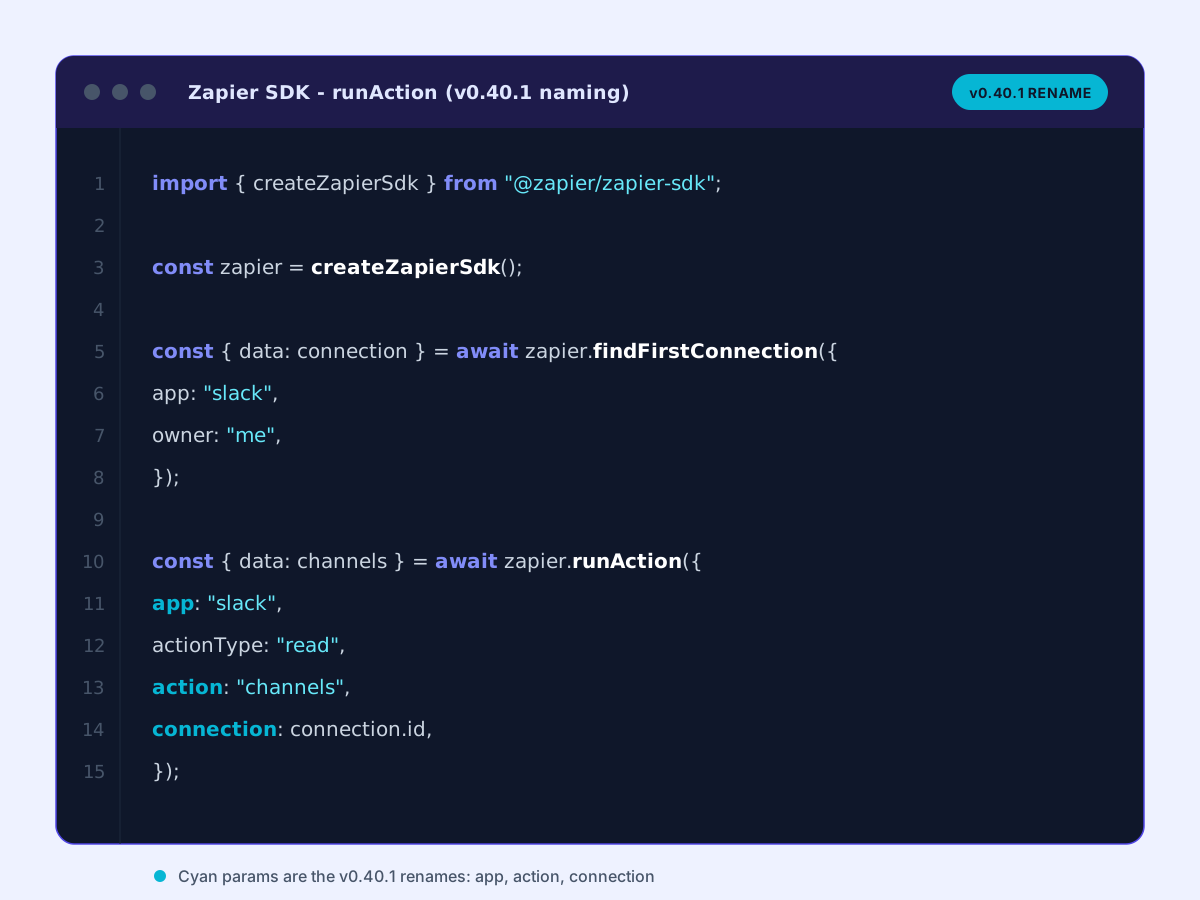
npx zapier-sdk login --skip-promptsThen the minimal pattern. Create the client, find a connection, run an action against it:
import { createZapierSdk } from "@zapier/zapier-sdk";

const zapier = createZapierSdk();

const { data: connection } = await zapier.findFirstConnection({
  app: "slack",
  owner: "me",
});

const { data: channels } = await zapier.runAction({
  app: "slack",
  actionType: "read",
  action: "channels",
  connection: connection.id,
});
Code shape follows Zapier's SDK quickstart at docs.zapier.com/sdk/quickstart, current as of May 2026.
One naming note that trips up early SDK code: the v0.40.1 changelog standardized the parameter names. appKey became app, connectionId became connection, actionKey became action, and the same pattern hit table, record, fields, and account. The CLI flags moved in lockstep (--app-key became --app, --connection-id became --connection). Per the SDK changelog, the old names are deprecated but still functional, so there are no breaking changes. If you copy a snippet from an article written a few weeks ago and see appKey, it will still run, but the new names are what the current docs use.
For an agent that needs more than the built-in actions, the SDK exposes two access styles. There is a convenience syntax for built-ins, apps.slack.write.channel_message(), and a fetch method for raw authenticated requests to an app's API beyond the pre-built catalog. Both ride the same Zapier-managed auth.
What is in the open beta today, per Zapier's SDK docs: the full action catalog across integrations, raw authenticated HTTP calls to roughly 3,600 app APIs, and action governance for the pre-built actions. The docs list the SDK as free during early access. That "free during early access" is the part to plan around, because early access does not last forever, and there is no published GA price yet.
What the SDK cannot do yet
The beta is real, but it has holes. Two of them change the build decision.
Triggers. The SDK cannot yet subscribe to real-time events in code. Zapier's docs list a Triggers API, the thing that would let your agent react to a new Stripe charge or a new row the moment it lands, as coming soon, targeting May 2026, not in the stable beta. So if your architecture is event-driven, the SDK is not your trigger layer today. Fall back to a webhook that fires into a Zapier Zap, or stand up n8n and use its webhook node as the event front door, then have your SDK agent do the downstream logic. Self-hosted teams that want the trigger and the execution on their own hardware will find n8n covers both halves.
Agent approval flow. The SDK docs also list user-level approval, where an end user signs off on what the agent is allowed to do, as coming soon rather than shipped. The related self-serve enterprise opt-in and direct API governance are in the same not-yet bucket. If you are building a product where your users connect their own Zapier accounts and you need them to approve scopes, that flow is not in the beta. Check back at GA before you design around it.
Neither gap touches the core "agent writes code, Zapier handles auth" use case. They narrow where the SDK fits, not whether it works.
The pick
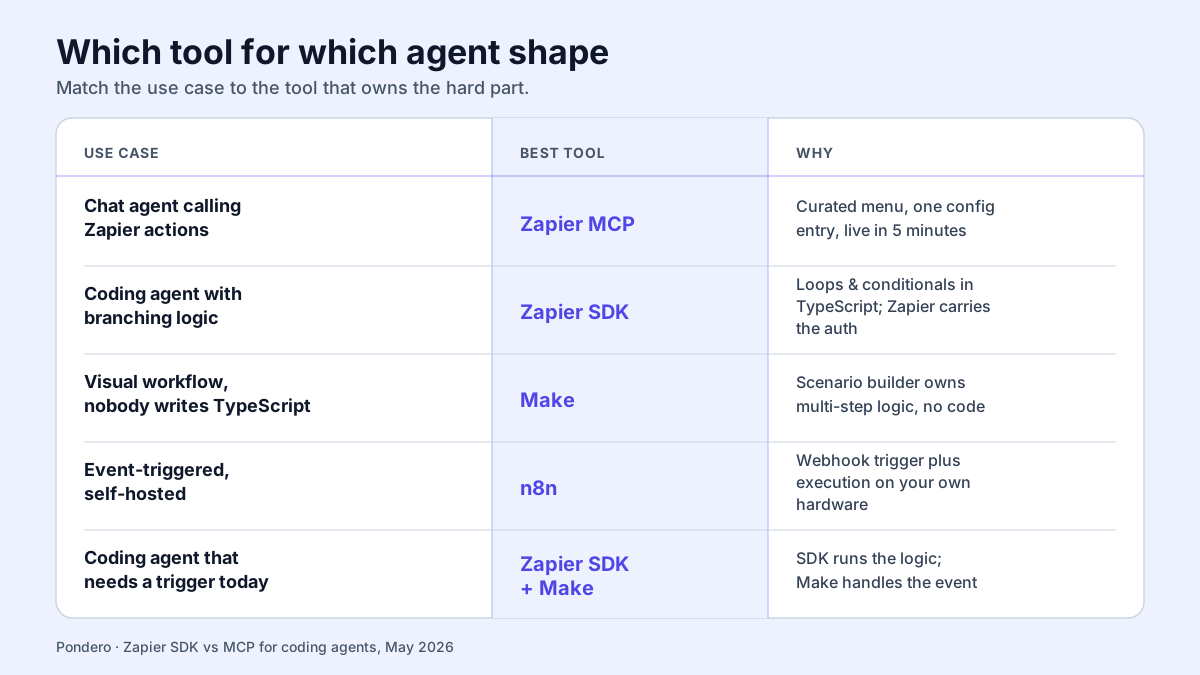
| Use case | Best tool | Why |
|---|---|---|
| Chat agent calling Zapier actions | Zapier MCP | Curated menu, one config entry, live in five minutes |
| Coding agent with branching logic | Zapier SDK | Loops and conditionals in TypeScript, Zapier carries the auth |
| Visual workflow, nobody writes TypeScript | Make | Scenario builder owns multi-step logic with no code |
| Event-triggered, self-hosted | n8n | Webhook trigger plus execution on your own hardware |
| Coding agent that needs a trigger today | Zapier SDK + Make | SDK runs the logic; Make handles the event the SDK cannot yet |
That last row is the common real-world stack while the Triggers API is still coming. Your SDK agent does the conditional work, and a Make scenario (or an n8n webhook) sits in front as the event source until Zapier ships triggers natively.
What we would do
Most developers doing agent work end up using both Zapier interfaces, in different parts of the stack. MCP is the conversational surface: a chat agent files a ticket, posts a message, updates a row, picking from a small governed menu you can stand up in an afternoon. The SDK is the execution layer for the moment a chat menu stops being enough, when the agent has to read a result and branch on it in code.
Start with MCP. It costs five minutes and it covers more cases than you would guess. Reach for the SDK the first time you hit a job the pre-built menu cannot express, a loop, a conditional, a raw API call past the catalog. And if the real blocker is that nobody on the team writes TypeScript, Make is the better fit, not Zapier at all. Match the tool to how your agent runs, not to the logo on the app you are trying to reach.